Remove Music From Video
Remove background music from videos online

Remove background music, keep vocals intact
Cleanly remove or replace music in any video
Get rid of music — maintain voice and video quality
Remove background music from your video without compromising vocal clarity. Kapwing’s AI music remover separates vocals from music and ambient noise, so you can cleanly isolate what matters — no re-recording or manual editing required.
With one click, split vocals and background music into separate tracks. From there, you’re in control: delete unwanted music, swap in a new soundtrack, or fine-tune your audio to make voices clearer and more focused.
.webp)
Built into a professional video and audio editing studio
Remove background music without breaking your flow. Kapwing’s AI music remover is built into the full video editor, so you can clean up audio and keep moving, no extra tools or exports.
Use one-click AI tools to equalize volume, sharpen vocals, and cut silences or filler words automatically. Need new audio? Generate custom songs and sound effects with Kapwing AI, or choose from a royalty-free stock library.
Finish your edit in the same workspace — adjust color and lighting, add transitions, trim, and crop. When you’re ready, export in high resolution and share anywhere.

Already transforming video creation across industries
Hear directly from the teams who publish faster, collaborate better, and stay ahead.


How to Remove Music from a Video Online
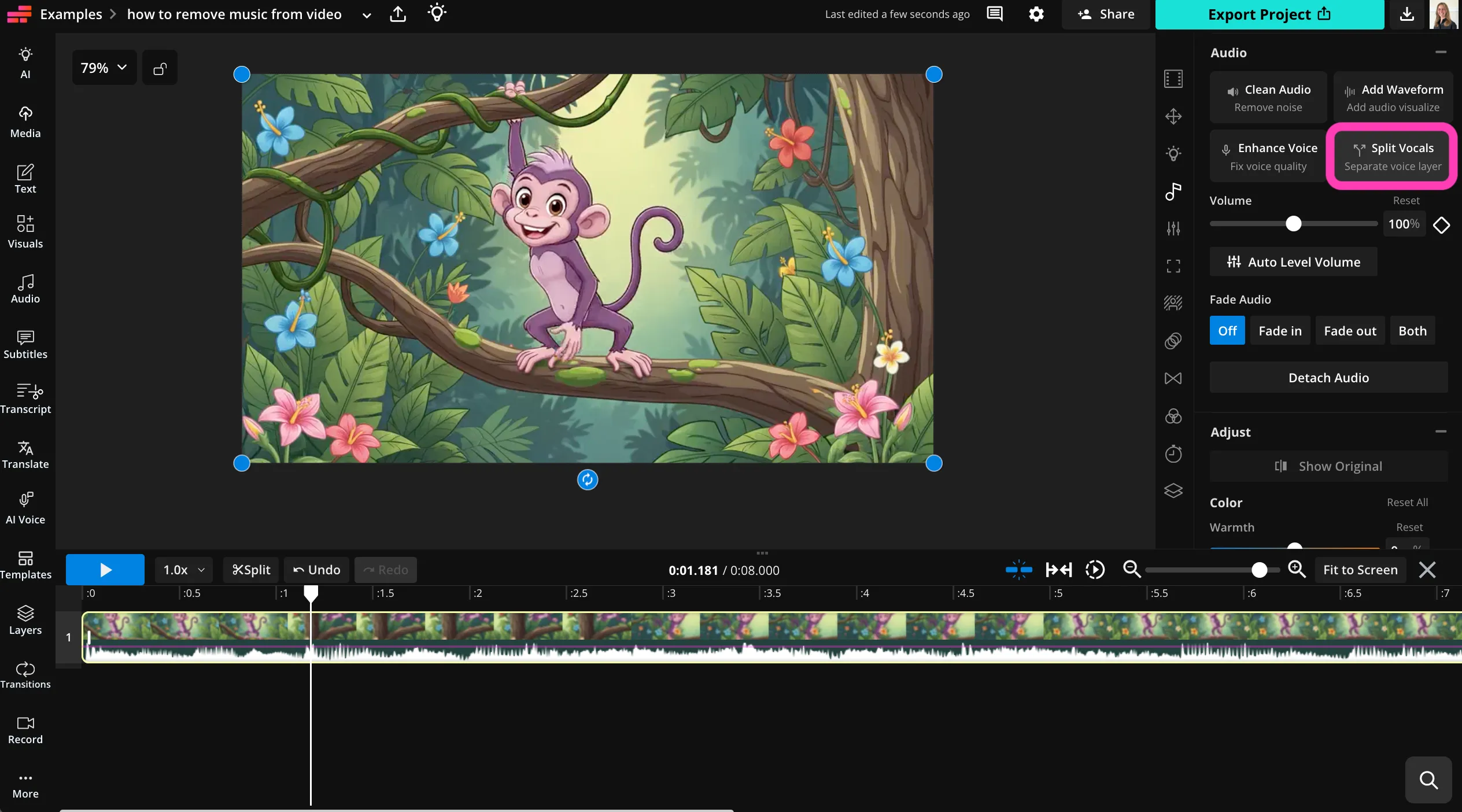
- Step 1Upload video
Create a new project in the Kapwing Studio. Click, drag, or paste a URL to upload your video.
- Step 2Split audio
Select the video file in the timeline. Click "Audio" in the right sidebar, then select "Split Vocals."
- Step 3Remove music
Delete the music track from the timeline. Use any of Kapwing's audio and video editing tools, then click "Export Project" to download and share your video.
What's different about Kapwing?



Frequently Asked Questions
We have answers to the most common questions that our users ask.
Is the Remove Music From Video tool free?
Anyone can try Kapwing's AI tools for free. Our AI tools run on a credit system, with each feature costing a set number of credits. For maximum creativity and full access to the video music remover, upgrade to a Pro account to unlock the full power of AI-driven content creation.
Is there a watermark on exports?
If you use Kapwing on a Free account, then all exports — including from the Remove Music From Video tool — contain a watermark. Once you upgrade to a Pro account, the watermark is completely removed from your creations.
How to remove background music from a video
To remove background music from videos with Kapwing, start by creating a project in the studio. Click, drag and drop, or paste a link to upload your video. Then select it in the timeline and find the Audio section of the righthand toolbar. Click "Split Vocals" to cleanly separate voice, music, and video files. Then delete the music track from the timeline.
You can replace background music with royalty-free music from the library, or use Kapwing's AI Song Generator to create a new custom song. You can also use Kapwing's extensive set of video and audio editing tools before exporting and sharing your video.
Can you remove music from TikTok videos?
Yes, you can paste your TikTok link into the studio to upload the video. Once it's in the studio, you can remove music and background noise from TikTok videos by clicking "Split Vocals" and then removing the tracks you don't need.
Can I remove music from videos on my phone?
Absolutely, you can remove music on your phone or tablet by opening the Kapwing Studio in your mobile browser. Upload your video, select it in the timeline, and click "Audio" in the bottom toolbar. Click "Split Vocals" to separate your file into music, voice, and video tracks. Then select the music file to delete it.
Can I replace music in videos after removing it?
Yes, you can replace music with royalty-free songs from the stock library, uploaded music tracks, or AI-generated songs. Chat with Kapwing AI to create a catchy new theme song or custom sound effects.
Discover Resources
Tips, templates, and deep dives to help you create faster and share with confidence.
View all


Get started with your first video in just a few clicks. Join over 35 million creators who trust Kapwing to create more content in less time.