
Add customizable stickers — for free
Add GIFs, emojis, and shapes to images online
Increase engagement with scroll-stopping stickers
Kapwing's Add Sticker to Image tool helps you transform static images into eye-catching visuals. Choose from our extensive sticker library of GIFs, emojis, shapes, and social media logos, then resize, rotate, recolor, and layer with precision.
Focus attention by annotating images with arrows and circles. Quickly turn images into attention-grabbing GIFs, reaction shots, and memes. Create everything from subtle accents to bold callouts with stickers that match your brand and capture attention across social media, marketing, and digital content.

Integrated with a powerful image editor
Kapwing's Add Sticker tool integrates seamlessly with a feature-packed Image Editor — no separate apps needed. Combine stickers with text overlays, filters, cropping, background removal, color adjustments, and more to create polished visuals in one workspace.
Fast, intuitive, and designed for any skill level, Kapwing's image editing studio empowers you to produce professional images for any platform without design experience.
Already transforming video creation across industries
Hear directly from the teams who publish faster, collaborate better, and stay ahead.


How to Add a Sticker to an Image
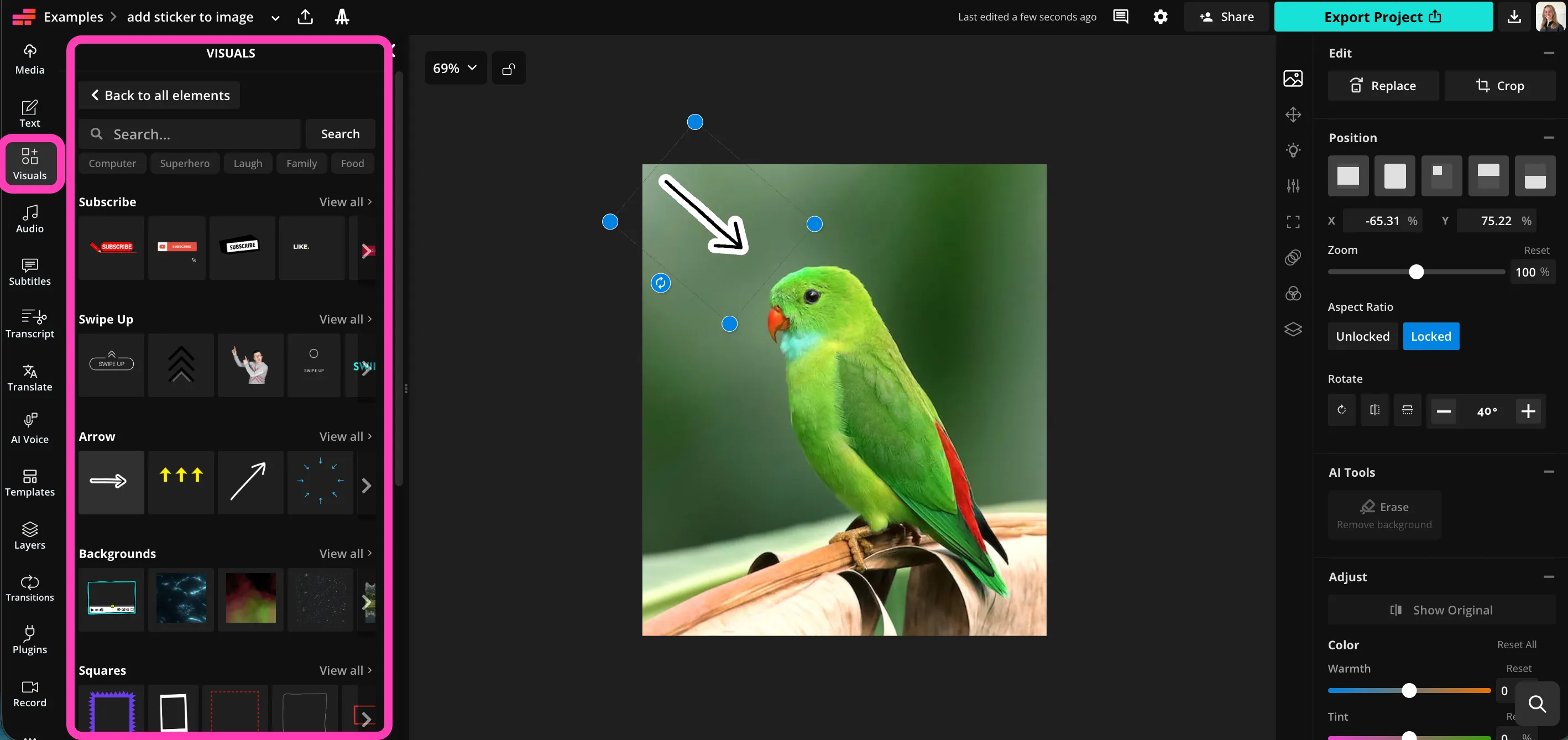
- Step 1Upload image
Create a new project in the Kapwing studio and click to upload your image.
- Step 2Add sticker
Select "Visuals" in the left sidebar, then click to add stickers to your image.
- Step 3Download
Adjust the color, aspect ratio, and position, then click "Export Project" to download your edited image.
What's different about Kapwing?



Frequently Asked Questions
We have answers to the most common questions that our users ask.
Is the Add Sticker to Image tool free?
Yes, Kapwing's Add Sticker to Image tool is free for all users.
Is there a watermark on exports?
If you use Kapwing on a Free account, then all exports — including the Add Sticker to Image tool — contain a watermark. Once you upgrade to a Pro account, the watermark is completely removed from your creations.
How to add stickers to images
To add a sticker to a picture with Kapwing, create a new project in the studio and click to upload your image. In the left sidebar, click "Visuals," then scroll down to browse the sticker library. Choose from trendy and classic GIFs, arrows, circles, emojis, and shapes. Click to add any sticker, then adjust size, aspect ratio, position, and color using the simple editor tools.
When you're ready to save your image, click "Export Project" in the top bar to download your sticker image as JPEG, PNG, GIF, or WebP.
How to add stickers to photos on iPhone
You can add stickers to images on iPhone or Android devices by opening the Kapwing studio in your mobile browser. Click to upload your image, then select "Visuals" from the bottom toolbar. Click to add any sticker, then drag to adjust size and position. Download your image to your phone by clicking "Export Project" in the top toolbar.
What kinds of stickers can I add to pictures?
Kapwing offers a full range of stickers, including attention-focusing arrows and circles, trendy and eye-catching GIFs, and simple, customizable shapes like hearts, squares, and stars. Browse the library of options by opening the "Visuals" tab in the lefthand sidebar.
What file types does Kapwing support?
Kapwing supports all popular image file types, including JPEG, PNG, and WebP. You can save your edited image as JPEG, PNG, WebP, or animated GIF.
Can I save my image as a GIF?
Yes, if you add moving stickers to your images, you can save them as high-quality GIF or WebP to preserve the animation. Click "Export Project," then choose the file format to download in.
Can I also add text overlays?
Absolutely, Kapwing allows you to overlay custom text in any font. Add a text box, type in your words, and then choose the font, text color, size, background, and drop shadow. You can combine stickers with text overlays for focused messaging on social media.
Discover Resources
Tips, templates, and deep dives to help you create faster and share with confidence.
View all

Get started with your first video in just a few clicks. Join over 35 million creators who trust Kapwing to create more content in less time.