Online Video Editor
Upload any video, edit with a drag-and-drop timeline and AI tools, then export in HD
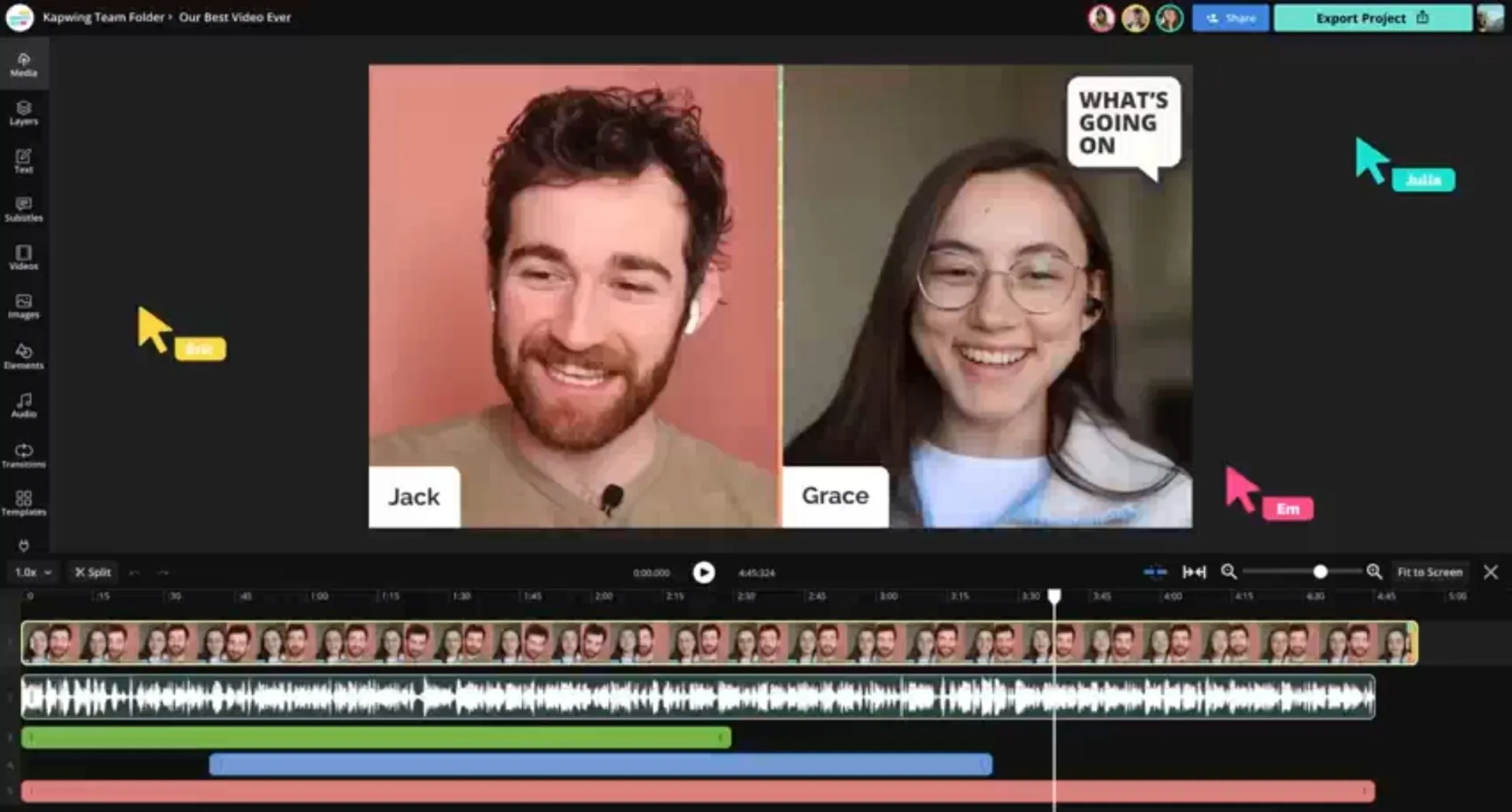
Create studio-quality videos 10x faster
Free. Fast. No Watermark on Pro.
Save hours with collaborative online video editing
Upload a video from your device, paste a URL, or record directly in the editor.
Kapwing's drag-and-drop timeline lets you trim, split, add transitions, layer B-roll, and apply effects — with AI tools that automate subtitles, audio cleanup, and background removal.
Create, edit, and export in up to 4K resolution. Supported input formats include MP4, MOV, AVI, WebM, and more.
By the numbers
Kapwing replaces desktop editing software with a browser-based app that works on Mac, Windows, Chromebook, and mobile
35M
creators use Kapwing
24
file formats supported, including MP4, MOV, AVI, and WebM
100,000
videos created every day
Your complete video editing app in the browser
Boost creativity. Increase productivity.
Kapwing's built-in AI Assistant lets creators brainstorm, generate, and edit — all within the online editor.
Use AI to create storyboards, scripts, scenes, and fully-edited videos end to end, without switching tools.
Whether you’re editing a video ad, building a product demo, or producing a long-form tutorial, automate the early work so you can ship finished content faster.

Repurpose videos into multiple clips
Turn one video into a collection of short, platform-ready clips with Kapwing's AI-powered Clip Maker — resized and optimised for any social channel.
Speakers are automatically centred, and built-in Safe Zones preview exactly how each clip displays across platforms.

Reach a global audience in 100+ languages
Scale your content internationally without expensive translation services or manual transcription.
Kapwing supports 100+ languages through subtitles, dubbing, and lip-sync technology — built directly into the editor.
Make content accessible to new audiences without rebuilding your production workflow.
How to Edit a Video Online
- Step 1Upload video
Upload your video to Kapwing.com, record a video in the studio, or copy and paste a URL link into the editor. Once you're ready to assemble your video, drag and drop clips onto the timeline.
- Step 2Edit video
Use the right-hand toolbar to choose edits, transitions, and effects for your project. The left-hand sidebar lets you access subtitles, images, voice overs, translations, and AI tools.
- Step 3Export and share
Once you're done, hit "Export" to generate your final video. Download, share via a unique Kapwing link, or share straight to socials.
Modern video creation without additional downloads
Create, edit, and collaborate with the leading online video editor
Streamline team-based workflows
Maximize your content creation process with collaborative editing, custom styles, and automatic translations that enhance teamwork and efficiency.
With all projects in one shared online location, files stay organized, and team members can easily stay aligned and up-to-date.
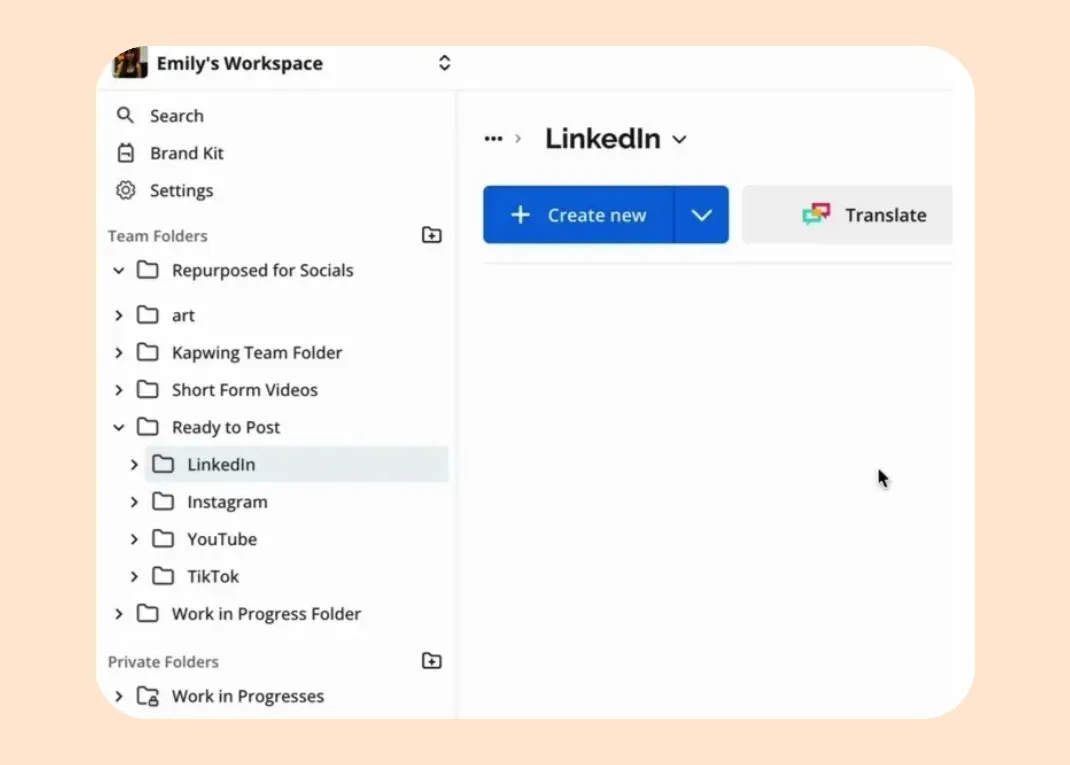
Instant collaboration for creative teams
Collaboration works best in real time. With Kapwing, you can instantly share projects by sending a link, making it easy for teammates to jump in and contribute.
Time-stamped comments allow for precise, contextual feedback, helping everyone stay aligned throughout the editing process.

Stay on-brand with custom styles
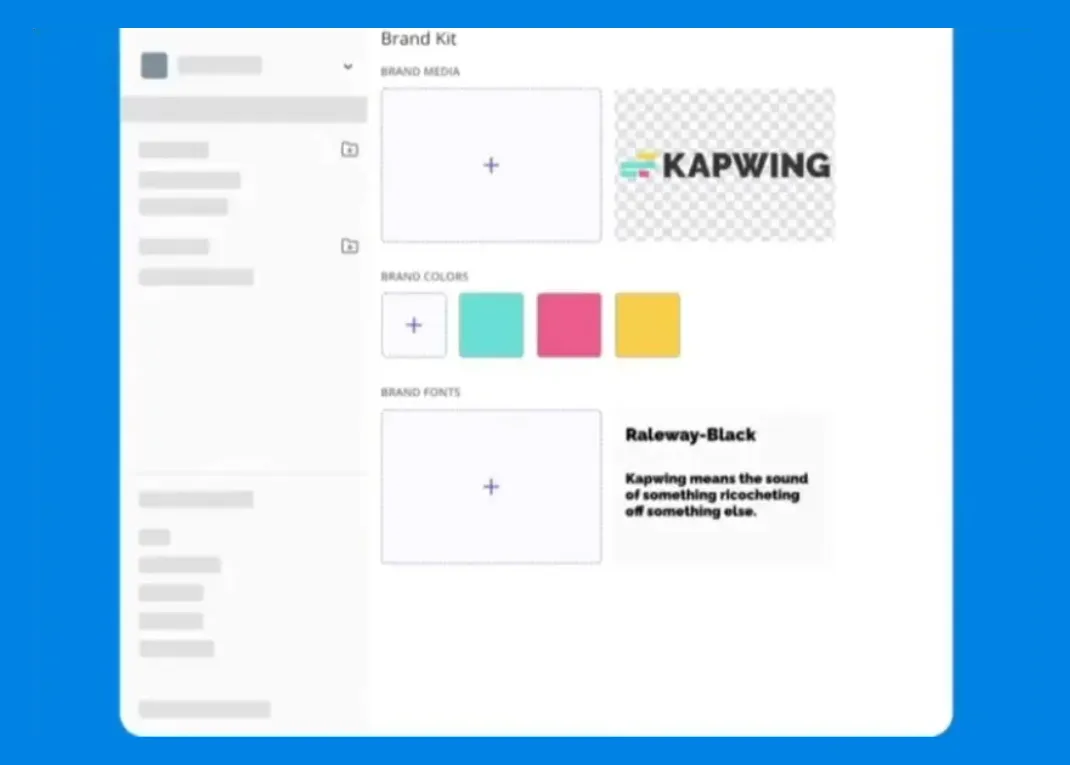
Pro users can utilize a Brand Kit to set color palettes, logos, fonts, and templates that automatically apply to new projects or workspaces.
Kapwing ensures brand consistency across all video, image, and audio content, making it the no.1 platform for managing your brand.
7 video editing tools every creator needs
Enhance videos for YouTube, TikTok, Instagram, and more
Reduce time spent creating and editing subtitles with Kapwing's automatic Subtitle Generator. Choose from over 100 styles to match your brand and ensure every video has the right tone of voice.

What's different about Kapwing?



Discover more powerful editing solutions
Join millions of creators using Kapwing to make better videos, faster

Add Audio to Video
Improve videos with thousands of royalty-free songs and sound effects from Kapwing's built-in music library. Mix, match, and layer tracks to craft dynamic and engaging content.
.webp)
Text-based Editor
Save time with text-based editing. Use an auto-generated transcript to delete or trim video sections effortlessly by editing the text directly in the online Video Editor.

Video Trimmer
Quickly trim, split, and cut your content with a user-friendly editing timeline designed for frame-by-frame precision — and anyone can start for free!
.webp)
AI Audio Enhancer
Instantly improve your recordings with AI-powered audio enhancement. Easily remove background noise, enhance speech clarity, and minimize room echoes from one single online platform.

Background Remover
Remove or replace video backgrounds without manual tracing, allowing you to create content without expensive green screens or traveling to filming locations

Collaborative Editing
Kapwing makes teamwork easy with shared workspaces and direct commenting for real-time or flexible collaboration

Special Effects
Enhance your videos with filters, animations, transitions, and speed adjustments — or apply a ready-made style from Kapwing’s library of AI effects, Custom Kais

Add Borders
Add the perfect video border to create space for captions, stickers, progress bars, and other elements that keep viewers engaged

Sound Effects
Add free royalty-free sound effects like crowd applause or cassette rewinds, or generate custom sounds by asking Kapwing’s AI Assistant

Stock Assets
Access royalty-free images, GIFs, videos, sound effects, and music clips directly in Kapwing's online Video Editor. Find everything you need to create stunning content without leaving the platform.

Templates
Use the online video maker to customize or create templates from scratch, choosing from a diverse selection of templates and memes updated daily
Free video editor with AI tools
Powered by eight leading AI models
Create short video clips from text prompts or with Image to Video technology — or generate an entire, fully-edited video just by entering a topic.

Already transforming video creation across industries
Hear directly from the teams who publish faster, collaborate better, and stay ahead.


Frequently Asked Questions
We have answers to the most common questions that our users ask.
Is Kapwing's online Video Editor free?
Yes, anyone can start using Kapwing's online Video Editor for free. There are some limitations around features and video length for users on the Free plan, and a small watermark is applied to exports. Upgrade to a Pro account to gain access to the full editing studio, including all AI-powered features.
Is there a Kapwing watermark on exports?
If you're using Kapwing on a Free account then all exports from within the online video maker will contain a watermark. Once you upgrade to a Pro account the watermark will be completely removed from your creations.
What video files does Kapwing work with?
Kapwing's online Video Editor works with all popular file types for video (MP4, AVI, MOV, WebM, and more)
Why should I edit videos online?
Online video editors outshine traditional software by offering a faster, more accessible editing experience. From simple cuts and overlays to sound effects, B-roll, and subtitles, online video editors offer versatile editing capabilities right in your web browser.
These cloud-based platforms facilitate collaboration, centralize storage, support powerful extensions, and provide a wealth of tutorials and templates. With no downloads or installations, online editors enable anyone to get started with video editing.
Does Kapwing support collaborative video editing?
Yes, Kapwing supports collaborative video editing by allowing users to create free, shared workspaces they can invite team members to join. 100+ collaborative video editing tools to streamline the creative process are also available in the online video editor. Teams can also upload a Brand Kit to their workspace or set one up together in real-time, helping ensure that assets are readily available and organized.
How do I repurpose video content?
Content repurposing involves adapting or recycling existing video content into other formats to extend its life cycle and impact. To do this, long-form content is generally broken down into smaller sections with individualized topics. For example, a 15-minute YouTube video can be repurposed into 15-60 YouTube Shorts and Instagram Reels by extracting key moments, replacing audio, and adding text overlays and calls-to-action. You can do this using Kapwing's Repurpose tool.
Why should I translate video subtitles into other languages?
There are three major reasons to translate subtitles:
- Increased Viewership: Translated content more effectively engages new audiences who want to watch videos in their native languages.
- Improved Accessibility: Subtitled content is far more effective with viewers who are hard of hearing or who better retain information through reading rather than listening.
- Enhanced Brand Perception: Providing translated subtitles shows investment in serving a diverse audience, often giving brands a more customer-centric feel.
What devices and browsers does Kapwing work with?
Kapwing's online video maker works on any device and browser, though we recommend Chromium-based browsers like Google Chrome, Microsoft Edge, and Safari. Kapwing also works on iOS and Android mobile devices. Since Kapwing is web-based software, it works across Windows, Mac, and other desktop devices, too.
Does the video editor include AI tools?
Yes, Kapwing’s Video Editor includes a wide range of AI-powered tools.
You’ll find one-click features in the right-hand panel for tasks like background removal, video stabilization, and audio cleaning.
Click the lightbulb icon at the top of the studio to open Kapwing’s AI Assistant, where you can generate lifelike videos, images, and audio with ease.
Can you edit and customize AI-generated videos?
Yes, all of Kapwing's AI-generated videos are completely customizable. Once they have been generated you can add a variety of edits based on your subscription package, including branded backgrounds, colors, images, and logos.
What resolution can I export in?
Kapwing supports export up to 1080p on the free plan and up to 4K on Pro plans. All exports are rendered in high quality with no compression artifacts.
Get started with your first video in just a few clicks. Join over 35 million creators who trust Kapwing to create more content in less time.