Convert YouTube to WebM
Add YouTube video — convert to WebM
Convert YouTube to high quality WebM — in seconds
Convert and download WebM files with an online tool
Versatile video files at the click of a button
Turn YouTube videos into lightweight, high-resolution WebM files using an online tool. Paste a link to upload a YouTube video into the Kapwing studio, then export as a web-optimized WebM file.
Kapwing's Convert YouTube to WebM tool preserves the quality of your video while reducing file size. It works entirely online, quickly converting your videos without installs or lengthy export time.
Create, edit, convert — all in one studio
Don't stop at file conversion: Kapwing's video converter is built into a comprehensive video editing studio. Upload your YouTube video, then enhance every aspect before you convert to WebM.
Add subtitles, voice overs, and dubbing using intuitive tools. Trim clips, add transitions, layer B-roll, and add text or sticker overlays. Upscale video resolution and enhance audio with AI-powered tools.

Already transforming video creation across industries
Hear directly from the teams who publish faster, collaborate better, and stay ahead.


How to Convert YouTube to WebM
- Step 1Upload YouTube
Open a new project in Kapwing and paste in your YouTube link.
- Step 2Convert to WebM
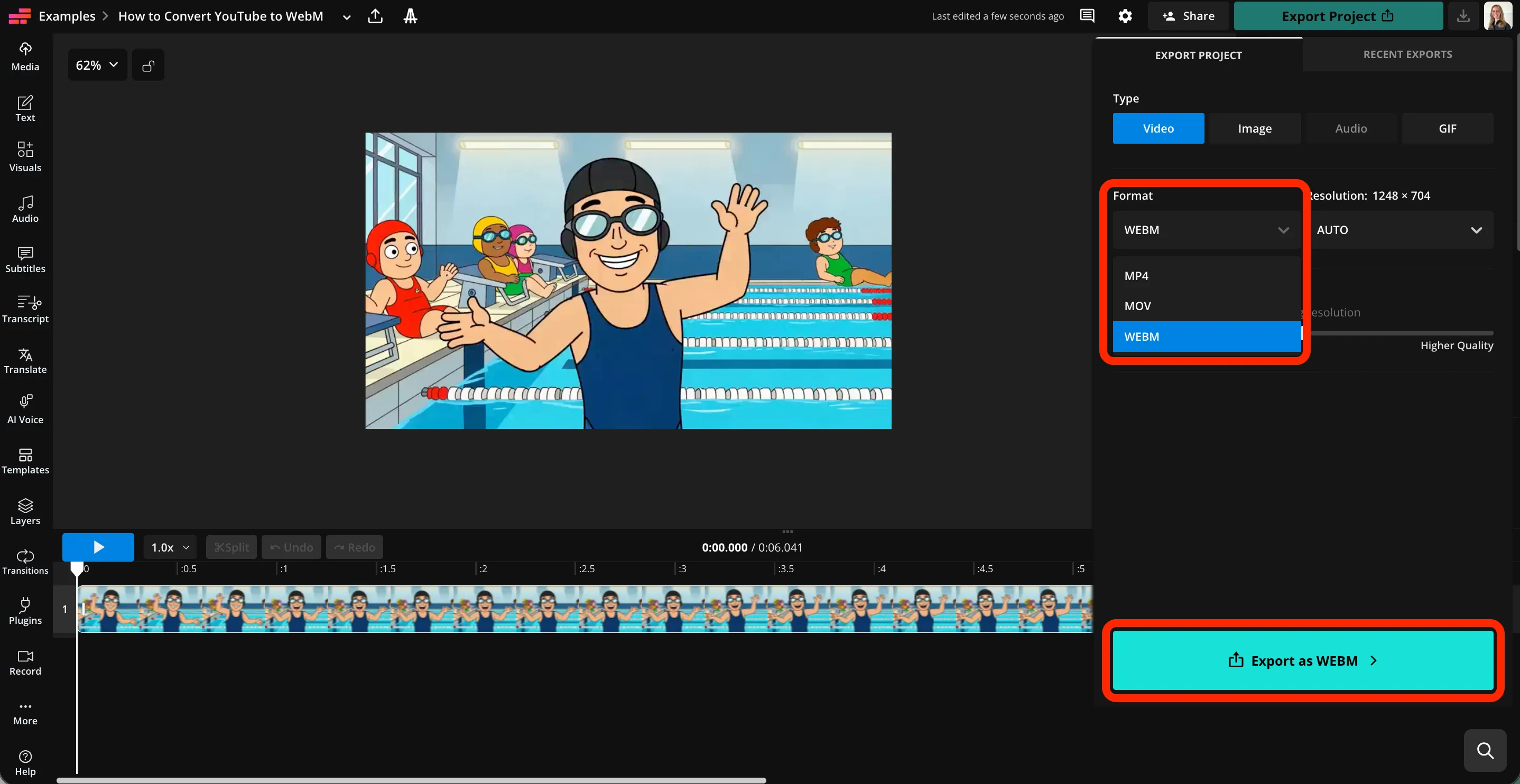
Click "Export Project" in the top toolbar, then select "WebM" from the Format dropdown. Click "Export as WebM."
- Step 3Download
Click to download your high quality WebM file.
What's different about Kapwing?



Frequently Asked Questions
We have answers to the most common questions that our users ask.
Is the Convert YouTube to WebM tool free?
Although you can convert videos to WebM for free with Kapwing, uploading YouTube videos with a pasted link requires a Pro account.
Is there a watermark on exports?
If you are using Kapwing on a free account, all exports — including from the Convert YouTube to WebM tool — have watermarks. To remove watermarks and access additional tools, upgrade to a Pro account.
How to convert YouTube to WebM
To change a YouTube link to WebM with Kapwing, create a new studio project. Paste the YouTube link to upload your video. Optionally, apply any of Kapwing's video editing tools.
Then click "Export Project" at the top right. In the Video tab, select "WebM" from the Format dropdown menu. Finally, click "Export as WebM" to download your high-resolution WebM video file.
Why convert YouTube to WebM?
Content creators and video professionals convert YouTube videos to WebM because it offers smaller file sizes with high quality, making videos faster to load and easier to use on websites. WebM is optimized for modern browsers, supports transparency, and is royalty-free, which makes it ideal for web playback, performance-focused SEO, and lightweight video editing or embedding.
Can I use Kapwing to edit my video before I convert it?
Absolutely, Kapwing offers an extensive range of free and AI-powered video editing tools. After you upload your YouTube video, you can finetune any aspect before downloading as a WebM file.
Can I convert YouTube to WebM on my phone?
Yes, Kapwing's Convert YouTube to WebM tool works on all devices, including Apple and Android phones and tablets. To convert YouTube links on your phone, open the Kapwing studio in your mobile browser.
Paste in your YouTube link to upload the video. Then click "Export Project." Select "WebM" from the Format dropdown, then click "Export as WebM" to convert YouTube to WebM. Click to download YouTube to WebM files.
Which browsers support WebM files?
All popular internet browsers, including Chrome, Firefox, Safari, and Edge, support WebM files. Use Kapwing to convert YouTube to high quality WebM files, then upload to your website for viewing on any browser.
Discover Resources
Tips, templates, and deep dives to help you create faster and share with confidence.
View all

Get started with your first video in just a few clicks. Join over 35 million creators who trust Kapwing to create more content in less time.