How to Use Seedance 2.5: A Guide for AI Video Creators
Seedance 2.5 can do a lot more than text-to-video.

Seedance 2.5 can do much more than generate a video from a text prompt. It supports text-to-video, image-to-video, multi-reference generation, video editing, extension, and native audio, with up to 50 reference inputs available for a generation.
That flexibility is also what makes Seedance 2.5 harder to learn. Before worrying about the perfect prompt, you need to understand which generation mode to use, what each reference controls, and how to structure those inputs without giving the model conflicting instructions.
This guide covers that system from end to end: the main ways to generate with Seedance 2.5, how its image, video, and audio references work, practical production workflows, and what to try when a generation goes wrong.
Table of Contents
- Seedance 2.5 vs. Seedance 2.0 – What's New?
- Seedance 2.5 Specifications
- How References Work in Seedance 2.5
- How to Use Seedance 2.5
- Seedance 2.5 Workflows and Examples
- Frequently Asked Questions
Seedance 2.5 vs. Seedance 2.0 – What's New?
Seedance 2.5 isn't just a quality upgrade over Seedance 2.0. The more important changes affect how you build a video in the first place.
The clearest example is duration. Seedance 2.5 supports up to 30 seconds in a single generation. That makes it possible to create sequences that would otherwise need to be generated as several shorter clips and assembled afterward.
Its reference system has expanded too. ByteDance documents support for up to 30 image references, 10 video references, and 10 audio references in one generation. Those inputs can be used together to control different parts of the output, from character consistency and composition to camera movement and sound.
Together, these changes make Seedance 2.5 less like a tool for generating isolated clips and more like a system for building complete video sequences.
Compared with Seedance 2.0, 2.5 generations tend to feel more continuous across shot changes, with stronger consistency, smoother transitions, and camera movement that carries more naturally.
Seedance 2.5 Specifications
Before generating, it's worth understanding Seedance 2.5's input and output limits. These determine how long a sequence can be, how much reference material you can provide, and which assets need to be trimmed before you start.
The headline limit is 30 seconds in a single generation, up from 15 seconds in Seedance 2.0. Seedance 2.5 also supports multi-round extension, so 30 seconds is a per-generation limit rather than necessarily the max length of the finished video.
For reference-based generation, ByteDance documents support for up to 30 images, 10 videos, and 10 audio files in a generation — 50 reference inputs in total.
Seedance 2.5
Quick specsFor creators, there are three specifications that matter most in practice:
- 30 seconds is a ceiling, not a target. Use enough duration for the action you're generating. A simple product orbit doesn't become better because you stretch it to 30 seconds.
- 50 references is capacity, not a recommendation. More references introduce more constraints for Seedance to reconcile. Start with the smallest reference set that contains all the information the generation actually needs.
- Check your provider before building the workflow. Resolution, available aspect ratios, reference-file requirements, pricing, and other implementation details can differ depending on where you're accessing.
How References Work in Seedance 2.5
References are where Seedance 2.5 becomes more useful as a production tool rather than just a text-to-video generator.
Seedance can use images, video, and audio simultaneously, with up to 30 image references, 10 video references, and 10 audio references in a single generation. More importantly, ByteDance says the model can interpret properties including composition, scene, visual style, characters, props, motion, and camera work from those materials and apply them according to the prompt.
What each type of reference can control
How to Use Seedance 2.5
Seedance 2.5 uses the same basic generation interface whether you're starting from text, an image, multiple references, or an existing video. There are four main ways to use it:
- Generate from text: Enter a prompt without attaching reference media.
- Animate an image: Add the image you want to use as the starting frame.
- Generate with references: Add images, videos, or audio and tell Seedance what each should control.
- Edit or extend a video: Add an existing video and describe what should change or happen next.
How to Generate a Seedance 2.5 Video With Text-To-Video
Text-to-Video is the simplest Seedance 2.5 workflow.
You provide no reference media, so Seedance generates the subject, environment, action, camera movement, and audio from your video prompt.
1. Describe the video you want.
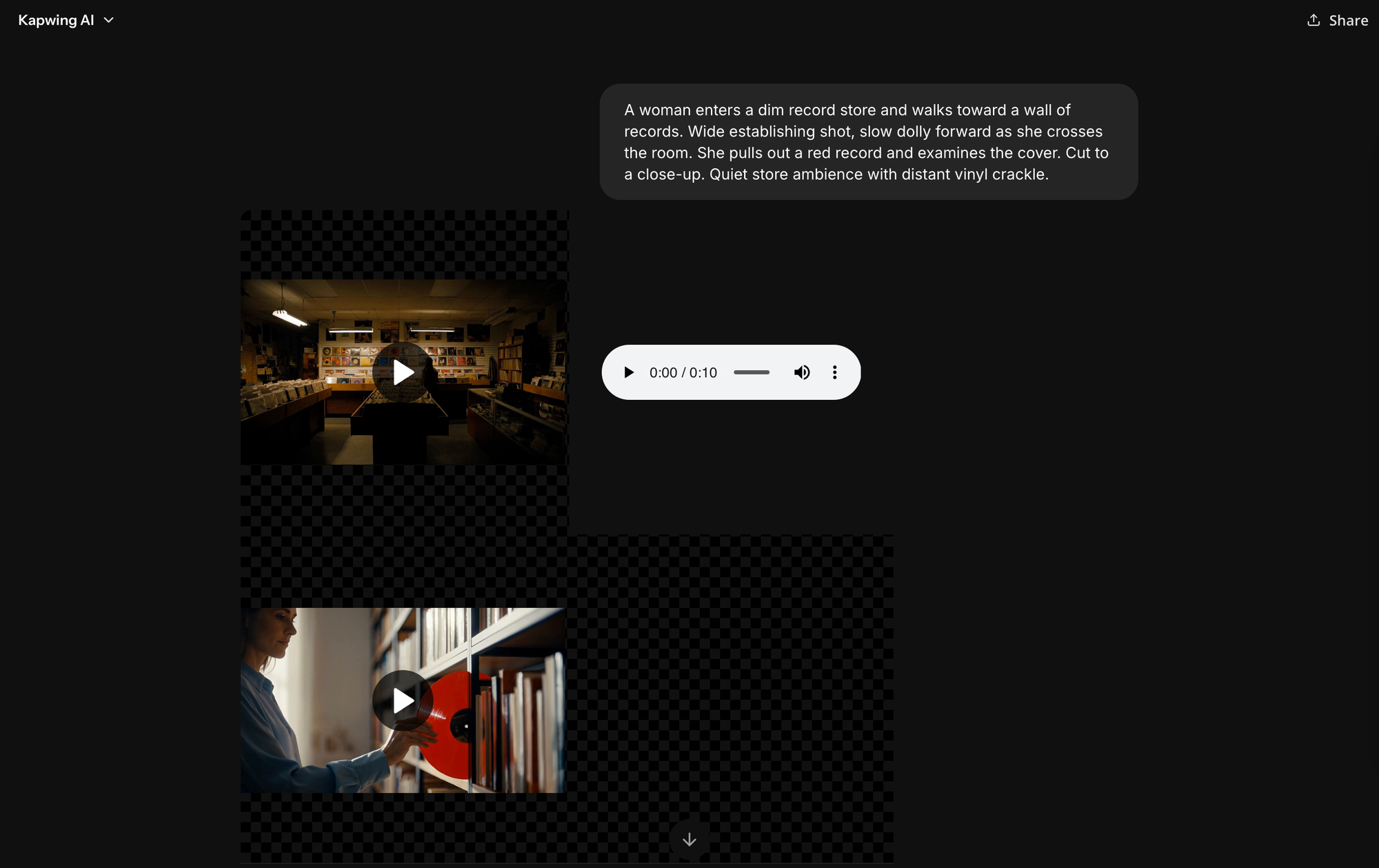
In the prompt box, specify the subject, setting, action, and camera behavior. Add audio instructions if sound matters to the scene. For example:
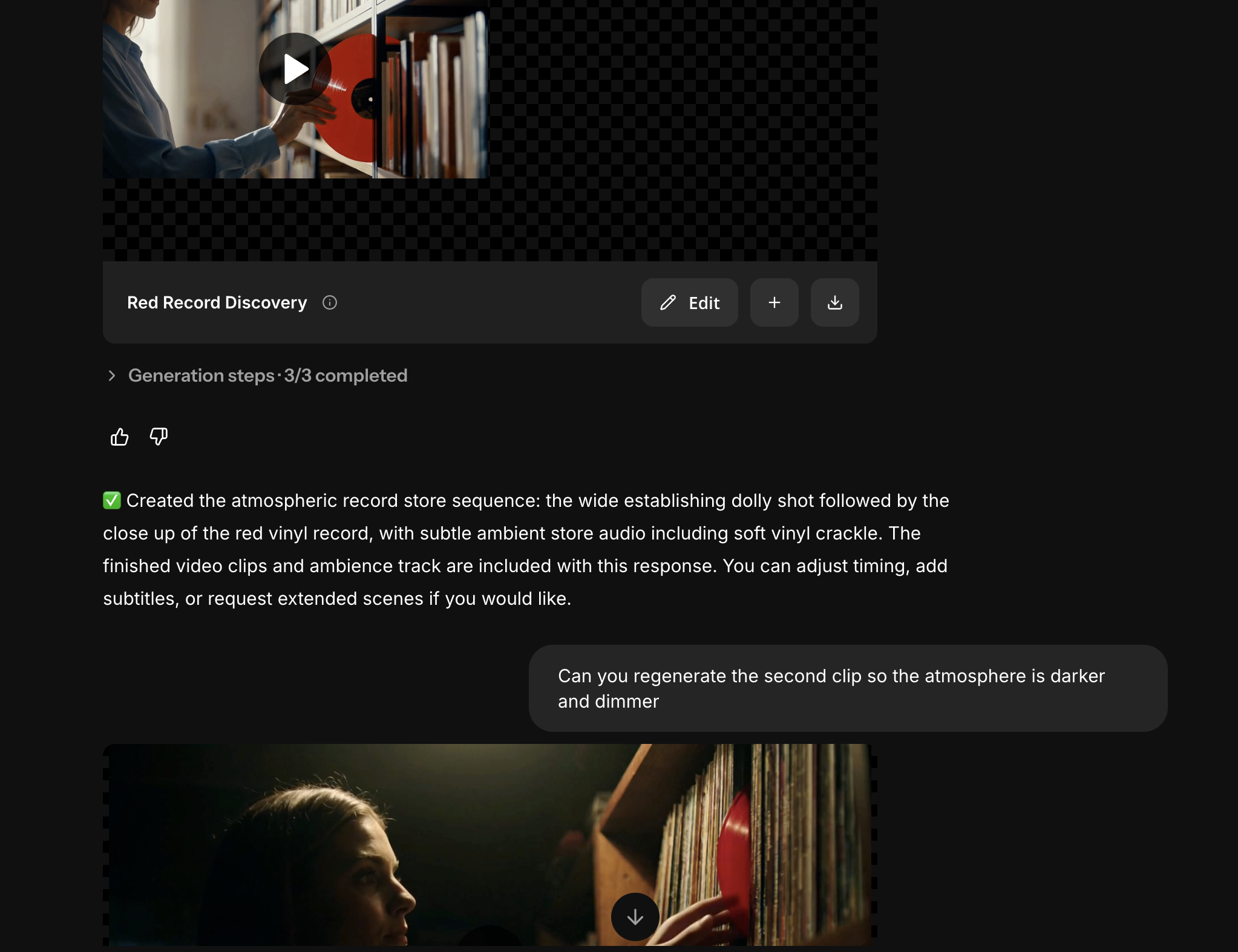
A woman enters a dim record store and walks toward a wall of records. Wide establishing shot, slow dolly forward as she crosses the room. She pulls out a red record and examines the cover. Cut to a close-up. Quiet store ambience with distant vinyl crackle.

To write a high-quality Seedance 2.5 prompt, make sure to describe:
- Subject: Who or what appears in the video.
- Setting: Where the scene takes place.
- Action: What happens and in what order.
- Camera: Shot size, angle, movement, and framing.
- Timing: How actions or shots are distributed across the available duration.
- Audio: Dialogue, ambience, sound effects, or music when relevant.
- Constraints: Details that must remain consistent or things Seedance should not change.
Build Your Prompt
Click any component to inspect what it controls.
Subject + Action
Identify who or what is in the scene, then give them a clear, concrete action to perform.
A barista pours steamed milk into a ceramic cup, forming a rosette.
Not every prompt needs all seven. A five-second product orbit can be much simpler than a 30-second multi-shot scene. Add structure in proportion to the complexity of the generation.
2. Generate and iterate.
Treat the first generation as a diagnostic pass. Watch the clip from beginning to end at least once before changing anything. Then evaluate it across five layers:
- Identity and appearance: Did characters, products, clothing, and other important visual details remain stable?
- Temporal structure: Did actions happen in the correct order and at a believable pace?
- Motion and camera: Did subjects move correctly? Did Seedance follow the requested camera path, speed, framing, and shot changes?
- Reference adherence: Did each image, video, or audio reference influence the property you assigned to it, and only that property?
- Audio-video coordination: Did dialogue, lip movement, sound effects, music, and visible actions line up?
This distinction matters because different failures require different fixes:
- Instruction failure: Seedance consistently interprets an instruction differently from what you intended. Rewrite that instruction more concretely.
- Constraint conflict: Two parts of the prompt or two references are asking for incompatible things. Remove or prioritize one.
- Information gap: Seedance is being asked to preserve something it cannot actually see. Add a reference that exposes the missing information.
- Temporal overload: Too many actions, camera moves, cuts, or spoken lines are competing for the duration. Reduce the sequence or give it more time.
- Generation variance: The instructions are clear and the setup has produced good results before, but this particular generation failed. Regenerate.
How to Generate a Seedance 2.5 Video With Image-To-Video
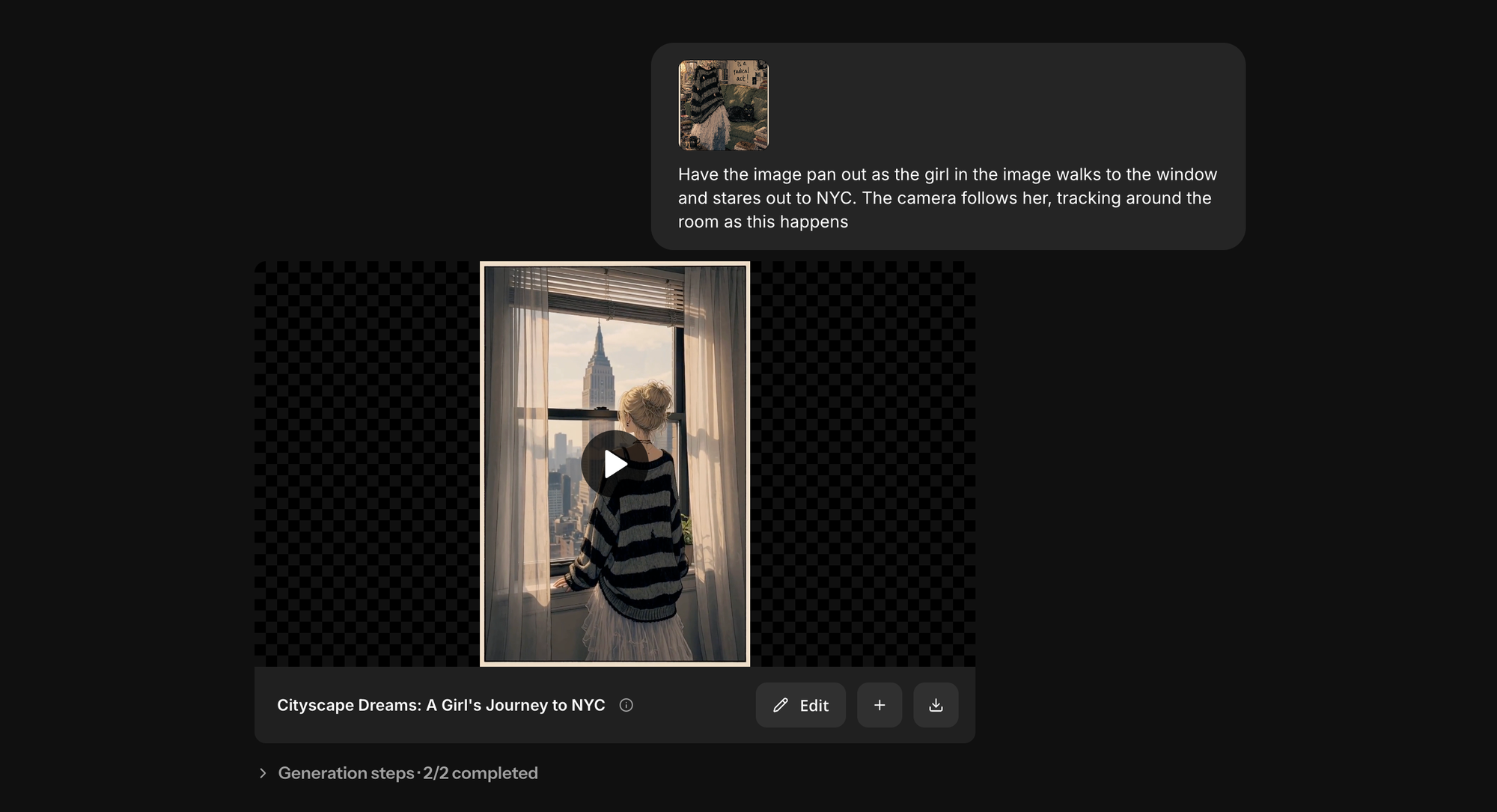
Adding an image changes Seedance's job. Instead of inventing the entire scene, the model begins with an existing visual and infers how that it should be animated.
That makes image-to-video particularly useful when composition or appearance is important: animating an image, adding movement to a shot, or turning a landscape into a drone-style shot.
1. Choose an image that supports the motion you want.
Don't choose the starting image based on appearance alone. Choose it based on what Seedance will need to infer once the image starts moving.
For example, a three-quarter product image generally provides more spatial information for an orbit than a flat front-facing shot. A wider portrait gives Seedance more information for full-body movement than a tight headshot.

In general, look for:
- A clearly defined subject
- Visible depth and spatial separation
- Enough room around the subject for the intended movement
- Good detail in anything that needs to remain recognizable
- Consistent lighting

2. Tell Seedance how the image should move.
Once the image is attached, use the prompt to re-describe information that the still image cannot provide: subject, camera movement, timing, environment, and sound. For example:
Begin from @Image1. Slow 20° clockwise camera orbit around the serum bottle. Preserve the bottle's proportions, cap, label, and position on the marble. Soft window light moves gradually across the glass. End on a tighter label close-up.
3. Add an end frame.
If your Seedance implementation supports start-frame and end-frame generation, a second image can constrain where the sequence finishes. This is useful for transformations, before-and-after sequences, pose changes, and transitions.
The start and end frames should be compatible enough that a plausible visual path exists between them.
If the subject changes pose, camera angle, lighting, environment, clothing, and scale simultaneously, Seedance has to invent explanations for all of those changes in the frames between them.

How to Generate With Multiple Image, Video, and Audio References
Multi-reference generation is where Seedance 2.5 differs most from a conventional image-to-video model.
A reference can provide a source of truth; for example, you might use one image for a character's face, another for their outfit, a video for camera movement, and an audio file for dialogue generation.
1. Build the reference set.
Before uploading anything, identify which properties of the finished video need to come from an existing source. For example:
- @Image1: Character identity
- @Image2: Outfit
- @Image3: Product appearance
- @Video1: Camera movement
- @Video2: Character action or choreography
- @Audio1: Dialogue or vocal delivery
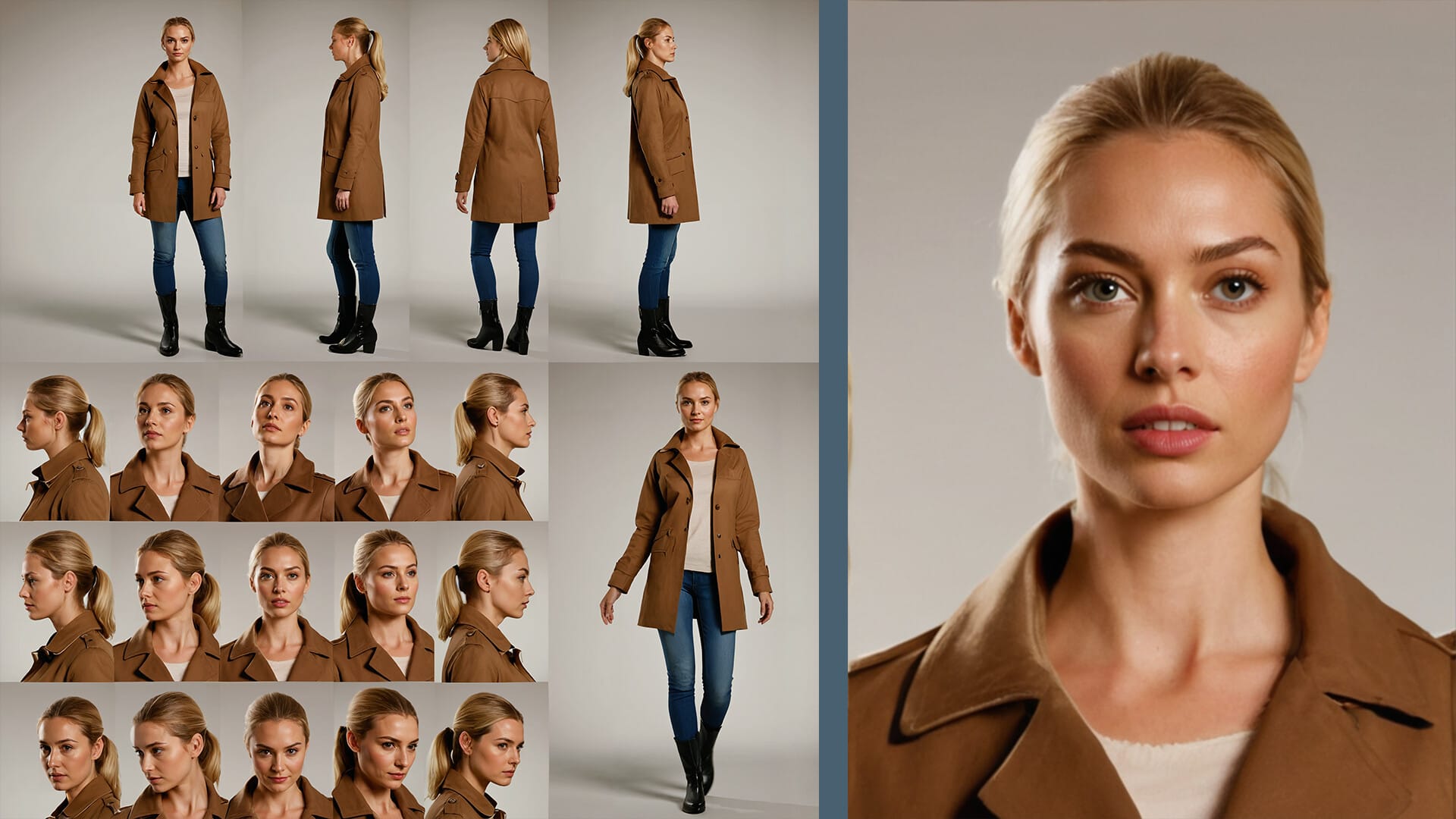
Character sheets or storyboards can be very useful here to add into the reference set.
If @Image1 already shows the character's face and outfit clearly, a second image showing almost exactly the same information may add little useful control. Worse, small differences between the two references can create ambiguity.
2. Assign each reference a specific role.
Uploading an asset doesn't tell Seedance which information inside it matters. Instead of:
Use @Image1, @Image2, and @Video1 as references.
Write:
@Image1 defines the woman's face, hair, and identity. @Image2 defines her outfit only. @Video1 defines camera trajectory and pacing only; do not copy its subject, environment, lighting, or color palette.
This reduces one of the most common problems in multi-reference generation: a reference unintentionally the generation result.

3. Separate reference instructions from the new scene.
Once each input has a role, describe the video you actually want to create separately. For example:
@Image1 defines the woman's face and identity. @Image2 defines her outfit only. @Video1 defines camera trajectory and pacing only; do not copy its subject or environment.
Generate the same woman walking through a bright contemporary art gallery. Begin in a medium-wide shot and reproduce the slow backward tracking movement from @Video1 as she walks toward camera. She stops in front of a large abstract painting and looks up. Preserve her identity and outfit throughout.
How to Edit an Existing Video With Seedance 2.5
Editing starts from a different premise: instead of asking Seedance to invent a sequence, you're asking it to change a defined property of existing footage.
The key skill here is defining the boundary between editable variables and protected variables.
1. Define the transformation precisely.
Start by identifying the actual edit. Avoid:
Make this scene more cinematic.
That leaves Seedance to decide whether “cinematic” means changing the lighting, color, camera movement, environment, depth of field, or even the subject. Instead:
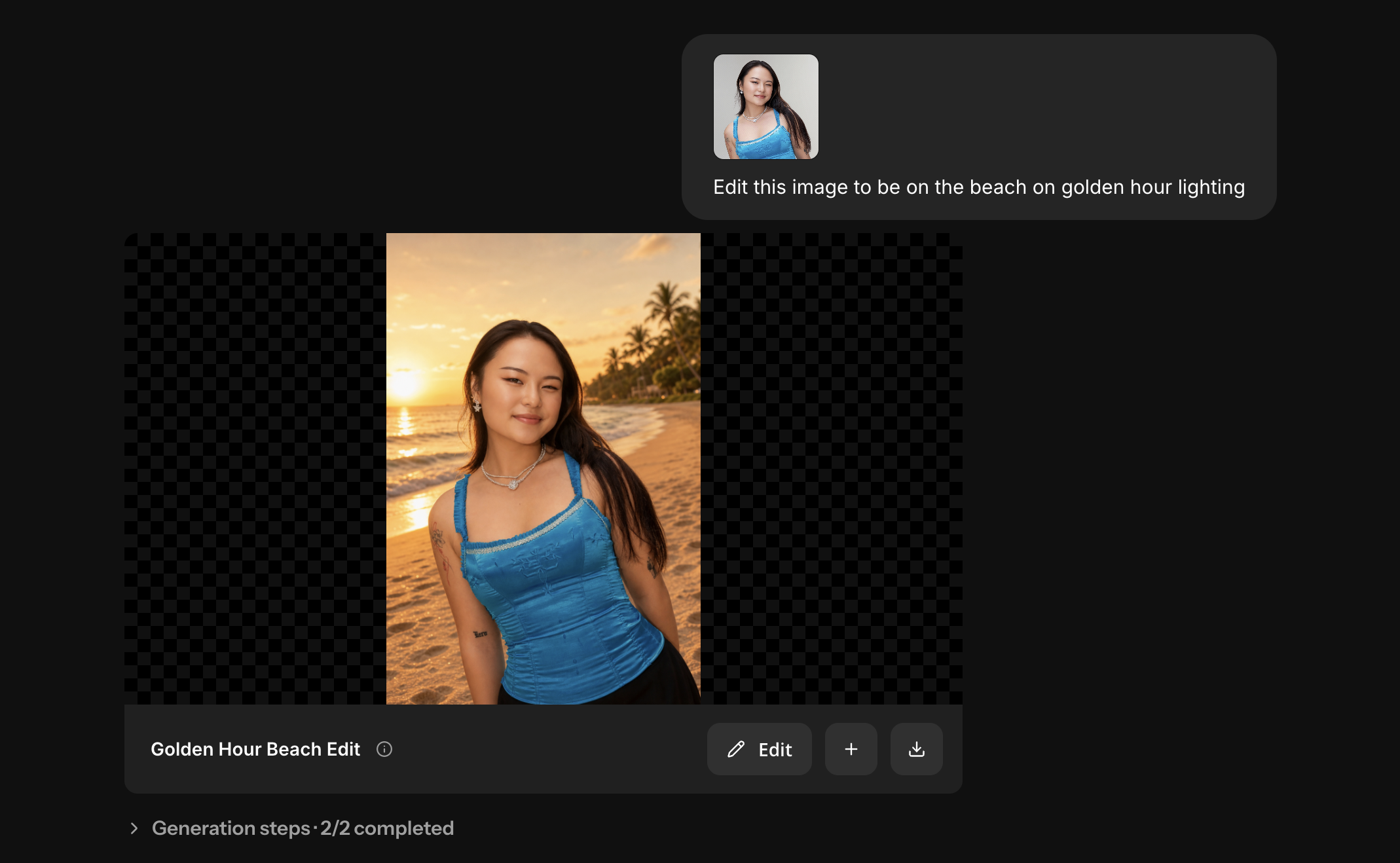
Replace the white studio background with a dark concrete showroom with soft overhead lighting.
2. Define what Seedance should preserve.
For editing, specifying what doesn't change can be as important as describing what does. For example:
Replace the white studio background with a dark concrete showroom. Preserve the subject's face, clothing, body movement, foreground position, camera trajectory, and timing.
Think of this as a preservation boundary around the existing footage.
3. Scope local edits by time.
If the requested change only occurs during part of the clip, define that interval. For example:
From 00:04–00:08, replace the background with a rainy Tokyo street at night. Preserve the original scene before and after this interval.
Timestamp-scoped edits reduce the size of the transformation problem. Instead of asking Seedance to reinterpret an entire 20-second clip, you're telling it exactly where the change belongs. You can also combine time and constraints:
From 00:04–00:08, replace the background with a rainy Tokyo street at night. Preserve the subject's identity, movement, foreground lighting, and camera trajectory throughout. Return to the original environment after 00:08.
Seedance 2.5 Workflows and Examples
Once you understand how Seedance handles references and prompts, the most useful way to work with it is to build each generation around the specific information the model needs to preserve.
The examples each uses a different combination of images, video, audio, timing, and preservation constraints depending on the production problem.
Create a Multi-Shot Product Ad
Product videos are a good fit for Seedance 2.5 because you can move through several shot types without regenerating the product separately for every shot.
Start with a clean product reference that clearly shows the details that need to survive the sequence.
Seedance 2.5 Product Ad Video Example Prompt
@Image1 defines the serum bottle, including its exact shape, amber glass, black cap, label, and proportions. Preserve these details throughout.
0–8s: Wide hero shot of the bottle on pale marble. Slow push forward as warm window light moves across the glass.
8–18s: A hand enters from the right and slowly rotates the bottle. Maintain its exact geometry and label.
18–25s: Cut to a tight macro shot of the label. Shallow depth of field, soft room tone and subtle glass-on-stone sound.
Keep a Character Consistent Across Multiple Shots
Choose one image as the canonical source for identity. If that image doesn't clearly establish the full outfit, use a second image specifically for those properties.
The difficult part isn't generating the first shot; it's carrying that character consistency through multiple shots.
Seedance 2.5 Character Consistency Example Video Prompt
SCENE CONTEXT: A four-member East Asian girl group in a super-fast hard K-pop hip-hop piece, told as one linear story in four acts: ORIGIN (a retro TV, a plunge into the screen, a retro-futuristic cockpit, space, a surreal dentist pocket reached through an eye), ARRIVAL (descent to Earth, a night airfield landing, exit in spacesuits), THE GAUNTLET (a huge crowd of fans and reporters they push through while performing), and THE DANCE (the beat drops as they break free and perform a group dance high on a tower, filmed both cinematically and by a circling reporter news helicopter). The clip lives in polished cinematic quality except during the gauntlet and the helicopter aerials, which are degraded reporter-camera footage. No cyclorama, no neon anywhere, no national flags.
MEMBER COUNT LOCK (critical): The group has exactly four members, never five, never six. No fifth member, no extra unnamed dancer, no background double, no duplicated or cloned member. Each of the four appears once and only once in any frame, no mirror, glass, or reflection showing an extra copy.
DUAL-QUALITY SYSTEM (critical): [FILM] is polished modern digital cinema, clean, sharp, stable, glossy, graded, deep glossy blacks, the default for the whole clip. [REPORTER CAM] is a degraded early-2000s cheap phone, camcorder, or news-helicopter look, heavy VHS-grade compression, chunky macroblock artifacts, smeared low resolution, muddy color, blown-out highlights, constant handheld or chopper jitter, crude digital crop-zoom punches, autofocus hunting, rolling-shutter wobble. The degradation appears only in REPORTER CAM beats and never leaks into FILM beats.
TRANSITION MOTIF: Alongside hard cuts, creative MATCH CUTs on round shapes and through eyes, a round CRT screen, a round porthole, a round dentist lamp, a planet disc, and a member's eye all rhyme. The camera pushes into the round shape or into an eye until it fills frame, then emerges in the next scene.
FORMAT MODE: Controlled twenty-four-beat rapid sequence, real-time motion, hard cuts and a few match cuts on the beat, average beat around 1.25 seconds. Every beat has a moving camera and hard motion, no static holds. Each beat tagged FILM or REPORTER CAM.
ACTION TIMING, approximately 152 BPM hard trap-drill K-pop, cuts land on the beat.
ACT 1, ORIGIN: 0.0s to 1.25s, FILM, an old wood-panel CRT glows in a dark room, camera pushes into the screen until white fills frame, match cut into round screen. 1.25s to 2.5s, FILM, cockpit reveal, the four in white spacesuits hitting a unison pose. 7.5s to 8.75s, FILM, one member floats in zero gravity in full body against the star-field, the camera orbiting her floating form, ending pushed toward her eye, match cut into her pupil. 8.75s to 10.0s, FILM, out of the pupil into a bright clinical dental room, one member alone in the dentist chair, match cut through the round lamp.
ACT 2, ARRIVAL: 10.0s to 11.25s, FILM, the ship punches down through cloud, hot orange heat glow raking the hull. 12.5s to 13.75s, FILM, the gear strikes the tarmac, steam and smoke billowing.
ACT 3, THE GAUNTLET: 13.75s to 15.0s, REPORTER CAM, degraded phone POV from behind the crowd barrier, violent handheld shake, other phones jutting into frame. 15.0s to 16.25s, FILM, the ramp lowers, the four appearing backlit in the doorway in spacesuits. 17.5s to 18.75s, FILM, the lead member walks the four across the floodlit tarmac straight toward camera, exactly four in a line. 20.0s to 21.25s, FILM, camera body-locked to the lead member as she pushes forward through the packed crowd.
ACT 4, THE DANCE (tower, card outfits, no spacesuits): 21.25s to 22.5s, FILM, all four burst into clear floodlit space and hit a hard unison hit as the beat drops, ending on a hard close of one member's eye, match cut into eye. 22.5s to 23.75s, FILM, out of the eye onto a tall open steel platform atop a broadcast tower high above the night city, the four now in their card outfits dance hard in a line, exactly four, no double. 23.75s to 25.0s, REPORTER CAM, degraded news-helicopter footage, the four small on the distant tower platform dancing. 28.75s to 30.0s, FILM, final freeze, the four land the final unison pose, camera cranes up and away for the last frame, exactly four figures.
PHYSICS: Real ground contact and weight transfer on every step, true jaw and lip mechanics on the rap, hair and cloth lag on spins and whips. Zero gravity in space, hair and necklace drift weightless with slow inertia. The ship carries real mass on descent and landing, gear compresses, steam billows. The crowd has real bodies and mass, fans and reporters press, sway and reach with true weight. FILM camera moves carry real inertia, REPORTER CAM motion is human or chopper chaos, real hand shake, stumble, jostle, never gimbal but plausible. Exactly four members and five fingers per hand.
LIGHTING: FILM beats lit for grounded cinematic contrast, never murky, no neon anywhere. TV room near-black with CRT glow only. Cockpit lit in cool cyan and warm amber. Space is black star-field with cool blue-white rim light. Dentist bright clinical white with one cold-blue accent. Tower platform cool moonlight plus hard tower floodlights plus warm distant city glow. REPORTER CAM beats show the same physical lights through a cheap sensor, crushed muddy shadows, harshly blown highlights.
AUDIO: Music added in post, no generated vocals, no words, no melody from the model. Mouth motion is rap cadence, not synced to specific words. Diegetic bed only: CRT hum, ship thruster rumble, steam hiss, crowd roar, helicopter rotor thrum under the aerials.
POSITIVE LOCKS: The group is exactly four members across all beats, no fifth member, no duplicate or cloned member. Faces and hair stay fully consistent with the four reference images. Wardrobe by act: spacesuits in origin, arrival, and gauntlet, card outfits on the tower. Spacesuits carry no national flags, no flag patches. No neon anywhere. The dual-quality system is strict, FILM beats stay fully clean, REPORTER CAM beats carry the full degraded look, the two never mix in one shot. Real-time 24fps, no slow motion, no speed ramps, no ghosting or trails.
Turn a Storyboard or 3D Blockout Into Finished Video
A rough storyboard, animatic, or 3D blockout can establish where subjects are positioned, how they move, and how the camera travels.
Separate references can then define what those subjects and environments should actually look like.
Seedance Storyboard to AI Video Prompt
Use the reference storyboard to make a full 30 second animation movie. Work through all fifteen panels in order, giving each panel roughly two seconds of screen time so the story plays out at a steady, unhurried pace across the whole thirty seconds. Do not rush the beats and do not finish early.
Do not render any text, numbers, letters, timecodes, panel numbers, captions, watermarks or on-screen graphics of any kind. Clean frames only.
Audio: Diegetic sound only — natural ambience, environmental foley, and subject-driven sound.
Create a UGC-Style Ad
UGC-style videos need to feel casual while simultaneously maintaining a character, product, spoken performance, and natural camera behavior.
For product-focused UGC, also watch for reference competition between the creator and the object. If the product needs an exact label or package design, use a clean reference rather than relying on the bottle visible in the character image.
Seedance 2.5 UGC Style Video Example Prompt
Vertical 9:16 UGC video, 30 seconds total, 24fps, shot on iPhone 14 Pro, authentic phone-camera look, handheld selfie framing from her seat for the whole video, arm's-length wobble, tiny refocus moments, soft even cabin lighting, natural vlog pacing, 8 shots, one consistent framing with small variations, the first shots shake with real turbulence, then the frame settles as the flight smooths out.
Cast: the young woman from the reference image, face fully visible and matching exactly in every shot, fair skin, shoulder-length pastel-pink wavy hair under a burgundy beanie with a small silver star pin, blue eyes, small stud earrings, natural minimal makeup. Her acting is understated and real, she blinks at a natural rate, reactions arrive a half-beat late, smiles start small and grow, she glances away from the lens and back mid-sentence, and she keeps her voice down like someone slightly self-conscious about filming on a plane, no wide eyes, no exaggerated faces, no performing.
Background passengers, realistic, alive, never NPC-like: scattered through the blurred cabin, a middle-aged man asleep against a window with his head tilted and mouth slightly open, a woman in her 30s reading a paperback, an older man scrolling a phone with reading glasses low on his nose, a young woman with headphones gazing out the window. Each moves subtly and independently, nobody looks at her or her camera, nobody reacts in sync.
Product: the exact box from the reference, BAKEY Chocolate Chip Cookie Dough, The London Bakehouse Co, Ready to Bake, red box with cream lettering and the cookie photo, sitting on her tray table.
Location: the airplane cabin from the reference, navy leather seats with white GGS AIR headrest covers, grey armrests, oval windows with soft daylight. Seating geometry fixed for every shot: she sits in the aisle seat, the aisle at her left shoulder, the seats to her right toward the window occupied by the sleeping man.
Segment 1 (0-10s): Shot 1, Turbulence Hook (0-4s), handheld selfie, the frame shaking, the cabin rattles through rough turbulence, she grips the armrest with one hand, phone wobbling in the other, and talks to the lens through it in a tight controlled voice: "So we are currently being shaken like a snow globe." Shot 2, It Settles (4-7s), same framing, the shake easing beat by beat until calm, she exhales slowly and says: "Okay. We're fine. Everything's fine." Shot 3, The Pivot (7-10s), she looks down at her tray table, lifts the red box into frame, pats it twice, and says: "And this survived, which is all that matters."
Segment 2 (10-20s): Shot 4, The Open (10-13.5s), closer selfie, she folds the box open and brings out one golden cookie, no speech. Shot 5, First Bite (13.5-17s), she takes an unhurried bite, chews for a real moment, and says: "Okay, that's actually really good." Shot 6, The Detail (17-20s), closer on the cookie, she breaks it in half slowly and murmurs: "Look at those chocolate chunks."
Segment 3 (20-30s): Shot 7, The Verdict (20-25s), same selfie framing, relaxed, she gives her recommendation: "These are Bakey, by the way. Honestly the best thing I packed for this trip." Shot 8, Quiet Outro (25-30s), no more words, she finishes the half in two calm bites, dusts her fingertips, tucks the box flap closed, and lets her head rest back against the seat, the frame holds calm and still, no product packshot.
Material realism: the turbulence reads true, the handheld frame jolts in irregular bumps, hair and tie sway with the plane's motion. The calm afterward is equally true, the frame's motion decays gradually, not instantly. The cookies are golden with matte cracked surfaces, soft flex at the bite, dark chocolate chunks glossy, real crumbs on the napkin. Skin is real human skin, visible pores, natural sheen, no plastic smoothness.
Audio: no music, she speaks on camera with accurate lip-sync. The soundscape carries the story, rough rattling cabin, creaking bins and a seatbelt chime under Shot 1, the rattle decaying into smooth engine hum in Shot 2, the cardboard flick in Shot 4, the soft cookie snap in Shot 6. Her voice: young American accent, warm and low-key, relaxed unhurried pace, every line a complete finished sentence, no trailing off. All speech ends by 25s.
Consistency rules: her face stays the same person from the reference in every frame. She stays in the same aisle seat for the entire video, no seat changes, no teleporting. Turbulence exists only in Shots 1-2 and never returns. The background passengers keep their same seats, faces, clothes and activities in every shot. The BAKEY box lettering stays sharp and correctly spelled whenever visible. The cookie only shrinks, whole in Shot 4, bitten from Shot 5, two halves in Shot 6, finished in Shot 8, never regrowing. Exactly five fingers per hand. No on-screen text or captions, no product packshot at the end, the video ends on her.
Frequently Asked Questions
Is Seedance 2.5 better than Seedance 2.0?
For more complex production workflows, Seedance 2.5 is a significant upgrade. Its 30-second generation window, larger multimodal reference capacity, stronger continuity, native audio-video generation, and editing capabilities make it better suited to multi-shot sequences rather than isolated clips.
Visually, the biggest difference is often continuity rather than raw image quality: 2.5 is better equipped to carry characters, scenes, motion, and camera language across a longer sequence without making every shot feel like a separately generated clip.
What resolution does Seedance 2.5 support?
This depends partly on where you access the model. Provider implementations can expose different resolution and quality options, so don't assume a resolution listed by one API or platform applies universally to Seedance 2.5.
Check the output controls of the implementation you're using, especially if resolution is important to your production workflow.
Why is Seedance 2.5 ignoring my references?
Usually, the problem is not simply that Seedance needs more references. Check whether each reference has a clearly defined role and whether multiple inputs contain conflicting information.
For example, if one image defines a character's identity and another is meant only to define clothing, say so explicitly. If a video is being used only for camera movement, tell Seedance not to copy its character, environment, or visual style. When a generation becomes confused, simplifying the reference set is often more effective than adding another input.
Can Seedance 2.5 edit an existing video?
Yes. ByteDance demonstrates Seedance 2.5 performing targeted changes to existing footage, including background replacement and timestamp-scoped edits, as well as turning rough 3D or clay-render sequences into finished visuals.
For controlled edits, define both what should change and what should remain unchanged. This helps prevent a localized edit from unnecessarily altering the subject, performance, camera movement, or other parts of the source footage.
Can Seedance 2.5 copy camera movement from another video?
Yes. A reference video can provide information about camera trajectory, framing, speed, pacing, and other temporal behavior.
If you only want the camera movement, specify that explicitly. A video also contains characters, environments, lighting, composition, and visual style, so leaving its role ambiguous can cause Seedance to borrow more from the reference than you intended.
Can Seedance 2.5 use a start frame and an end frame?
Yes, implementations that expose start- and end-frame generation can use one image to establish the beginning of a sequence and another to constrain its ending.
This works best when a plausible visual transition exists between the two. The more simultaneously you change pose, camera angle, environment, lighting, scale, clothing, or other major properties, the more Seedance has to invent between the supplied frames.
How many references can you use with Seedance 2.5?
ByteDance says Seedance 2.5 supports up to 30 image references, 10 video references, and 10 audio references, for up to 50 reference inputs in total.
That doesn't mean you should use all 50. For most projects, use the smallest set of references that clearly defines the characters, objects, movement, audio, or other properties you need to preserve.