
How to Make Dreamcore Videos with AI: Prompts and Step-by-Step Guide
Clouds in washing machines. Roads leading into the sky. Learn how to create viral-style dreamcore videos with AI, step-by-step tutorials, and ready-to-use prompts.

This fall, my social media feeds have been filled with clouds being washed in laundromats, hung on clotheslines, and neatly arranged on supermarket shelves. Everything is bathed in soft pinks and mint greens, usually accompanied by a quiet piano melody. These surreal scenes aren't real footage. They're AI-generated dreamcore videos, and they've become a popular trend on TikTok and Instagram.
While the finished videos look effortless, creating a convincing dreamcore aesthetic takes more than typing a prompt into an AI video generator. The process starts with an imaginative concept, followed by a carefully generated image, subtle animation, and thoughtful editing to bring the scene to life.
In this guide, we'll explain what dreamcore is, break down the visual elements behind the aesthetic, and show you how to make dreamcore videos with AI step by step. You'll also find ready-to-use AI prompts, editing tips, and creative ideas to help you make your own dreamlike videos.
Table of Contents:
- What Is Dreamcore?
- How to Make Dreamcore Videos with AI
- Dreamcore AI Video Prompts You Can Copy and Paste
- How to Edit Dreamcore Videos
- Frequently Asked Questions
What Is Dreamcore?
Dreamcore is a surreal internet aesthetic that makes images and videos feel like a half-remembered dream. The settings are familiar, like a backyard, a school hallway, or a swimming pool, but something is slightly off. The goal is to make viewers feel comforted and uneasy at the same time.
The style has no single origin. Creators on Tumblr and Reddit were posting dreamlike surreal images by 2016–2018 before anyone called it "dreamcore." Liminal-space photos picked up attention around 2019, and by 2020–2021 dreamcore had its own communities, with TikTok pushing it into the mainstream. It grew up alongside weirdcore, and the two still share a lot of visual DNA.
The feeling underneath it has a name: anemoia, or nostalgia for a time you never lived. A 2025 study in Empirical Studies of the Arts found that people who are naturally prone to nostalgia respond more strongly to dreamcore images.
@anotherworldcore #dreamcore #liminalspaces ♬ original sound - 𝐀𝐧𝐨𝐭𝐡𝐞𝐫 𝐖𝐨𝐫𝐥𝐝
5 Elements of the Dreamcore Aesthetic
The dreamcore aesthetic combines familiar places with surreal details that make them feel like something from a half-remembered dream. Think of an empty suburban street that leads into the clouds, a laundromat filled with floating cotton-candy clouds, or a lone house surrounded by endless water.
Here are five visual elements that define the dreamcore aesthetic:
- Familiar, empty locations: Childhood bedrooms, indoor swimming pools, school hallways, quiet neighborhoods, and abandoned malls create a sense of nostalgia. The absence of people makes these spaces feel unusually still.
- Surreal or impossible details: Clouds hanging on clotheslines, staircases leading into the sky, or roads disappearing into water introduce something unexpected into an otherwise recognizable setting.
- Soft, nostalgic colors: Pastel pinks, mint greens, pale blues, and faded yellows are common in dreamcore videos. Darker variations use muted greens, blues, and washed-out colors for a more unsettling atmosphere.
- Hazy lighting and imperfect textures: Diffused sunlight, soft shadows, slight blur, and subtle film grain can make AI-generated scenes resemble old photographs or memories rather than polished digital renders.
- Slow movement and stillness: Gentle camera zooms, slowly drifting clouds, rippling water, and empty, motionless environments help create the floating sensation associated with dreams.
If you're looking for inspiration, start with locations commonly associated with dreamcore and liminal spaces: indoor pools, nearly identical suburban houses, children's play areas, hotel corridors, and empty shopping malls. The 2025 horror game Dreamcore explores a similar aesthetic through surreal, maze-like environments that feel both familiar and unsettling.
@fever.dreamer_ The water is warm, lights never turn off. No exits 🛟 #dreamcore #poolrooms #backrooms #liminalspaces #weirdcore ♬ 7 weeks & 3 days (liminal) - emptiness
How to Make Dreamcore Videos with AI
The easiest way to make dreamcore videos with AI is to generate an image first, then animate it. This gives you more control over the setting, colors, and surreal details than generating an entire video from a text prompt.
For this tutorial, we'll use Kai to generate images, turn them into videos, and edit the final result. You can follow the same general process with other AI image and video generators.
Step 1: Plan Your Dreamcore Scene
Before generating anything, decide what your dreamcore video will look like. Start with a familiar location, add one impossible detail, and choose the feeling you want to create. For example:
- A pastel laundromat where fluffy clouds are washed and hung to dry, with a calm, whimsical atmosphere.
- An empty indoor swimming pool with a waterslide that disappears into the clouds, creating a nostalgic, dreamlike feeling.
- A quiet school hallway that opens into a starry sky, with a slightly unsettling atmosphere.
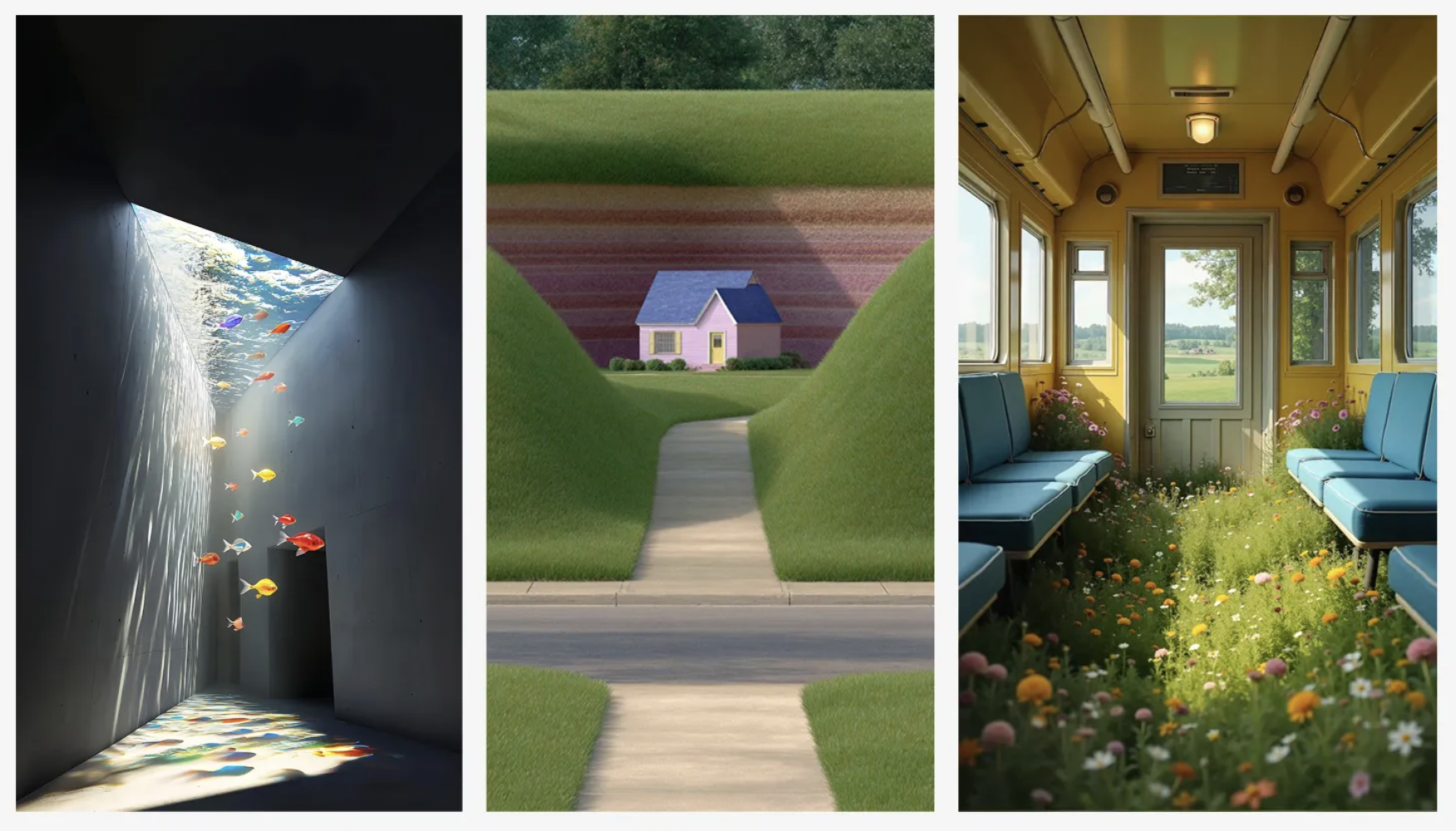
Try to keep your concept simple. AI video generators tend to produce more consistent results when you focus on one surreal element rather than filling the scene with multiple unusual objects or actions.
If you're planning a video with multiple scenes, create a short shot list before generating your images. This will help you decide what to show and how the camera should move.
| Shot | Purpose | Typical camera |
|---|---|---|
| 1. Establishing | Show the familiar place | Locked or very slow push |
| 2. Detail | Ground it with a real texture: tiles, carpet, a light switch | Locked close-up |
| 3. The anomaly | Reveal the impossible element | Slow push or drift toward it |
| 4. The exit | End somewhere that can loop or fade, like a bright doorway or open sky | Slow push into light |
Step 2: Generate Your Dreamcore Image
Your starting image determines most of the finished video's appearance, including its composition, lighting, and colors. There are two ways to create it: generate an image directly from a text prompt or start with your own drawing.
The first approach is faster, while the second gives you more control over complex compositions.
Option A: Generate an Image With a Text Prompt
Open Kai and describe the dreamcore scene you want to create. You can use an AI image model such as ChatGPT Image, Nano Banana, or Seedream.
A good dreamcore image prompt should include five details:
- Location: Describe a recognizable setting, such as a bedroom, shopping mall, indoor pool, or empty street.
- Surreal element: Introduce something impossible, like clouds hanging from clotheslines or a staircase leading into the sky.
- Color and lighting: Choose a consistent palette, such as pastel pink and mint green, with soft morning sunlight.
- Camera style: Specify a photographic look, such as an early-2000s digital camera, slightly faded film, or a VHS recording.
- Composition: Explain the camera angle and which objects or architectural details should remain clearly defined.
Example AI Dreamcore Image Prompt:
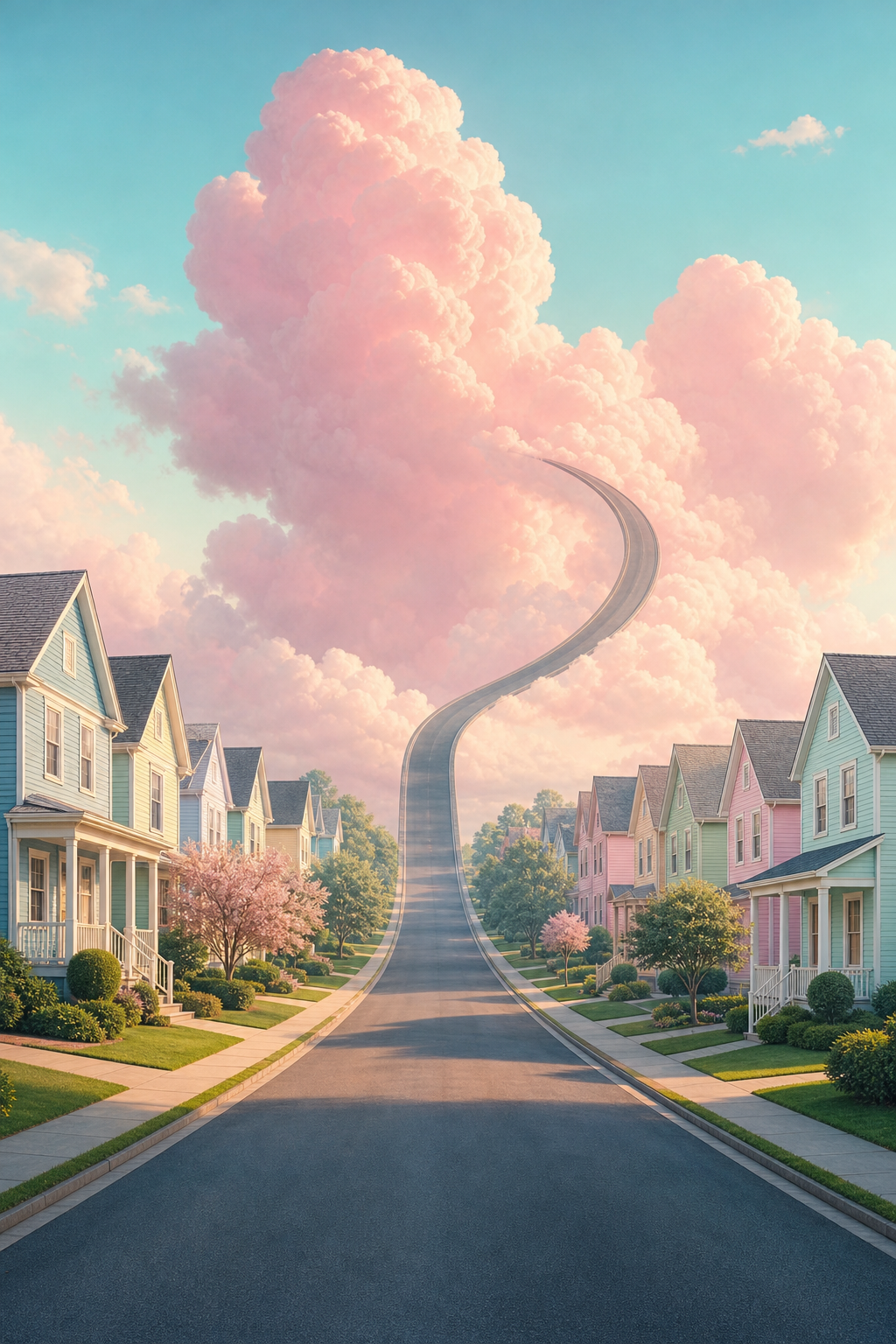
An empty suburban street in the early morning. Small pastel houses line both sides of the road, which gradually curves upward into a sky filled with enormous pink clouds. Soft sunlight, pale blue and mint-green colors, slightly faded early-2000s digital photography, subtle grain. Shot at eye level with a wide-angle lens. Nostalgic, peaceful, dreamlike atmosphere. No people, cars, or readable signs. Realistic architecture and clean, straight lines.
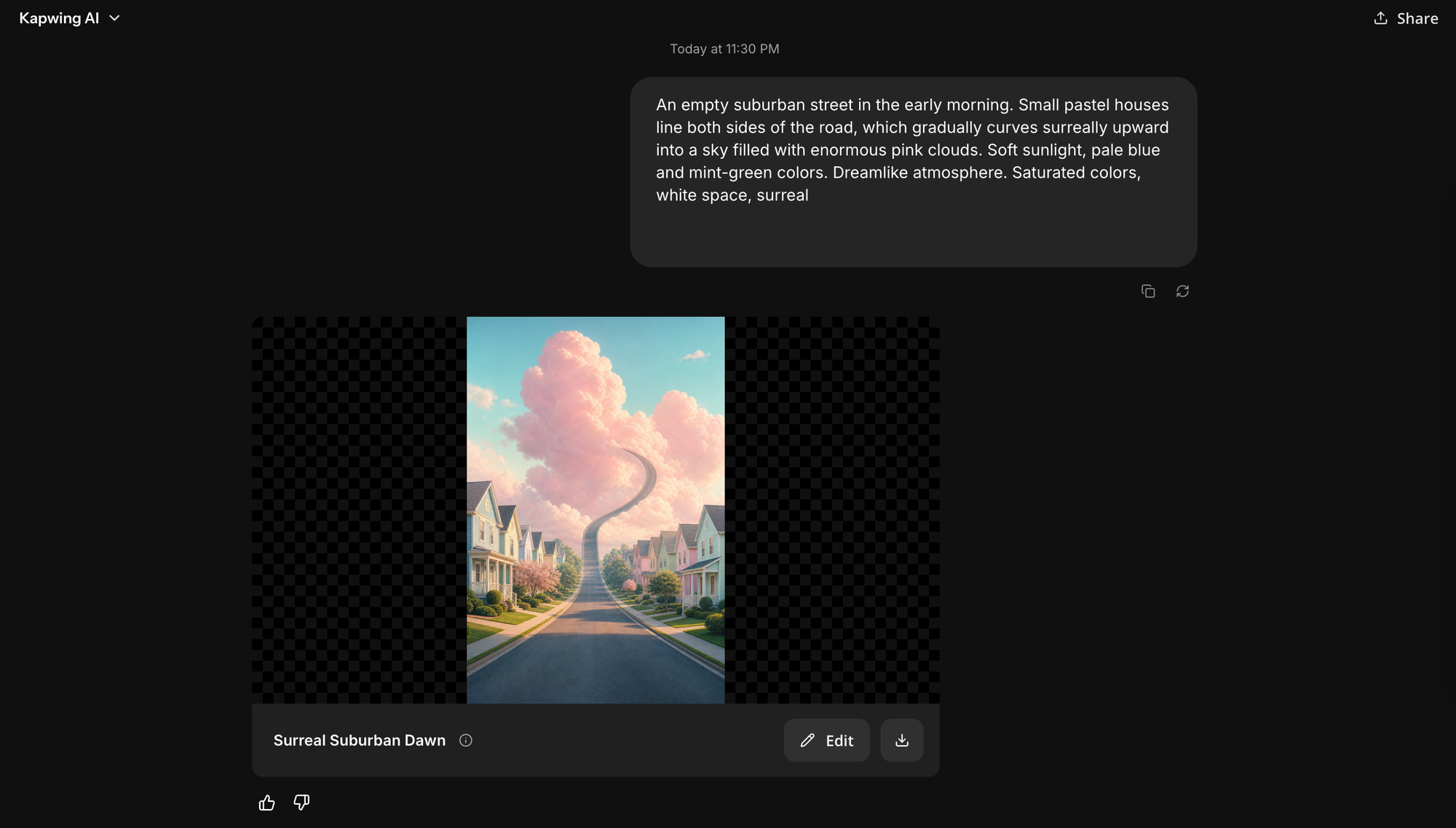
When generating the image, think about how you plan to animate it afterward.
For example, if your video will feature a slow camera movement down a hallway, place something simple at the far end, such as a bright doorway or an open sky. This reduces the amount of new architectural detail the video model needs to invent as the camera moves.
Option B: Turn Your Own Drawing Into a Dreamcore Image
If you have a specific scene in mind, starting with a drawing can give you more control over the composition. You can sketch on paper and take a photo of it, or use a digital drawing tool to create the layout.
The drawing doesn't need to be detailed or realistic. When sketching, focus on three things:
- Start with the ordinary setting: Draw the walls, floor, furniture, or other familiar elements before adding the surreal detail.
- Use large, simple shapes: Define the overall composition instead of filling the drawing with tiny objects and intricate textures.
- Avoid unnecessary annotations: Use your AI prompt to describe colors, materials, and lighting instead of writing instructions directly on the sketch.
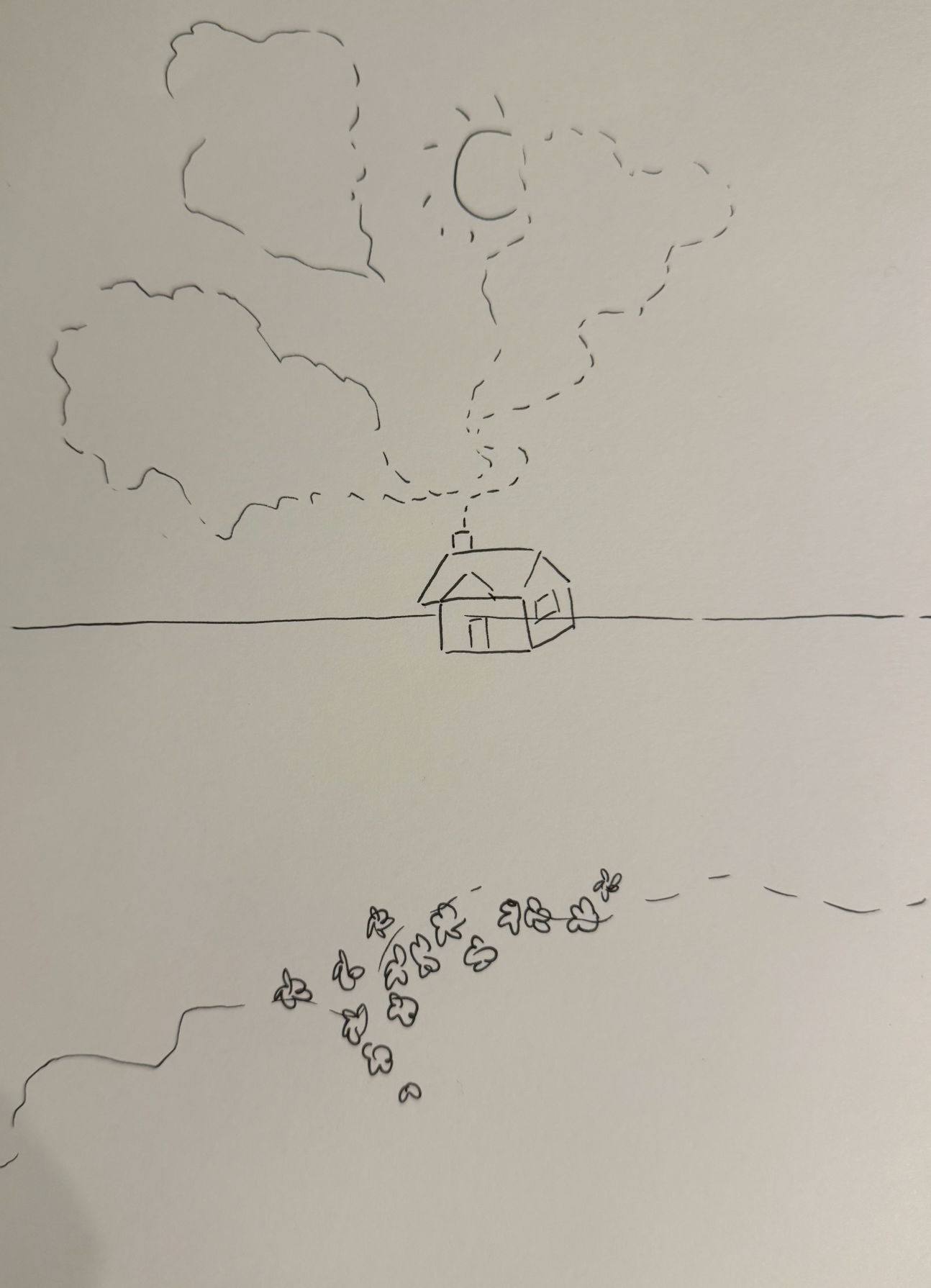
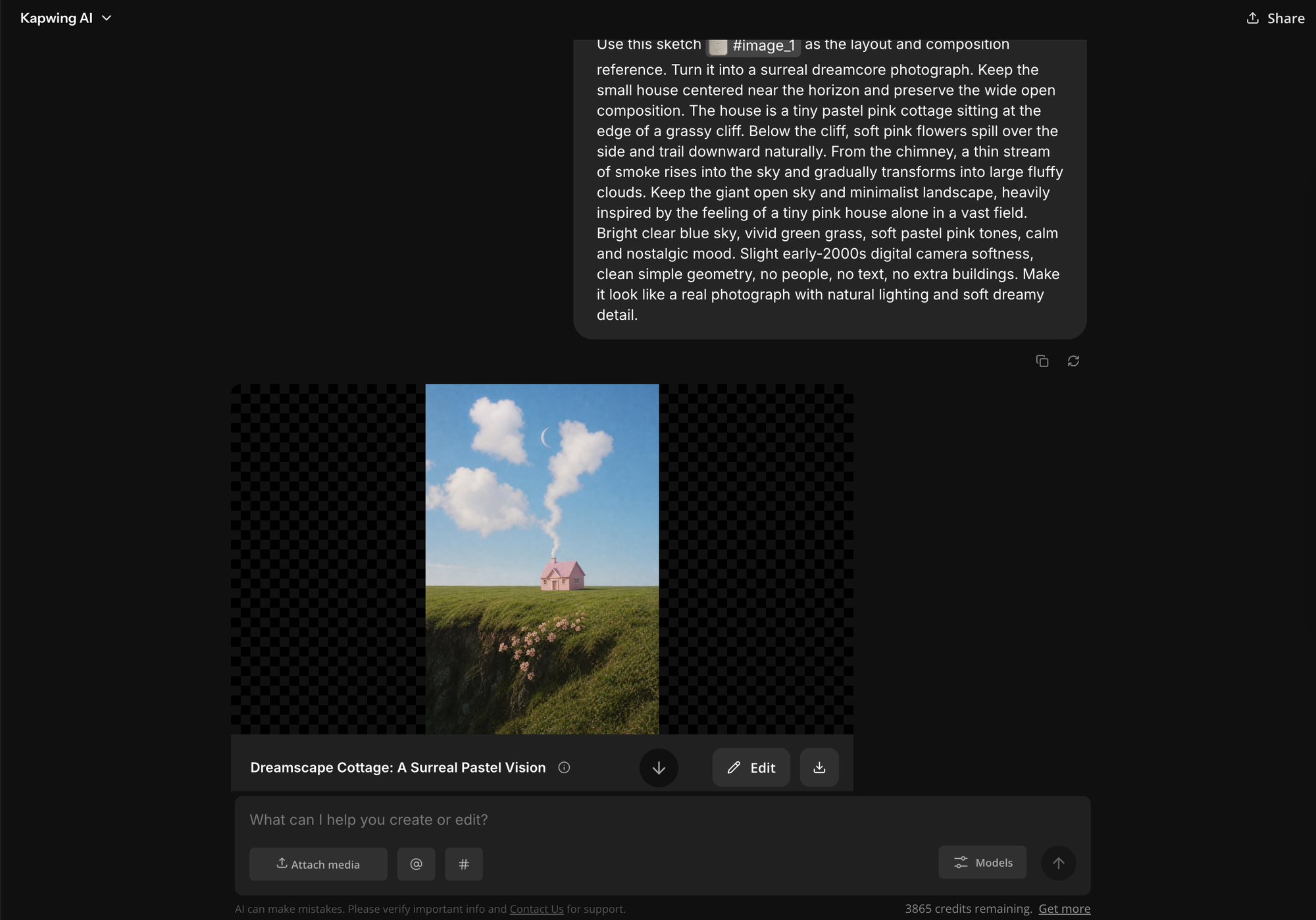
Once your drawing is ready, upload it to Kai and ask the AI to turn the sketch into a image while preserving the original layout.
Example Sketch-to-image Prompt:
Use this sketch as the layout and composition reference. Turn it into a surreal dreamcore photograph. Keep the small house centered near the horizon and preserve the wide open composition. The house is a tiny pastel pink cottage sitting at the edge of a grassy cliff. Below the cliff, soft pink flowers spill over the side and trail downward naturally. From the chimney, a thin stream of smoke rises into the sky and gradually transforms into large fluffy clouds. Keep the giant open sky and minimalist landscape, heavily inspired by the feeling of a tiny pink house alone in a vast field. Bright clear blue sky, vivid green grass, soft pastel pink tones, calm and nostalgic mood. Slight early-2000s digital camera softness, clean simple geometry, no people, no text, no extra buildings. Make it look like a real photograph with natural lighting and soft dreamy detail.
Step 3: Animate Your Dreamcore Image With AI
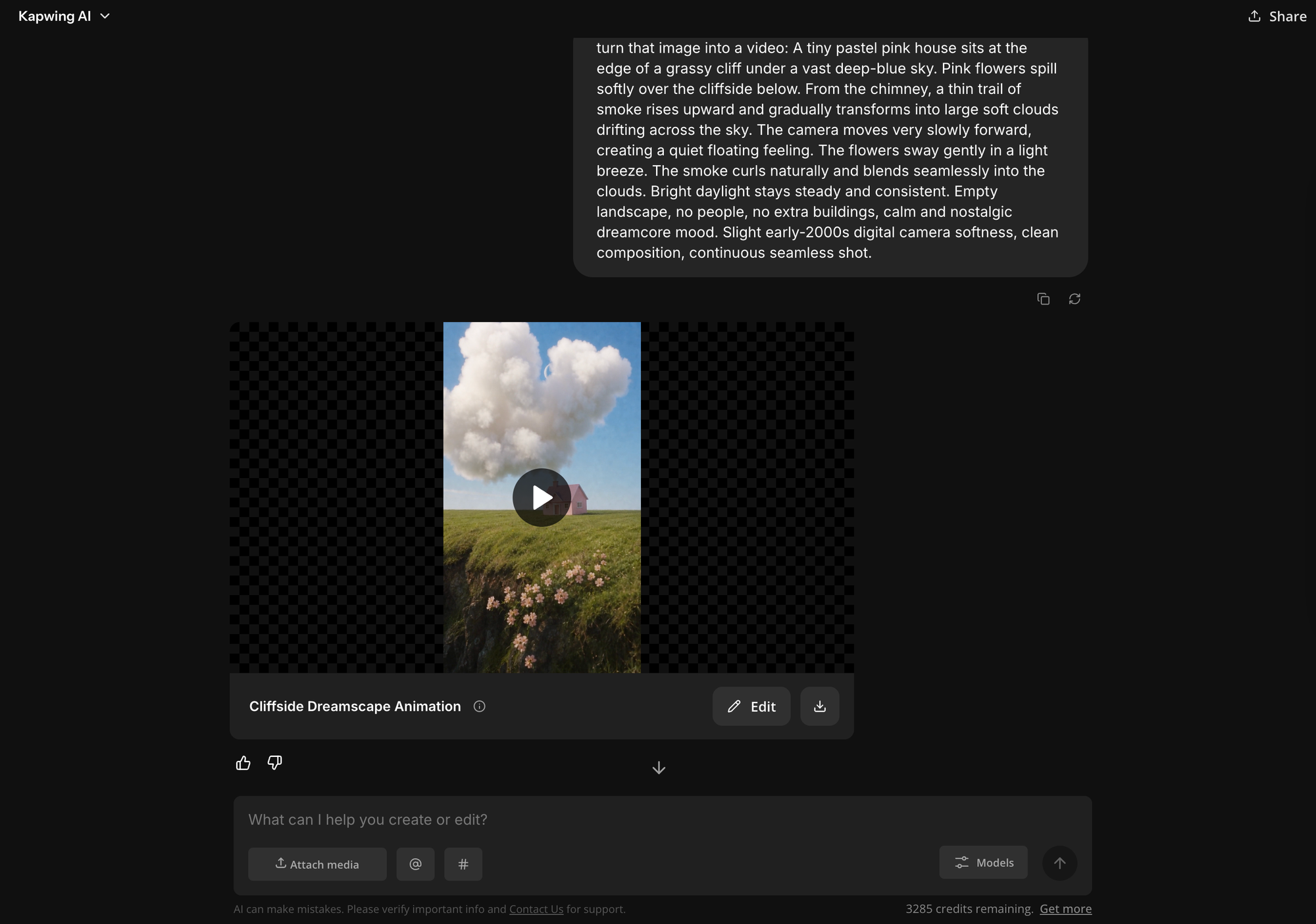
Once you're happy with your image, the next step is to turn it into a short video using an image-to-video. Upload your image as the starting frame and write a motion prompt describing what should happen in the scene.
Focus on movement rather than repeating the image description. The image already establishes the appearance of the location, so your motion video prompt should explain how the camera moves, which objects are animated, and which details must stay still. You can use this simple formula:
Camera movement + speed + subject movement + stationary elements + consistent lighting
Example Dreamcore Image to Video Prompt
A tiny pastel pink house sits at the edge of a grassy cliff under a vast deep-blue sky. Pink flowers spill softly over the cliffside below. From the chimney, a thin trail of smoke rises upward and gradually transforms into large soft clouds drifting across the sky. The camera moves very slowly forward, creating a quiet floating feeling. The flowers sway gently in a light breeze. The smoke curls naturally and blends seamlessly into the clouds. Bright daylight stays steady and consistent. Empty landscape, no people, no extra buildings, calm and nostalgic dreamcore mood. Slight early-2000s digital camera softness, clean composition, continuous seamless shot.
Different camera movements create different effects, but some are more difficult for AI video generators to reproduce consistently.
Here are some common camera movements seen in dream core videos:
| Camera | What the model has to invent | Risk | Best for |
|---|---|---|---|
| Locked-off | Nothing new, only subject motion | Lowest | Liminal stillness, living drawings, loops |
| Slow push forward | The far end of the space | Medium | Hallways, roads, "drawn in" shots |
| Slow sideways drift | The edge you move toward | Medium | Wide pastel scenes, suburbs |
| Handheld POV walk | Everything ahead, plus natural shake | High | Found-footage and weirdcore-adjacent clips |
| Orbit or move through objects | Full 3D structure of the scene | Very high | Avoid for dreamcore |
Step 4: Review and Refine Your AI Dreamcore Video
Watch your generated clip before moving on to the next scene. Pay attention to the background, camera movement, lighting, and any objects that change unexpectedly.
AI video generators sometimes distort walls, introduce new objects, or create sudden movements that break the atmosphere. If something looks wrong, change one part of your prompt at a time rather than rewriting the entire prompt.
For example:
- The room starts warping: Replace "move forward through the hallway" with "slowly move forward for a short distance."
- Objects appear or disappear: Add "all objects and background elements remain fixed throughout the shot."
- The movement feels too fast: Use "very slow, steady camera movement" and reduce the number of actions.
- The lighting changes unexpectedly: Specify "consistent, soft lighting with no flickering or changes in brightness."
Step 5: Build Your Dreamcore Video Sequence
Once you've generated a dreamcore clip you're happy with, create the remaining scenes. A dreamcore video doesn't need a traditional story. Instead, it should feel like exploring places that are strangely familiar, connected by a consistent visual style and atmosphere.
You can also create a continuous dreamcore journey by using the last frame of one clip as the starting image for the next. This transition works well for first-person videos exploring empty hallways, surreal buildings, or other liminal spaces.
Dreamcore AI Video Prompts You Can Copy and Paste
Rather than prompting an AI video generator with something vague like "a beautiful dreamcore world," describe the setting, lighting, colors, and specific details that make the scene unusual. A useful image-prompt formula is:
Familiar location + one impossible detail + color palette + lighting + camera style + mood
Once you've generated the image, write a separate motion prompt describing how the camera or objects should move. Here are four dreamcore video ideas with ready-to-use prompts.
Pastel Dreamcore: A Laundromat Filled With Clouds
This concept combines an everyday setting with a playful, impossible detail. It works well for soft, colorful dreamcore videos.
Image prompt:
An empty neighborhood laundromat at sunrise. Fluffy pink and white clouds hang from clotheslines above the washing machines as if they are drying laundry. Pastel peach walls, mint-green floor tiles, and silver washing machines. Soft sunlight enters through large windows. Slightly faded early-2000s digital photography, delicate film grain, soft haze, nostalgic pastel colors. Dreamlike, peaceful, whimsical atmosphere. Realistic room proportions, clean architectural details, no people or readable text.
Motion prompt:
The camera slowly moves forward through the laundromat. The small clouds gently sway and float above the washing machines. Soft morning sunlight remains consistent. All machines, walls, and furniture stay in place. Smooth, continuous camera movement.
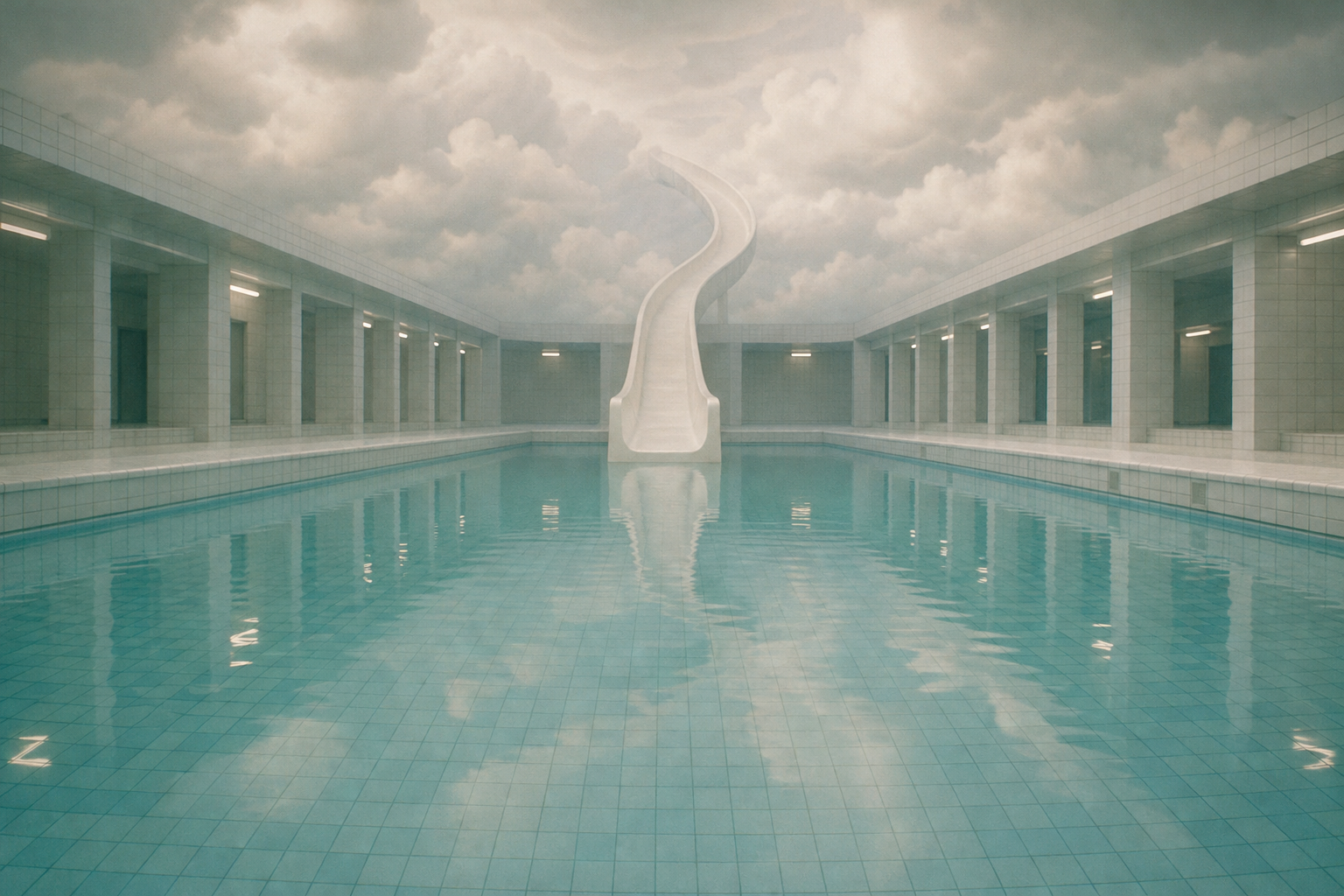
2. Liminal Dreamcore: An Endless Swimming Pool
Empty swimming pools, tiled hallways, and unusual indoor spaces are common visual elements in liminal-space videos. This example uses a familiar swimming pool with architecture that feels impossible.
Image prompt:
A large, completely empty indoor swimming pool with pale turquoise water and white tiled walls. A curved white waterslide extends upward into a ceiling made of soft white clouds. Symmetrical composition, central vanishing point, faint fluorescent lighting, subtle haze, muted blue-green color palette. Slightly blurry early-2000s photography. Peaceful, nostalgic, and strangely familiar atmosphere. No people, realistic water reflections, straight tile lines.
Motion prompt:
Stationary camera facing the swimming pool. The turquoise water ripples very gently while the clouds above the waterslide drift slowly. The slide, pool tiles, and walls remain completely still. Soft, even lighting. Minimal movement and one continuous shot.
3. Nostalgic Dreamcore: A Suburban Road Into the Sky
This style works well for creators who want a warm, comforting atmosphere that still feels slightly unreal.
Image prompt:
A quiet suburban neighborhood at golden hour. Small pastel houses in baby blue, pale pink, and butter yellow line an empty street. The asphalt road gradually curves upward into a sky filled with enormous cotton-candy clouds. Warm evening sunlight, soft shadows, nostalgic late-1990s photography, slightly faded colors and subtle film grain. Peaceful, surreal, familiar atmosphere. No people, cars, or street signs.
Motion prompt:
The camera slowly glides forward along the empty road toward the clouds. The pastel houses remain stationary while clouds drift gently across the sky. Warm sunlight stays consistent. Smooth, slow camera movement with no sudden changes.
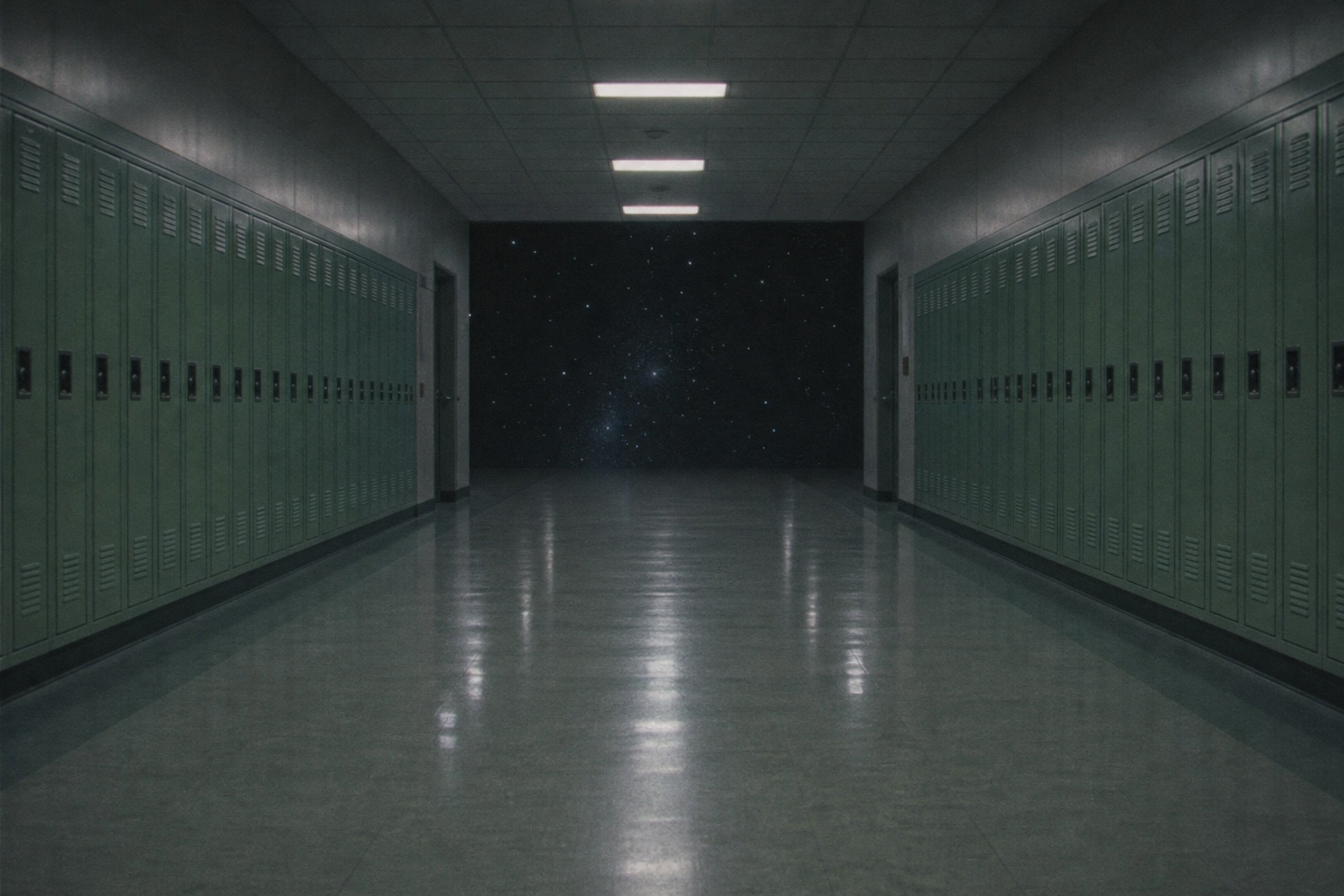
4. Dark Dreamcore: An Empty School Hallway
Not all dreamcore videos need to be pastel-colored. Darker dreamcore overlaps with weirdcore, liminal spaces, and found-footage aesthetics.
A first-person camera perspective can make the viewer feel as though they're wandering through a dream themselves.
Image prompt:
An empty school hallway at night, lined with identical pale green lockers and a polished linoleum floor. At the far end, the hallway opens directly into a dark, star-filled sky. Dim overhead fluorescent lights, cool green-blue color tones, soft focus, subtle VHS-style grain, early-2000s camcorder footage. Unsettling but quiet atmosphere. Symmetrical hallway composition, no people or creatures.
Motion prompt:
First-person handheld camera slowly walking down the center of the school hallway toward the starry sky. Very subtle natural camera shake, steady forward movement. The lockers, walls, and ceiling lights remain fixed. Continuous shot, no sudden camera movements.
How to Edit Dreamcore Videos
After generating your dreamcore scenes, combine them in a video editor.
The editing stage is where individual AI-generated clips begin to feel like a single dream. Consistent colors, slow pacing, and atmospheric audio can make even simple scenes feel more immersive.
Adjust the Colors to Create a Dreamlike Look
Dreamcore videos often use faded colors, hazy lighting, and soft contrast to create a sense of nostalgia. The exact color treatment depends on the atmosphere you want:
- Soft pastel dreamcore: Light pinks, pale blues, peach tones, reduced contrast, and slightly lifted shadows.
- Liminal-space dreamcore: Muted greens and blues, soft fluorescent lighting, and subtle haze.
- Dark dreamcore: Cool shadows, faded highlights, slight grain, and low-light camera textures.
- Nostalgic dreamcore: Warm highlights, gentle blur, faded saturation, and early-digital-camera effects.
Use Slow Transitions Between Scenes
Dreamcore videos typically benefit from slower pacing than conventional short-form edits. Instead of cutting rapidly between locations, allow viewers enough time to recognize each environment and notice what makes it unusual.
Try holding individual scenes for approximately three to five seconds, then adjust based on the music and visual movement.
Use gentle crossfades to connect similar scenes. For example, a fade between two pastel-colored hallways can create the feeling of moving from one dream into another. Hard cuts can still work, particularly when you want to introduce an unexpected location or create a moment of unease. Use them selectively rather than throughout the video.
Add Atmospheric Music and Sound Effects
Sound is one of the most important parts of a dreamcore video. The right audio can make a normal-looking location feel nostalgic, peaceful, mysterious, or unsettling. Experiment with different sound styles depending on your concept:
- Soft piano or music-box melodies: Good for nostalgic childhood settings and pastel dreamcore.
- Ambient soundscapes: Long, quiet synthesizer tones can make surreal environments feel expansive and unfamiliar.
- Environmental sounds: Distant footsteps, fluorescent buzzing, running water, or wind can make an empty space feel strangely real.
- Distorted or muffled audio: Subtle pitch changes, reverb, and low-quality recordings can create a remembered-dream effect.
Frequently Asked Questions
What is a dreamcore video?
A dreamcore video is a short, surreal visual that resembles a dream or distant memory. It often features familiar locations, unusual objects, soft or faded colors, slow camera movement, and atmospheric audio. Dreamcore videos can feel peaceful, nostalgic, mysterious, or slightly unsettling.
How do you make dreamcore videos with AI?
Start by generating an image of a familiar setting with one surreal detail, such as an empty swimming pool beneath a cloudy sky. Upload the image to an AI image-to-video generator, describe a simple movement, and generate a short clip. Then edit the video to add color effects, transitions, ambient music, and optional text.
What AI tools can make dreamcore videos?
Dreamcore videos can be created using AI image generators and image-to-video models. Tools such as Midjourney, Kling, and other image-to-video generators can help create surreal environments and animate them. Kapwing can also be used to assemble generated clips and add music, transitions, and effects.
How do you make an AI dreamcore image move?
Upload the image to an image-to-video generator and describe one movement, such as a slow forward camera glide or gentle clouds drifting across the sky. Keep the motion subtle and specify which objects should remain stationary. Short clips are often easier to control than longer, more complex animations.
What should I include in a dreamcore AI prompt?
A good dreamcore prompt describes a recognizable location, one unusual element, a consistent color palette, soft lighting, camera texture, and the intended atmosphere. For video generation, add one simple motion instruction and clarify which parts of the scene should remain unchanged.
What's the difference between dreamcore, weirdcore, and liminal spaces?
Dreamcore focuses on surreal, nostalgic, dreamlike imagery that may feel comforting or unsettling. Weirdcore typically uses more distorted, confusing, or deliberately strange imagery, while liminal-space content focuses on empty transitional environments, such as hallways, shopping malls, and waiting rooms. These aesthetics often overlap.
Can I turn my own drawings into dreamcore videos?
Yes. Upload a drawing to an AI image or video generator and use it as the visual reference. You can animate the original artwork while preserving its style, or transform it into a realistic scene before generating the video. For better results, keep the composition consistent and use simple camera movement.
Can you make dreamcore videos without AI?
Yes. Record ordinary environments such as empty playgrounds, hallways, swimming pools, or quiet suburban streets. Then use a video editor to adjust the colors, add grain, apply subtle blur, slow the footage, and include atmospheric audio to create a dreamcore aesthetic.
Can you make AI dreamcore videos for free?
Some AI video generators offer free trials or limited generation credits, although availability, watermarks, and export restrictions vary. You can also create dreamcore-style videos using your own footage and free editing tools without relying on AI generation.