How to Make an AI Video of Yourself in GTA 6 (With Prompts)
Why wait for GTA 6 when you can steal the spotlight in your own AI-generated trailer?
What would you look like as a playable character in Grand Theft Auto VI? Using AI image and video generators, you can turn a photo of yourself into a GTA 6-style character, place yourself in a fictional Vice City-inspired environment, and generate animated scenes that resemble footage from an open-world video game.
Unlike a standard GTA AI filter, which typically transforms a selfie into a stylized portrait or loading-screen image, this workflow gives you control over your character's appearance, outfit, surroundings, movements, and camera angles. You can create anything from a third-person gameplay sequence to a cinematic character introduction without having to animate a 3D model yourself.
In this tutorial, we'll walk through how to make your own GTA 6 AI video using Kapwing, including how to maintain character consistency across multiple generations and recreate the visual characteristics of modern open-world games.
Table of Contents
- What Is the GTA 6 AI Video Trend?
- How to Make an AI Video of Yourself in GTA 6
- How to Make the Goodbye GTA 5 AI Video Trend
- How Much Does a GTA 6 AI Video Cost in Kapwing Credits?
- Frequently Asked Questions
What Is the GTA 6 AI Video Trend?
The GTA 6 AI video trend uses AI to transform real people into Grand Theft Auto video game characters.
There are three main variations of the trend:
| GTA 6 AI effect | What it creates |
|---|---|
| GTA 6 AI filter | A stylized image of yourself inspired by GTA promotional artwork |
| GTA 6 gameplay video | Animated third-person footage that resembles open-world gameplay |
| GTA 6 cinematic video | Character introductions, cinematic cutscenes, and fan-made trailers |
The key distinction between these formats is the rendering style. GTA loading-screen artwork typically uses illustrated characters, bold outlines, and exaggerated colors, while GTA gameplay videos require three-dimensional character rendering, environmental lighting, and camera movement that resembles a game engine.
For this tutorial, the focus is on turning yourself into a consistent video game character that can appear across multiple animated scenes.
How to Make an AI Video of Yourself in GTA 6
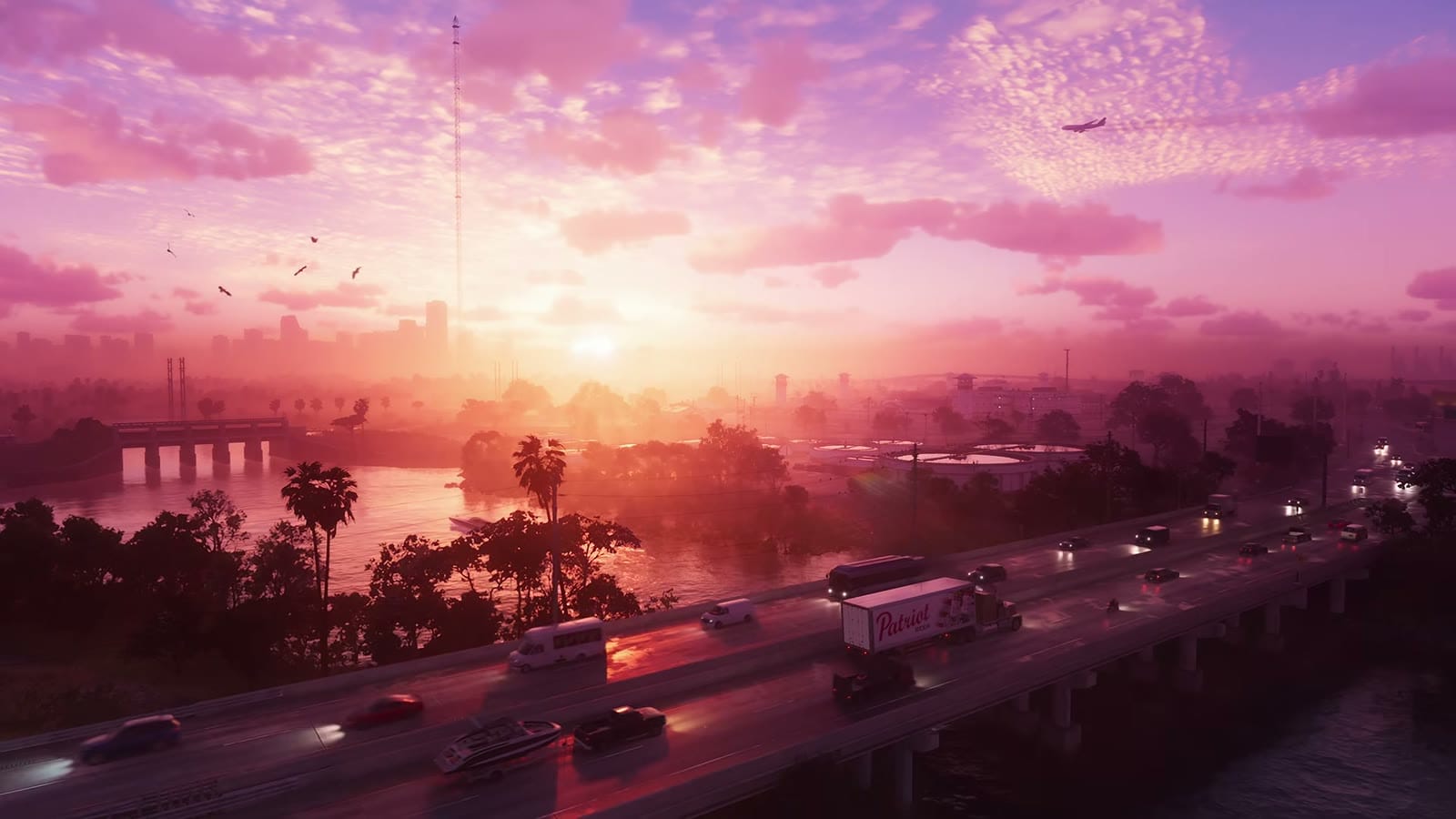
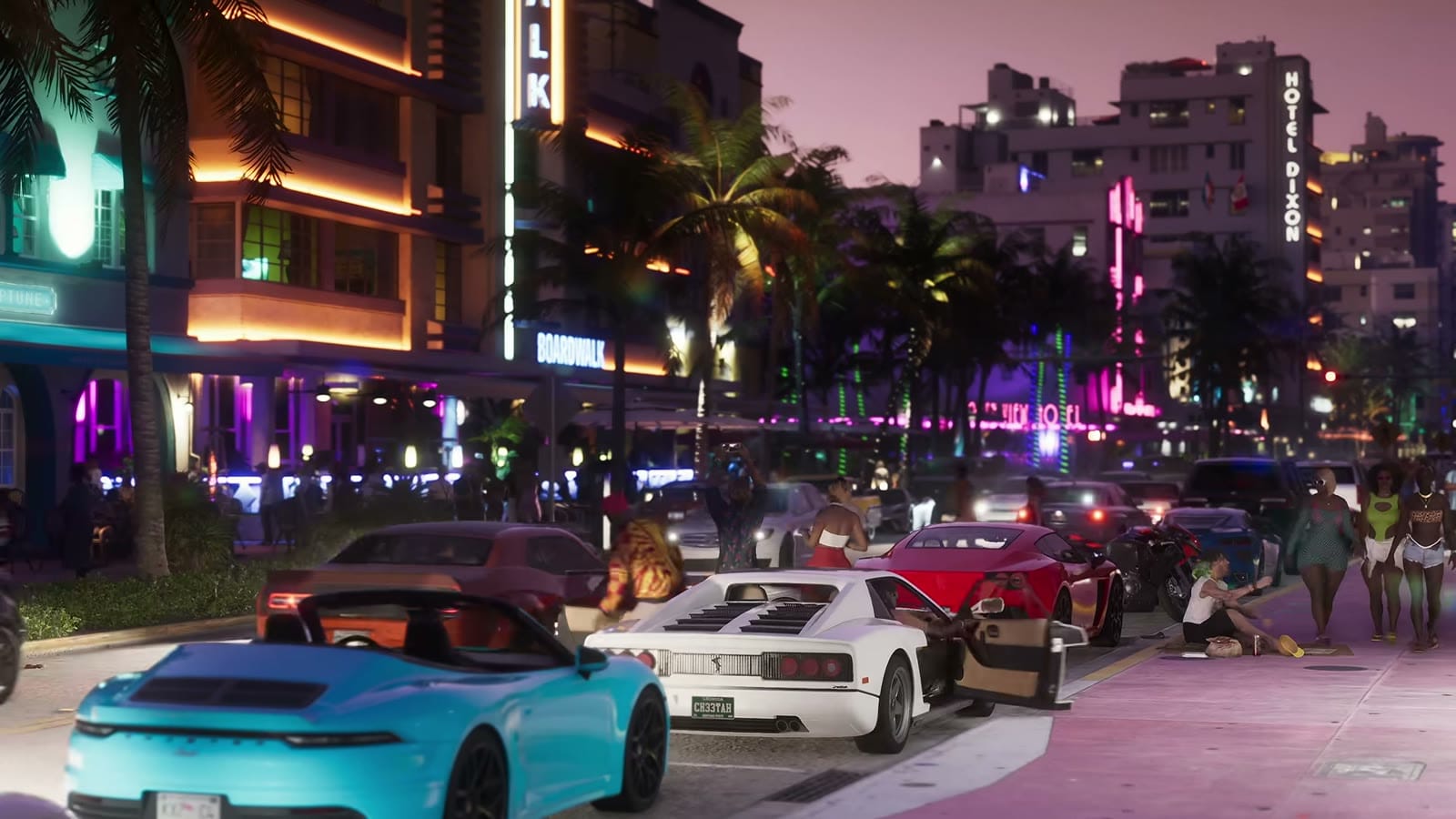
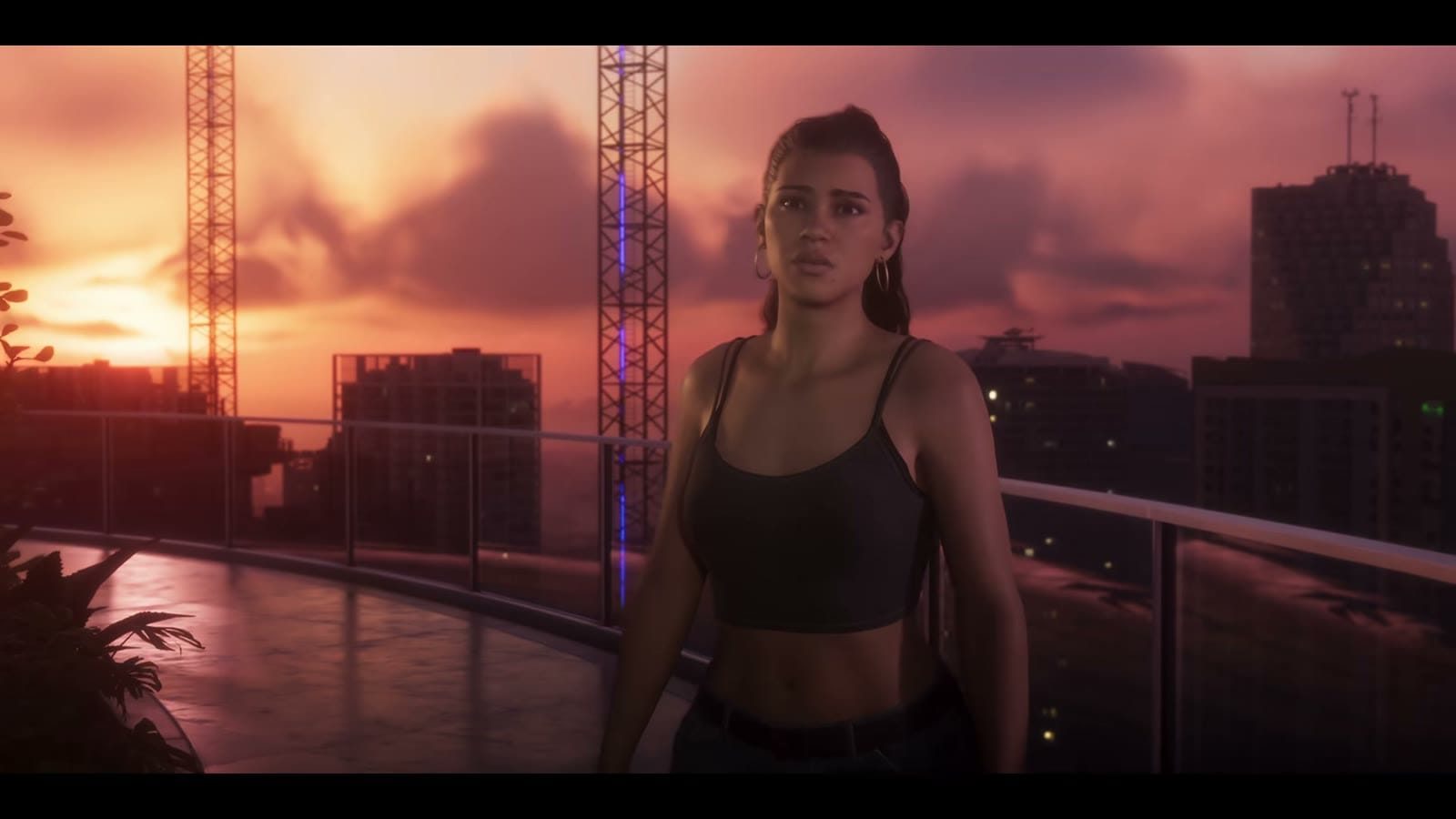
Every prompt in this guide shares one style block. We pulled frames from the trailers and wrote down what each one teaches: GTA VI Trailer 1, GTA VI Trailer 2, the GTA VI Launch Trailer and the Vice City 10th Anniversary trailer.
These frames turned into the lighting and color lines in every prompt below.
Step 1: Turn Yourself Into a GTA 6 Character
A common mistake is simply asking an image generator to "make me look like GTA 6." This can produce an illustrated portrait instead of an in-game character.
To achieve the gameplay aesthetic, describe the appearance of a real-time 3D render, including character textures, environmental shading, hair rendering, and material properties.
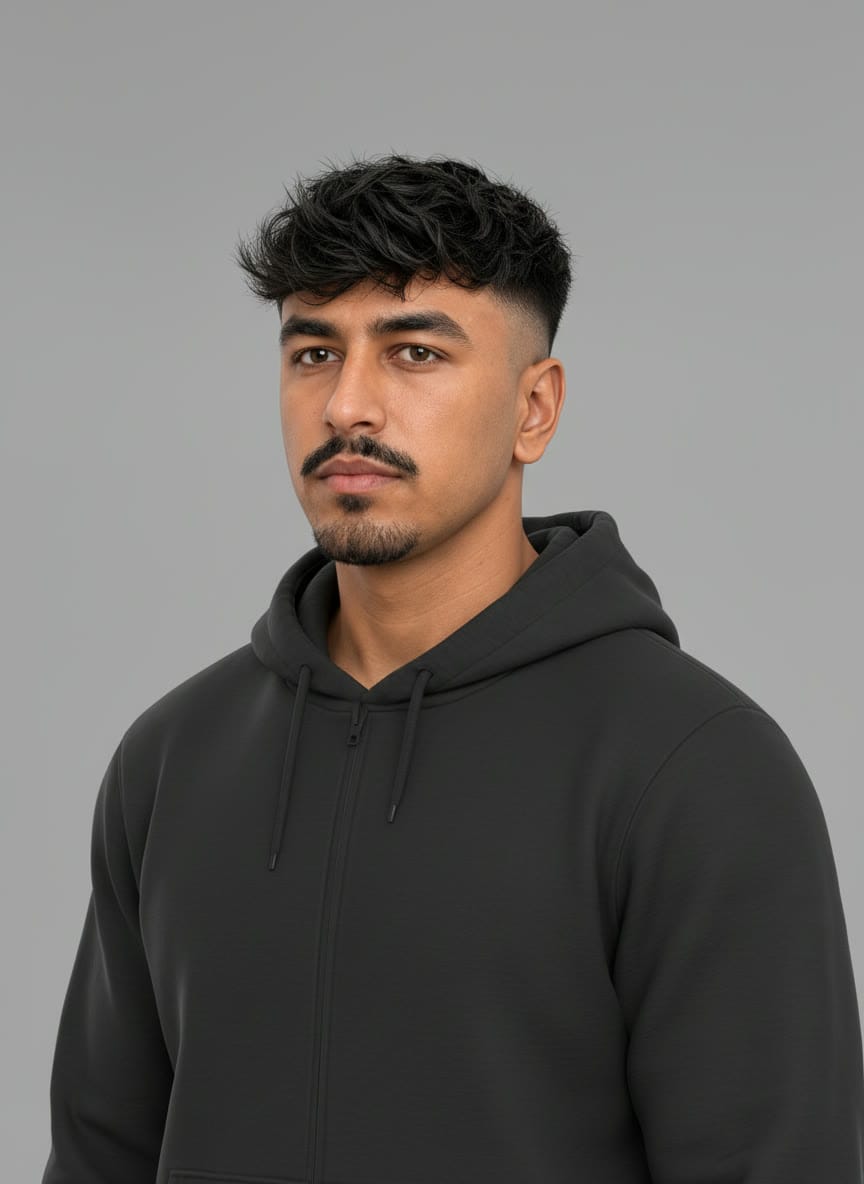
Open Kai and upload a clear photograph of yourself. Ideally, use an image taken at eye level with even lighting, minimal facial obstruction, and no heavy filters.
When writing your image generation prompt, specify that the uploaded photograph should be used as an identity reference rather than a composition reference. The AI should preserve your recognizable facial features while rebuilding your appearance as a rendered video game character.
GTA Character Face Portrait Prompt
Use Nano Banana Pro for this image, portrait 3:4, 2K. Make exactly one image.
Use the reference images ONLY as identity reference: #image_1 is a real photo of the man, #image_2 is a reference sheet of the same man. Ignore their backgrounds, their lighting and any camera lens distortion; correct the facial proportions to a natural portrait lens. Create a brand-new image: a re-rendered 3D video game character model of this man, chest-up portrait, slight three-quarter front view, as seen in an Unreal Engine 5 character viewer of a AAA open-world crime game, in the style of a modern open-world crime game protagonist.
Identity: about 30, light brown skin, textured dark almost-black cropped hair with a skin fade at the sides and a messy fringe pushed forward, thick dark eyebrows, brown eyes, a full dark moustache and a short chin goatee with light stubble along the jaw. Black zip hoodie, zipped up.
This must read instantly as a real-time game render, NOT a photo: game-ready 3D head model, skin as a smooth baked texture with soft subsurface scattering and a clean specular sheen, no pores, slightly game-stylized features, glossy rendered eyes with crisp catchlights, hair made of stylized hair-card clumps with crisp alpha edges and soft anisotropic sheen, hoodie with normal-mapped fabric folds.
Lighting: neutral engine model-viewer lighting. Soft even white key light, white fill, subtle white rim for silhouette separation, light ambient occlusion. No colored lights, no bloom. Background: flat neutral mid-gray. Everything sharp, no depth of field. Polished next-gen console character render.
Avoid: photograph, photorealistic skin, pores, film grain, selfie distortion, studio photography, cartoon, cel-shading, Pixar, anime, caricature.
Kai now runs image prompts like this with GPT Image 2.
If your first result looks like a photo, run it again and keep the one that reads as a game character.
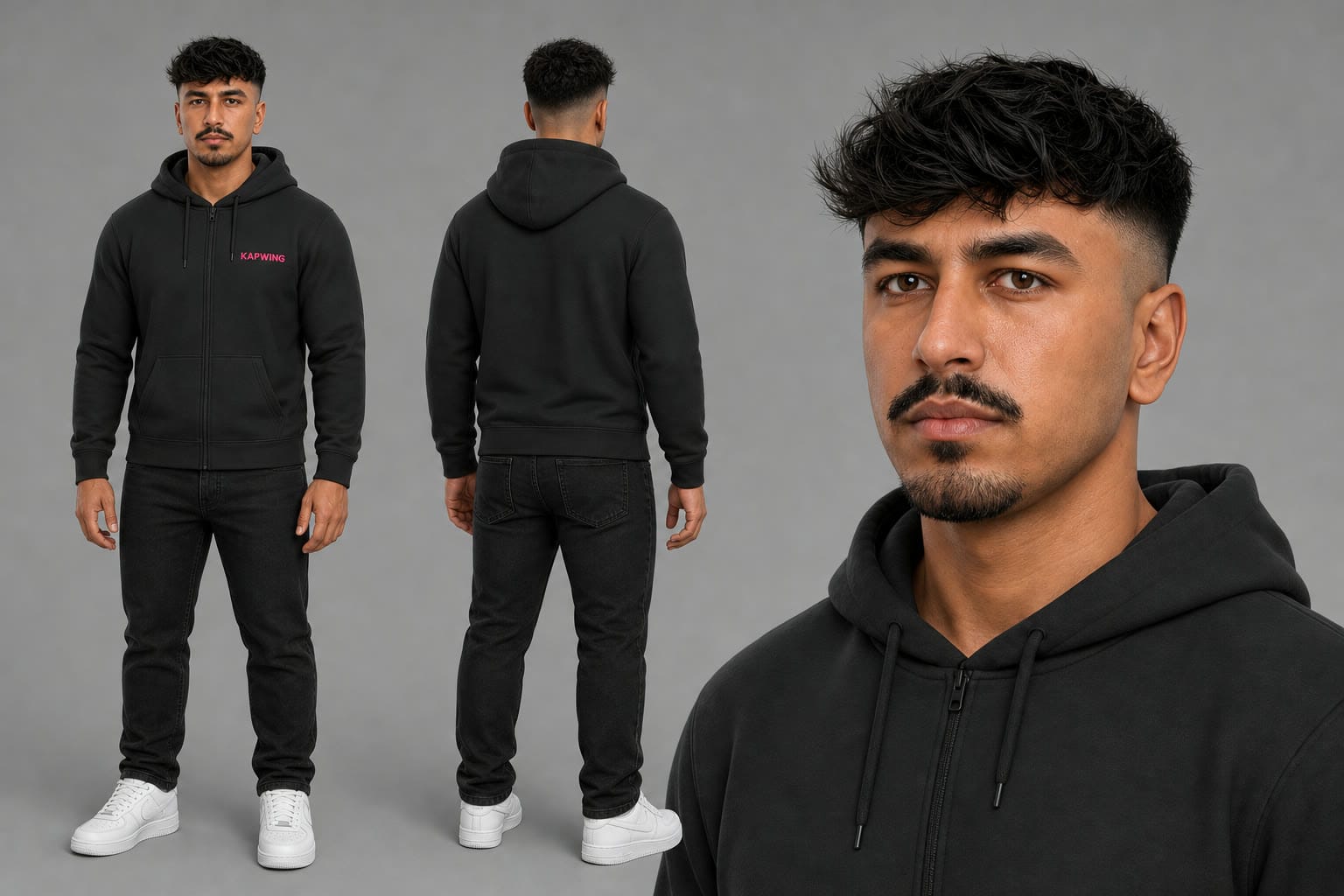
Once you're happy with your character's face, generate a character reference sheet showing the same character from multiple angles. A useful character sheet includes a close-up portrait, a full-body front view, a side profile, and a rear view.
The rear view is particularly useful for GTA-style gameplay footage because the character is frequently filmed from behind. Without this reference, an AI video model has to invent details such as the back of your outfit, hairstyle, and body proportions.
GTA Character Sheet Prompt
Use GPT Image 2 for these images, landscape 16:9, at the highest resolution it can make (2K or above if possible). Make exactly two images, two variations of the same prompt, one character sheet in each image with no dividing lines or borders between the three panels.
Use #image_1 as the face lock and render style reference: same face, hairstyle, eyebrows, eyes, moustache, goatee, stubble, skin shading and Unreal Engine game render look. Only the framing and outfit change. #image_2 is a frame from a Rockstar GTA VI trailer: use it for the level of in-game render detail only (how a next-gen in-engine character is shaded and textured). Never copy its people, faces, clothes, car, background or lighting.
Create a 3-panel video game character asset sheet of this exact character, real-time Unreal Engine 5 render, GTA VI in-game protagonist style. Layout: full-body front view, full-body back view, close-up head portrait on the right. Relaxed neutral standing pose, arms at the sides, feet slightly apart. Build: 6ft, athletic and broad-shouldered.
Hair: exactly as in the reference: textured dark almost-black cropped hair with a skin fade at the sides and a messy fringe pushed forward. No headwear.
OUTFIT: a black zip hoodie, zipped up, with a small hot-pink logo mark and the short pink wordmark KAPWING on the left chest. Plain black back. Slim black jeans. Clean white low-top trainers.
Back view: back of the same hairstyle with the skin fade, plain black hoodie back with the hood down, the back pockets of the jeans.
Render style identical to the reference, applied to the whole body: game-ready 3D model, smooth baked skin texture with soft subsurface and clean specular sheen, no pores, game-stylized features, glossy rendered eyes, hair built from hair-card clumps with crisp alpha edges and anisotropic sheen. Clothing as game assets: normal-mapped fabric folds on the hoodie, denim weave texture on the jeans, crisp modeled trainer edges.
Lighting: neutral engine model-viewer lighting. Soft even white key from the front, white fill, subtle white rim for silhouette separation, light baked ambient occlusion. No colored lights, no bloom.
Background: flat neutral mid-gray seamless, identical across all three panels, soft contact shadow under the feet.
Everything sharp, no depth of field, the face in the head portrait as sharp and detailed as possible. Clearly a video game character model sheet, not a photograph.
Avoid: changing his face or hairstyle, long hair, cap, hat, headwear, tattoos, any other brand logos, colored rim lights, photograph, photorealistic skin, film grain, cartoon, cel-shading, Pixar, anime.
Step 2: Animate Your GTA 6 AI Character With Your Own Voice
Once you've generated your GTA 6 character sheet, the next step is to turn that static image into an animated character reference using Seedance 2.5. This allows the AI video generator to establish how your character speaks.
While this step is optional if you're making a GTA 6 AI video without dialogue, it's particularly useful for creating cinematic cutscenes or a longer AI-generated GTA 6 trailer featuring the same character across multiple shots.
Open Seedance 2.5 in Kapwing and upload the following reference assets:
- #image_1: Your GTA 6 AI character sheet.
- #image_2: A straight-on image of your face.
- #audio_1: A clean recording of your voice.
Set your video duration to 10 seconds, select a 16:9 landscape aspect ratio, and enable native audio. The prompt below creates a two-panel animated character sheet that captures your character's full-body movements, facial expressions, and speaking voice.
GTA Animated Character Sheet Prompt
Seedance 2.5 only (not MiniMax, not any other model), ONE single generation, 10 seconds, 16:9 landscape, with native audio ON.
Seedance 2.5 generates his spoken line and all sound itself in this same generation, in sync with his mouth. A silent video is not acceptable. No separate text-to-speech or lip-sync step, no assembly. No separate scenes, no assembly step and no separate clips.
[GOAL]
A video character sheet for a video game character: the character sheet #image_1 brought to life, so it locks his look, his attitude and his voice for later scenes. Video game character, Unreal Engine 5 look. It must clearly look like a real-time 3D game character in an engine character viewer, not a photograph and not live action.
[REFERENCES]
image_1 is his game character sheet: use his face, textured dark almost-black cropped hair with the skin fade and messy fringe, neat moustache and short goatee, athletic 6ft build, and his outfit (black zip hoodie with the small pink KAPWING wordmark on the left chest, black jeans, white trainers), in its Unreal Engine 5 game render look.audio_1 is his real voice: copy its timbre, accent and delivery for every word he says. A young British man's voice, low and natural.
Do not use the image's lighting.
[LAYOUT]
Two panels side by side on one flat neutral mid-grey seamless background, the camera locked off on the whole frame the entire time, no camera movement, no cuts.
Left panel: his full body, head to toe, standing, the same outfit.
Right panel, larger: a straight-on head-and-shoulders close-up of his face, looking straight into the lens.
[ACTION]
0 to 10 s, left panel: he walks two slow steps towards the camera, stops, then turns slowly on the spot to show his side, his back and his other side, and ends facing the camera again. His mouth stays closed.
Right panel: he blinks, glances down for a moment, then looks back up into the lens and speaks. Attitude: a tired, broke small streamer, quiet frustration that turns into determination, a little cheeky at the end.
[AUDIO]
Right panel, his line, low and a bit flat for the first two sentences, then sharper with a small smirk on the last two words, in the voice of #audio_1:
"Everyone's making money off GTA 6. Everyone except me. Watch this."
He speaks the whole line once, in order, word for word, with a short pause after "GTA 6" and after "except me". Only the right-panel face speaks; the full-body figure never moves its mouth.
Sound: his voice only, dry and close, like a voice-over recorded on a podcast microphone in a treated vocal booth, right up against the mic: no echo, no reverb, no room sound, no hiss, no distortion, clean and full. Silence between his words. No footsteps, no music, no sound effects. No subtitles.
[EXCLUSIONS]
No text or labels on screen, no other people, no logos except the small pink KAPWING wordmark on his chest, no HUD, no watermark. No photorealism, no film grain. The grey background and the two-panel layout never change.
[MAINTAIN CONSISTENCY]
One man only, the same face in both panels, the same outfit the whole time, the camera locked.
Use #image_1 and #audio_1 as references only, Seedance 2.5 reference-to-video, one generation: none of them is the first frame.
Generate it at 720p, the highest resolution Seedance 2.5 has here, as the final video.
Step 3: Generate GTA 6-Style Locations and Backgrounds With AI
One of the biggest challenges when creating an AI GTA 6 trailer is maintaining environmental consistency across different shots.
To avoid this, we used GPT Image 2 to generate dedicated references images before producing any of our video scenes.
Generate a GTA 6 Vice City-Inspired Establishing Shot
An establishing shot introduces the location and sets the visual tone of your AI-generated trailer.
For our opening sequence, we created a GTA 6-inspired coastal city at night, combining luxury waterfront skyscrapers, neon lighting, palm-lined streets, and a run-down apartment building.
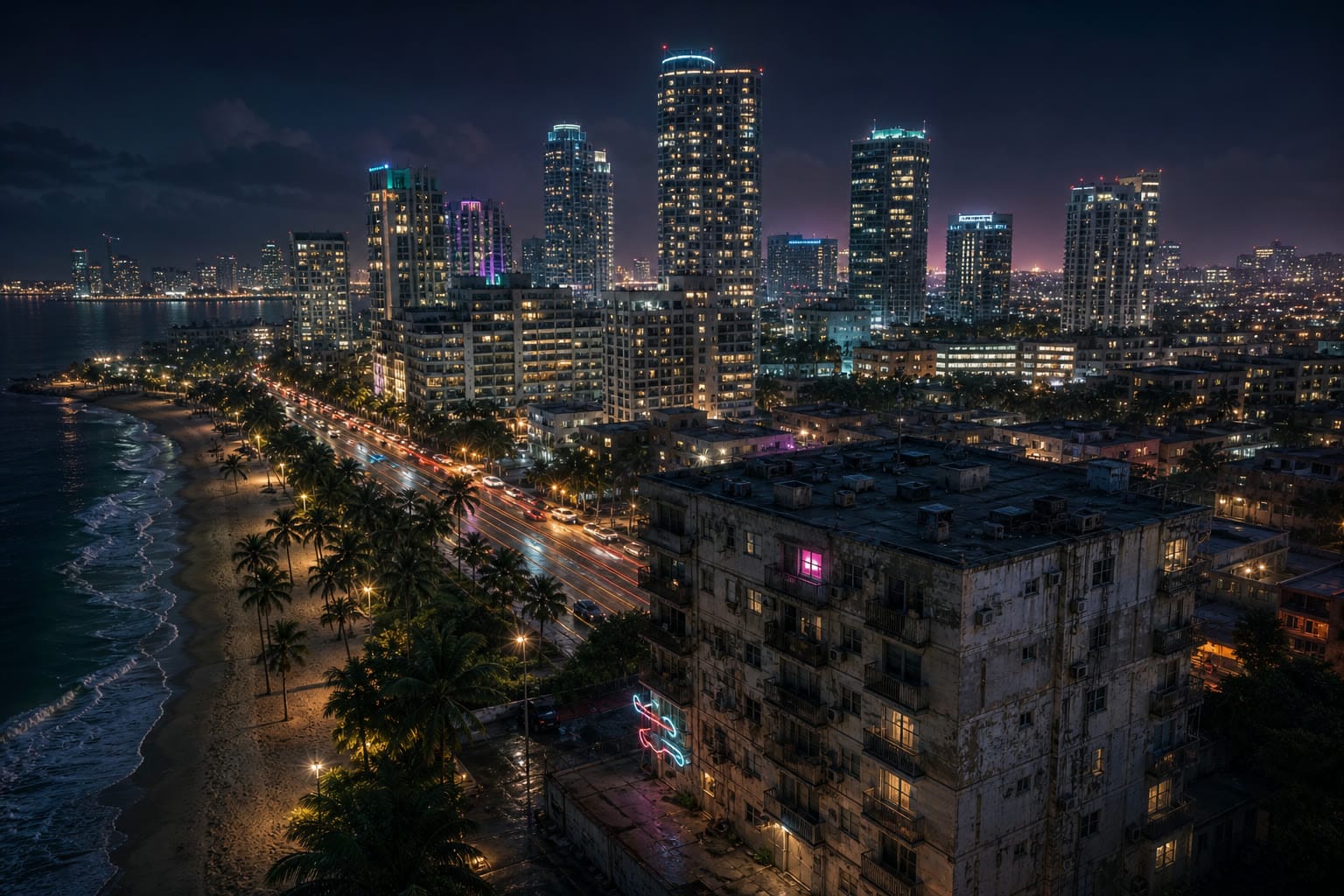
GTA 6 Establishing Shot Prompt
Use GPT Image 2 for these images, landscape 16:9. Make exactly two images, two variations of the same prompt, no people in them.
A wide establishing shot of a sun-and-neon Florida coastal crime city at night, seen from a drone about 120 m up over the bay, looking inland.
Background, filling the upper two thirds of the frame: a dense cluster of luxury glass skyscrapers and Art Deco hotel towers along the waterfront, thousands of warm tungsten windows, a few rooftop neon accents in teal, green and magenta, aircraft warning lights blinking on the tallest tower. They glitter: this is where the money is.
Middle ground: a palm-lined boulevard along the beach with long red and white car light trails, the dark sea and a strip of pale sand on the left, gentle surf catching the city light.
Foreground, lower right third: a run-down four-storey stucco apartment block in the shadow of the towers, peeling paint, rusted balconies, satellite dishes, AC units dripping, a flickering neon sign on its side (no readable letters). Every window dark except one small window on the top floor, glowing hot magenta from a monitor inside. That window is where the camera is about to push in.
Lighting: night, humid haze over the whole city, warm tungsten from the towers, teal and magenta neon accents, the sky deep navy with a faint purple glow from the city, soft bloom on every light source, a gentle lens flare from the boulevard lights.
Style: the look of a Rockstar GTA VI trailer: obviously a video game, rendered at the highest next-gen in-engine quality, Unreal Engine 5 real-time cinematic render, Lumen global illumination, ray-traced reflections on the glass towers and the wet street, detailed worn textures (peeling stucco, rust, dirty concrete), in-game cinematic drone camera framed like a real aerial film shot, crisp and sharp, no film grain. A calm, beautiful, slightly lonely opening shot of a game trailer.
16:9, no people, no HUD, no minimap, no text, no readable signs, no logos, no watermarks.
Create a Consistent Interior Environment for Your GTA 6 Character
Next, generate the main interior location where your character's story takes place.
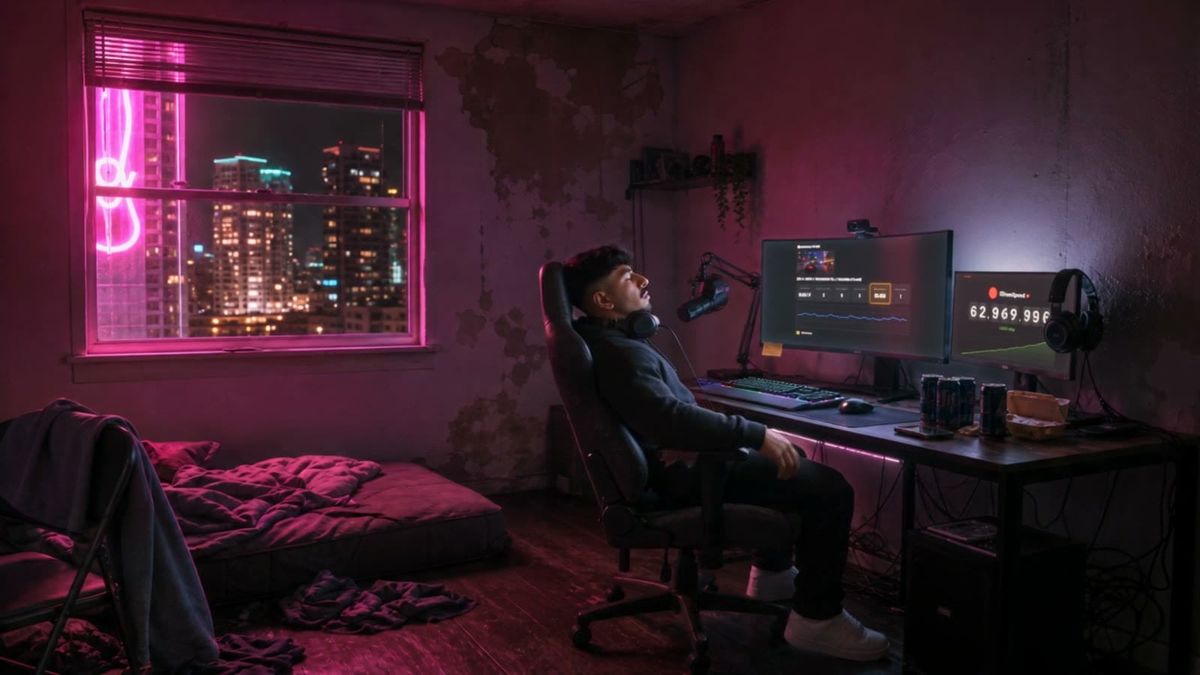
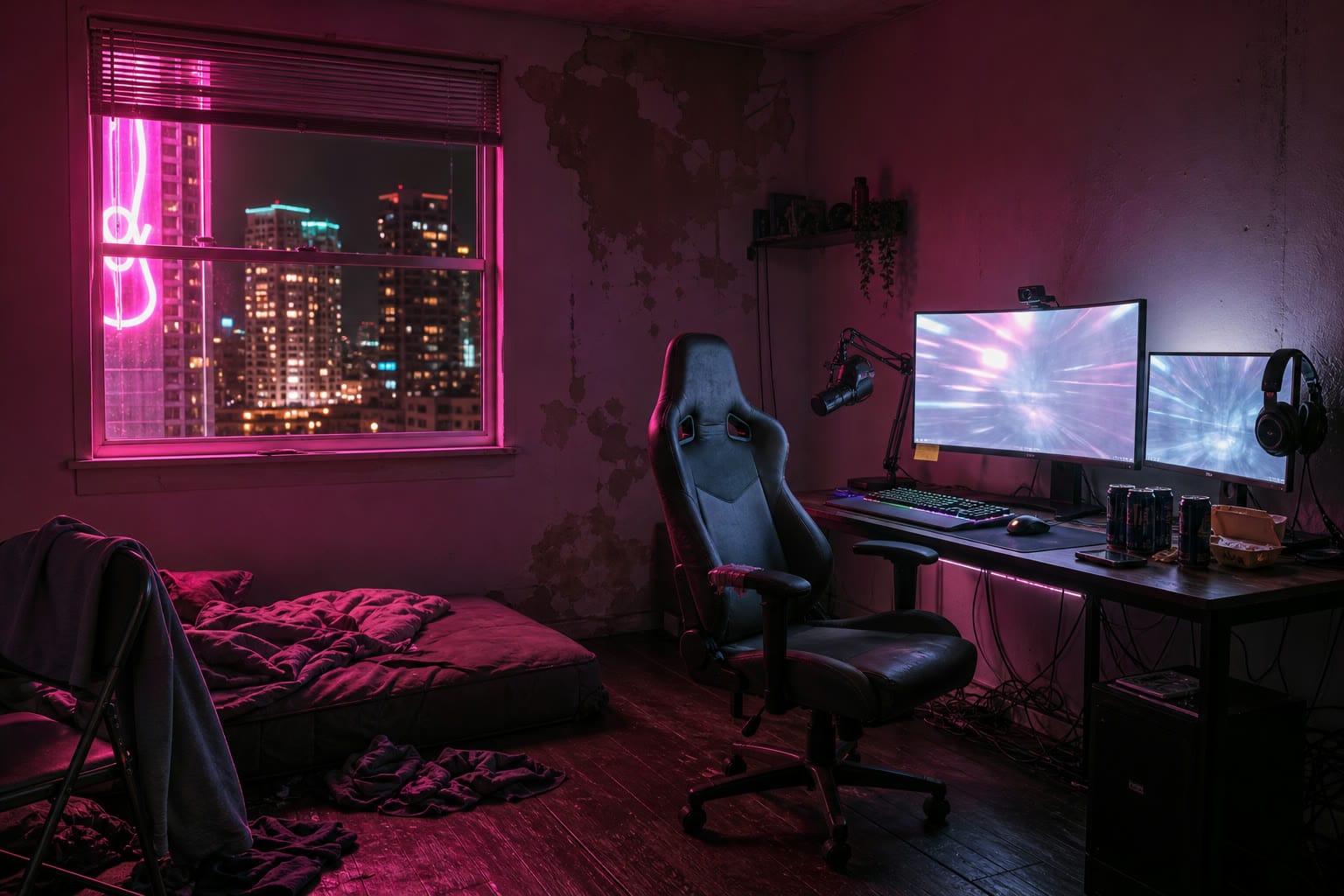
In our GTA 6 AI video, this was a small apartment belonging to a struggling gaming streamer, complete with a dual-monitor streaming setup, gaming chair, mattress, and neon-lit window.
GTA 6 Main Room Prompt
Use GPT Image 2 for these images, landscape 16:9. Make exactly two images, two variations of the same prompt, no people in them.
A cramped, cheap one-room studio flat at night in a sun-and-neon Florida coastal crime city, home of a broke small streamer who lives and streams in the same room.
Camera at standing chest height (about 1.4 m), about 3.5 m from the desk, from the room's back corner, three-quarter view, so we see the desk wall straight ahead-right, the window wall on the left and part of the floor in front.
Against the right-hand wall: a cheap, slightly too small desk crammed with a streaming setup: a large curved main monitor and a smaller second monitor beside it, both glowing, a webcam clipped on top of the main monitor, a black podcast microphone on a cheap scissor arm, a headset hanging off the corner of the second monitor, a mechanical keyboard with a glowing edge, a mouse on a worn mousepad, a smartphone lying face down beside the keyboard, a small square yellow sticky note stuck on the bottom-left corner of the main monitor's bezel (no readable text from this distance), four empty energy drink cans, a greasy takeaway box. A worn grey-and-black gaming chair, a little tape on one armrest, turned slightly towards camera.
Left wall: one small single window, the blind half open, and through it, far away and out of reach, the glittering luxury glass towers of the city with warm tungsten windows and a few teal rooftop neons, soft and out of focus. Just outside the window, the edge of a flickering magenta neon sign throws a hot magenta wash across the room.
Foreground left: a bare mattress on the floor with a tangled duvet, a pile of laundry, a hoodie thrown over a cheap folding chair. Peeling paint, a damp patch on the ceiling, cables everywhere, one cheap LED strip under the desk.
Lighting: night, one dominant magenta wash from the neon sign and the monitors, cool white monitor glow on the desk and chair, soft haze in the air, the room otherwise dark, the distant towers warm through the window.
Style: the look of a Rockstar GTA VI trailer: obviously a video game, rendered at the highest next-gen in-engine quality, Unreal Engine 5 real-time cinematic render, Lumen global illumination, ray-traced reflections on the monitors and the window glass, detailed worn textures, in-game cinematic camera framed like a real film shot, deep focus inside the room, crisp and sharp, no film grain. It must say "broke, grinding, still trying" in one look.
16:9, no people, no HUD, no text, no readable screens (the monitors show only soft unreadable glow), no logos, no watermarks.
For our GTA 6 trailer, we generated two additional perspectives:
- A reverse angle showing the gaming chair and the rest of the apartment from behind the monitors.
- A close-up of the streaming desk, including the phone, keyboard, monitors, and handwritten sticky note.
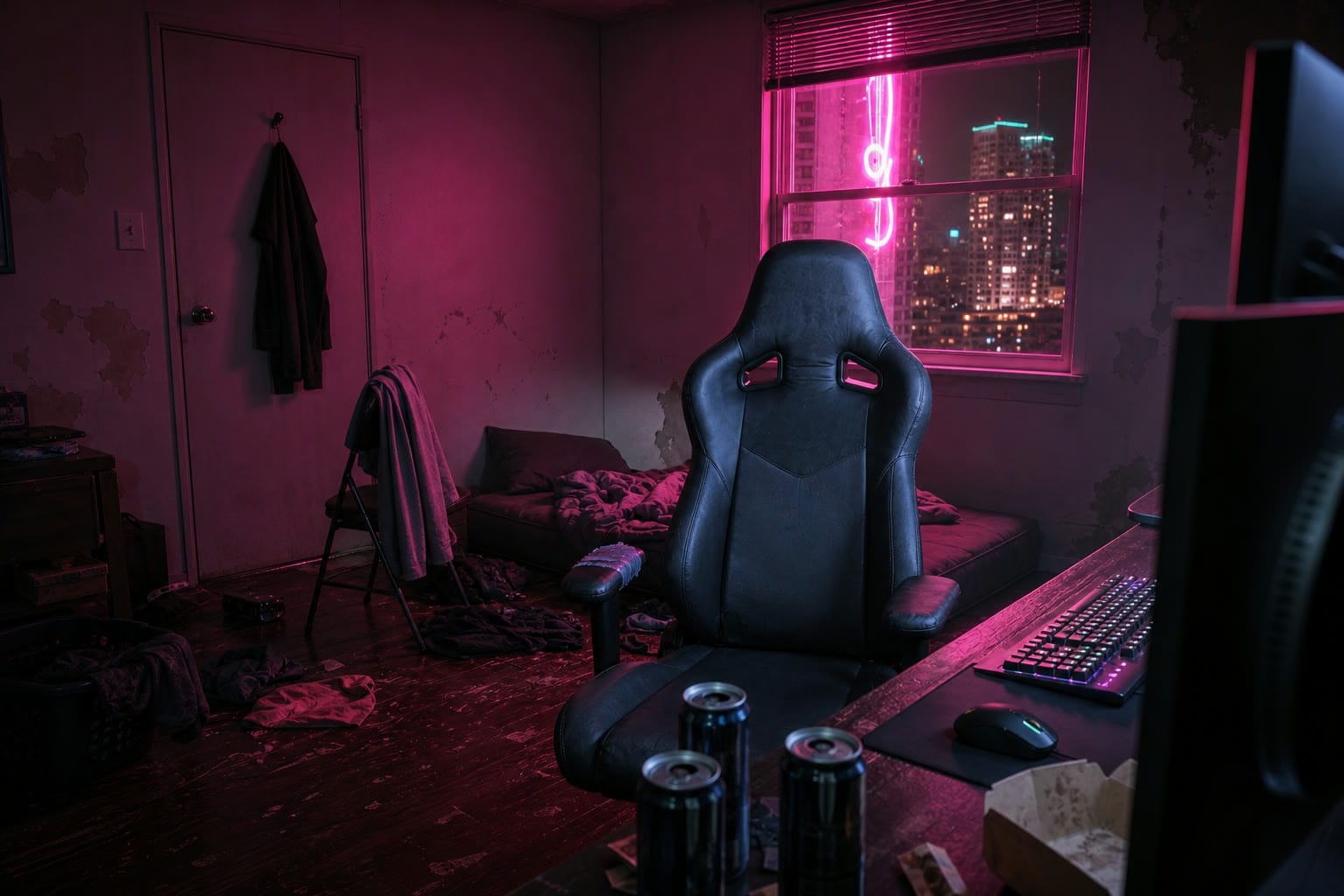
GTA 6 Main Room Reverse Prompt
Use GPT Image 2 for these images, landscape 16:9. Make exactly two images, two variations of the same prompt, no people in them. #image_1 is the room: use it as the location reference only, and keep everything in it exactly as it is.
The same room as #image_1, the cramped cheap studio flat at night, seen from the opposite direction: the reverse angle.
Camera: standing just behind and slightly to the side of the two monitors on the desk, at seated eye height (about 1.2 m), looking back across the room towards the gaming chair. The backs of the curved main monitor and the second monitor frame the right edge of the frame in soft focus, the monitor glow spilling forward onto the chair.
What we see, keeping the room exactly as in #image_1: the same worn grey-and-black gaming chair with the tape on the armrest, empty and facing the camera, its seat and headrest lit cool white by the monitors; the edge of the same desk in the foreground with the same mechanical keyboard, the mouse, the empty energy drink cans and the takeaway box; behind the chair, the rest of the room: the same bare mattress on the floor with the tangled duvet, the same folding chair with the hoodie, the laundry on the floor, the same peeling paint and damp patches, and the same small window with the half-open blind on the side wall, the same magenta neon sign outside it washing the room hot magenta. The back wall behind the chair has a cheap flat door with a coat hook and a light switch.
Lighting: the same as #image_1: night, one dominant magenta wash from the neon sign, cool white monitor glow falling on the chair and the desk, soft haze in the air, the corners of the room dark.
Style: the same render as #image_1: the look of a Rockstar GTA VI trailer, obviously a video game, rendered at the highest next-gen in-engine quality, Unreal Engine 5 real-time cinematic render, Lumen global illumination, detailed worn textures, in-game cinematic camera framed like a real film shot, crisp and sharp, no film grain.
16:9, no people, no HUD, no text, no readable screens, no logos, no watermarks.
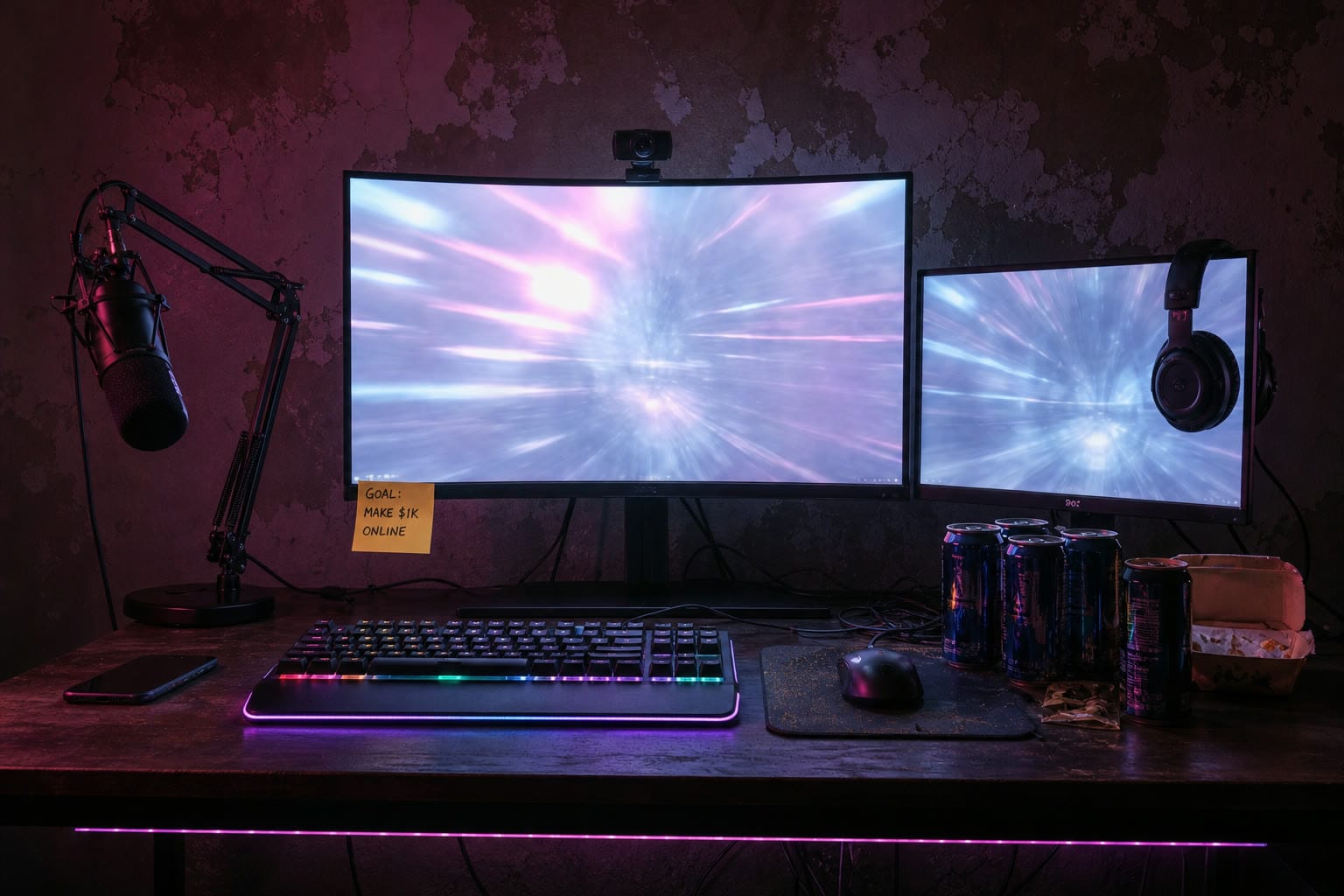
GTA 6 Main Room Close-Up Prompt
Use GPT Image 2 for these images, landscape 16:9. Make exactly two images, two variations of the same prompt, no people in them. #image_1 is the room: use it as the location reference only, and keep the desk and everything on it exactly as it is.
The same room as #image_1, the cramped cheap studio flat at night: a closer shot of the streaming desk.
Camera: seated eye height (about 1.1 m), about 1 m back from the desk, centred on the main monitor, looking straight at the desk, so the desk fills the frame from edge to edge.
What we see, keeping it exactly as in #image_1: the same curved main monitor and the smaller second monitor beside it, both glowing with soft unreadable light, the webcam clipped on top of the main monitor, the black podcast microphone on its cheap scissor arm, the headset hanging off the corner of the second monitor, the mechanical keyboard with its glowing edge, the mouse on the worn mousepad, the empty energy drink cans and the greasy takeaway box, cables, the LED strip glowing under the desk. A smartphone lies face down beside the keyboard.
The sticky note: one small square yellow sticky note stuck on the bottom-left corner of the main monitor's bezel, slightly curled at one corner, handwritten in thick black marker in a hurried hand, clearly readable, exactly these words on three lines:
GOAL:
MAKE $1K
ONLINE
Lighting: the same as #image_1: night, the magenta wash from the neon sign outside the window coming from the left, cool white monitor glow on the desk, soft haze, the wall behind the monitors dark with peeling paint.
Style: the same render as #image_1: the look of a Rockstar GTA VI trailer, obviously a video game, rendered at the highest next-gen in-engine quality, Unreal Engine 5 real-time cinematic render, Lumen global illumination, detailed worn textures, in-game cinematic camera framed like a real film shot, deep focus across the desk, crisp and sharp, no film grain.
16:9, no people, no HUD, no readable text anywhere except the sticky note, no readable screens, no logos on the cans or the monitors, no watermarks.
Step 4: Create GTA 6 AI Prop and Screen Reference Images
Character and location references aren't the only assets that need to remain consistent throughout an AI-generated GTA 6 video. Creating dedicated reference images for these elements gives Seedance 2.5 a more specific visual target, particularly when generating close-up shots or scenes involving readable text.
For our GTA 6 AI trailer, we created two dedicated prop references: a worn black iPhone and a handwritten sticky note that appears throughout the story.
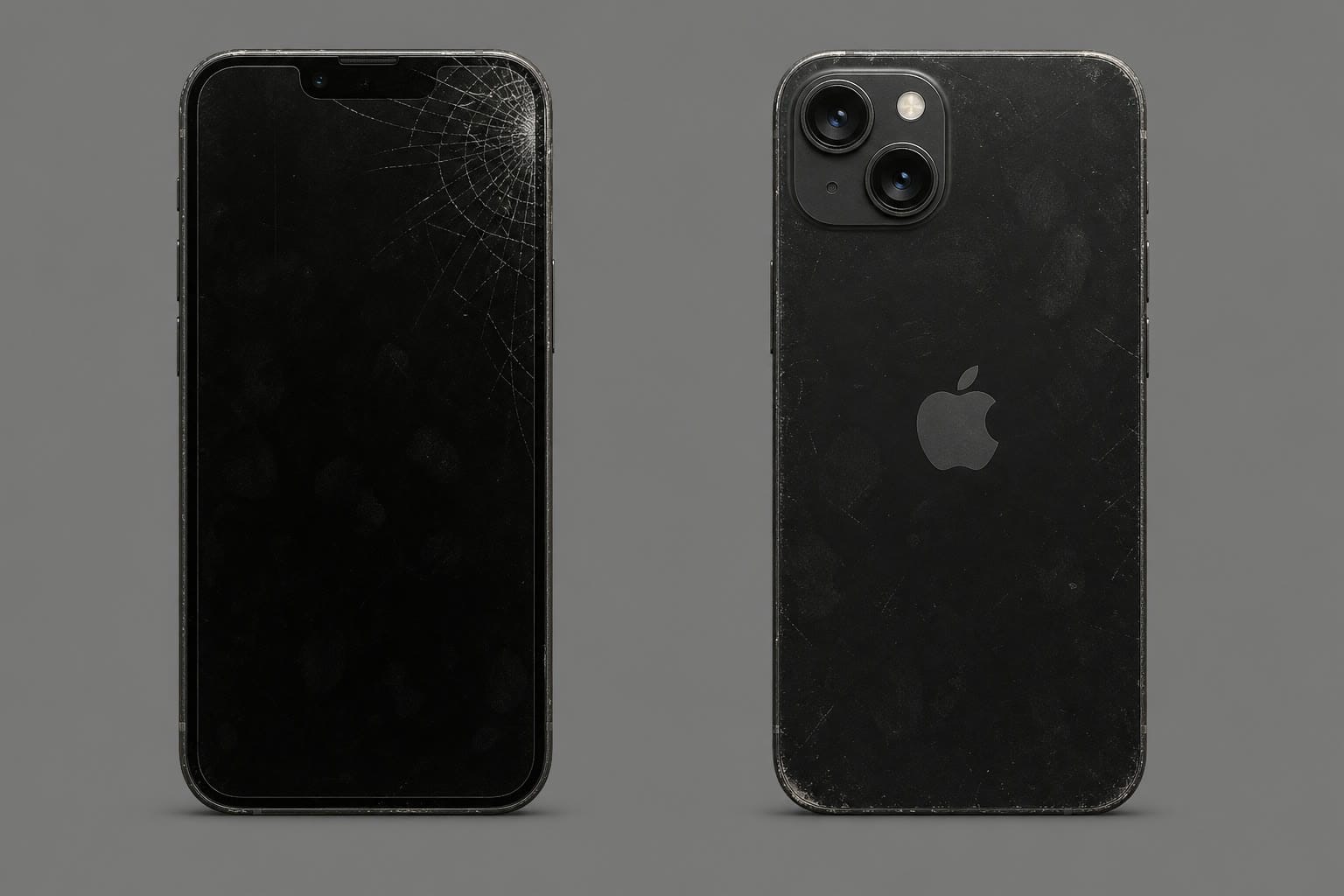
GTA 6 Smartphone Prop Prompt:
Use GPT Image 2 for these images, landscape 16:9. Make exactly two images, two variations of the same prompt, no people in them.
A video game prop asset sheet of one slightly battered black iPhone (an older model, iPhone 13 shape: flat edges, the notch at the top of the screen, the diagonal dual camera on the back, the Apple logo in the centre of the back), two views side by side on one flat neutral mid-grey seamless background: on the left the front, screen off (glossy black glass with a spiderweb crack in the top-right corner); on the right the back (black glass back with scuffs and fingerprints, worn edges on the frame). Both views upright, the same size, the same phone, soft contact shadow under each.
Render: real-time Unreal Engine 5 game prop, GTA VI in-game asset style, PBR materials, crisp modelled edges, scratches and fingerprints on the glass, neutral engine model-viewer lighting: soft even white key, white fill, subtle white rim. No coloured lights, no bloom. Everything sharp, no depth of field.
No hands, no people, no case, no readable text, no watermarks.
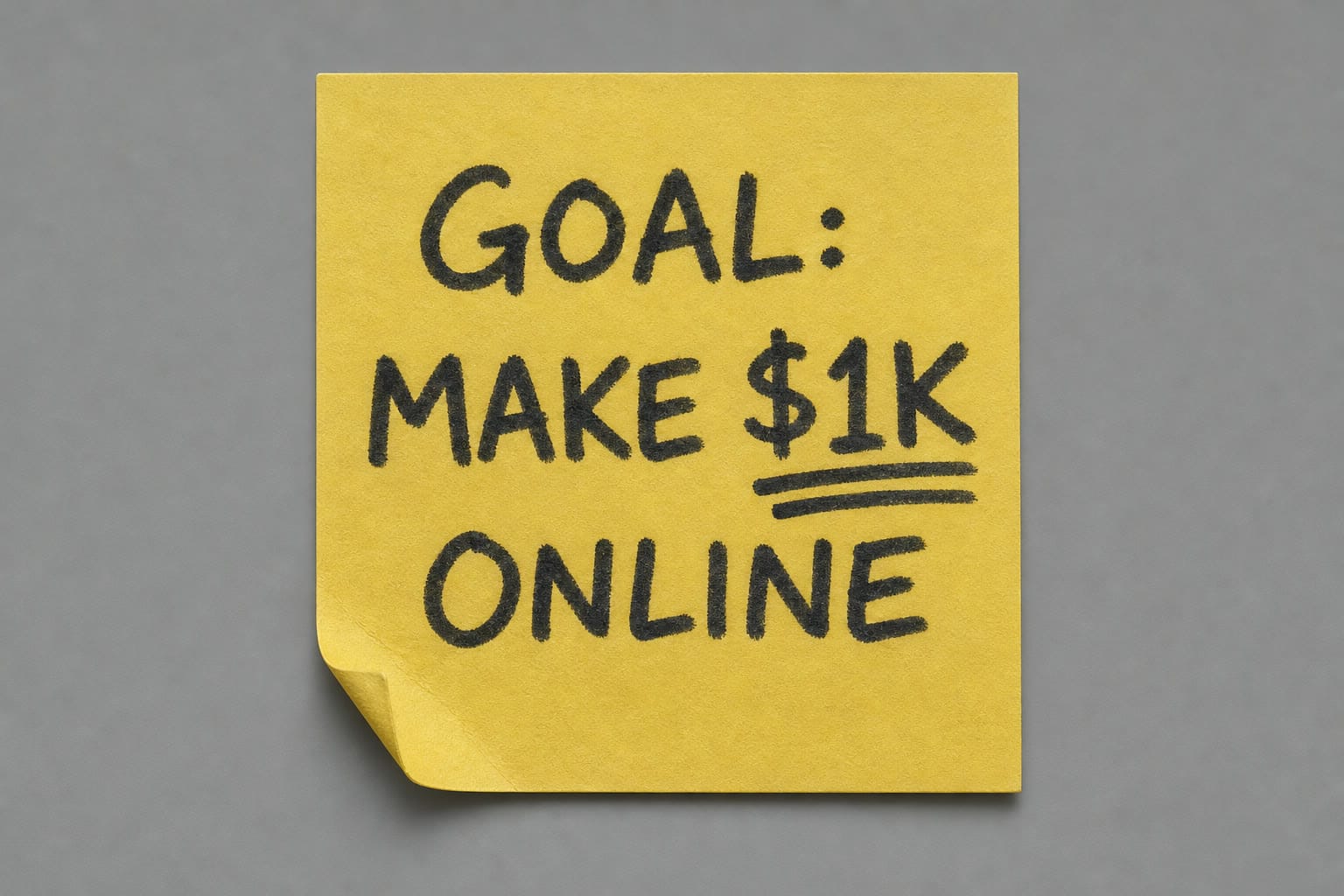
GTA 6 Sticky Note Prop Prompt:
Use GPT Image 2 for these images, landscape 16:9. Make exactly two images, two variations of the same prompt, no people in them.
A video game prop asset sheet of one square yellow sticky note, shown flat and straight-on, large in the centre of a flat neutral mid-grey seamless background, a soft contact shadow under it, one corner slightly curled.
Handwritten on it in thick black marker in a hurried hand, clearly readable, exactly these words on three lines:
GOAL:
MAKE $1K
ONLINE
"$1K" is underlined twice.
Render: real-time Unreal Engine 5 game prop, GTA VI in-game asset style, paper fibre texture, slight crease, the marker ink a little bled at the edges, neutral engine model-viewer lighting: soft even white key, white fill. No coloured lights, no bloom. Everything sharp.
No other text, no hands, no people, no logos, no watermarks.
If your GTA 6 AI video includes a character looking at a computer, checking their phone, or interacting with a digital interface, generate the screen content as a separate image before animating the scene.
For our trailer, we used GPT Image 2 to recreate two interfaces: a YouTube Studio livestream summary and a mobile banking app.
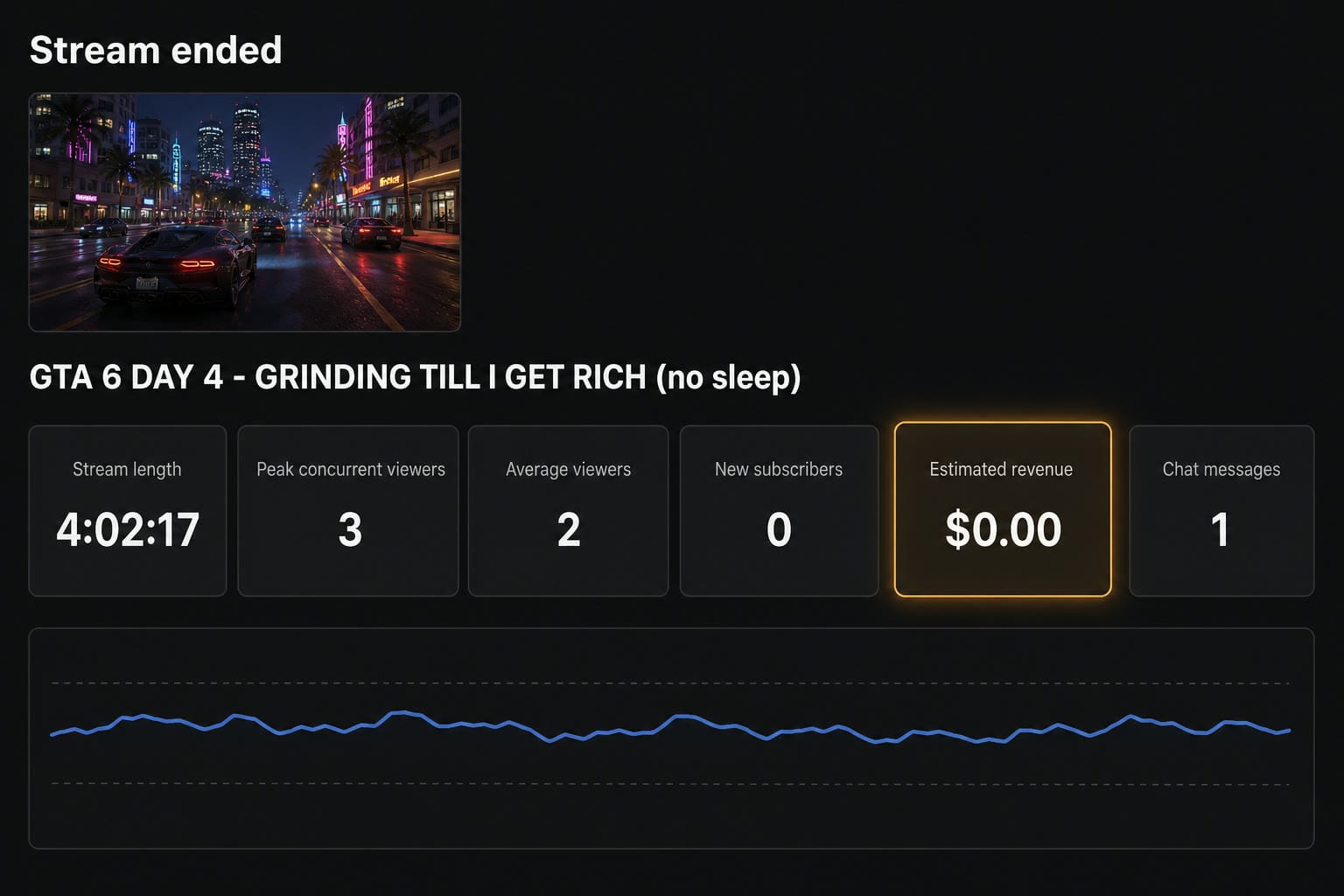
YouTube Studio Screen Prompt:
Use GPT Image 2 for these images, landscape 16:9. Make exactly two images, two variations of the same prompt.
A flat, straight-on, full-screen capture of a desktop computer screen (no monitor bezel, no room): the YouTube Studio live stream "Stream ended" summary page in dark mode, the real YouTube Studio interface. Everything crisp and readable.
Header: "Stream ended". A small stream thumbnail of a GTA-style night city game scene. Stream title: "GTA 6 DAY 4 - GRINDING TILL I GET RICH (no sleep)". Below, a row of big stat cards, exactly these values:
Stream length: 4:02:17
Peak concurrent viewers: 3
Average viewers: 2
New subscribers: 0
Estimated revenue: $0.00
Chat messages: 1
A small flat line graph of concurrent viewers along the bottom, flat at 2 to 3 the whole way.
The "$0.00" card is the one the eye lands on. No people, no faces, no other numbers, no watermarks.
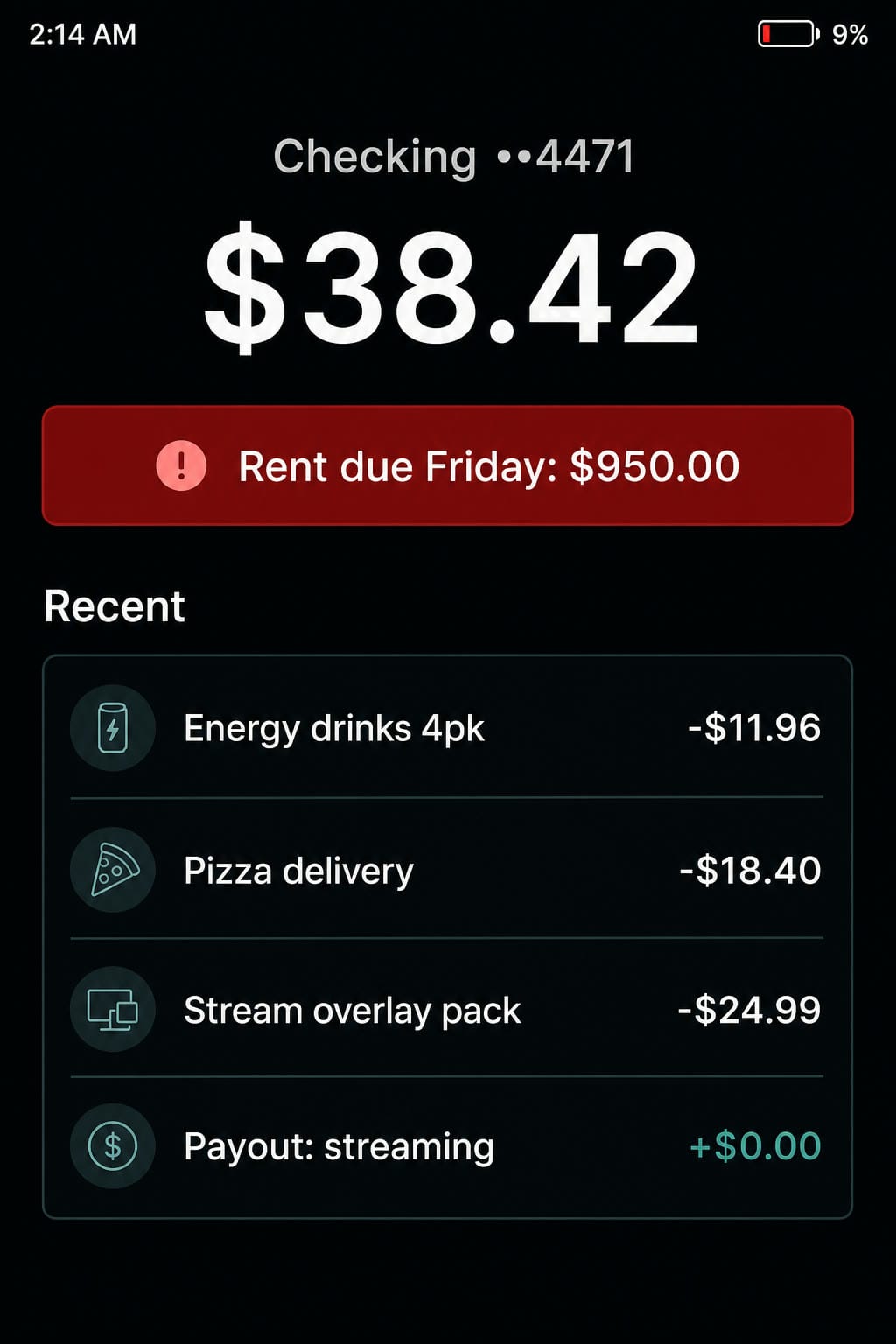
Mobile Banking App Screen Prompt:
Use GPT Image 2 for these images, portrait 9:16. Make exactly two images, two variations of the same prompt.
A flat, straight-on, full-screen capture of a smartphone screen (no phone body, no hand): a modern mobile banking app in dark mode, a generic bank with no real brand. Everything crisp and readable.
Top: "Checking ••4471". Big balance: $38.42. Under it a red banner: "Rent due Friday: $950.00". Below, a short "Recent" list, exactly:
Energy drinks 4pk -$11.96
Pizza delivery -$18.40
Stream overlay pack -$24.99
Payout: streaming +$0.00
Status bar at the top: 2:14 AM, a low battery at 9%.
No people, no faces, no logos of real banks, no watermarks.
Step 5: Write Your GTA 6 AI Video Prompts
With your character, voice, locations, and prop references ready, you can start writing the video generation prompts for your GTA 6-inspired trailer. We used Seedance 2.5 because it can generate multiple camera angles, cinematic cuts, character movements, voice-overs, and sound effects within a single generation. Rather than generating every shot individually, we divided our story into five scenes, each containing multiple shots.
For cinematic AI video generation, a detailed, structured prompt is considerably more effective than a general description of what happens in a scene. Each of our Seedance 2.5 prompts follows the same framework:
| Prompt section | What to include |
|---|---|
| Goal | The scene's narrative purpose, duration, and video game aesthetic. |
| References | Each reference asset, identified by its tag, with instructions on which details to reproduce or ignore. |
| Continuity | Character appearance, clothing, environment, lighting, and prop placement across shots. |
| Shot breakdown | Timestamps, camera angles, focal lengths, character movements, starting and ending positions, and transitions. |
| Visual style | GTA 6-inspired graphics, in-engine rendering aesthetic, textures, reflections, and lighting. |
| Camera and performance | Character expressions, body language, camera movement, and emotional delivery. |
| Audio | Dialogue, voice-over, ambient noise, sound effects, and their timing. |
| Exclusions | Unwanted elements such as watermarks, subtitles, HUDs, and additional characters. |
| Maintain consistency | The visual and audio elements that must remain unchanged throughout the generation. |
Below are the five original Seedance 2.5 prompts we used to create our GTA 6 AI trailer.
You can copy these prompts directly and replace the character references, dialogue, environments, and narrative details with your own.
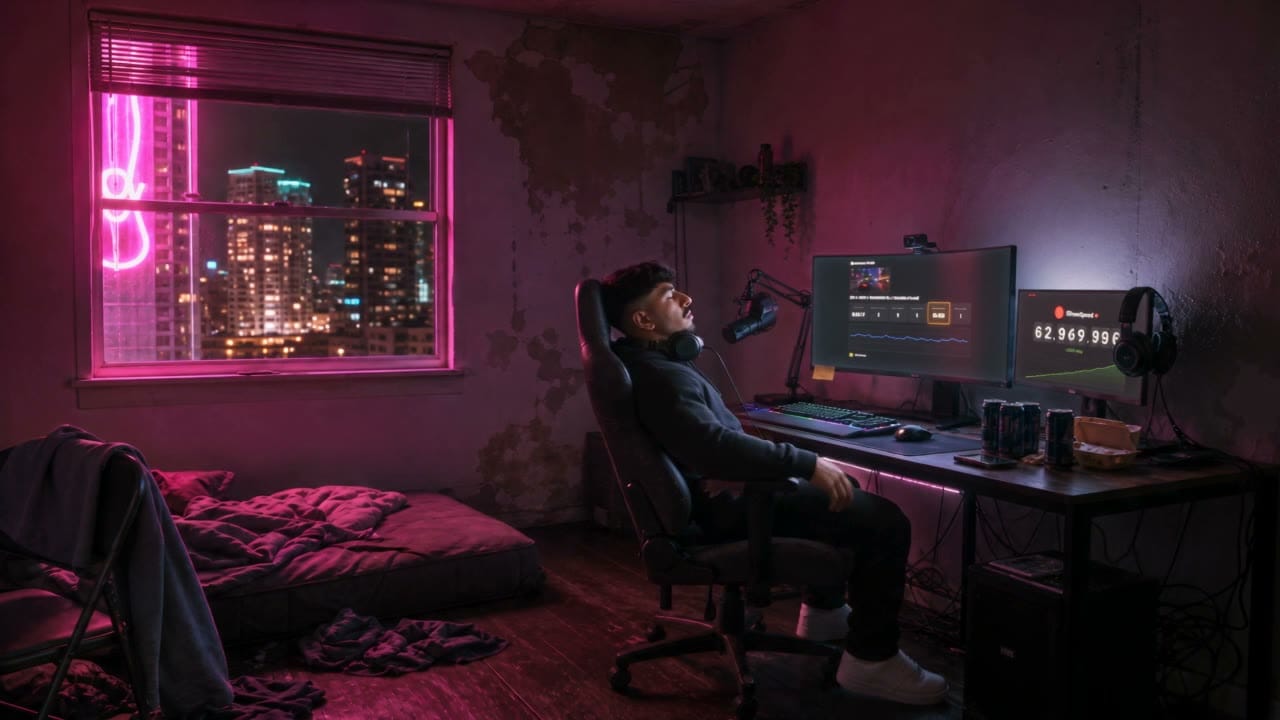
Scene 1: Stream Over (15 Seconds, 4 Shots)
Seedance 2.5 only (not MiniMax, not any other model), ONE single generation, 15 seconds, 16:9 landscape, with native audio ON.
Seedance 2.5 generates his voice-over and all sound itself in this same generation. A silent video is not acceptable. No separate text-to-speech step, no assembly. No separate scenes, no assembly step and no separate clips: the four shots below are cuts inside this one generation.
[GOAL]
The opening scene of a fake trailer for a next-gen open-world crime video game, an in-engine cinematic cutscene rendered in Unreal Engine 5, four shots, 15 seconds: late at night in a neon coastal city, a broke small streamer ends a four-hour stream in his cheap studio flat and sees he made nothing, while a famous streamer's subscriber counter rolls past 63 million. His inner thoughts play as a voice-over. It must clearly look like a 3D video game cutscene, not live action.
[REFERENCES]
image_1 is his character sheet: copy his face, textured dark almost-black cropped hair with the skin fade and messy fringe, neat moustache and short goatee, athletic build, black jeans and white trainers, in its Unreal Engine 5 game render look. His top is a completely plain black zip hoodie with a blank chest: no logo, no wordmark, no print and no lettering anywhere on it (ignore the small logo on the sheet's hoodie). Do not use the sheet's grey background or its lighting.video_1 is a voice reference only: use only its voice (his timbre, accent and delivery) for the voice-over. Do not use anything else from #video_1: not its grey background, its two-panel layout, its framing, its lighting or its words.image_2 is the city at night for shot 1: the glittering luxury towers along the beach, the palm boulevard, and the run-down apartment block in the lower right with one top-floor window glowing magenta. Use this exact city and this exact building.image_3 is his room for shot 2: the cramped, run-down studio flat, the window with the half-open blind and the magenta neon sign outside, the towers through the glass, the mattress on the floor, the gaming chair, the desk with the curved main monitor, the second monitor on its right, the mic arm and the headphones. Use this exact room and layout.image_4 is exactly what the main monitor shows in shot 3: the end-of-stream summary, "GTA 6 DAY 4 - GRINDING TILL I GET RICH (no sleep)", stream length 4:02:17, peak viewers 3, estimated revenue $0.00.image_5 is exactly what the second monitor shows in shot 4: the live subscriber counter for IShowSpeed, "+200K today" in green, the red graph climbing. The counter only ever counts UP towards 63,000,000; it never shows 64,000,000 or any number above 63,000,000.image_6 is exactly what the main monitor shows in shot 2 before he clicks: his live stream of the game, a red sports car drifting down a neon boulevard at night, the LIVE badge with 3 viewers, the stream title along the bottom.
[CONTINUITY]
Subject: one man only, the streamer from #image_1, the same face, hair and plain black hoodie in every shot. He is alone.
Scene: the same small room from #image_3 at night in shots 2 to 4; the main monitor is the curved one in front of him, the second monitor is to its right.
Props: the stream of #image_6 and then the summary of #image_4 belong to the main monitor only; the counter of #image_5 belongs to the second monitor only.
[SHOT 1 | 0 to 4 s | night aerial, the money and him]
Camera: wide 24 mm drone, high over the bay, a slow glide forward between two of the tallest glass towers, then a smooth tilt and descent down past them, as one continuous move.
Initial state: the towers from #image_2 fill the upper two thirds of the frame, close enough that their lit windows slide past the lens; the aircraft warning lights blink on the tallest; haze over the city; the sea and the car light trails of the palm boulevard on the left.
Action sequence: the camera slips past the towers, so the money glides by and away, and drops below their rooftops onto the run-down block in their shadow, its one magenta top-floor window growing in the frame.
End state: the magenta window centred, small and alone, the towers now looming over it out of focus.
Transition: cut.
[SHOT 2 | 4 to 8 s | wide, locked, three-quarter from behind, framed by the room]
Camera: wide 28 mm, locked off, low at seat height, three-quarter from behind and to the left of the gaming chair. Foreground left: the edge of the unmade mattress on the floor, soft and out of focus. Midground: him in the chair, a dark silhouette rimmed by the monitor glow. Background: the two monitors and, high on the left wall, the window with the magenta neon sign and the towers through the glass.
Initial state: he sits forward in the chair facing the two monitors, his right hand on the mouse, headphones round his neck; the main monitor clearly shows #image_6, his live stream of the game with the red car drifting, colourful and moving, throwing shifting colour onto him and the wall.
Action sequence: he clicks the mouse once to end the stream. The gameplay vanishes and the main monitor turns to a flat dark summary page, so the colour on him dies and the room drops darker, leaving the magenta neon as the strongest light. He lets go of the mouse and slumps back into the chair, his head tipping back against the headrest, his arms dropping onto the armrests.
End state: slumped still, small in the frame, the city glittering through the window above him.
Transition: cut.
[SHOT 3 | 8 to 11 s | insert, the main monitor, rack focus]
Camera: close insert on the main monitor's glass, long 85 mm lens, very slight push in. The shot opens with the focus on his faint reflection in the dark glass (his tired face, lips pressed together, the magenta window behind him), then racks focus onto the screen.
Initial state and action: as the focus lands, the screen shows exactly #image_4, sharp and readable; the camera drifts across the stat tiles and settles on the $0.00 revenue tile, its orange outline glowing.
End state: $0.00 sharp in the centre of the frame, his reflection a soft ghost over it.
Transition: cut.
[SHOT 4 | 11 to 15 s | over his shoulder onto the second monitor]
Camera: over-the-shoulder from behind his right shoulder, long 85 mm lens, slow push in. Foreground left: his ear, cheek and jaw in soft focus, lit red and white by the screen. The second monitor sharp beyond him.
Initial state and action: the second monitor shows #image_5 with the counter at 62,999,996; the last digits tick UP one at a time, 62,999,997, 62,999,998, 62,999,999, and roll over to 63,000,000 at about 13 s, then stop there. It never shows 64,000,000. The red graph ticks up, "+200K today" in green under it. The red light of the graph washes over his cheek. He does not move.
End state: 63,000,000 sharp and readable beyond his still, out-of-focus profile.
Transition: end of video.
[VISUAL STYLE]
A next-gen open-world crime game trailer: obviously a video game, rendered at the highest in-engine quality, Unreal Engine 5 real-time cinematic, Lumen global illumination, ray-traced reflections, shot like a real film on real cameras, never a game camera. Night is warm tungsten windows with teal and magenta neon accents, never blue darkness. Inside, the room is lit only by practical sources: the magenta neon through the window, the cold white monitors, a thin LED strip under the desk, with haze in the air and soft bloom on every light. Worn textures: peeling paint, stained walls, scuffed chair leather, energy drink cans. Long-lens shallow depth of field, bokeh city lights, warm highlights with slightly teal shadows, blacks with detail, crisp and sharp, no film grain.
[CAMERA AND PERFORMANCE]
He never speaks on screen: his lips stay pressed together the whole time in every shot. Every shot is a director's shot: the camera says the story before the voice does. The towers glide away from us; he is small in his own room; his face is a ghost over $0.00; the 63 million is sharp while he is a blur. Tiredness shows in the body: a slow click, the slump, the head tipping back, shoulders heavy, eyes unmoving. All light is motivated by a source in the frame.
[AUDIO]
Voice-over, off-screen, his inner thoughts, in the voice of #video_1. Dialogue language: British English. Low, tired and flat, quiet, close to the mic, dry, no echo, no reverb. Each line on its shot, whole sentences, said once each, in order:
Shot 2, at about 6 s: {Four hours.}
Shot 3, at about 9 s: {Three viewers. Zero dollars.}
Shot 4, at about 12 s: {Speed just hit 63 million.}
Shot 1: <distant city hum, faint traffic and wind>, no voice.
Shot 2: <a soft stream-ended chime on the click, the chair creaks as he slumps>.
Shots 3 and 4: <quiet room tone, a fridge hum>; as the counter lands on 63,000,000.
No music. No subtitles.
[EXCLUSIONS]
No logo or lettering on his hoodie. No text on screen other than what #image_6, #image_4 and #image_5 show on the monitors. No other people. No HUD or minimap over the film itself (only inside the monitor in shot 2, as #image_6 shows), no watermark, no photorealism, no film grain.
[MAINTAIN CONSISTENCY]
One man only, the same face as #image_1, lips pressed together throughout, the same room from #image_3 with the same layout in shots 2 to 4, #image_4 only on the main monitor and #image_5 only on the second monitor.
Use #image_1, #image_2, #image_3, #image_4, #image_5, #image_6 and #video_1 as references only, Seedance 2.5 reference-to-video, one generation: none of them is the first frame.
Generate it at 720p, the highest resolution Seedance 2.5 has here, as the final video.
The opening scene establishes the GTA 6-inspired city before introducing our main character.
It uses four cinematic shots, transitioning from a wide aerial view of the city to an interior shot and two monitor close-ups.
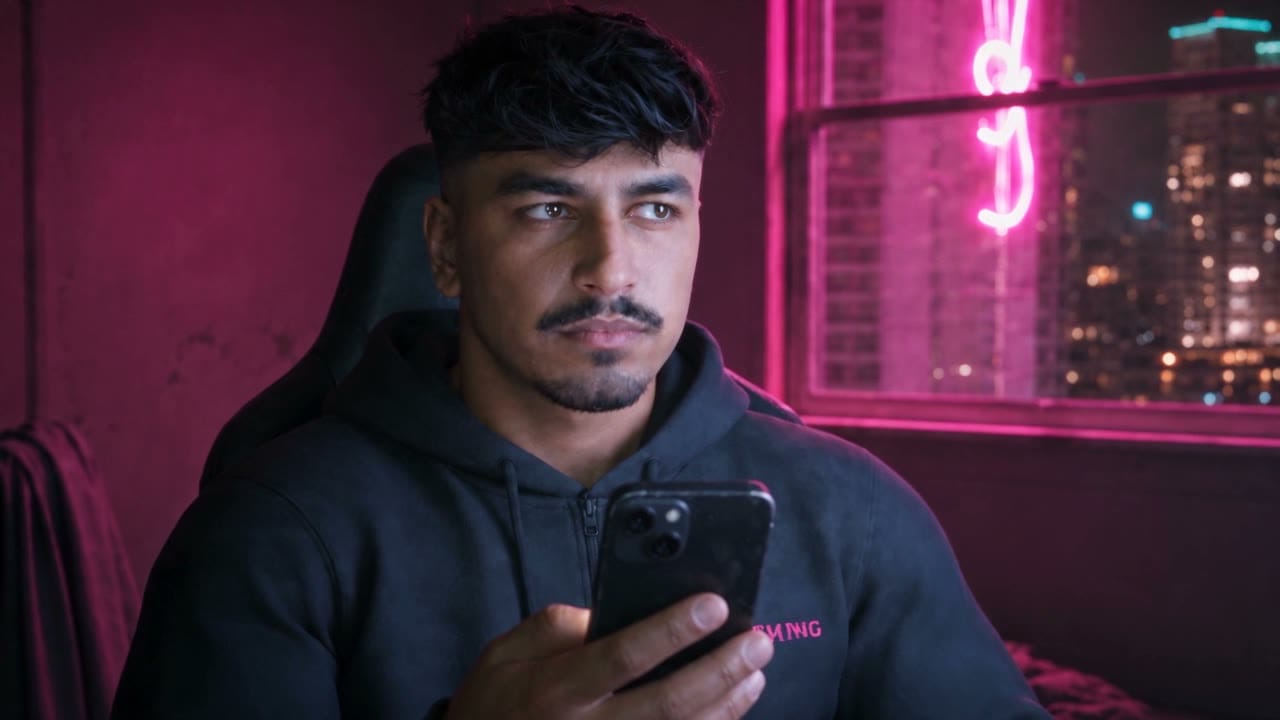
Scene 2: Rent's Due (15 Seconds, 3 Shots)
Seedance 2.5 only (not MiniMax, not any other model), ONE single generation, 15 seconds, 16:9 landscape, with native audio ON.
Seedance 2.5 generates his voice-over and all sound itself in this same generation. A silent video is not acceptable. No separate text-to-speech step, no assembly. No separate scenes, no assembly step and no separate clips: the three shots below are cuts inside this one generation.
[GOAL]
The second scene of a fake trailer for a next-gen open-world crime video game, an in-engine cinematic cutscene rendered in Unreal Engine 5, three shots, 15 seconds: late at night in his cheap studio flat, a broke small streamer looks at the goal on his sticky note, sees his rent is due, and stares at his phone while his inner thoughts play as a voice-over. It must clearly look like a 3D video game cutscene, not live action.
[REFERENCES]
image_1 is his character sheet: copy his face, textured dark almost-black cropped hair with the skin fade and messy fringe, neat moustache and short goatee, athletic build, in its Unreal Engine 5 game render look. His top is a completely plain black zip hoodie with a blank chest: no logo, no wordmark, no print and no lettering anywhere on it (ignore the small logo on the sheet's hoodie). Do not use the sheet's grey background or its lighting.video_1 is a voice reference only: use only its voice (his timbre, accent and delivery) for the voice-over. Do not use anything else from #video_1: not its grey background, its two-panel layout, its framing, its lighting or its words.image_2 is his desk for shots 1 and 2: the curved main monitor with the yellow sticky note on its bottom-left bezel, the second monitor, the mic arm, the RGB keyboard, the energy drink cans, the LED strip under the desk. Use this exact desk.image_3 is exactly the sticky note on the bezel in shot 1: yellow, "GOAL: MAKE $1K ONLINE" handwritten in black marker, the top glued flat, the bottom corner curling up.image_4 is his phone in shots 2 and 3: the same cracked black iPhone, front and back.image_5 is exactly what the phone screen shows in shot 2: the bank app, Checking ••4471, $38.42, the red banner "Rent due Friday: $950.00", the recent payments list.image_6 is the room behind him in shot 3, seen from the monitors: the gaming chair, the mattress on the floor, the window with the magenta neon sign and the towers through the glass. Use this exact room.
[CONTINUITY]
Subject: one man only, the streamer from #image_1, the same face, hair and plain black hoodie in every shot. He is alone.
Scene: the same small room at night: the desk of #image_2 in front of him, the room of #image_6 behind him.
Props: the sticky note of #image_3 is on the main monitor's bezel only; the phone of #image_4 is in his right hand in shots 2 and 3, and its screen shows #image_5.
[SHOT 1 | 0 to 4 s | macro along the monitor bezel, rack focus]
Camera: 100 mm macro along the bottom-left bezel of the main monitor, a slow slide from left to right; the focus starts on the bezel edge and racks onto the sticky note.
Initial state: the bezel edge sharp; behind it the main monitor's dark summary page glows soft and out of focus.
Action sequence: the camera slides; the focus pulls onto the sticky note from #image_3, "GOAL: MAKE $1K ONLINE", the black marker letters sharp, the curled bottom corner catching the light.
End state: the note sharp, filling the right two thirds of the frame.
Lighting: cold monitor spill on the paper, a magenta edge from the window.
Transition: cut.
[SHOT 2 | 4 to 8 s | top-down over his right shoulder onto the desk]
Camera: 50 mm, top-down over his right shoulder onto the desk, slow push in.
Initial state: the phone from #image_4 lies face down on the desk by the keyboard and the energy drink cans.
Action sequence: his right hand picks the phone up into frame, screen towards the camera, and his thumb opens the bank app, which shows exactly #image_5. The red rent banner glows red on his fingers.
End state: the red "Rent due Friday: $950.00" banner centred in the frame, sharp and readable.
Transition: cut.
[SHOT 3 | 8 to 15 s | front close-up, slow push]
Camera: front, slightly low, from the monitor side, 85 mm, a slow push from a medium close-up to a close-up over 7 seconds.
Initial state: he sits in the gaming chair holding the phone in his right hand at chest height; the phone screen lights his face cold white from below; the magenta neon from the window behind him rims his hair and shoulder; the room of #image_6 soft and out of focus behind him.
Action sequence: he stares at the phone, jaw tight, lips pressed together. He lets out one slow breath through his nose and his shoulders drop. His eyes lift off the phone towards the second monitor, just off screen to the side, hold there for a moment, then go back down to the phone. Only his eyes move: his lips stay pressed together and his jaw stays closed the whole time, even while he looks away.
End state: close-up, eyes down, the phone light on his face.
Transition: end of video.
[VISUAL STYLE]
A next-gen open-world crime game trailer: obviously a video game, rendered at the highest in-engine quality, Unreal Engine 5 real-time cinematic, Lumen global illumination, ray-traced reflections, shot like a real film on real cameras, never a game camera. The room is lit only by practical sources: the magenta neon through the window, the cold white monitors, the phone, a thin LED strip under the desk, with haze in the air and soft bloom on every light; never blue darkness. Worn textures: peeling paint, scuffed desk, energy drink cans, the cracked phone glass. Long-lens shallow depth of field, bokeh lights, warm highlights with slightly teal shadows, blacks with detail, crisp and sharp, no film grain.
[CAMERA AND PERFORMANCE]
He never speaks on screen: his lips stay pressed together the whole time in every shot. The pressure tightens shot by shot: a tiny goal, a big bill, then the longest held face of the intro. Tension shows in the body: a tight jaw, one slow breath out through the nose, shoulders dropping, eyes moving and not much else. All light is motivated by a source in the frame.
[AUDIO]
Voice-over, off-screen, his inner thoughts, in the voice of #video_1. Dialogue language: British English. Low, tired and quiet, close to the mic, dry, no echo, no reverb. Each line on its shot, whole sentences, said once each, in order:
Shot 1, at about 1 s: {My goal is a thousand.}
Shot 2, at about 5 s: {Rent's due Friday, and I've got 38 dollars left.}
Shot 3, at about 9 s: {GTA 6 came out four days ago, and everyone's making money off it. Everyone except me.}
Shot 1: .
Shot 2: <the phone scraping off the desk, a soft tap>; starts under the voice and carries on.
Shot 3: <the low pulse, a fridge hum, his slow breath out through the nose>.
No music. No subtitles.
Generate it at 720p, the highest resolution Seedance 2.5 has here, as the final video.
The second scene introduces the character's motivation through three shots: a handwritten financial goal, a close-up of his mobile banking app, and a slowly approaching portrait of his face.
The challenge here is directing a believable character performance without spoken dialogue on screen.
Scene 3: The Clip (12 Seconds, 3 Phone Shots)
Seedance 2.5 only (not MiniMax, not any other model), ONE single generation, 12 seconds, 16:9 landscape, with native audio ON.
Seedance 2.5 generates his voice-over and all sound itself in this same generation. A silent video is not acceptable. No separate text-to-speech step, no assembly. No separate scenes, no assembly step and no separate clips: the three shots below are cuts inside this one generation.
[GOAL]
The third scene of a fake trailer for a next-gen open-world crime video game, an in-engine cinematic cutscene rendered in Unreal Engine 5, three shots, 12 seconds: late at night, a broke small streamer's phone lights up with a notification, he finds a clip page has posted a Short of his own stream with 1.4 million views, and he reads the page's bio, while his inner thoughts play as a voice-over. The phone is the whole world in this scene. It must clearly look like a 3D video game cutscene, not live action.
[REFERENCES]
image_1 is his character sheet: copy his hands, skin tone and the cuff of his plain black hoodie (no logo, no lettering), in its Unreal Engine 5 game render look. Do not use the sheet's grey background or its lighting.video_1 is a voice reference only: use only its voice (his timbre, accent and delivery) for the voice-over. Do not use anything else from #video_1: not its grey background, its two-panel layout, its framing, its lighting or its words.image_2 is his phone in every shot: the same cracked black iPhone, held in his right hand.image_3 is exactly what the phone screen shows in shot 1: the lock screen reading 2:16 over a night city wallpaper, and the YouTube notification "Clip Cartel uploaded: 'streamer had no idea he was being clipped'" with a small neon thumbnail.image_4 is exactly what the phone screen shows in shot 2: the Short playing, his own face from his stream with his hands on his head, the caption "HE DIDN'T KNOW HE WAS LIVE", the @ClipCartel name and 1.4M views.image_5 is exactly what the phone screen shows in shot 3: the Clip Cartel profile, its banner, 2.3M subscribers, the bio "I make more clipping streamers than they make streaming", and rows of Shorts with millions of views.image_6 is the room behind the phone, dark and out of focus: the gaming chair, the mattress, the window with the magenta neon sign.
[CONTINUITY]
Subject: one man only, the streamer from #image_1; we see only his right hand and thumb, his hoodie cuff and at most a soft edge of his shoulder. He is alone.
Props: the phone of #image_2 is in his right hand in every shot; its screen shows #image_3, then #image_4, then #image_5, in that order, and nothing else.
Scene: the dark room of #image_6 behind the phone, always soft.
[SHOT 1 | 0 to 3 s | over his shoulder onto the phone in his hand]
Camera: 50 mm, over his right shoulder, close on the phone in his right hand, locked, with a tiny push as the notification lands.
Initial state: the phone screen has gone dark in his hand; the room behind is dark and soft.
Action sequence: the phone buzzes in his hand and lights up to the lock screen of #image_3; the YouTube notification slides in from the top. His thumb, about to put the phone down, stops dead.
End state: the notification sharp and readable, the screen light flaring on his fingers.
Transition: cut.
[SHOT 2 | 3 to 8 s | the phone filling the frame]
Camera: 85 mm, the phone filling most of the frame in his hand, a slow push towards the view count.
Initial state: his thumb taps the notification.
Action sequence: the Short of #image_4 plays on the phone: his own face from his stream, hands on his head; the light of the Short flickers over his fingers.
End state: "1.4M views" sharp in the frame.
Transition: cut.
[SHOT 3 | 8 to 12 s | the phone, slow tilt down to the bio]
Camera: 85 mm, close on the phone, a slow tilt and push down from the banner to the bio line.
Initial state: his thumb taps the @ClipCartel name and the profile of #image_5 opens.
Action sequence: the camera tilts down past the banner and the subscriber count and settles on the bio.
End state: the bio "I make more clipping streamers than they make streaming" sharp, everything else soft.
Transition: end of video.
[VISUAL STYLE]
A next-gen open-world crime game trailer: obviously a video game, rendered at the highest in-engine quality, Unreal Engine 5 real-time cinematic, shot like a real film on real cameras, never a game camera. The trailers' phone-insert grammar: the phone screen fills the frame, shot by a real lens with shallow focus on the glass, a little bloom and the faint reflection of the room in the cracked screen, the UI sharp and readable. The only light is the phone screen on his fingers and a magenta edge from the neon window behind; never blue darkness. Warm highlights with slightly teal shadows, blacks with detail, crisp and sharp, no film grain.
[CAMERA AND PERFORMANCE]
Disbelief, then curiosity, shown only through the hand: the thumb freezing, a small tighter grip, the thumb tapping quickly. Nobody speaks on screen.
[AUDIO]
Voice-over, off-screen, his inner thoughts, in the voice of #video_1. Dialogue language: British English. Close to the mic, dry, no echo, no reverb. Each line on its shot, whole sentences, said once each, in order:
Shot 1, at about 1 s, quiet and sharp, then a full one-second pause before the next line: {Hang on.}
Shot 2, at about 4 s, disbelieving: {Someone's clipped my stream. 1.4 million views. That's more than my whole channel.}
Shot 3, at about 9 s, slowly, reading it in his head: {I make more clipping streamers than they make streaming.}
Shot 1: <the phone buzzes, a notification ping>.
Shot 2: <the Short's tinny audio from the phone speaker, quiet under the voice>.
Shot 3: <a soft screen tap, quiet room tone>.
No music. No subtitles.
[EXCLUSIONS]
No text on screen other than what #image_3, #image_4 and #image_5 show on the phone. No other people in the room, no HUD, no watermark, no photorealism, no film grain. No logo or lettering on his hoodie.
[MAINTAIN CONSISTENCY]
One man only, the same cracked iPhone in his right hand in every shot, the screens in the order #image_3, #image_4, #image_5.
Use #image_1, #image_2, #image_3, #image_4, #image_5, #image_6 and #video_1 as references only, Seedance 2.5 reference-to-video, one generation: none of them is the first frame.
Generate it at 720p, the highest resolution Seedance 2.5 has here, as the final video.
Generating believable smartphone interactions is one of the more difficult aspects of AI video production, particularly when a screen needs to display specific, readable information.
For this scene, we supplied three separate screen references and instructed Seedance 2.5 to display them in sequence as the character interacts with his phone.
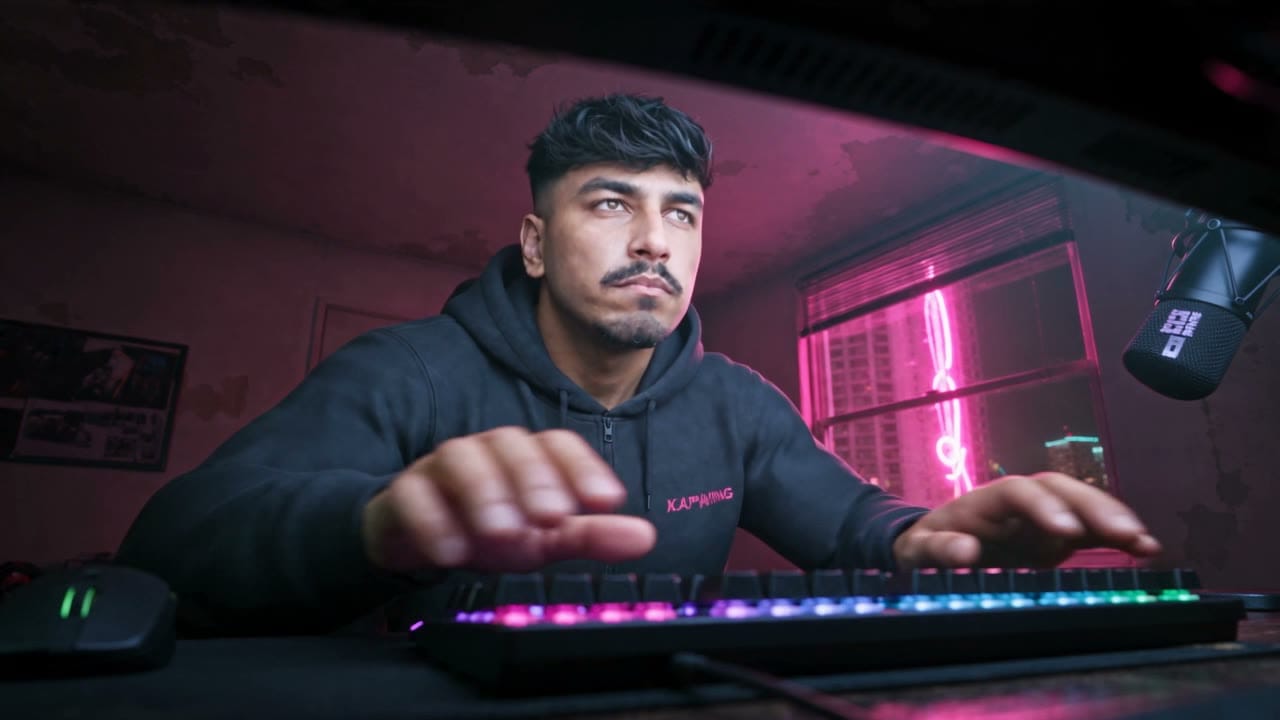
Scene 4: Fine, Then (10 Seconds)
Seedance 2.5 only (not MiniMax, not any other model), ONE single generation, 10 seconds, 16:9 landscape, with native audio ON.
Seedance 2.5 generates his voice-over and all sound itself in this same generation. A silent video is not acceptable. No separate text-to-speech step, no assembly. No separate scenes, no assembly step and no separate clips: the three shots below are cuts inside this one generation.
[GOAL]
The fourth scene of a fake trailer for a next-gen open-world crime video game, an in-engine cinematic cutscene rendered in Unreal Engine 5, three shots, 10 seconds: late at night, a broke small streamer realises the money is in clipping, puts his phone down, leans in to his computer and creates a new YouTube channel, while his inner thoughts play as a voice-over. It must clearly look like a 3D video game cutscene, not live action.
[REFERENCES]
image_1 is his character sheet: copy his face, textured dark almost-black cropped hair with the skin fade and messy fringe, neat moustache and short goatee, athletic build, in its Unreal Engine 5 game render look. His top is a completely plain black zip hoodie with a blank chest: no logo, no wordmark, no print and no lettering anywhere on it (ignore the small logo on the sheet's hoodie). Do not use the sheet's grey background or its lighting.video_1 is a voice reference only: use only its voice (his timbre, accent and delivery) for the voice-over. Do not use anything else from #video_1: not its grey background, its two-panel layout, its framing, its lighting or its words.image_2 is the room behind him in shots 1 and 2, seen from the monitors: the gaming chair, the mattress on the floor, the window with the magenta neon sign and the towers through the glass. Use this exact room.image_3 is his desk in shot 2: the curved main monitor, the second monitor, the RGB keyboard, the energy drink cans, the LED strip. Use this exact desk.image_4 is his phone in shots 1 and 2: the same cracked black iPhone.image_5 is exactly what the main monitor shows in shot 3: YouTube's "How you'll appear" create-channel box, the name "Jonny Shapland GTA 6 Clips", the handle "@JonnyShaplandGTA6Clips" with a green tick, the blue "Create channel" button.
[CONTINUITY]
Subject: one man only, the streamer from #image_1, the same face, hair and plain black hoodie in every shot. He is alone.
Scene: the same small room at night: the room of #image_2 behind him, the desk of #image_3 in front of him.
Props: the phone of #image_4 is in his right hand in shot 1 and goes face down on the desk in shot 2. The main monitor shows #image_5 in shot 3.
[SHOT 1 | 0 to 4 s | front close-up, slow push]
Camera: front close-up from the monitor side, slightly low, 85 mm, a slow push in.
Initial state: he holds the phone in his right hand at chest height; its screen lights his face cold white from below; the magenta neon rims his hair from the window behind; the room of #image_2 soft behind him; his lips pressed together.
Action sequence: a half-laugh through his nose, his shoulders jump once. Then his eyes narrow and one corner of his mouth lifts into a small smirk, lips still closed. His eyes lift off the phone.
End state: the smirk, eyes up and focused.
Transition: cut.
[SHOT 2 | 4 to 7 s | low angle from the floor by the desk, looking up at him]
Camera: 35 mm, low angle from near the floor beside the desk, looking up at him past the desk edge, locked. The camera is well below his eye line so he towers in the frame, the magenta neon window and the ceiling above him.
Initial state: he sits back in the gaming chair in the magenta light, the phone in his right hand.
Action sequence: he puts the phone face down on the desk with a tap, sits forward out of the shadow into the white monitor light, and pulls the keyboard in towards him with both hands.
End state: leaning in, his face lit full by the monitors from below, hands on the keyboard, determined.
Transition: cut.
[SHOT 3 | 7 to 10 s | insert, the main monitor]
Camera: 50 mm insert, the main monitor filling the frame, real lens, a slow push towards the name field.
Action sequence: the screen shows exactly #image_5; the name "Jonny Shapland GTA 6 Clips" types in fast, letter by letter; the cursor glides to the blue "Create channel" button and clicks it.
End state: the click on "Create channel".
Transition: end of video.
[VISUAL STYLE]
A next-gen open-world crime game trailer: obviously a video game, rendered at the highest in-engine quality, Unreal Engine 5 real-time cinematic, Lumen global illumination, ray-traced reflections, shot like a real film on real cameras, never a game camera. The room is lit only by practical sources: the magenta neon through the window, the white monitors, the phone, the LED strip under the desk, with haze and soft bloom; never blue darkness. Screen inserts are shot by a real lens: shallow focus on the glass, a little bloom and a faint reflection of the room, the UI sharp and readable. Warm highlights with slightly teal shadows, blacks with detail, crisp and sharp, no film grain.
[CAMERA AND PERFORMANCE]
He never speaks on screen: his lips stay pressed together the whole time in every shot. The scene turns from defeated to determined and a bit cheeky: the half-laugh, the smirk, then leaning in from the shadow into the light; the low angle gives him the power for the first time.
[AUDIO]
Voice-over, off-screen, his inner thoughts, in the voice of #video_1. Dialogue language: British English. Close to the mic, dry, no echo, no reverb. Each line on its shot, whole sentences, said once each, in order:
Shot 1, at about 1 s, slow, a half-laugh in the voice: {So the money isn't in streaming. It's in clipping.}
Shot 2, at about 4.5 s, sharper, decided, trailing off: {Fine. If I can't beat them...}
Shot 1: .
Shot 2: <the phone tapping face down on the desk, the chair rolling forward>.
Shot 3: <fast keystrokes, one mouse click> and no voice.
No music. No subtitles.
Generate it at 720p, the highest resolution Seedance 2.5 has here, as the final video.
The fourth scene marks a turning point in the story, using changes in camera angle, facial expression, body language, and lighting to communicate the character's shift from frustration to determination.
We used a front-facing close-up, a low-angle shot, and a computer screen insert within a single Seedance 2.5 generation.
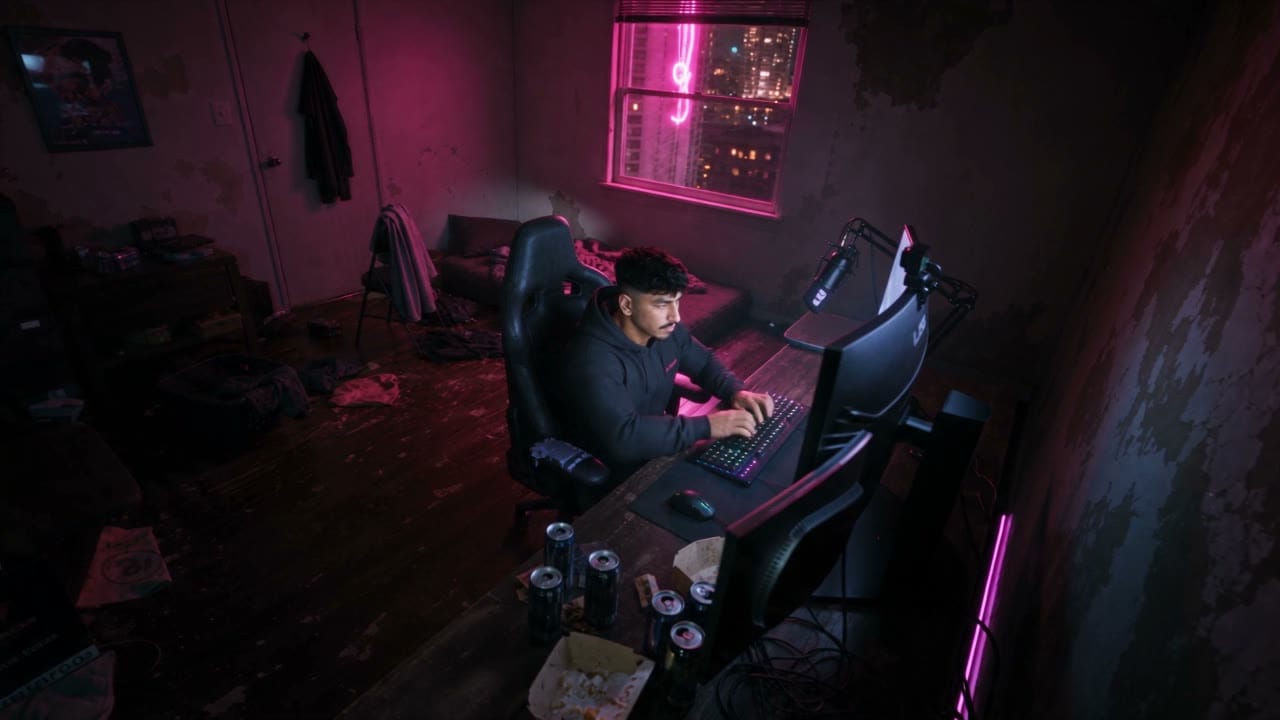
Scene 5: The Click (10 Seconds, 3 Shots)
Seedance 2.5 only (not MiniMax, not any other model), ONE single generation, 10 seconds, 16:9 landscape, with native audio ON.
Seedance 2.5 generates his voice-over and all sound itself in this same generation. A silent video is not acceptable. No separate text-to-speech step, no assembly. No separate scenes, no assembly step and no separate clips: the three shots below are cuts inside this one generation.
[GOAL]
The last scene of a fake trailer for a next-gen open-world crime video game, an in-engine cinematic cutscene rendered in Unreal Engine 5, three shots, 10 seconds: late at night, a broke small streamer searches for how to clip GTA 6 and clicks a video; the discovery is intense. We see him from high above at his desk, then his face appears in the dark video player as it loads, then the bright flash of the video starting fills his eyes.
[REFERENCES]
image_1 is his character sheet: copy his face, textured dark almost-black cropped hair with the skin fade and messy fringe, neat moustache and short goatee, athletic build, in its Unreal Engine 5 game render look. His top is a completely plain black zip hoodie with a blank chest: no logo, no wordmark, no print and no lettering anywhere on it (ignore the small logo on the sheet's hoodie). Do not use the sheet's grey background or its lighting.video_1 is a voice reference only: use only its voice (his timbre, accent and delivery) for the voice-over. Do not use anything else from #video_1: not its grey background, its two-panel layout, its framing, its lighting or its words.image_2 is his desk, seen from above in shot 1: the curved main monitor, the second monitor, the RGB keyboard, the mouse, the energy drink cans, the LED strip under the desk. Use this exact desk.image_3 is his room, for shot 1 and for the reflection in shot 2: the gaming chair, the mattress on the floor, the window with the magenta neon sign and the towers through the glass.
[CONTINUITY]
Subject: one man only, the streamer from #image_1, the same face, hair and plain black hoodie in every shot. He is alone.
Scene: the same small room at night, the desk of #image_2, the room of #image_3.
[SHOT 1 | 0 to 4 s | high bird's-eye view straight down over the desk]
Camera: high overhead, looking straight down from the ceiling onto him at the desk, 24 mm, a very slow descent and a slow quarter rotation.
Initial state: he sits forward in the gaming chair, hands on the keyboard and mouse, the two monitors throwing cold white light up over his head, shoulders and hands; the magenta neon from the window spills across the floor and the mattress; energy drink cans on the desk.
Action sequence: he types fast, stops, his right hand moves to the mouse and clicks once, then he leans in closer to the screen.
End state: leaning in, frozen, lit by the screens, small in the dark room.
Transition: cut.
[SHOT 2 | 4 to 7.5 s | the dark video player, rack focus from the screen to his reflection]
Camera: close on the main monitor's glass, 85 mm, locked. The monitor shows a dark black video player with a small white loading circle spinning in the middle; no other text or interface in frame.
Action sequence: the shot opens with the focus sharp on the spinning white loading circle on the screen; then the focus racks slowly back to his reflection in the dark glass: his face from #image_1, lips pressed together, eyes wide on the screen, the magenta window of #image_3 glowing behind him. As his reflection comes into sharp focus, the loading circle stops and the player bursts into bright white light that floods through his reflection.
End state: the screen bright white, his reflection washed out.
Transition: cut.
[SHOT 3 | 7.5 to 10 s | extreme close-up of his eyes]
Camera: extreme close-up on his eyes, front, 100 mm, locked.
Action sequence: the bright white light flashes across his face and catches as two bright reflections in his eyes; his pupils narrow and he does not blink.
End state: the flash filling his eyes, the frame almost white.
Transition: end of video.
[VISUAL STYLE]
A next-gen open-world crime game trailer: obviously a video game, rendered at the highest in-engine quality, Unreal Engine 5 real-time cinematic, Lumen global illumination, ray-traced reflections, shot like a real film on real cameras, never a game camera. The room is lit only by the monitors and the magenta neon from the window, with haze and soft bloom; never blue darkness. Long-lens shallow depth of field, warm highlights with slightly teal shadows, blacks with detail, crisp and sharp, no film grain. The flash is a clean bright white bloom.
[CAMERA AND PERFORMANCE]
He never speaks on screen: his lips stay pressed together the whole time. An intense discovery: fast typing, the click, leaning in, eyes wide and unblinking. The flash is the hand-off into the real video.
[AUDIO]
Voice-over, off-screen, his inner thoughts, in the voice of #video_1. Dialogue language: British English. Close to the mic, dry, no echo, no reverb. Said once:
Shot 1, at about 0.5 s, quick and curious: {How do you even clip GTA 6?}
Shot 1: , then .
Shot 2: near silence, the faint hum of the computer, then .
Shot 3: as the flash lands.
No music. No subtitles.
Generate it at 720p, the highest resolution Seedance 2.5 has here, as the final video.
The final scene combines an overhead camera angle, a reflection shot, and an extreme close-up of the character's eyes.
It ends with a bright white flash that serves as a transition into the main YouTube video.
Step 6: Generate Your GTA 6 AI Video With Seedance 2.5 in Kapwing
Once your prompts are ready, open Kai and generate each scene individually using Seedance 2.5.
Generating your trailer in smaller sections gives you more control over the final output and allows you to regenerate individual scenes without starting the entire video from scratch.
Seedance 2.5 supports generations between four and 15 seconds in this workflow. If you're creating a longer GTA 6 AI video, divide your script into scenes that fit within this duration range.
Here's how we structured our GTA 6 AI trailer:
| Scene | Duration | Camera shots | Cinematic focus |
|---|---|---|---|
| Stream Over | 15 seconds | 4 | Establishing shots and character introduction |
| Rent's Due | 15 seconds | 3 | Emotional close-ups |
| The Clip | 12 seconds | 3 | Smartphone interactions |
| Fine, Then | 10 seconds | 3 | Character reactions |
| The Click | 10 seconds | 3 | Cinematic ending |
| Total | 62 seconds | 16 |
Upload your character sheets, environment images, prop references, screen images, and animated voice reference to Kai. Make sure each asset corresponds to the reference tag used in your prompt, such as #image_1 or #video_1.
We recommend generating a lower-resolution 480p version of each scene before committing to a final 720p generation. This allows you to identify problems with character consistency, camera movements, dialogue delivery, and screen content while spending fewer credits on testing.
Step 7: Edit Your GTA 6 AI Trailer in Kapwing
The final step is to assemble your AI-generated scenes into a complete cinematic trailer using Kapwing's online video editor.
While Seedance 2.5 handles the camera cuts within individual scenes, editing the scenes together gives you control over the pacing, narrative, and sound design.
Download your final scenes and put them in order in the Kapwing editor. Trim the start and end of each clip so every cut lands on an action.
Then finish the sound. You can re-record any line in your own voice and lay it over the scene. Use the audio editor to balance the voice, the sound effects and the music. Add subtitles if you post it as a Short.
Watch every scene at full size before you post. Look for screens that changed, numbers that jumped, and logos you did not ask for. If one shot is wrong, fix that line in the prompt and generate the scene again.
How to Make the Goodbye GTA 5 AI Video Trend
The "Goodbye GTA 5" AI video trend reimagines the transition from Grand Theft Auto V to Grand Theft Auto VI as an farewell.
In the video, a GTA-inspired crew hands you a copy of GTA 6 and the keys to their sports car before watching you drive away into the sunset. The original Instagram Reel received approximately two million likes in its first week, according to our research notes.
You can recreate the viral GTA 5 goodbye trend using the same AI video generation workflow outlined above, with three key differences:
- Generate additional AI characters: Create three original characters inspired by the personalities and aesthetics of the GTA 5 crew.
- Put yourself on the GTA 6 cover: Generate a custom Grand Theft Auto VI game cover featuring your own likeness.
- Use a consistent cinematic location: Create a sunset beach pier environment that serves as the location reference for both video generations.
Step One: Generate GTA 5-Inspired AI Character Reference Sheets
Start by generating three original characters using GPT Image 2 in Kapwing. Give each character a distinct appearance, outfit, and personality so that Seedance 2.5 can distinguish between them when multiple people appear in the same shot.
For our version of the Goodbye GTA 5 trend, we created three characters inspired by familiar GTA character archetypes: a retired criminal in a tailored suit, a casually dressed streetwise character, and an unpredictable character in a worn T-shirt.
Each character reference sheet should include multiple facial angles and full-body views against a neutral background. Unlike the character sheets in our previous GTA 6 workflow, these references should specify photorealistic skin textures, natural lighting, and realistic clothing rather than a 3D video game render.
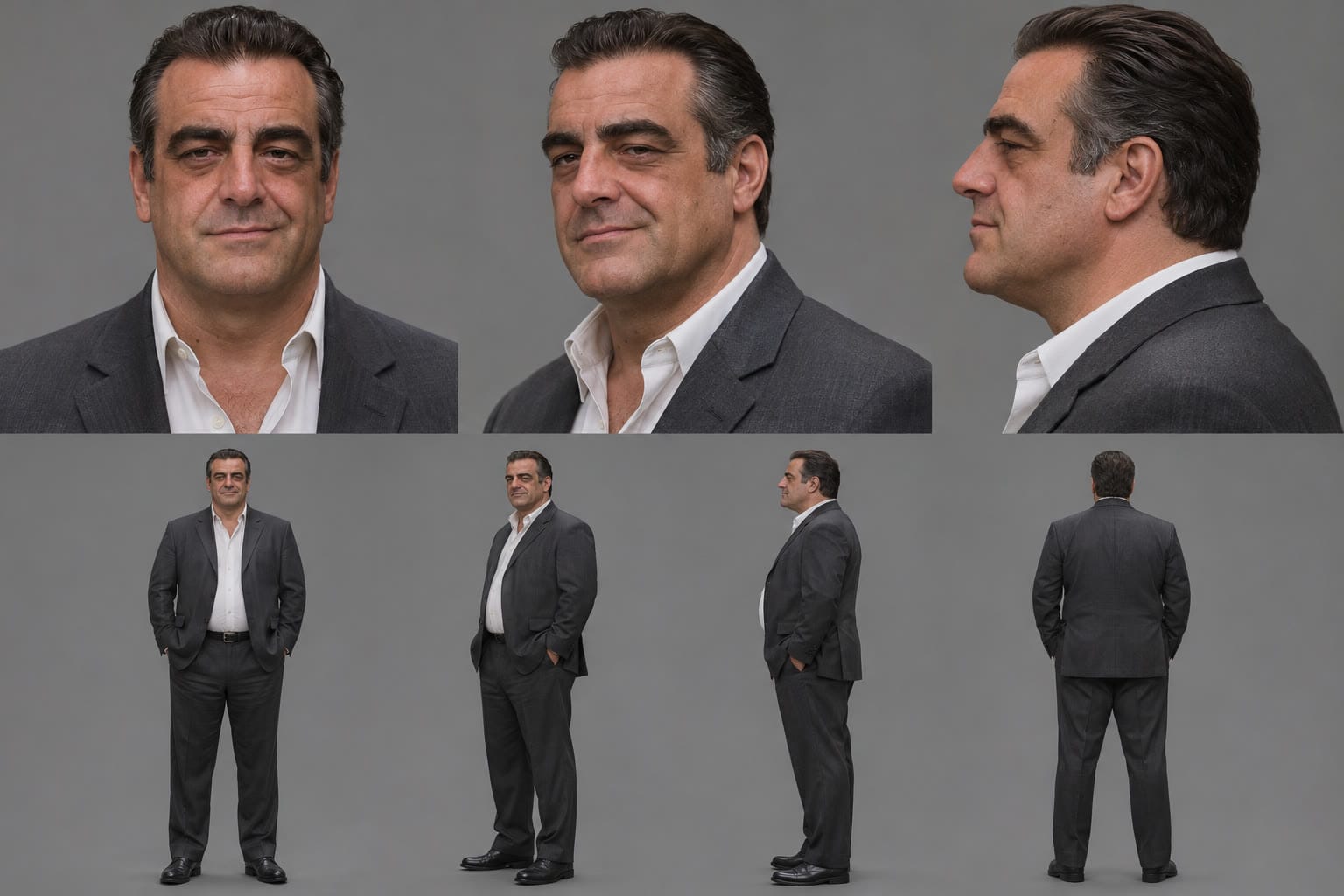
Example GTA Crew Character Sheet Prompt
An original invented man, not based on any real person or actor: a retired bank robber in his late forties who has made it, the father figure of a three-man crew. Stocky, broad chest, a slight middle-age paunch, square jaw, clean shaven, dark brown hair combed back neatly with a little grey at the temples, heavy dark eyebrows, a tired knowing half smile. Wearing a charcoal grey two-piece suit, a crisp white open-collar shirt with no tie, black leather shoes.
Character reference sheet, landscape, on a plain neutral grey studio background. Top 60 percent: three large head-and-shoulders close-ups side by side, straight-on front, three-quarter left and 90-degree left profile, pin sharp on the face. Bottom 40 percent: four small full-body views head to feet, front, three-quarter, side and back. Clean soft studio lighting. The same person, face, build and clothes in every view. No text, no labels, no watermarks, no extra people, no background environment.
Photorealistic, shot on a full-frame cinema camera, natural skin texture with pores, real fabric. Not a cartoon, not a video game render, not CGI.
Step Two: Create a GTA-Inspired Sunset Background and Custom GTA 6 Cover
The Goodbye GTA 5 trend relies on a recognizable cinematic aesthetic: a California beachfront, warm sunset lighting, palm trees, and a brightly colored retro sports car.
Generate an empty environment reference using GPT Image 2 before introducing any characters. This gives Seedance 2.5 a consistent location to reference across both scenes, reducing the likelihood of changes to the pier, vehicle, or surrounding landscape.
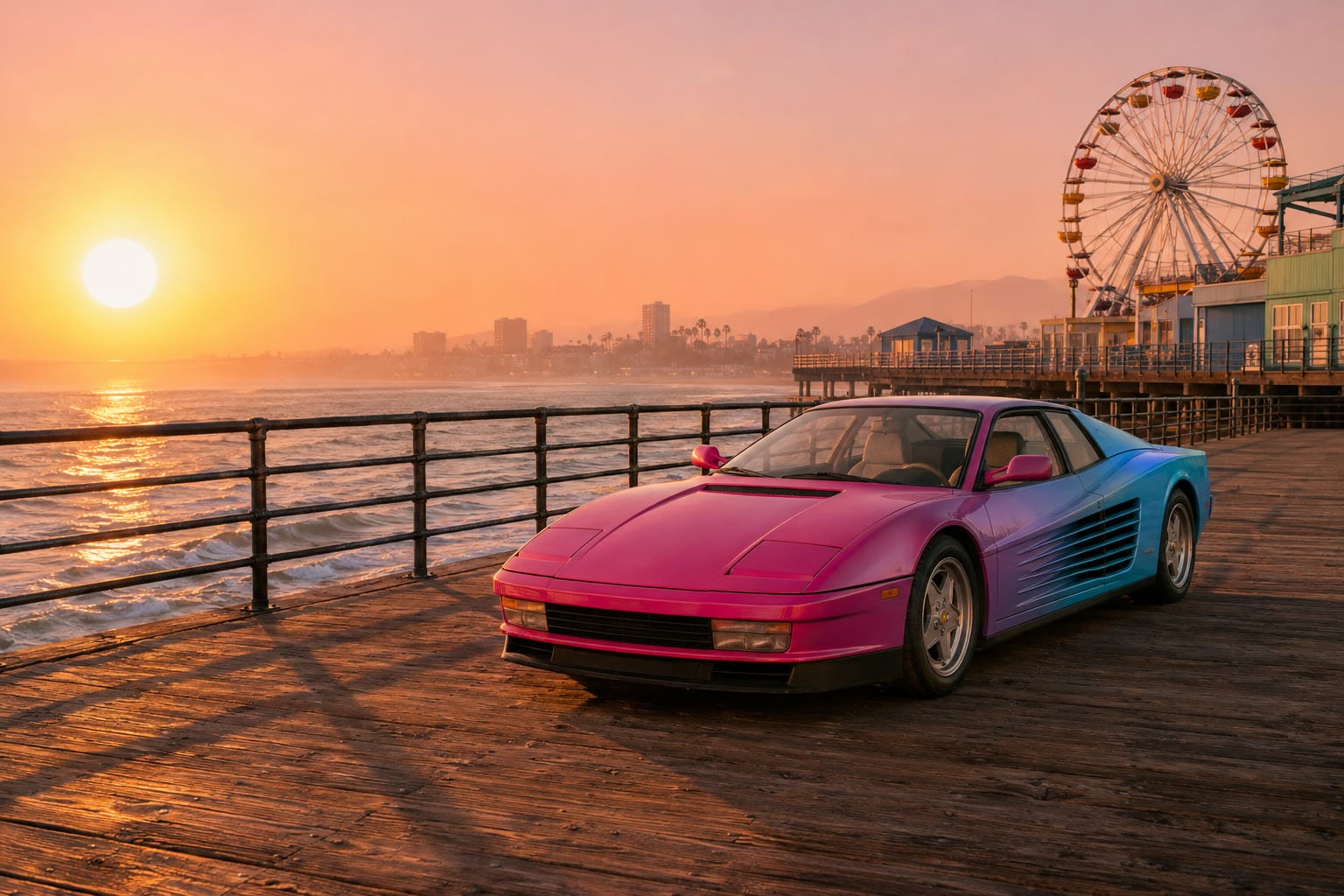
GTA Sunset Pier AI Image Prompt
A landscape 4:3 photographic environment plate, an empty location with no people in it. A wide shot on a long wooden beach pier in Southern California at golden hour, the sun low and huge over the Pacific on the left, a hazy peach and pink sky. Weathered wooden planks, a black metal railing along the edge, a Ferris wheel and a few pier buildings behind on the right, the city skyline and palm trees soft in the distance. Parked on the pier on the right: a 1980s Italian flat-nosed mid-engine sports car with long side strakes and pop-up headlights, its paint a two-tone fade from hot magenta pink at the front to sky blue at the back. Warm backlight, long shadows, gentle lens haze. Photorealistic, shot on a full-frame cinema camera, natural skin texture with pores, real fabric. Not a cartoon, not a video game render, not CGI. No people, no text, no signs with lettering, no logos
Next, generate a custom GTA 6 game cover featuring yourself. Upload your own character reference sheet alongside the three crew character sheets and instruct the image generator to create two game cases:
- A GTA 5 PlayStation 4 cover featuring the three original crew members.
- A GTA 6 PlayStation 5 cover featuring your character as the main protagonist.
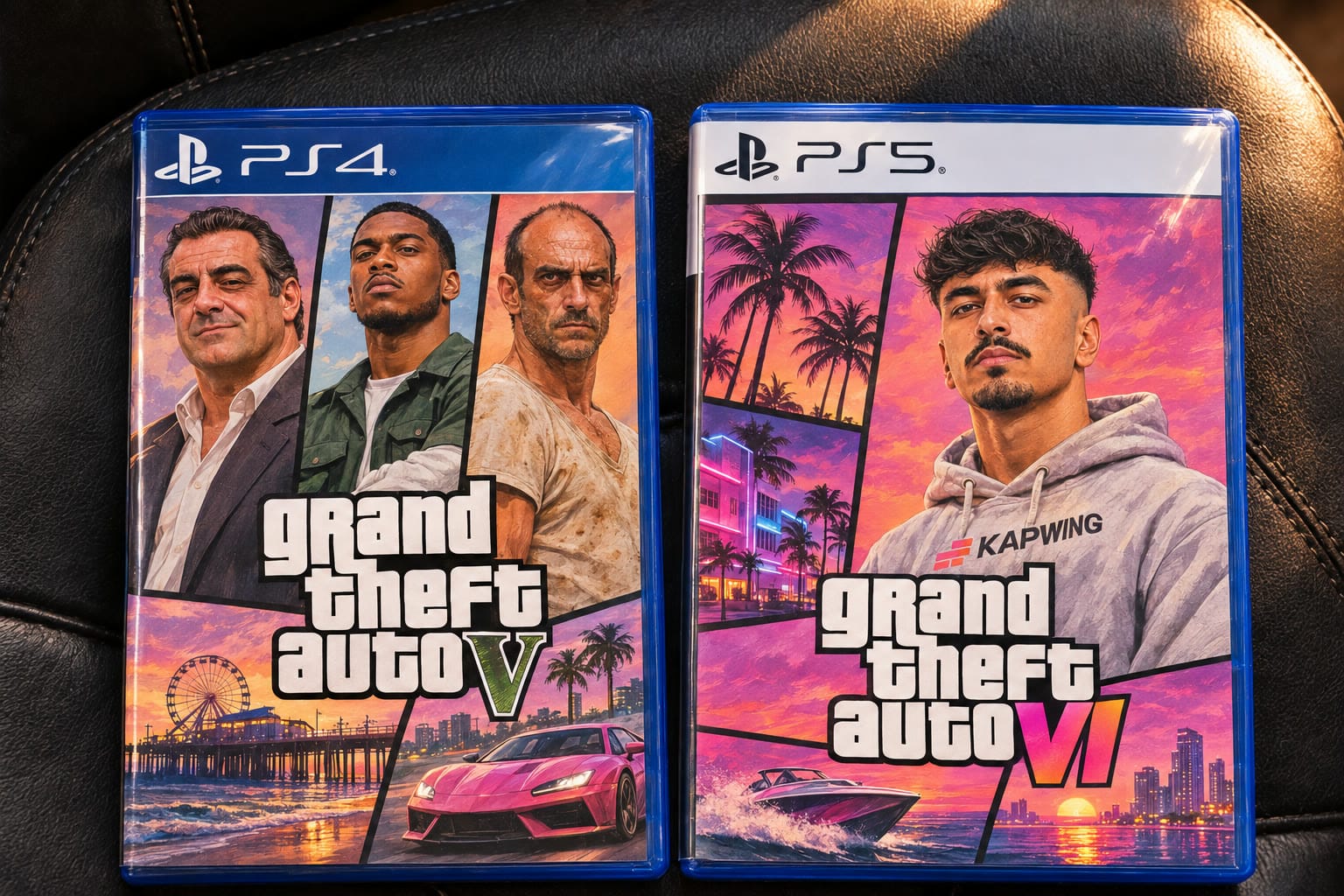
Custom GTA 6 Game Cover AI Prompt
A photographic product shot, top-down, of two video game cases lying side by side on a black leather car seat in warm evening light. Real plastic cases with blue PlayStation headers, natural reflections on the plastic, leather texture, shallow depth of field. Photorealistic, not CGI.
Both covers are ORIGINAL illustrated cover art made only from the people in the attached reference images, no other characters at all.
Left: a PlayStation 4 case titled "Grand Theft Auto V" in bold white stacked type. Its cover is a collage of painted comic-style panels starring the three men from reference images 2, 3 and 4: the man in the charcoal suit, the man in the open dark green work shirt over a white long-sleeve top, and the balding man in the stained off-white V-neck, each in his own panel, plus panels of a pier at sunset and a pink sports car.
Right: a PlayStation 5 case titled "Grand Theft Auto VI" in bold white stacked type with a big pink and orange "VI". Its cover is a pink, purple and orange neon-sunset collage of painted panels, and the big hero panel is the man from reference image 1: his exact face, hair, beard and moustache from that sheet, wearing the grey hoodie with the KAPWING chest print. Smaller panels: palm trees, a neon beach skyline, a speedboat.
Step Three: Generate the Goodbye GTA 5 AI Video With Seedance 2.5
We recreated the Goodbye GTA 5 trend using two 15-second Seedance 2.5 generations, producing a 30-second cinematic sequence with ten planned shots.
Both generations use the same six image references to maintain character identity, clothing, vehicle design, and environmental continuity.
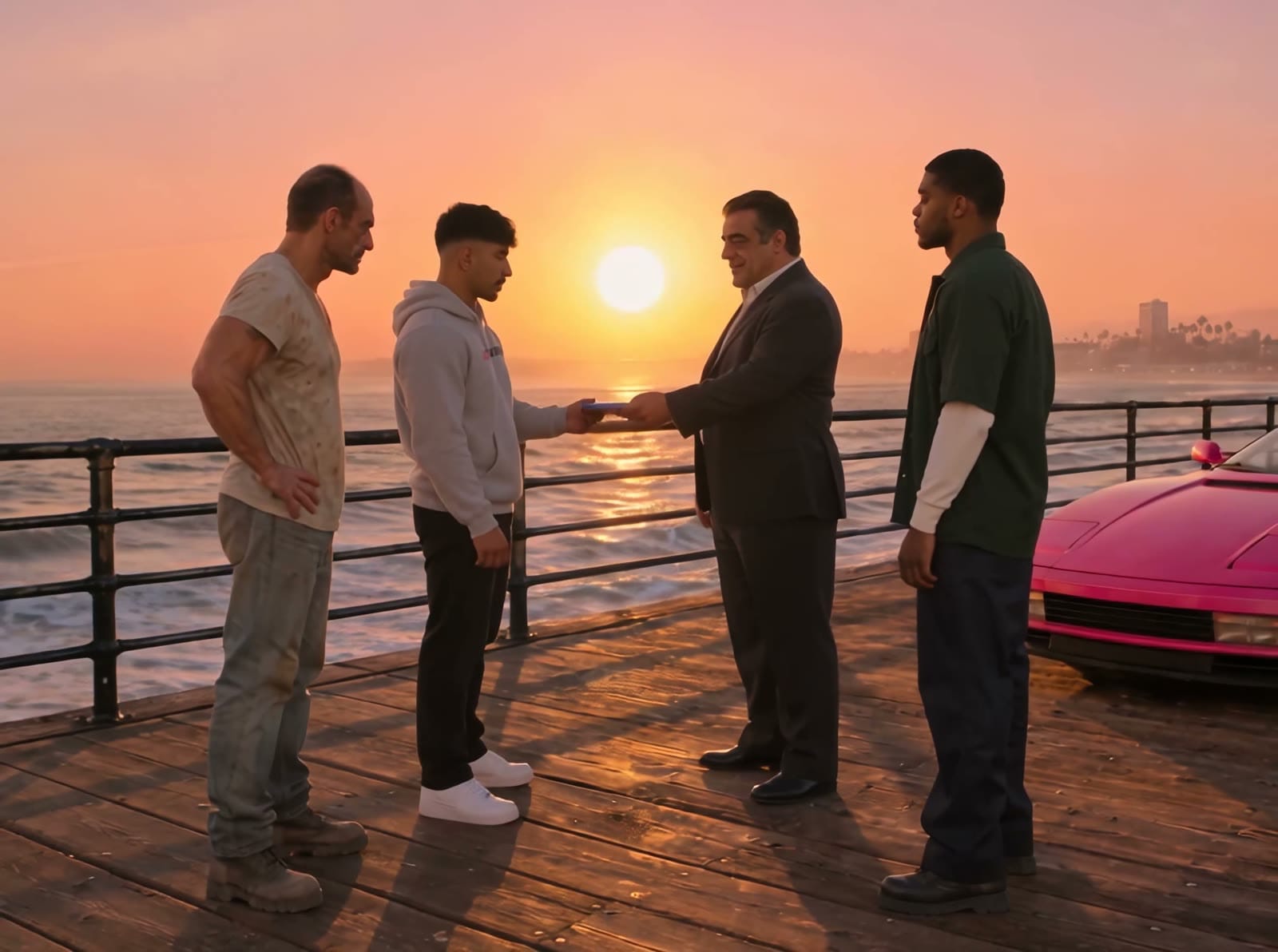
Goodbye GTA 5 AI Video Prompt: The Farewell
A 15 second photoreal cinematic film scene, 4:3 landscape, one single Seedance 2.5 generation with five camera cuts inside it. Golden hour on a wooden Southern California beach pier, the sun low and huge over the Pacific, warm peach and pink backlight, soft lens haze, shallow depth of field, shot like a feature film on a cinema camera. The story: a three-man crew says goodbye to the young friend they raised. They hand him the sequel and the keys to their car, because it is time for him to move on.
Cast (identity, hair, build and clothes come from the references only):
- image_1 is the young man who is leaving: the grey KAPWING hoodie, black jeans and white trainers exactly as on #image_1. He is 6 feet tall with an athletic, broad-shouldered build.
- image_2 is the man in the charcoal suit and open white shirt.
- image_3 is the man in the open dark green work shirt over a white long-sleeve top.
- image_4 is the balding man in the stained off-white V-neck T-shirt and worn jeans.
image_5 is the location: the wooden beach pier, the black railing, the Ferris wheel and the pink-to-blue 1980s sports car. #image_6 shows the two game cases: the old Grand Theft Auto V for PlayStation 4 with the three men on its cover, and the new Grand Theft Auto VI for PlayStation 5 with #image_1 himself as the hero on its cover.
Use every image as a reference only (Seedance 2.5 reference-to-video): none of them is the first frame.
Shot list:
0.0 to 3.7 s: Wide shot from the side, the four men standing in a loose circle on the pier, the low sun and the sea behind them. #image_2 hands #image_1 the Grand Theft Auto VI PlayStation 5 case from #image_6 and says warmly, in a low gravelly voice: "Take care, kid." #image_4 stands with his hands on his hips, #image_3 watches quietly.
3.7 to 5.6 s: Over-the-shoulder close-up looking down at #image_1's hand holding the Grand Theft Auto VI case, the cover sharp: it is the cover from #image_6, with #image_1's own face on it. The pier planks soft below.
5.6 to 9.4 s: Low angle from knee height. #image_3 holds out a car key, drops it into #image_1's palm and they shake hands firmly. #image_2 stands between them in the background. The pink-to-blue sports car from #image_5 is parked further down the pier, the city skyline behind it.
9.4 to 12.9 s: Low angle close on the front of the pink sports car on the pier, its black grille sharp in the foreground; behind it, soft and silhouetted against the sun, the four men stand together by the railing.
12.9 to 15.0 s: Medium close-up. #image_4 grabs #image_1's hoodie at the shoulder with his fist, pulls him in and stares at him, eyes wet, jaw clenched, holding back tears. #image_3 and #image_2 behind them.
Sound: waves under the pier, gulls, a soft sea breeze, quiet footsteps on wood. Only the one spoken line. No music.
Make it ONE single Seedance 2.5 generation of the whole prompt exactly as written, with the camera cuts happening inside that one generation. No separate clips and no assembly step.
Generate it in Seedance 2.5 draft mode first: a 480p draft preview, so I can approve it and then finish that same draft at full resolution from its draft ID. Do not generate the full resolution version yet.
The second scene completes the transition from GTA 5 to GTA 6. Your character thanks the crew, gets into the sports car, places the new game beside the old one, and drives away along the California coastline.
For this generation, we also attached a voice recording so Seedance 2.5 could reproduce the main character's voice. The final aerial shot gradually pulls away from the car, creating the sense of closure that makes the original trend so effective.
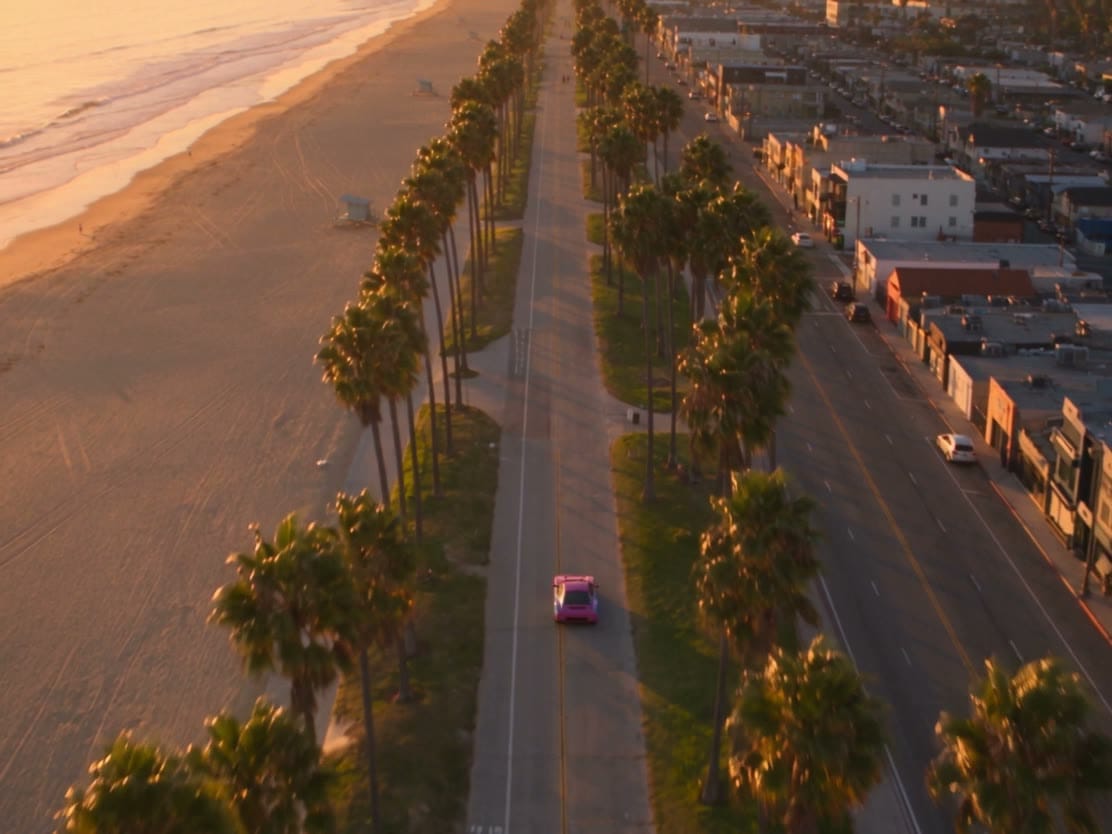
Goodbye GTA 5 AI Video Prompt: Driving Into the Sunset
A 15 second photoreal cinematic film scene, 4:3 landscape, one single Seedance 2.5 generation with five camera cuts inside it. It continues the same goodbye on the same wooden Southern California beach pier at golden hour: warm peach and pink backlight, soft lens haze, shallow depth of field, shot like a feature film on a cinema camera. The young man has the sequel and the car keys; now he says thank you and drives away.
Cast (identity, hair, build and clothes come from the references only):
- image_1 is the young man who is leaving: the grey KAPWING hoodie, black jeans and white trainers exactly as on #image_1. He is 6 feet tall with an athletic, broad-shouldered build.
- image_2 is the man in the charcoal suit and open white shirt.
- image_3 is the man in the open dark green work shirt over a white long-sleeve top.
- image_4 is the balding man in the stained off-white V-neck T-shirt and worn jeans.
image_5 is the location: the wooden beach pier, the black railing, the Ferris wheel and the pink-to-blue 1980s sports car. #image_6 shows the two game cases: the old Grand Theft Auto V for PlayStation 4 with the three men on its cover, and the new Grand Theft Auto VI for PlayStation 5 with #image_1 himself as the hero on its cover.
Use every image as a reference only (Seedance 2.5 reference-to-video): none of them is the first frame.
The attached audio is the voice reference for #image_1: his timbre and accent only.
Shot list:
0.0 to 4.0 s: Close-up of #image_1 facing the camera, the blurred shoulders of two of the men in the foreground on either side, the pier and the beach soft behind him. Tears run down his face, he presses his lips together, then says quietly, his voice breaking: "Thanks."
4.0 to 7.9 s: Inside the pink sports car, seen from the passenger side. #image_1 sits in the black leather driver's seat, lays the Grand Theft Auto VI case down on the passenger seat beside him, then turns the key in the ignition. The sunset glows through the windscreen.
7.9 to 10.3 s: Top-down close-up of the black leather passenger seat: the old Grand Theft Auto V PlayStation 4 case and the new Grand Theft Auto VI PlayStation 5 case lying side by side, exactly as in #image_6.
10.3 to 12.5 s: From behind the three men, #image_2 on the left, #image_3 in the middle, #image_4 on the right, standing at the pier railing watching the pink sports car drive away along the beachfront road below, palm trees and low buildings, hills behind. #image_2 says softly: "Bye."
12.5 to 15.0 s: High aerial drone shot following the small pink car down a long straight road lined with tall palm trees, the beach and the ocean on one side and the low town on the other, golden light, the camera slowly rising.
Sound: the car engine starting and pulling away, waves, gulls, wind. Only the two spoken lines. No music.
Make it ONE single Seedance 2.5 generation of the whole prompt exactly as written, with the camera cuts happening inside that one generation. No separate clips and no assembly step.
Generate it in Seedance 2.5 draft mode first: a 480p draft preview, so I can approve it and then finish that same draft at full resolution from its draft ID. Do not generate the full resolution version yet.
How Much Does a GTA 6 AI Video Cost in Kapwing Credits?
The cost of creating a GTA 6 AI video depends on the number of reference images you generate, the length of your video, the generation resolution, and how many attempts you need to achieve the desired results.
Here's a breakdown of the Kapwing credit costs from our testing in November 2026.
| AI generation task | Kapwing credits |
|---|---|
| Two reference images with GPT Image 2 | 12 |
| 10-second animated character sheet with audio at 720p | 233 |
| 480p draft previews of four trailer scenes | 605 |
| 15-second Seedance 2.5 video at 720p | 348 |
| 12-second Seedance 2.5 video at 720p | 307 |
| 10-second Seedance 2.5 video at 720p | 279 |
| Two Goodbye GTA 5 video scenes | 531 |
The most effective way to reduce AI video generation costs is to finalize your reference images before generating video and test complex scenes at a lower resolution.
Correcting an inconsistent character sheet or an inaccurate environment reference early can prevent multiple expensive video regenerations later.
Frequently Asked Questions
How do you make an AI video of yourself in GTA 6?
Make a game version of yourself as a character sheet, then add your voice in a 10-second video character sheet. Build each location, prop and screen as an image. Then write one prompt per scene and generate it with Seedance 2.5 in Kai.
What are the best GTA 6 AI video prompts?
The prompts that work best name every reference and say what to take from it. They give each shot a time, a camera and an action. They end with what must never appear. Every prompt we used is in this article, ready to copy.
Can I use my own face in a GTA 6 AI video?
Yes. Use your photo to make the face shot and the character sheet. The scenes then use the game-style sheet, not your photo. In our tests, Seedance 2.5 in Kai refused real photos of people as scene references, but the sheet always worked.
Can the AI use my real voice?
Yes. Record 10 to 15 seconds on a microphone and attach it when you make the video character sheet. Each scene then uses that clip as a voice reference. You can also re-record any line yourself in the Kapwing editor.
What AI video generator makes GTA 6 style videos?
We used Seedance 2.5 in Kai for every scene. It takes several reference images and a voice, makes clips of 4 to 15 seconds, and cuts between shots inside one clip. Kapwing's AI video generator has more options.
How long can a GTA 6 AI video be?
Each Seedance 2.5 generation runs 4 to 15 seconds. For a longer video, make several scenes and join them in the editor. Our trailer was 5 scenes and about 66 seconds.
How do I make the Goodbye GTA 5 AI trend?
Make your character sheet, 3 invented crew sheets, a pier at sunset and an image of both game cases with you on the GTA 6 cover. Then generate 2 scenes of 15 seconds each: the hand-over, then the goodbye drive.
Why does my GTA 6 AI video look like real life instead of a game?
Say it plainly in the prompt: "an in-engine cinematic cutscene rendered in Unreal Engine 5" and "not live action". Use a game-style character sheet, not a photo. Keep the exclusions line that bans a photoreal look and film grain.
Can I post GTA 6 AI videos on YouTube?
Make it clear the video is AI-generated and not real gameplay. YouTube may ask you to label AI content that looks real when you upload, so check YouTube's current rules first. You can find more creator guides on our YouTube resources page.