When Should You Label Videos as 'AI'?
A 2026 survey found that 91% of consumers expect brands to disclose AI use in marketing — but when does social media content actually need an AI label?
Every major social media app now has a switch that can tag your post as AI. TikTok, Instagram, Facebook, and YouTube all ask some version of the same question when you upload: Was this made with AI?
You know what you did to your video. What you want to know is where each platform draws the line: which AI edits require disclosure, and whether adding that label could cost you reach or engagement.
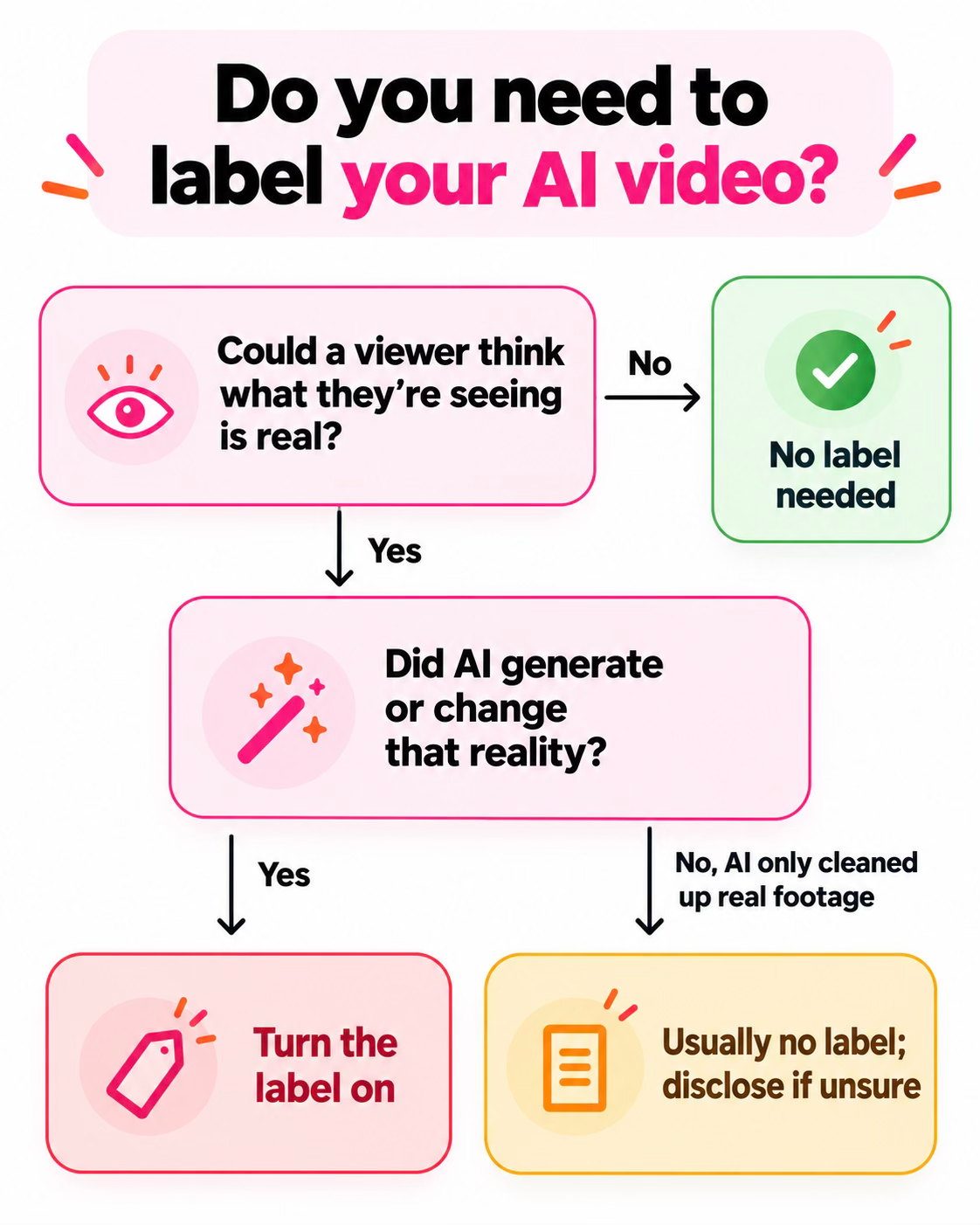
As a general rule, you should label a video when AI creates or meaningfully changes something a viewer could mistake for real footage or audio: a realistic person who doesn’t exist, an event that never happened, or a real person appearing to say something they never said. Routine edits like captions, color correction, cleaner cuts, and upscaling generally don’t require disclosure, provided they don’t mislead viewers about what actually happened.
The harder cases sit between those extremes: AI voice-overs, generated B-roll, or edits that change what viewers think happened. This guide explains where each platform draws the line, then examines the other question on creators’ minds: what AI labels mean for visibility and engagement.
AI Edited vs. AI Generated: The Core Distinction
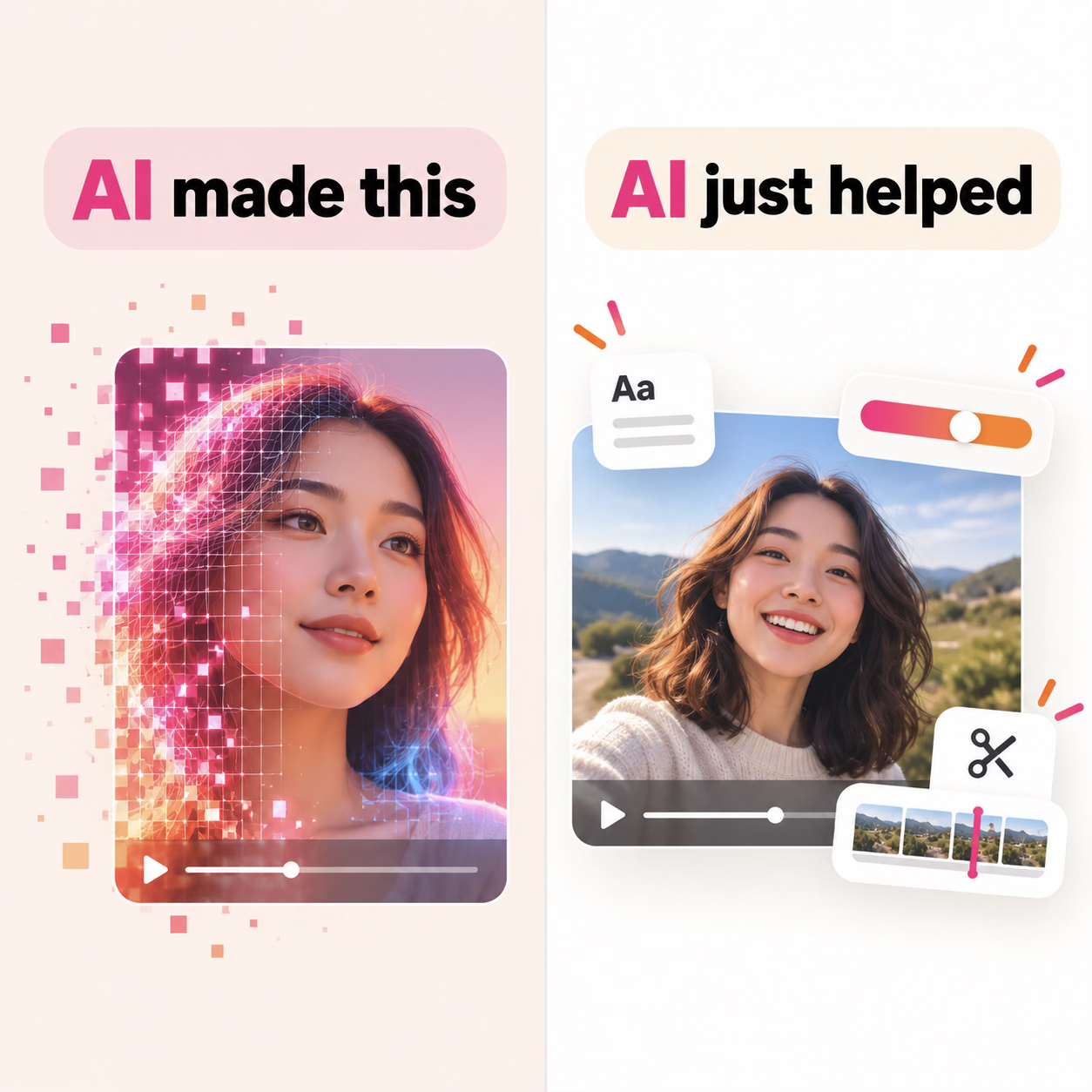
A useful starting question is: did AI simply improve your footage, or did it create or change something viewers could mistake for reality?
If AI creates or meaningfully changes what looks or sounds real, a label is generally required. That includes a realistic clip generated with Kling, Veo, or Seedance; a lifelike person who doesn’t exist; an invented event presented as real footage; or a real person edited to say or do something they didn’t. Even if you started with genuine footage, substantial AI alterations can require disclosure.
Routine AI editing generally doesn’t require a label. Auto-captions, color correction, background blur, noise reduction, upscaling, and an AI-assisted cut of your own clips typically improve the presentation without changing what happened. Production help, such as polishing a script or designing a thumbnail, also generally falls outside video disclosure requirements.
Then there’s the middle, and this is the part that gets a little confusing: a few edits land differently depending on where you post. These include common AI edits such as dubbing your own voice into another language, removing an object with generative fill, and putting an AI version of yourself on camera.
The platform sections below help outline each app's guidelines. Where a platform stays vague, fall back to the test above: if an AI-generated result could pass as real, you should disclose it.
Quick Sort:
- Generally requires a label: Realistic AI-generated clips, lifelike AI-generated people or avatars, invented events presented as real footage, and real people made to say or do something they didn’t.
- Generally doesn’t require a label: Captions, minor color adjustments, blur, upscaling, noise reduction, routine cuts of real footage, and help with scripts or thumbnails.
- Check the platform and the specific edit: AI dubbing or voice cloning, background replacement, and generative-fill object removal.
How to Label AI Content on Each Platform
Each app puts its disclosure controls in a different place and has its own examples of what needs a label. Here’s how TikTok, Instagram, Facebook, and YouTube handle it.
TikTok
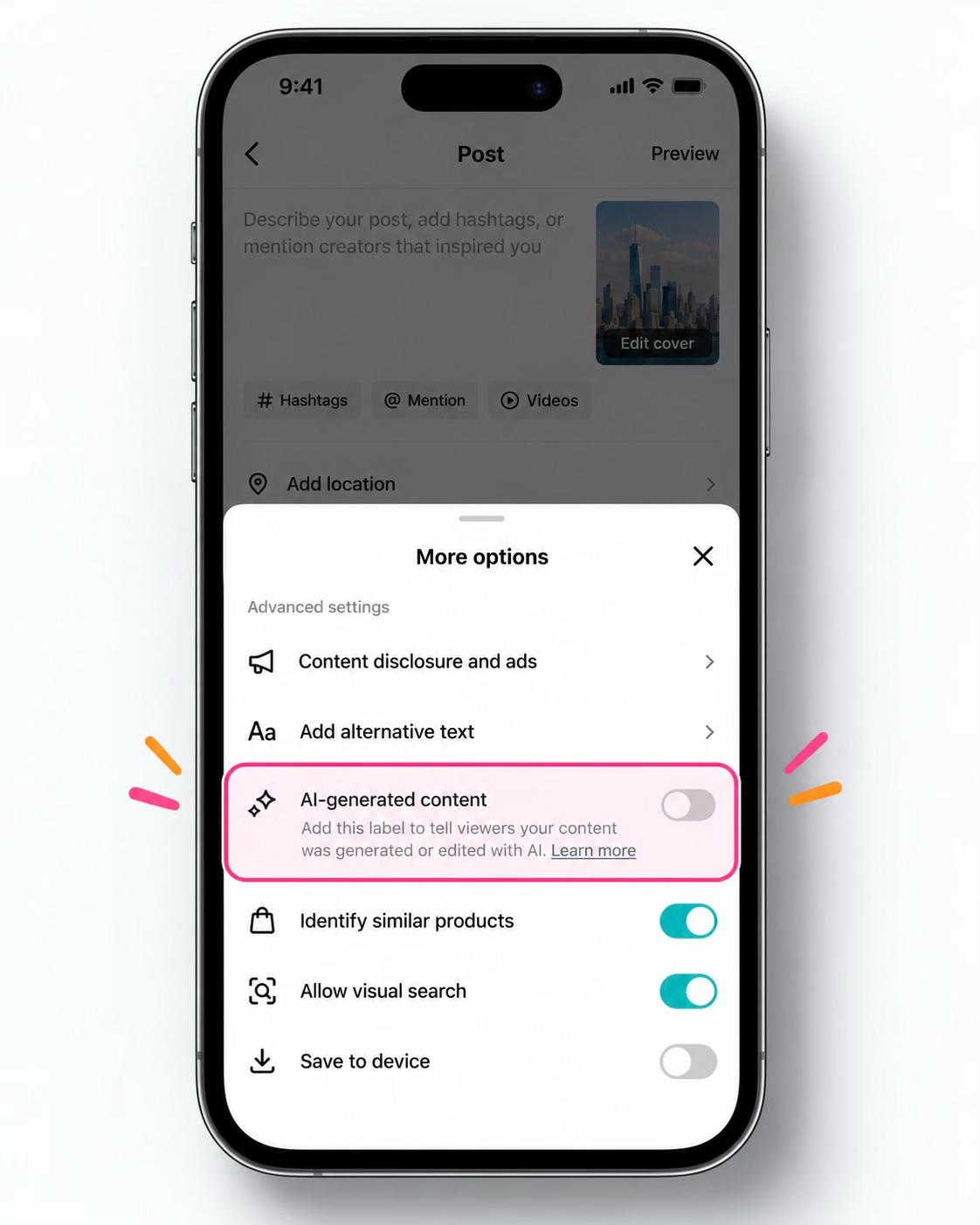
TikTok requires labels for AI-generated content containing realistic images, audio, or video. To add one, record or upload your video, tap Next, open More options, and turn on AI-generated content.
TikTok may also label content automatically when you use its AI effects or upload a file carrying Content Credentials — metadata that identifies how it was created.
Unlabeled realistic AI content can be removed. TikTok also says enabling the label won’t affect a video’s distribution as long as the content follows its Community Guidelines.
Instagram and Facebook
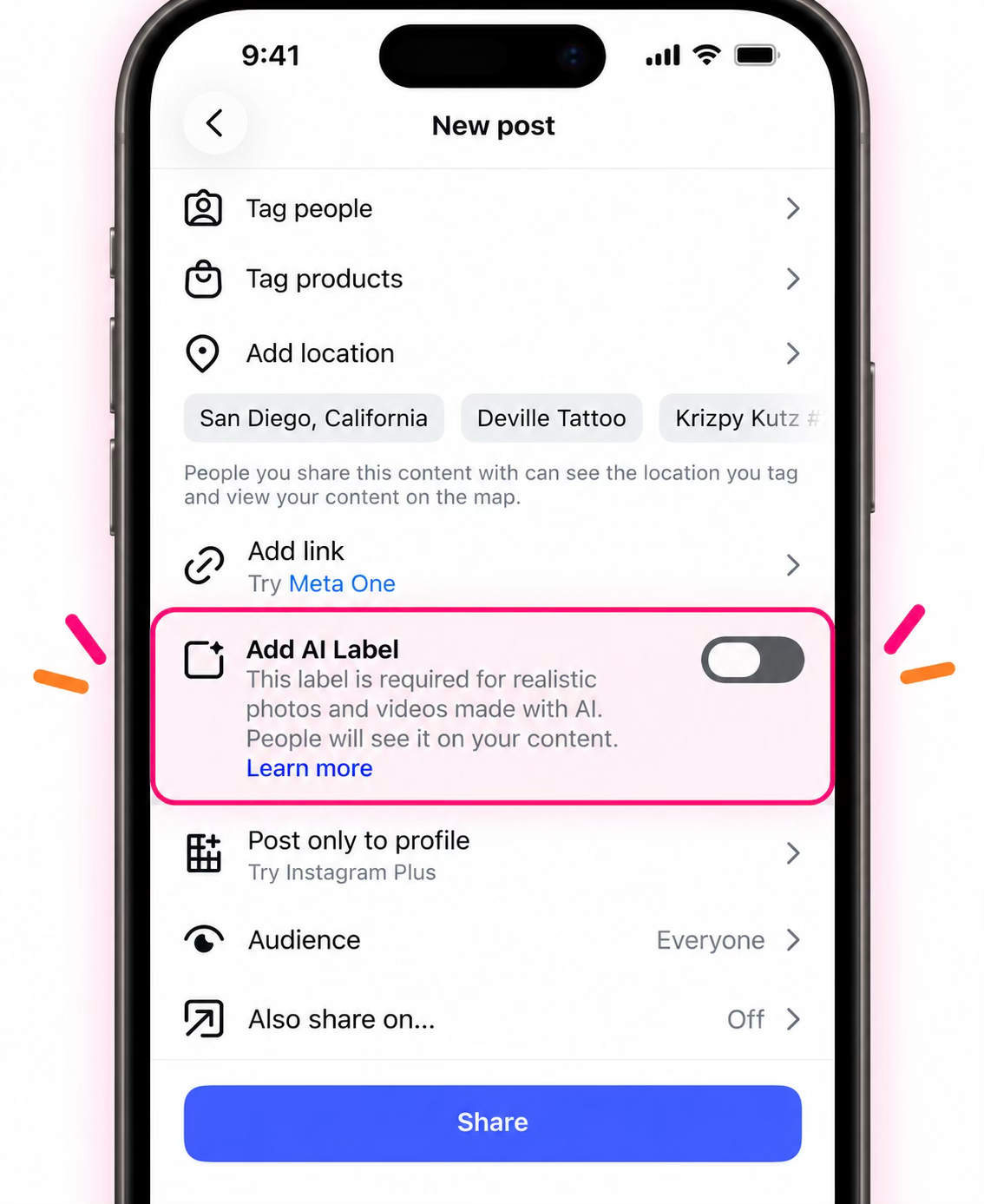
Meta calls its tag “AI info.” You can add it yourself in the post’s advanced settings, and Meta applies it automatically when it detects AI provenance data.
One quirk worth knowing: Meta treats fully AI-generated posts and lightly AI-edited ones differently. An AI-generated image or video gets a visible label, while a post that was only edited with AI has its “AI info” tucked into the post’s menu, where almost nobody looks. You still disclose. Meta just decides how loudly.
More info on Meta’s explanation of AI labels here.
YouTube (and Shorts)
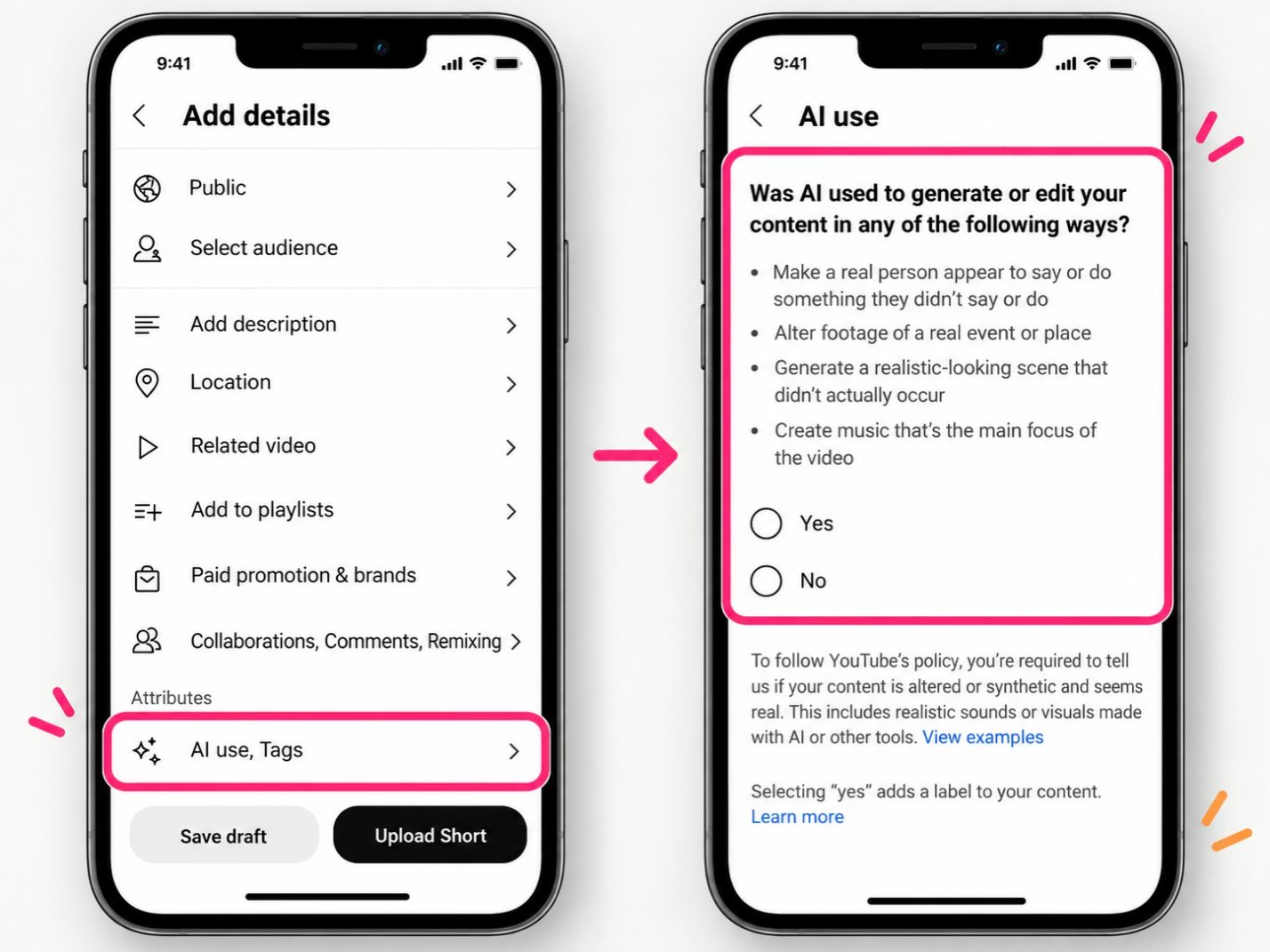
YouTube gives specific examples of what needs disclosure. At upload, you answer whether the video contains “altered or synthetic” content
You don’t need to say yes for beauty filters, color, captions, upscaling, sharpening, cloning your own voice for a voiceover, or help with your script and thumbnail.
You do need to say yes for a realistic scene that didn’t happen, a real person altered to say or do something, or real footage changed to misrepresent an event.
A label shows on the video itself for photorealistic or music content, and sits in the expanded description for other AI content. YouTube also states plainly that disclosing doesn’t cost you reach or monetization.
Cross-Platform Tracker
Every “when to label” call below follows the same principle: realistic AI that could pass as real gets disclosed. Last verified November 2026 against each platform’s own policy.
AI CONTENT DISCLOSURE GUIDE
| Platform | The label | When to turn it on | Edited vs generated | Auto-applies? | Primary source |
|---|---|---|---|---|---|
 TikTok |
“AI-generated” | Realistic synthetic people, places, or events | One bucket; a realistic result triggers it | Yes, from provenance data | TikTok Guidelines |

 Instagram and Facebook |
“AI info” | Photorealistic AI content | Generated gets a visible label; edited gets the label hidden in the menu | Yes, from provenance data | Meta Help |
 YouTube and Shorts |
“Altered or synthetic content” | Realistic scenes, altered real people or events | Clear carve-outs for assistive edits | Yes, for Google-AI tools and provenance data | YouTube Help |
 X |
No self-disclosure label (enforcement-based) | No creator toggle | Judged on deceptive harm | No creator label | X Policy |
 LinkedIn |
“Content Credentials” icon | No creator mandate | Not specified | Yes, reads provenance data | LinkedIn Help |
 Pinterest |
“AI modified” | Platform applies it | One label for both | Yes, metadata + classifiers | Pinterest Newsroom |
 Snapchat |
Ghost + sparkle watermark | Snap's own AI tools | Not clearly separated | Yes, on Snap-AI content | Snap Policy |
Can AI Labeling Hurt Your Reach?
This is the fear that makes many creators reluctant to label their AI content. The answer has two parts.
First, the good news: no major platform has explicitly stated that it demotes posts simply for carrying an AI label.
Instead, platforms increasingly target mass-produced, repetitive, low-effort content — whether AI-generated or not.
YouTube’s 2025 monetization update, for example, targeted “mass-produced and repetitive” uploads amid growing concerns about AI slop on the platform. While this update concerned monetization rather than reach, the distinction is important: the focus was on the content itself, not whether it carried an AI label.t.
Now, the complication: AI labels can negatively affect how viewers respond to content.
- A 2026 Copenhagen Business School experiment found the effect was strongest on emotional posts, where engagement was roughly 24 percentage points lower for AI-enhanced content and 46 points lower for fully AI-generated content.
- A University of Southern California study examining roughly a million TikToks alongside controlled experiments found that labeled posts received fewer likes, while viewers also perceived creators as having put in less effort.
- A peer-reviewed study in PNAS Nexus found that an “AI-generated” label reduced how accurate viewers perceived a post to be, although it had little effect on sharing or overall trust.
Taken together, the research suggests that AI labels can affect engagement, but the impact varies by content and platform. One possible explanation is how viewers interpret the label itself: “AI-generated” can signal “low effort,” making content feel less personal or authentic.
Disclose in Your Own Words
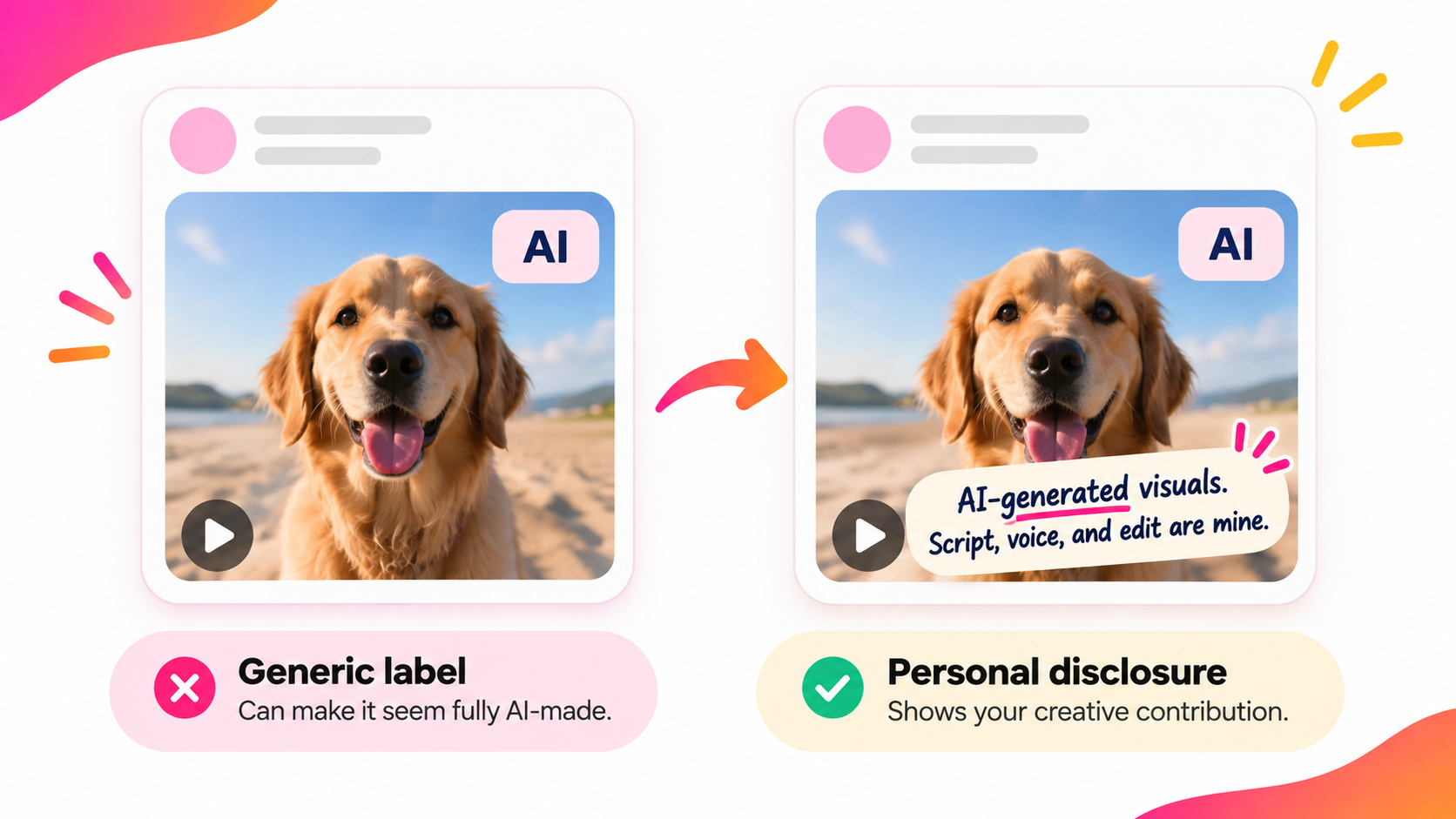
The research also points to a practical way to reduce the potential penalty of AI labels. Explain how you used AI in your own words. A generic “AI-generated” label can leave viewers assuming a machine did all the work, with little human involvement.
Adding a personal disclosure gives viewers more context. Include it in your caption or description, and consider adding an on-screen note or brief spoken explanation when viewers might miss the caption. For example: “AI-generated visuals. Script, voice, and edit are mine.”
This doesn't replace the platform's AI label. Keep that switched on where required, and use your own disclosure to explain your contribution. When viewers understand the human effort behind the content, they're less likely to assume it was created entirely by AI.
When Apps Label AI Content for You
Sometimes, platforms automatically label your content as AI-generated, and they don't always get it right.
The problem is that these labels don't always reflect how much AI was actually used. A minor AI touch-up in Photoshop might trigger a label, while heavily AI-edited content from a tool that doesn't embed the same metadata could go undetected.
This has already caused problems for photographers. In one case, a genuine news photograph taken in 1984 by a former White House photographer was incorrectly labeled as AI-altered.
Similar detection systems apply to video. However, provenance metadata can be lost when files are re-encoded or processed through other tools, meaning AI-generated content may go undetected.
The takeaway: automatic labeling isn't always accurate or consistent. Don't rely on platforms to identify AI content for you. Disclose it yourself, even when an automatic label doesn't appear.
Is Labeling Ever Actually Required by Law?
For everyday social videos, there isn't a universal law requiring AI labels. But depending on where and why you're publishing, there are exceptions worth knowing:
- EU. Since August 2026, the EU AI Act has required businesses and professional creators using AI to disclose realistic deepfakes. This covers synthetic images, audio, and video that could mislead viewers into thinking they're authentic. Personal, non-professional use is generally excluded, and routine edits like color correction or captions don't normally trigger the requirement.
- United States. There's no general nationwide requirement to label every AI-generated social or marketing video. California's AI Transparency Act primarily places disclosure and detection responsibilities on AI tool providers and platforms, rather than individual creators. However, using AI to make misleading advertising claims can still violate consumer protection laws, and the FTC can take action.
- Elsewhere. China has mandatory AI content labeling rules covering the creation and distribution of synthetic content, including requirements for platforms to identify and label AI-generated material.
For most creators, platform rules will be the more immediate concern. But if you're publishing realistic synthetic content commercially, making advertising claims, or distributing content in regions with specific disclosure laws, legal requirements may also apply.
The One Rule Worth Memorizing
You don't want to rethink the rules every time you post. One principle covers most everyday situations:
If AI generated something a viewer could mistake for real, label it. If AI only polished footage you actually filmed, you usually don't need to. And when you're genuinely unsure, add a short disclosure explaining what AI contributed.
Copy-paste disclosures
Copy an example and customize it for your content.
Made with AI. Visuals generated with [tool]; script and edit are mine.
AI-generated video. The story and voice are mine.
AI-assisted: background and b-roll generated with AI, everything else shot by me.
Contains AI-generated visuals.
Choose the description that accurately reflects your work, add the relevant details, and use it alongside any required platform label.
The goal isn't just to follow the rules. It's to make clear what AI created and what you contributed.