
How to Make Sheru Bhai AI Videos (Prompts + Tutorial)
Sheru Bhai is taking over social media, with one video reaching 4.3 million views.
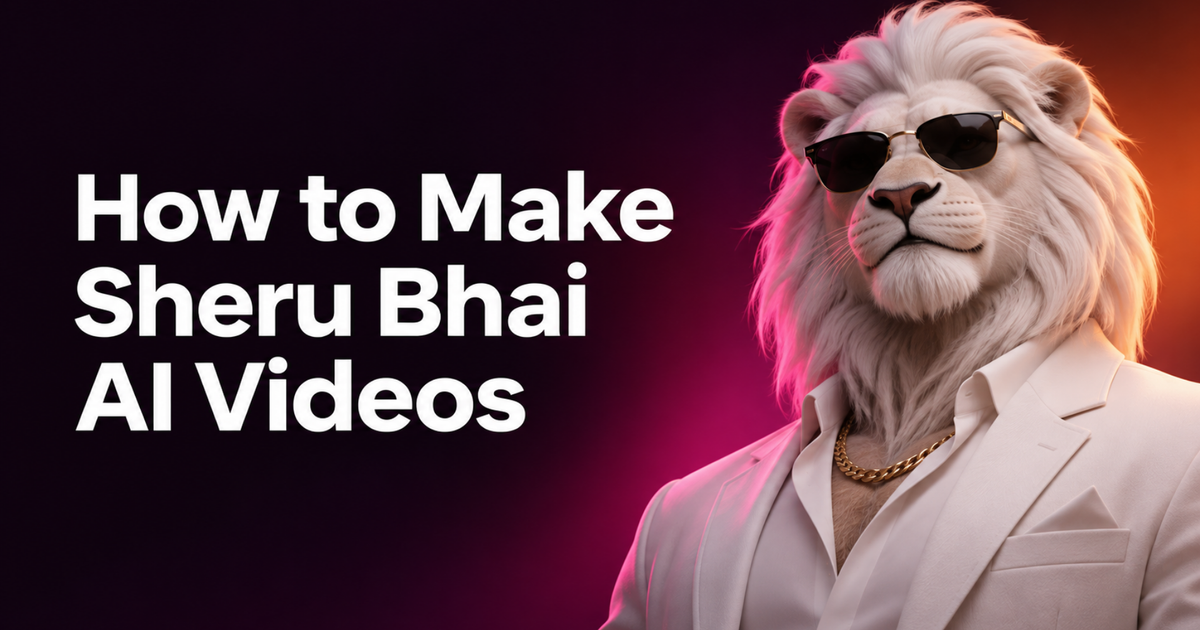
Sheru Bhai is an AI-generated lion millionaire. In one popular version of the trend, the golden-maned lion outbids another character for an absurdly expensive car, jet, or mansion. Each bid becomes more ridiculous until his opponent gives up. Other videos show Sheru making dramatic entrances, walking through palaces, or posing alongside real people in AI-generated photos.
If you want to make a Sheru Bhai video, you need three things: a recognizable character, a short scene with a clear punchline, and an AI video generator.
In this tutorial, I'll show you two ways to recreate the format. The first uses a simple copy-and-paste AI video prompt. The second uses character reference sheets and motion references in Seedance 2.5 through Kapwing for more consistent results. For the longer tutorial, we'll build an original character inspired by the trend: a snow leopard businessman in a midnight-blue velvet suit. That way, you can learn the format without making an identical copy of Sheru.
Table of Contents:
- What Is the Sheru Bhai AI Trend?
- How to Make a Sheru Bhai-Style AI Video
- How to Make a Sheru Bhai AI Photo
- Common Problems With Sheru Bhai AI Video Prompts
- Frequently Asked Questions
What Is the Sheru Bhai AI Trend?
Sheru Bhai is a fictional, lion-headed AI character appearing in short-form videos and images on Instagram, YouTube, and TikTok.
His most recognizable appearance includes a golden or white lion's head, thick mane, luxury suit, gold jewelry, and confident body language. Some videos give him a deep Hindi-speaking voice, while others concentrate on cinematic visuals.
The trend has developed several formats:
- Auction videos: Sheru competes against another animal or animated character, bidding increasingly ridiculous amounts for expensive objects.
- Boss entrance videos: Sheru arrives in a luxury car, walks through a palace, or makes a dramatic entrance surrounded by bodyguards.
- AI photos: People generate images of themselves standing beside Sheru, posing as friends, business partners, or celebrities.
- Short AI dramas: Sheru appears in fictional stories involving rival bosses, conversations, and confrontations.
How to Make a Sheru Bhai-Style AI Video
The easiest way to recreate the trend is to start with a specialized Claude Skill that understands the video format.
Instead of manually planning the scenes, writing image prompts, and figuring out how to keep the characters consistent, you can describe the video you want and let the Skill prepare the production instructions. The process has four steps:
- Use the Sheru Bhai Claude Skill to generate the video prompt and a list of reference images.
- Create the reference images in Kapwing using the image prompts provided by the Skill.
- Generate the entire video in Seedance 2.5 using the references and prompt.
- Review and refine the result before publishing.
We'll use a luxury auction as our example, but you can apply the same workflow to different characters and scenarios.
Step 1: Generate Your Sheru Bhai Video Prompt With Claude
Start by opening Claude with the custom Sheru Bhai Skill enabled.
The Skill is designed specifically for this AI video trend. It understands the common auction format, character roles, exaggerated Hindi bidding dialogue, and fast-paced cinematic editing.
You only need to describe the video you want to make.
For example, let's create an auction featuring a snow leopard and a brown bear competing for a diamond mansion:
Example Request to the Sheru Bhai Claude Skill
Create a Sheru Bhai-style AI auction video.
The main character is a wealthy snow leopard wearing a midnight-blue velvet suit. His rival is a brown bear wearing a black pinstripe suit.
They're competing to buy a diamond-covered mansion at a luxury auction.
A fox auctioneer introduces the prize.
Make the story funny and dramatic, with exaggerated Hindi bidding dialogue, fast camera cuts, and a clear winning punchline.
I want the finished video to be 15 seconds long, vertical 9:16, generated in one pass with Seedance 2.5 in Kapwing.
Give me the reference images I need, prompts to create those references, and one complete video-generation prompt.
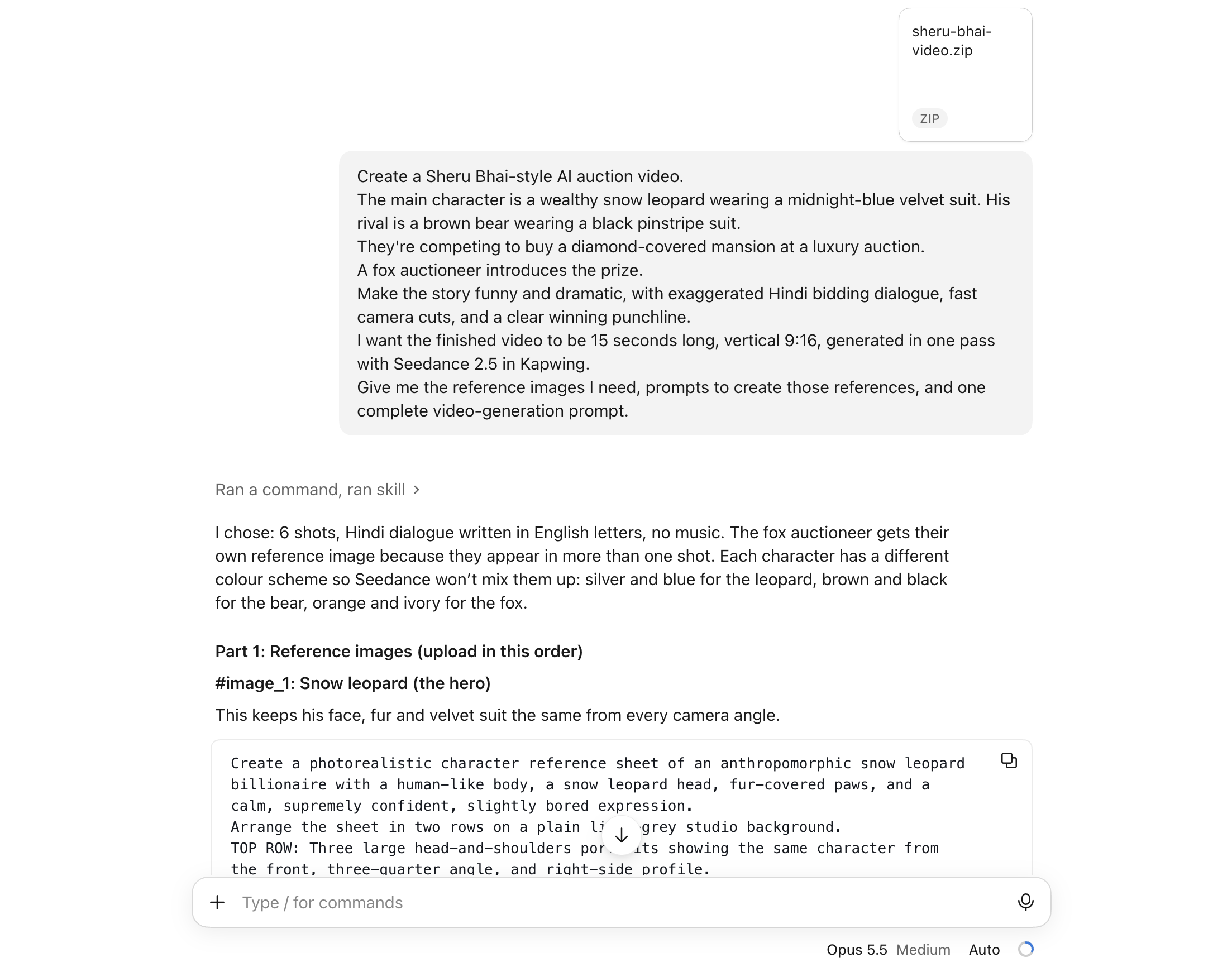
The Skill should return two main deliverables.
- A reference-image plan: This identifies every character and environment needed for the video, with a corresponding image-generation prompt.
- A complete Seedance 2.5 video prompt: This includes the shot-by-shot timeline, dialogue, camera framing, character movements, audio instructions, and reference assignments.
The output should be ready to use in Kapwing without having to manually combine several scenes.
Step 2: Create Your AI Character Reference Sheets
For our auction example, the Skill identifies four references. Open Kai.
We'll use the image prompts generated by the Claude Skill to create the character reference sheets.
| Reference | Purpose |
|---|---|
#image_1
|
Snow leopard's appearance and clothing |
#image_2
|
Brown bear's appearance and clothing |
#image_3
|
Auction hall architecture, furniture, and lighting |
#image_4
|
Auctioneer's appearance and clothing |
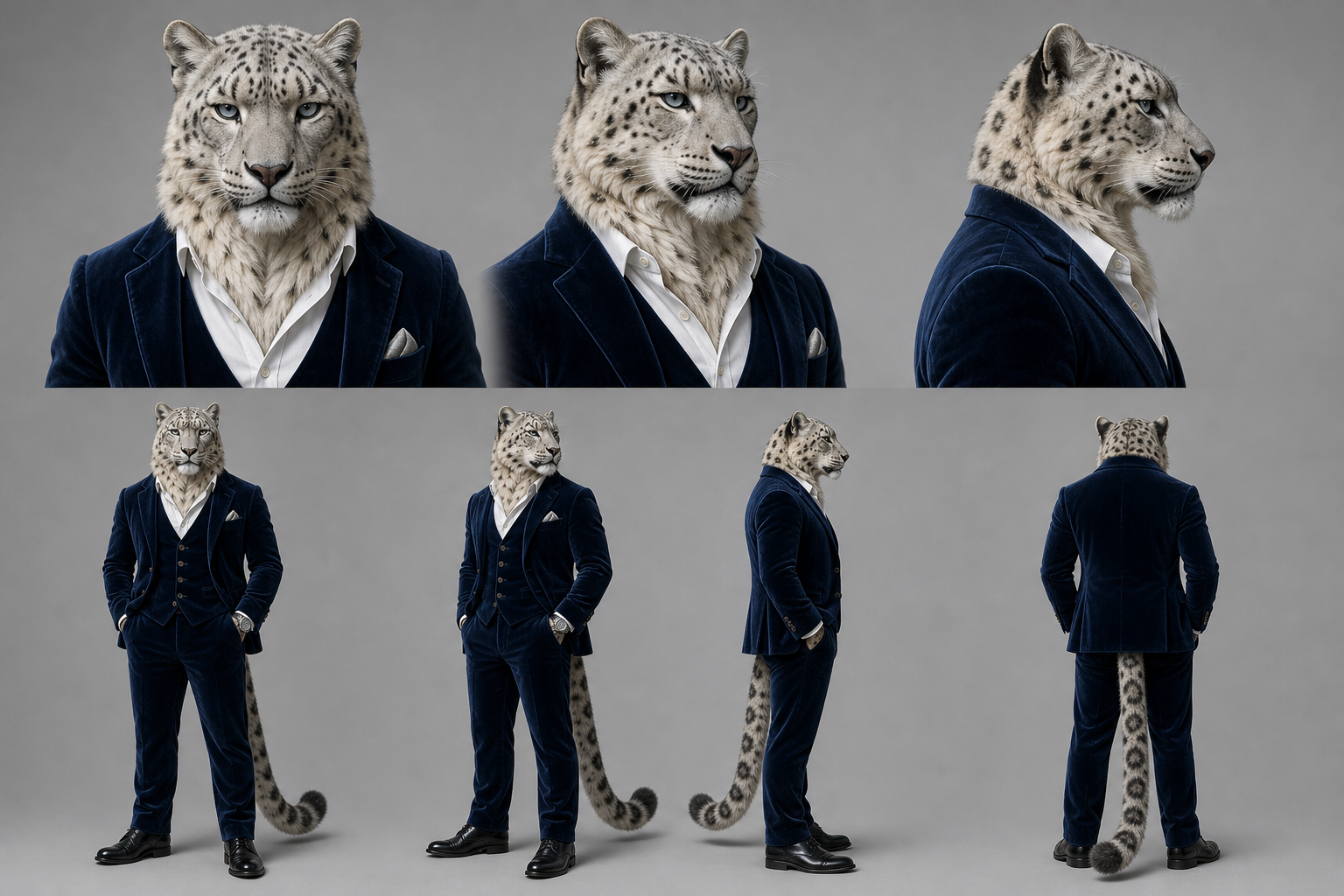
Start by designing the main character. A single portrait might work for a simple close-up, but it provides limited information about what the character looks like from the side or behind.
A character reference sheet shows several views of the same character, helping the video model preserve its appearance when the camera moves. For our example, we're creating a snow leopard businessman.
Snow Leopard Business Man Example Character Sheet
Create a photorealistic character reference sheet of an anthropomorphic snow leopard businessman with a human-like body, a snow leopard head, fur-covered paws, and a confident, slightly arrogant expression.
Arrange the sheet in two rows on a plain light-grey studio background.
TOP ROW: Three large head-and-shoulders portraits showing the same character from the front, three-quarter angle, and right-side profile.
BOTTOM ROW: Four smaller full-body views showing the front, three-quarter angle, right profile, and back.
The character must look identical in all seven views.
FUR: Pale silver-grey with dark rosette spots and a thick cream-colored chest ruff.
CLOTHING: Midnight-blue velvet three-piece suit, white dress shirt, silver pocket square, silver wristwatch, and polished black shoes.
The midnight-blue suit is fabric, not fur. The fur must never replace the clothing or change its color.
Use realistic fur texture, natural proportions, consistent lighting, and sharp details.
No text, labels, captions, or watermarks.
Next, create a rival.
The rival should look different enough that the model doesn't confuse the two characters. Choose another species, a contrasting outfit, and a distinct silhouette.
Sheru Bhai Rival Example Character Sheet
Create a photorealistic character reference sheet of an anthropomorphic brown bear mafia boss with a human-like body, bear head, fur-covered paws, and an expressive, easily offended face.
Use the same two-row reference sheet layout: three head-and-shoulders portraits showing the front, three-quarter angle, and profile, followed by four full-body views.
The bear must have the same appearance in every panel.
FUR: Thick dark-chestnut brown fur.
CLOTHING: Black pinstripe double-breasted suit, crimson silk shirt, thick gold chain, and polished black shoes.
The character is clearly a brown bear, not a lion or snow leopard.
Use a neutral studio background, even lighting, realistic textures, and consistent proportions.
No text, labels, captions, or watermarks.
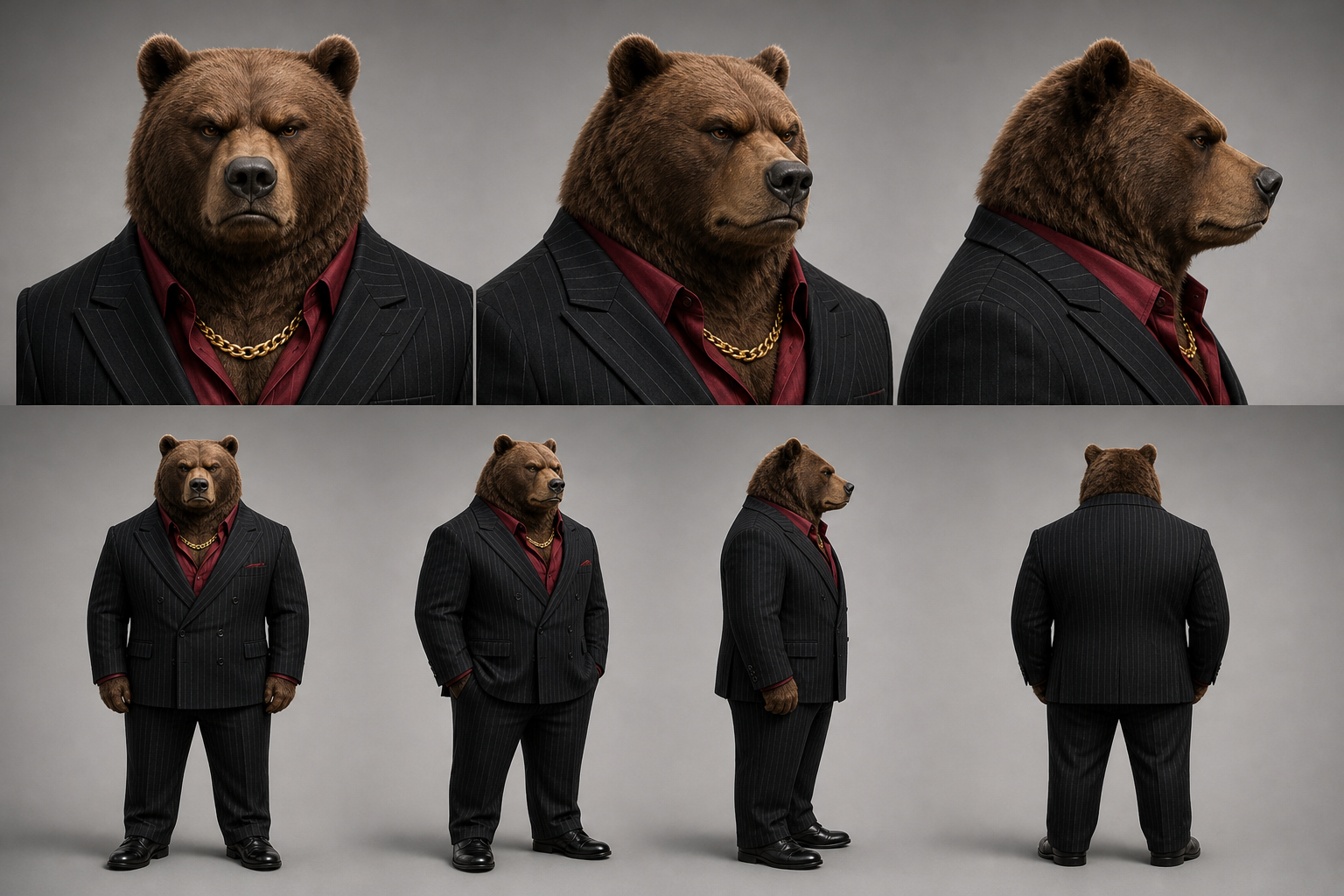
Next, create an environment reference sheet. This defines the appearance of the auction hall so the background doesn't change dramatically between scenes.
The environment should have a consistent layout, color palette, lighting, and seating arrangement.
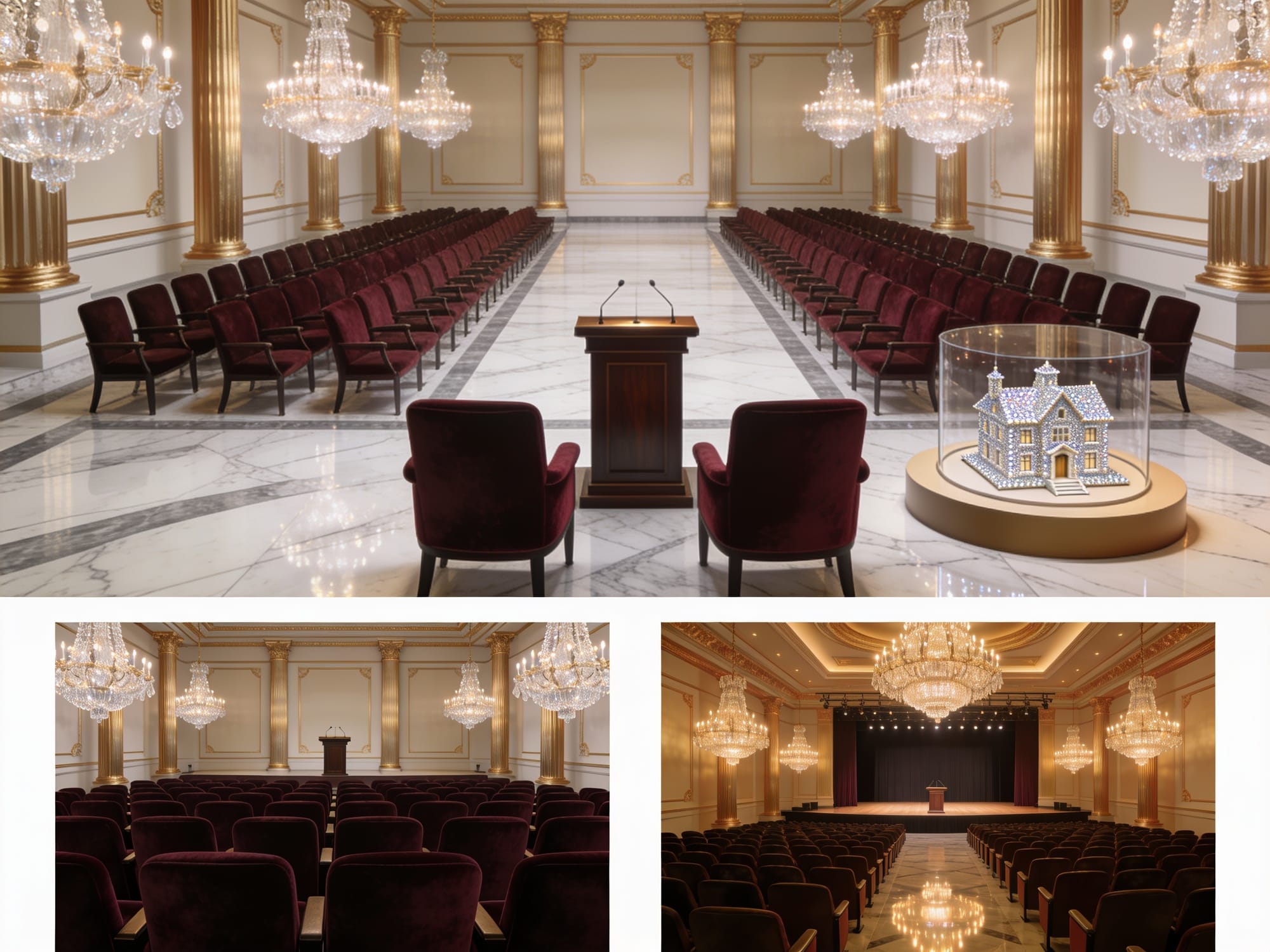
Auction Hall Environment Reference Prompt
Create a photorealistic environment reference sheet for an extravagant luxury auction hall.
Show three complementary views of the exact same interior: a wide establishing view facing the stage, a view of the front VIP seating area, and a view from the stage toward the audience.
ARCHITECTURE: Polished white-and-grey marble floors, cream-colored walls with elaborate gold molding, enormous crystal chandeliers, and tall gold-trimmed columns.
FURNITURE: Rows of dark burgundy velvet VIP chairs, with two prominent front-row seats placed beside each other. A polished dark wooden auctioneer's podium stands at the front of the room.
DISPLAY: A miniature diamond-covered mansion is displayed in a glass presentation case on a raised circular platform near the podium.
LIGHTING: Warm golden chandelier lighting with realistic reflections on marble and glass.
Maintain exactly the same room layout, architectural features, furniture, colors, and lighting in every view.
High-end photorealistic cinematic CGI, realistic materials, sharp details.
No people, characters, labels, captions, logos, or watermarks.
We'll also create a reference for any reoccurring characters.
For our video, this was an auctioneer who appeared at the beginning and end of the video.
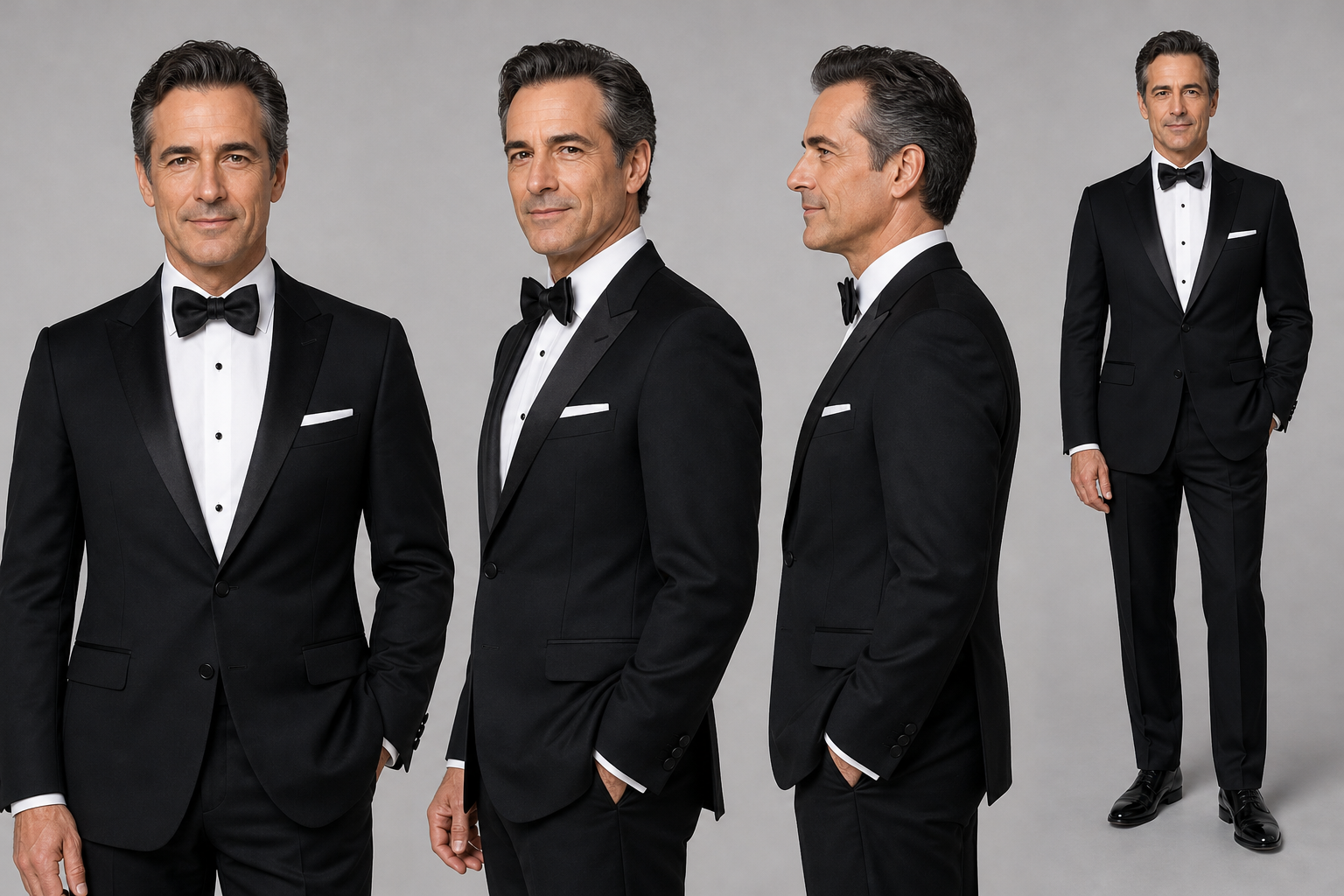
Auctioneer Character Reference Prompt
Create a photorealistic character reference sheet of a charismatic male luxury auctioneer in his late forties.
He has neatly styled dark hair with slight greying at the temples, a clean-shaven face, expressive eyebrows, and a confident professional expression.
He wears a perfectly tailored black tuxedo, crisp white dress shirt, black bow tie, and polished black formal shoes.
Show three upper-body views from the front, three-quarter angle, and profile, plus one full-body front view.
Keep his facial features, hairstyle, proportions, and clothing identical across all views.
Plain light-grey studio background, realistic skin texture, even lighting, sharp professional photography.
No text, labels, captions, or watermarks.
Step 3: Generate The Scene With Seedance 2.5
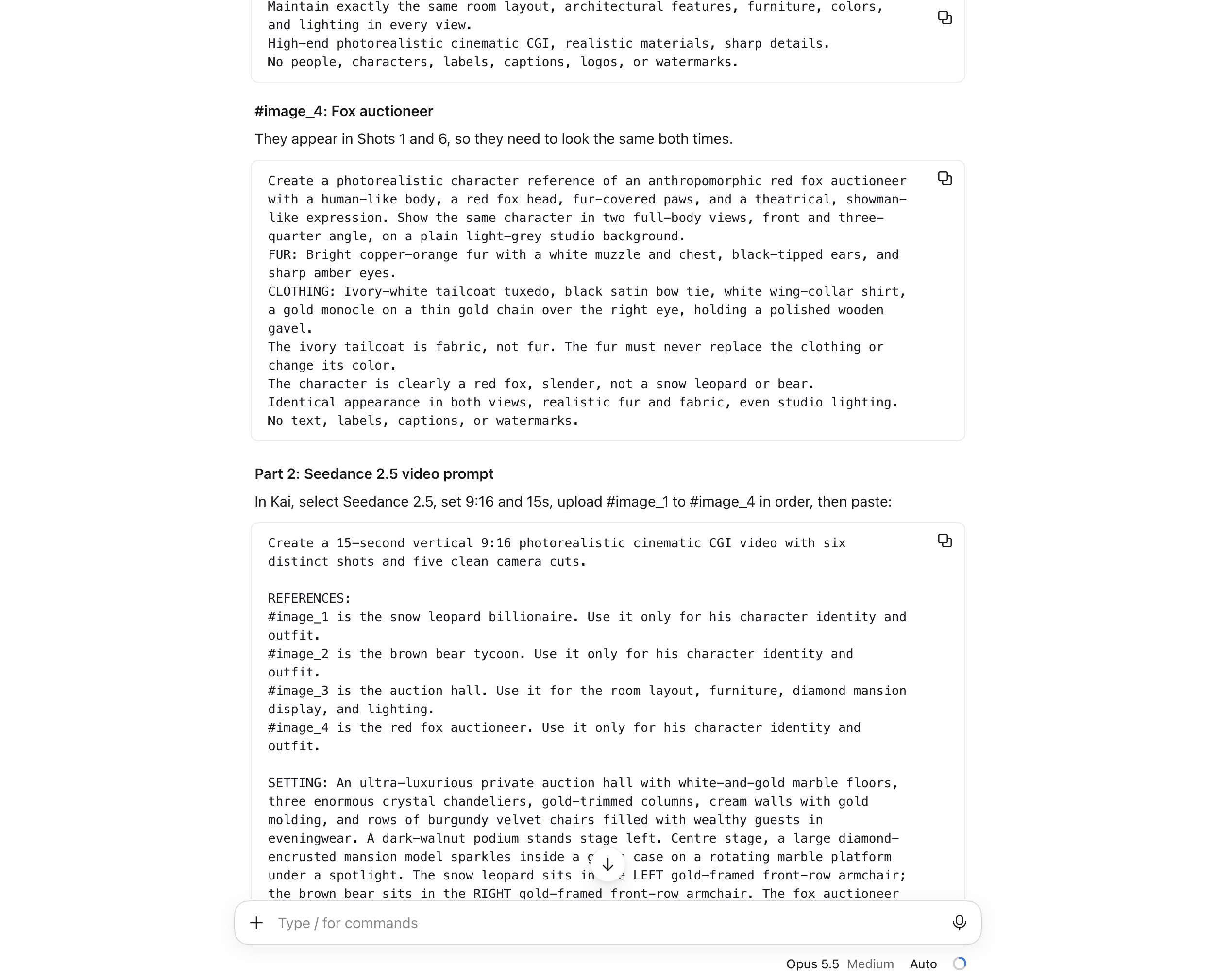
Open Kai and select Seedance 2.5. We'll use the second part of Claude's output: the complete video prompt.
Upload the four reference images in the order specified by the Skill, then paste the video-generation prompt. For our auction, we want the entire bidding war generated as one 15-second video.
Example Sheru Bhai-style Seedance 2.5 video prompt
Use Seedance 2.5: Seedance 2.5 only (not MiniMax, not any other model), ONE single generation, 15 seconds, 9:16 vertical, with native audio ON.
Seedance 2.5 generates the Hindi dialogue and all sound itself in this same generation, in sync with the mouth, with the four reference images attached. A silent video is not acceptable. No separate text-to-speech or lip-sync step, no assembly, the cuts happen inside this one generation.
REFERENCES (identity and place only, never show the sheet layouts or the grey studio backgrounds):
image_1 is the snow leopard billionaire. #image_2 is the brown bear billionaire. #image_3 is the auction hall. #image_4 is the auctioneer.
Keep each character exactly as on his sheet: face, fur, suit and accessories never change. Humanoid bodies with real animal heads, two arms, two legs, never four-legged, never a mask or costume.
Only the character who is speaking moves his mouth; everyone else stays silent and reacts.
GEOGRAPHY: the snow leopard sits in the LEFT VIP row facing right. The bear sits in the RIGHT VIP row facing left. The auctioneer stands at the podium on the stage beside the mansion in its glass case. Wealthy human guests in black tie fill the chairs behind.
STYLE: photorealistic cinematic film, real fur and velvet, expressive faces, warm chandelier light, shallow depth of field.
THE WHOLE BIDDING WAR, fast cuts, a new bid every 2 to 3 seconds:
0-3 s: the auctioneer from #image_4 at the podium beside the glass case: "Pachaas crore se shuru!"
3-5 s: the bear from #image_2 raises his black paddle: "Pachaas crore!"
5-8 s: the snow leopard from #image_1 lifts his ivory paddle without looking: "Sau crore."
8-11 s: the bear jumps to his feet, paddle high, furious: "Paanch sau crore!"
11-13 s: the snow leopard stands, buttons his jacket: "Ek hazaar crore."
13-15 s: the auctioneer slams the gavel: "Sold!" The bear's jaw drops.
AUDIO: the lines, crowd gasps rising with each bid, the gavel. No music.
Notice how the prompt describes more than just the story.
It tells the model which reference image belongs to each character, where everyone sits, when the camera should cut, who speaks each line, and what sounds should be generated.
Step 4: Refine the Video With the Same Claude Skill
Once the generation finishes, watch the result.
Check whether the characters look consistent, the dialogue is assigned to the correct speaker, and the camera cuts happen in the right order.
If everything works, your video is ready. You can still open it in the editor to adjust the volume, add captions, or trim a pause.
If something doesn't work, return to your Sheru Bhai Claude Skill. Because the Skill already understands the trend's format, you can describe the generation problem and ask it to rewrite the original prompt.
Example Prompt Correction Request
Use my Sheru Bhai Skill to fix the video prompt.
The bear's second bid was skipped, and the snow leopard spoke the wrong line.
Keep the same characters, four image references, 15-second duration, and overall auction story.
Make the speaker assignments clearer and simplify the movements so every bid fits.
Keep the Seedance 2.5 native audio instructions and the single-generation requirement.
Return the revised video prompt.
How to Make a Sheru Bhai AI Photo
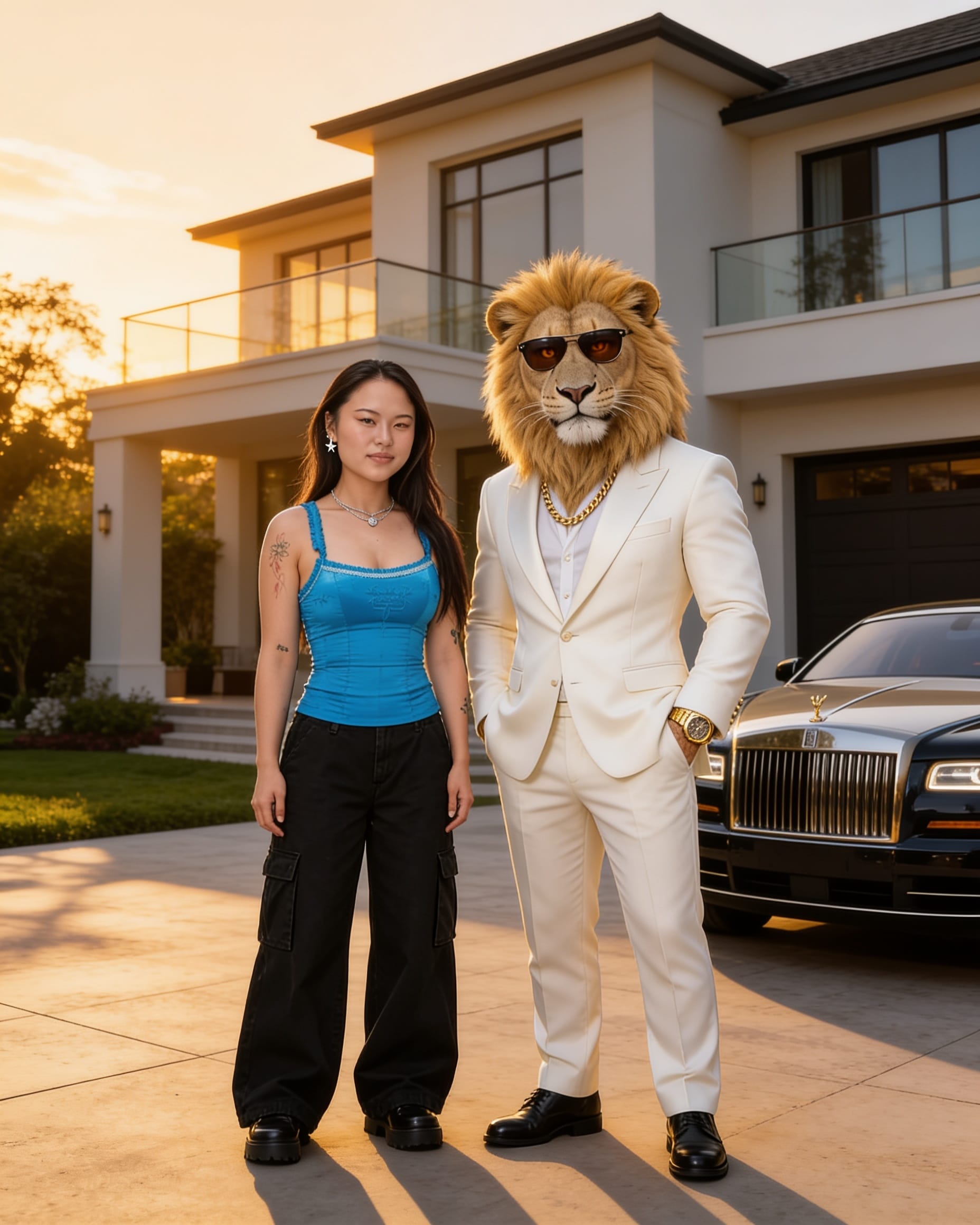
You don't have to create a video to participate in the trend. Another popular variation involves generating a photo of yourself standing beside a fictional lion-headed businessman, as though the two of you are friends or colleagues.
Start with a clear photo of yourself and upload it to an image generator that supports image references.
Sheru Bhai AI Photo Prompt
Create a photorealistic cinematic portrait of me standing beside a friendly, fictional lion-headed millionaire character.
Use my uploaded photo as the visual reference for my own face, hairstyle, and proportions. Preserve my recognizable appearance.
The lion character has a thick golden mane, realistic fur, expressive amber eyes, and a human-like body. He wears an elegant ivory luxury suit, gold watch, dark sunglasses, and a gold chain.
We are standing together outside a beautiful modern mansion with a luxury car parked nearby.
Both characters look directly at the camera, smiling confidently like longtime friends posing for a photograph.
Realistic skin and fur textures, natural body proportions, warm late-afternoon lighting, cinematic photography, sharp focus, and believable shadows.
Do not add extra people, distorted hands, captions, logos, or watermarks.
Common Problems With Sheru Bhai AI Video Prompts
AI-generated animal characters can look convincing in one frame and inconsistent in the next.
Here are the problems most worth checking before you publish.
| Problem | What to try |
|---|---|
| The suit changes color or blends into the fur. | Specify fur and clothing separately in both the character sheet and video prompt. |
| The rival starts looking like the main character. | Use a visibly different species, outfit, color palette, and silhouette. |
| The auction hall looks like a drawing. | Describe real materials, lighting, and architecture. State that the sketch only supplies motion. |
| The character's face changes between shots. | Reuse the original character sheet, shorten the scene, and simplify head movement. |
| The characters develop extra paws or distorted limbs. | Reduce complex gestures, overlapping characters, and rapid camera movement. |
| Hindi dialogue sounds unnatural. | Shorten the lines, test pronunciations separately, and replace unreliable audio in the editor. |
| The final reaction feels rushed. | Trim or split the sequence and leave more room for the losing character's expression. |
One useful principle is to fix problems in the reference assets before repeatedly generating the full video.
If the character sheet already contains inconsistent clothing, the video model has no single correct outfit to follow.
Frequently Asked Questions
Who is Sheru Bhai?
Sheru Bhai is a fictional AI-generated lion-headed character who appears in luxury-themed short videos, comedic auction scenes, cinematic entrances, and AI-generated photos. His appearance commonly includes a mane, expensive suit, and gold accessories.
Is Sheru Bhai a real person?
No. Sheru Bhai is a fictional AI character. Individual videos may use different generation and editing methods, but the lion-headed personality is not a real person.
How do you make a Sheru Bhai AI video?
Create a detailed character prompt or reference image, generate a short auction or entrance scene using an AI video model, then add dialogue, sound effects, and captions. For a recurring series, reuse approved character references so the design remains consistent.
What is the original Sheru Bhai AI prompt?
There is no publicly verified original production prompt. The prompts circulating in tutorials are recreations. You can use the examples in this guide to produce a similar format and customize the character, setting, and dialogue.
Can you make Sheru Bhai AI videos for free?
You may be able to draft scripts and experiment with some AI image tools without paying, depending on their free tiers. However, video generation often requires credits or a paid plan. Check the generation cost and export restrictions before starting.
Can I make a Sheru Bhai video with Google Flow?
Yes. Several tutorials use Google Flow to generate Sheru-style clips from text prompts, often creating an opening and payoff as separate scenes. The reference-based Kapwing workflow in this guide offers another approach, particularly when you want to reuse a character design and a specific performance.
What does "arban tarban sharban" mean?
In these videos, phrases such as "arban tarban sharban" are used as exaggerated, rhyming money expressions. Much of the humor comes from mixing recognizable number words with invented units that sound impossibly large.
Can I make an AI photo with Sheru Bhai?
Yes. Upload a photo of yourself to an image generator that supports reference images, then describe the fictional lion character, the pose, and the desired setting. Check the result carefully for facial resemblance and distorted details.
How long should a Sheru Bhai AI video be?
A short scene of around 10 seconds can work for a single joke. For a longer auction, 15–20 seconds gives the characters more room for bidding and reactions. Use the shortest duration that delivers the setup and punchline clearly.
Can I use the original Sheru Bhai audio or music?
Only if you have the appropriate rights or the platform provides the sound for your intended use. A sound being widely shared does not automatically mean it is licensed for every use, particularly monetized content. Creating your own dialogue and sound effects is a straightforward alternative.