
How to Make Jean Philanthrope AI Videos
Jean Philanthrope pulled in more than 77 million Instagram views with just eight videos.
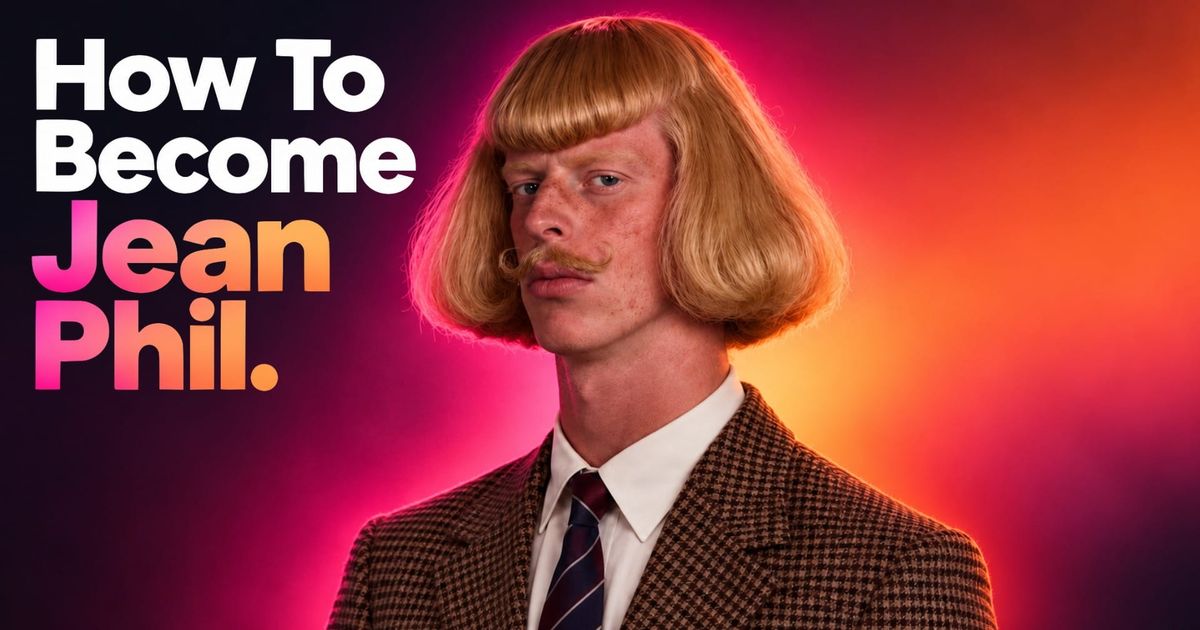
Jean Philanthrope is a strange character even by internet standards: a blond man with a curled mustache and brown suit who keeps turning up in ordinary places and, sooner or later, starts shadowboxing.
The first known Jean Philanthrope videos appeared in September 2026. Within days, clips were pulling in millions of views and viewers were arguing over whether the man was real, AI-generated, or some combination of both. He is now widely treated as an AI character, although the person behind the account has never publicly explained how the videos are made.
What is reproducible is the format. You need a character who looks the same from video to video, a short motion reference that gives them a recognizable physical routine, and a video model capable of combining the two in different settings.
For this tutorial, I used Seedance 2.5 in Kapwing to recreate that setup with an original character rather than copying Jean Phil himself.
Table of Contents:
- What Is the Jean Philanthrope Trend?
- Is Jean Philanthrope AI?
- How to Make a Jean Philanthrope-Style AI Video
- How to Keep the Character Consistent Across Videos
- Frequently Asked Questions
What Is the Jean Philanthrope Trend?
Jean Philanthrope — usually shortened to Jean Phil — has a blond bob, curled mustache, patterned brown suit, and the expression of someone taking all of this much more seriously than everyone watching.
His earliest documented Instagram post appeared on September 17, 2026, with TikTok following two days later. The videos took off quickly, but Jean Phil didn't stay a one-character phenomenon for long. Within days, a whole group of similarly strange AI personalities started appearing around him.
@jean_philanthrope She feels safe with the man.
♬ original sound - DjJoeMix Nj
The most direct copy was Archibald Brown, an English counterpart written as Jean Phil's rival. He has the same old-fashioned energy, but his posts turn the resemblance into a running feud, repeatedly challenging Jean Phil to a fight.
By September 25, Archibald had already passed 110,000 Instagram followers.
@archibald_brown @Jean Phil ♬ sunet original - tonilk_
Then there is Derek Mercer, who takes the format in a completely different direction. Instead of a suited European gentleman, Derek is an absurdly muscular, long-haired gym character built around lines like "No skinny guys allowed."
One of his September posts, "Remember your gym bro," reached nearly 30 million plays and 2.7 million likes according to recent tracking.
@derek.mercer.2006 Nobody understands me💔
♬ original sound - Derek Mercer
Benjamin Stachio pushes the visual joke even further. He has three stacked mustaches, an impossibly thick neck, bright yellow trousers, and mostly appears dancing in crowded bars.
His account began posting on September 27, and passed 90,000 Instagram followers within the first week. One of his early dancing videos drew more than 640,000 likes.
@benjamin_stachio Clearing my head #fyp
♬ original sound - benjamin_stachio
Is Jean Philanthrope AI?
Jean Phil is widely reported as AI-generated character, but there is still no public production breakdown from the anonymous person running the account.
It's easy to look at the videos and infer how they might have been made. It's much harder to say which model was used, whether the movement comes from a real performance, or how much manual editing happens afterward.
What we can say is that the character behaves like the kind of recurring subject current motion reference-based video models are designed to handle. His appearance stays largely fixed while the environment and performance change around him.
So rather than trying to reverse-engineer an unknown workflow, I focused on recreating the same production problem: how do you make one fictional AI character perform the same recognizable action across multiple videos without their face and outfit changing every time?
How to Make a Jean Philanthrope-Style AI Video
You don't need to recreate Jean Phil himself to use the format. The workflow is the same one we use for other reference-based Seedance videos: build the character , give Seedance a motion reference for the performance, then combine the two in a new setting.
For this example, I used an original character rather than copying Jean Phil's face, outfit, or exact styling.
Step 1: Create a Character Reference Sheet
Start by creating the person who will appear in every video.
The character should be recognizable from more than one angle, so I wouldn't rely on a single portrait. Instead, create a character reference sheet showing the same person from the front, three-quarter angle, and profile, with one full-body view.
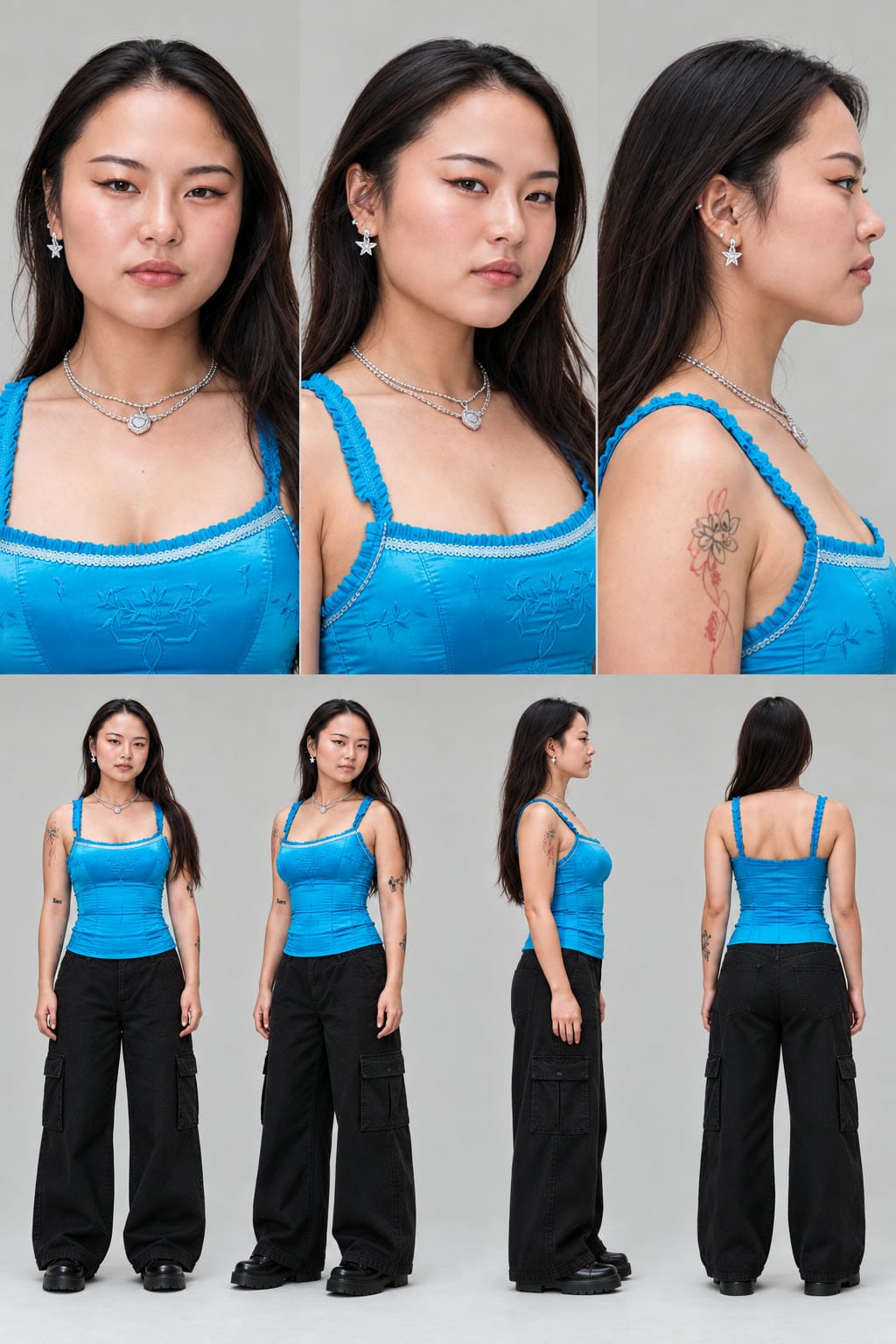
Character Sheet AI Prompt:
A photoreal character reference sheet of the person in #image_1.
Layout: two rows on a plain light grey studio backdrop with soft, even lighting and no shadows on the backdrop.
TOP ROW, taking approximately the top 60% of the image: three large head-and-shoulders portraits side by side, pin sharp, with natural skin texture:
1. straight-on front view
2. three-quarter view
3. right-side profile
BOTTOM ROW: four smaller full-body views at the same scale, relaxed standing pose with arms at the sides:
1. front
2. three-quarter
3. right profile
4. back
Same person, same outfit, same lighting in all seven views. Preserve their face exactly as shown in #image_1.
They wear [DESCRIBE OUTFIT].No text, labels, captions, or watermarks anywhere in the image.
If you want to resemble Jean Phil, you can create your own rendition of his character.
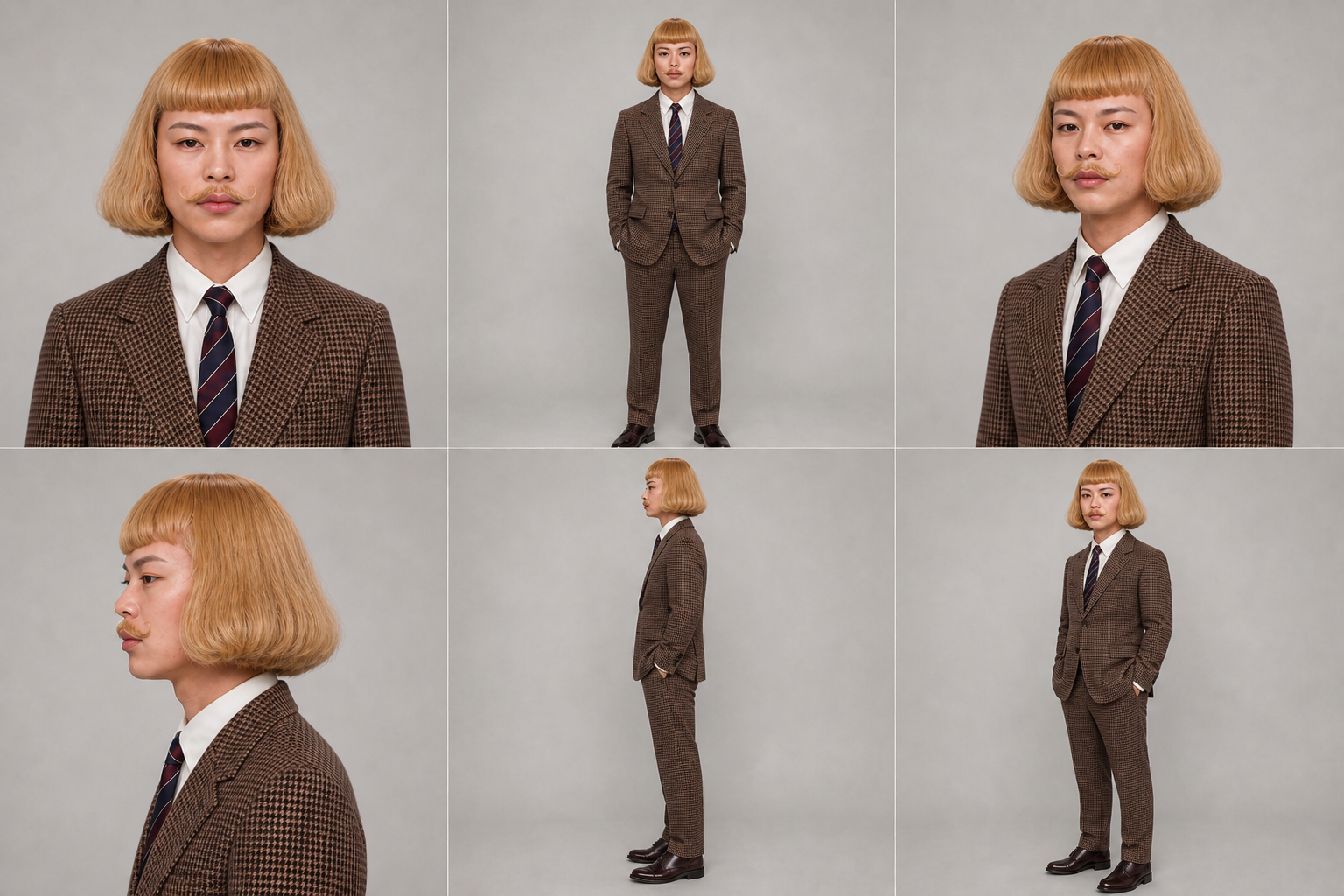
Using the prompt below, you can add a blond wig, mustache, and suit to any headshot of your choosing. You can also tweak the prompt to alter the degree of resemblance. This will automatically generate a character reference sheet.
Jean Phil Inspired Character Sheet Prompt
Create a photorealistic multi-view character reference sheet of this same person, keeping their facial features, skin tone, face shape, and overall likeness recognizable in every panel.
Restyle them with a shoulder-length blond bob wig, curled blond handlebar mustache, and a tailored brown houndstooth suit with a white dress shirt, tie, and formal shoes.
Show the same person in front view, three-quarter view, and side-profile view, including both portrait and full-body poses.
Keep the wig, mustache, face, body proportions, outfit, shoes, and accessories consistent across every panel.
Plain light-gray studio background, soft even lighting, neutral serious expression, relaxed pose, realistic hair and fabric, photorealistic detail.
No text, no labels, no alternate outfits, and no additional people.
Step 2: Create the Motion Reference
Next, you need a video that tells Seedance how the character should move.
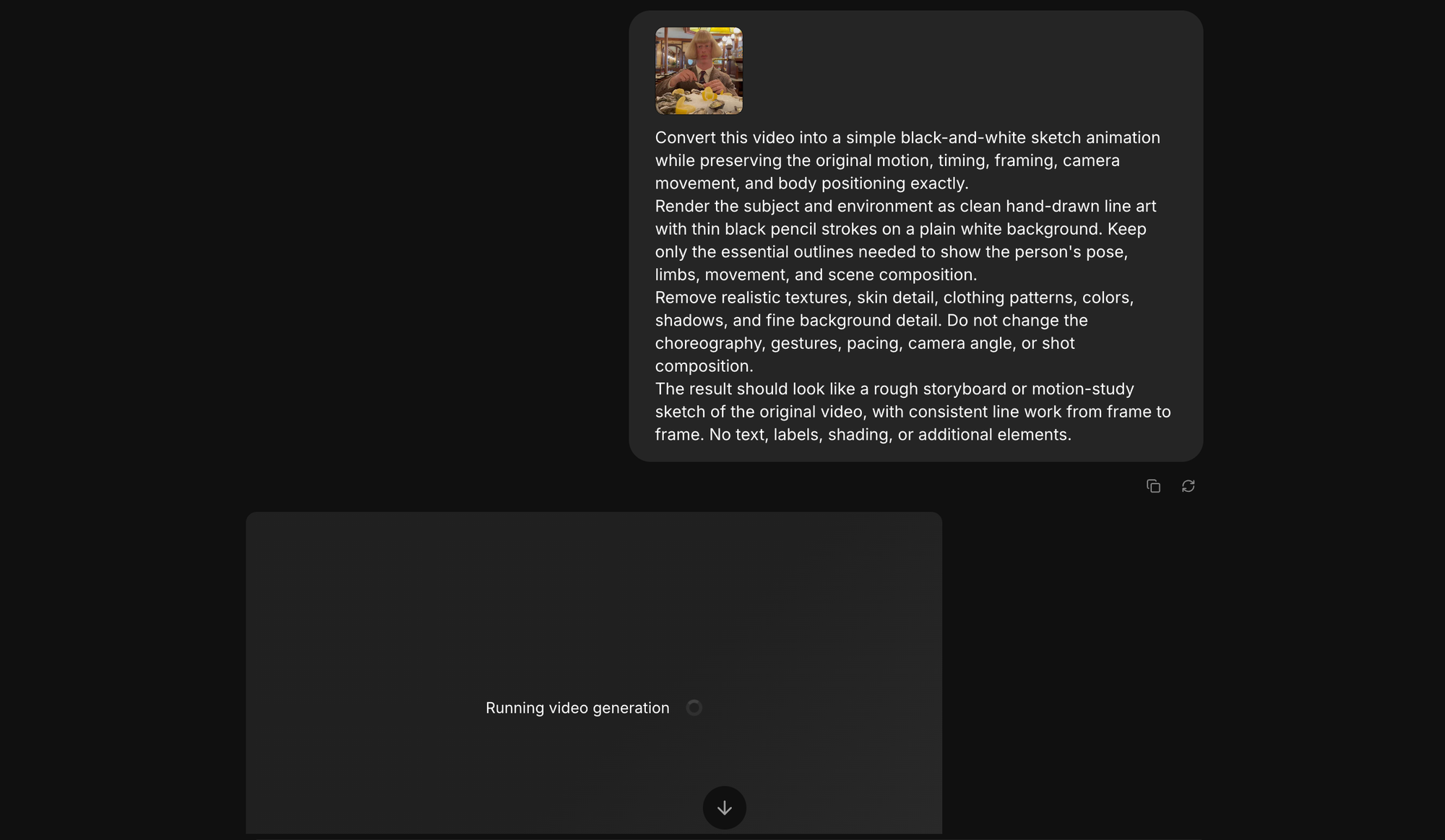
For our version, we took a few of Jean Philanthrope’s existing videos into Kai and converted them into a sketch-style reference before using them as motion inputs. That gave us the same body movement, timing, and framing without using the original footage as the finished visual.
Sketch-Style Motion Reference Prompt
Convert this video into a simple black-and-white sketch animation while preserving the original motion, timing, framing, camera movement, and body positioning exactly.
Render the subject and environment as clean hand-drawn line art with thin black pencil strokes on a plain white background. Keep only the essential outlines needed to show the person's pose, limbs, movement, and scene composition.
Remove realistic textures, skin detail, clothing patterns, colors, shadows, and fine background detail. Do not change the choreography, gestures, pacing, camera angle, or shot composition.
The result should look like a rough storyboard or motion-study sketch of the original video, with consistent line work from frame to frame. No text, labels, shading, or additional elements.
The important part is that the reference video is only there for motion. Seedance can pull the performance from it, while the character reference from Step 1 controls who appears in the final video.
You also don’t need to start with a Jean Phil clip. The same setup works with any motion reference you want your character to follow. You could record yourself doing a short dance, use a simple walking sequence, create a boxing routine, or start with another video whose movement you want to reproduce.
Step 3: Combine the Character and Motion in Seedance 2.5
Now bring the two references together.
Open Kai in Kapwing, select Seedance 2.5, and upload both your character sheet and the sketch-style motion video from the previous step.
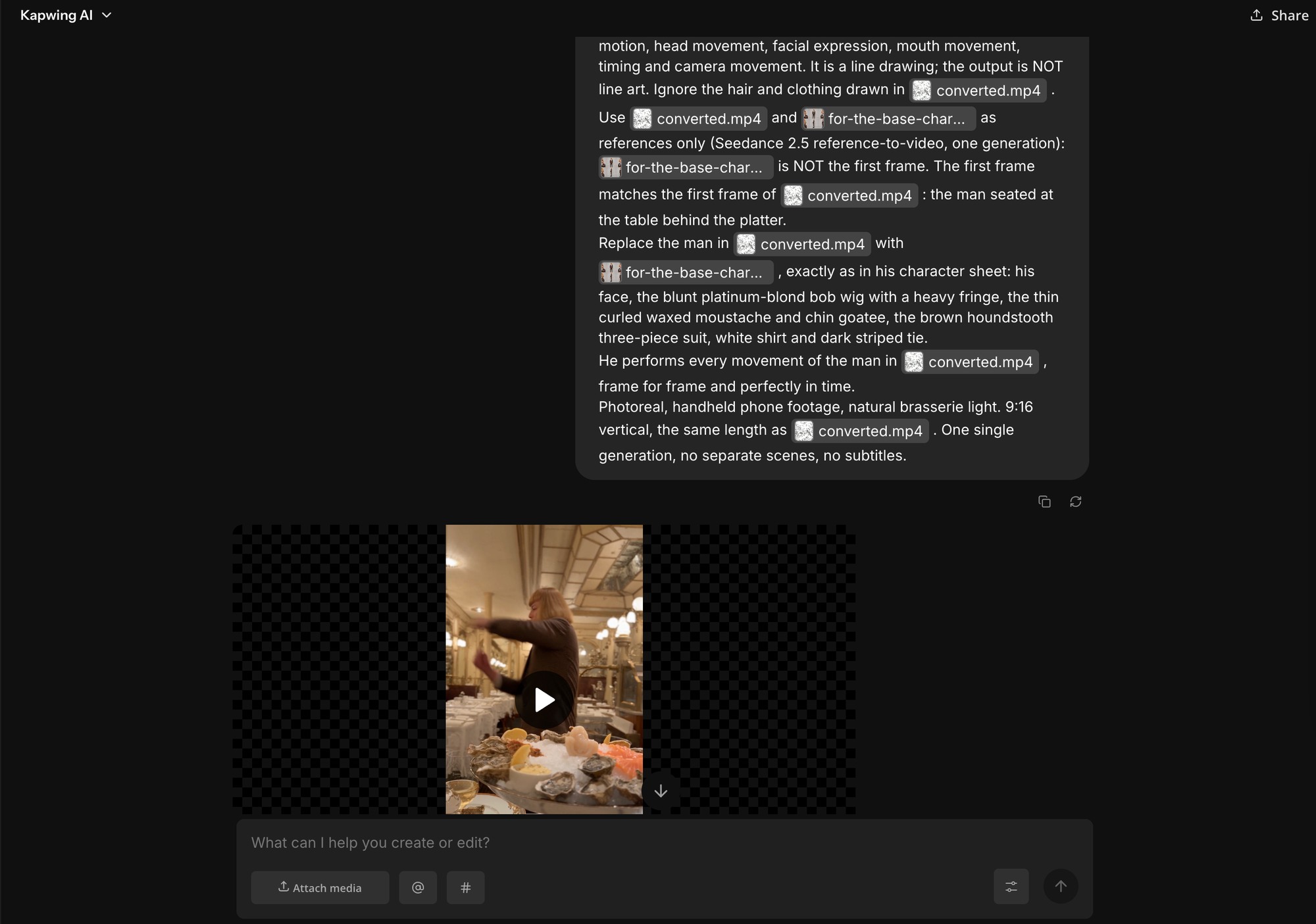
The sketch reference is there to preserve the original performance without asking Seedance to also carry over the original person's appearance. Your character sheet handles that separately.
Jean Phil Trend Prompt
Use the input video #video_1 only as the reference for motion, head movement, facial expression, mouth movement, timing and camera movement. It is a line drawing; the output is NOT line art. Ignore the hair and clothing drawn in #video_1 .
Use #video_1 and #image_1 as references only (Seedance 2.5 reference-to-video, one generation): #image_1 is NOT the first frame. The first frame matches the first frame of #video_1 : the man seated at the table behind the platter.
Replace the man in #video_1 with #image_1 , exactly as in his character sheet: his face, the blunt platinum-blond bob wig with a heavy fringe, the thin curled waxed moustache and chin goatee, the brown houndstooth three-piece suit, white shirt and dark striped tie.
He performs every movement of the man in #video_1 , frame for frame and perfectly in time.
Photoreal, handheld phone footage, natural brasserie light. 9:16 vertical, the same length as #video_1 . One single generation, no separate scenes, no subtitles.
Step 4: Finish the Video in Kapwing
Once you have a generation you like, open it in the Kapwing editor for cleanup.
You usually don't need to do much. Trim the strongest section, make sure the framing works in 9:16, and add the music or audio you want to use.
If you're making several videos with the same character, I would also keep the edit style consistent. The same music treatment, pacing, and framing can help the account feel like one series rather than unrelated AI clips.
From there, you can reuse the same character sheet and motion reference for the next video and change only the location in the prompt.
How to Keep the AI Character Consistent Across Videos
The interesting thing about Jean Phil isn't the shadowboxing by itself. He has a recognizable look, a repeated movement, and a very narrow personality. That makes each new location feel like another episode rather than a completely separate AI video.
You can also see this idea becoming more formalized in the tools themselves. Higgsfield now has an AI Influencer builder specifically for creating persistent virtual characters, with controls for face, body, hair, style, and accessories. Once a character is saved, you can reuse it across future generations or send it directly into Genjutsu, where a reference video can drive the character's movement.
Same character. New episode.
Keep Jean Phil’s identity and motion locked, then change only the environment. Click a setting to see how the prompt evolves without rebuilding the character.
A deliberately narrow visual identity that stays consistent from episode to episode.
The simplest way to do that is to reuse the exact same character sheet every time. Don't regenerate it for each post, even if you think you can make a slightly better version. Small changes to the face, hair, suit, or proportions can make the next video feel like a different person.
I would also keep the character description unchanged. If the first prompt describes a blond bob, curled mustache, and brown houndstooth suit, reuse that wording rather than rewriting it differently every time.
The same applies to the motion reference. If the recurring movement is part of the character's identity, keep using the same base clip unless you're intentionally introducing a new routine.
Frequently Asked Questions
Who is Jean Philanthrope?
Jean Philanthrope, often called Jean Phil, is a viral AI character known for his blond bob haircut, curled mustache, brown suit, and recurring shadowboxing videos.
His videos began spreading in September 2026 and quickly inspired a wave of similar AI characters and parody accounts.
Is Jean Philanthrope a real person?
Jean Phil is widely treated as an AI-generated character. The person behind the account has not publicly identified an actor or released the original production workflow.
How are Jean Philanthrope videos made?
The original creator has not explained the process publicly, so there is no confirmed workflow.
For our recreation, we used a character reference sheet for appearance and a separate sketch-style video for motion, then combined the two in Seedance 2.5.
What is the Jean Phil prompt?
There is no verified original Jean Phil prompt.
A more reliable approach is to use references rather than relying on text alone. Use one image or character sheet for the person's appearance, another video for the movement, and use the written prompt mainly for the setting and final look.
Can I make myself look like Jean Phil?
Yes. Start with a clear photo of yourself and ask an image model to keep your face while adding a blond bob wig, curled mustache, brown patterned suit, and other styling.
For this workflow, I recommend generating those changes directly into a multi-angle character reference sheet so you can reuse it in video.
Why turn the motion reference into a sketch first?
The sketch keeps the movement, timing, framing, and camera behavior while removing much of the original person's visual detail.
That makes it easier to tell Seedance: use this video for the performance, but use the character sheet for the person's identity and appearance.