Predictions for Brand Marketing Teams in 2026
2026 is the year that marketing becomes agentic. Successful marketing teams will set up brand guidelines and guardrails to collaborate with AI agents on the fly.

Maintaining brand consistency across Instagram Reels, TikTok, LinkedIn, and YouTube Shorts isn't just about slapping your logo on every video. It's about creating a recognizable visual system that works across wildly different platform requirements—without making your team recreate assets from scratch every time.
The challenge in 2026 is that platform formats are more fragmented than ever. Instagram now treats all videos as Reels (up to 20 minutes), TikTok allows ultra-wide 5120×1080 formats, and LinkedIn prioritizes square 1:1 videos for desktop feeds. Each platform has different text limits, font options, and video length restrictions.
At the same time, new generative AI models are changing the way that we create content. 2o25 was the year of AI Slop, but 2026 will be the year that AI video generation goes mainstream. With AI Video Generation, marketers can make increasingly realistic footage without ever using a camera. Effective storytellers will leverage AI in 2026 to propel their brand message without losing personality, trust, or recognizability.
This guide covers the practical systems that keep your brand recognizable across platforms—without burning out your creative team.
What Brand Consistency Actually Means in 2026
Brand consistency isn't about making every video look identical. It's about creating a recognizable visual language that adapts to each platform's native format.
As AI seeps into more and more marketing workflows, brands must set up guardrails and structures that enable generative models to operate seamlessly, streamlining content creation. Here are the three areas where brands will need to increase their investment in 2026:
- Establish a robust brand kit
- Train AI workflows on your style and tone
- Use cloud software to enable AI collaboration with a human in the loop
Establish a robust brand kit
The brands that maintain consistency in 2026 use anchor elements: repeating design choices that make content instantly recognizable, regardless of aspect ratio or platform. These typically include:
- Consistent color palette (3-5 core colors with specific hex codes). Document your exact brand colors so designers aren't approximating.
- 2-3 branded fonts used consistently. Also, define the typography hierarchy, or which fonts get used where
- Recurring graphic elements (shapes, borders, frames, borders)
- Standardized logo placement and sizing. For example, vertical (9:16): Bottom right corner, 80px from edges
- Consistent text animation styles
- Safe zones: Mark areas where text and key visuals should stay to avoid platform UI elements. Instagram Reels, for instance, covers roughly 20% of the bottom of the screen with UI elements, while TikTok covers about 25%.
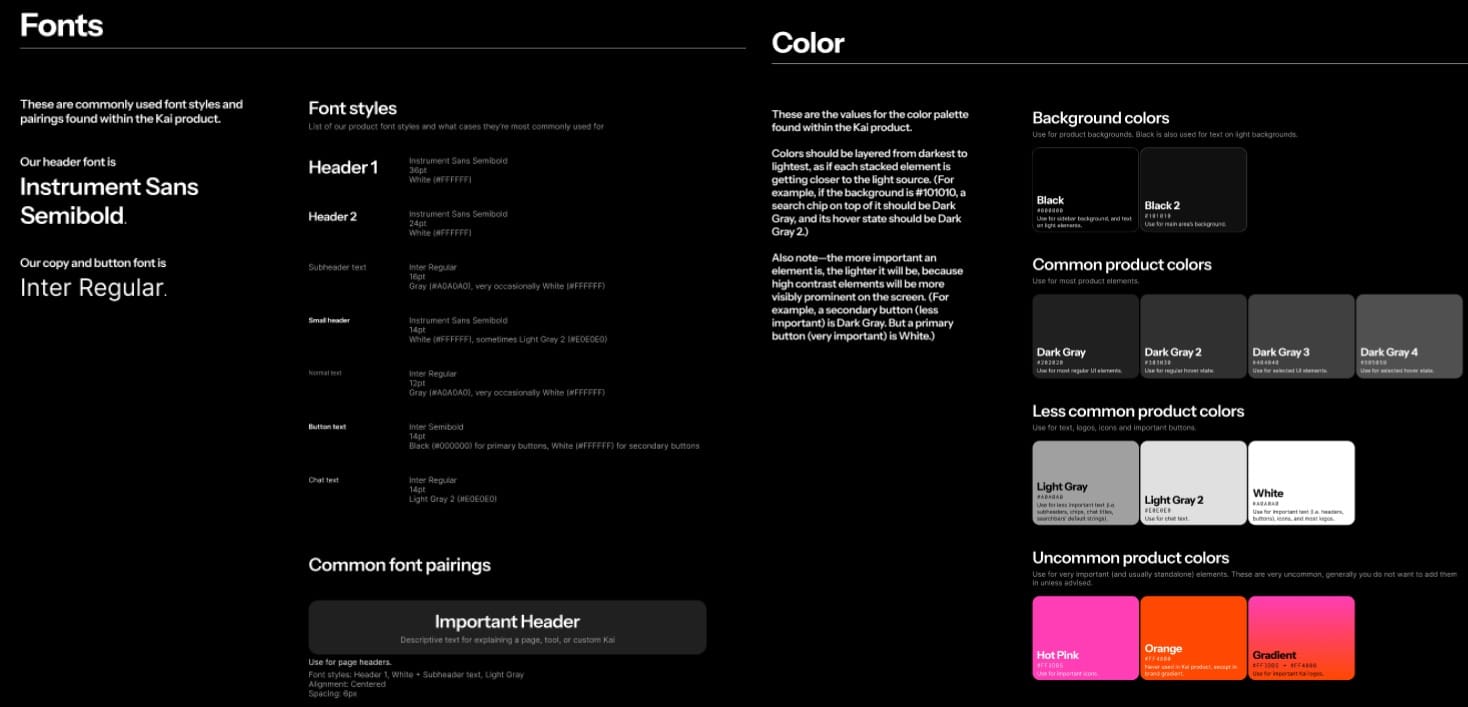
Start by documenting your visual system in a single reference document. At Kapwing, we use a Figma file that represents our brands visual identity. This isn't a massive brand book—it's a practical guide your team can reference while editing.
Building Reusable Templates
Once you have the documentation, propagate these brand elements into your design software. For example, Kapwing and Canva both have brand kits that will enable your team to easily access visual elements for video editing and for image design. In Kapwing, you can set up video brand templates with placeholders so that creative team, agency partners, freelancers, and partner teams can easily scale brand design output. A solid brand kit is the foundation of brand consistency.
Templates are the foundation of efficient brand consistency. Instead of starting from scratch every video, create master templates for each content type and platform.
Platform-specific templates for each major format:
- 9:16 vertical (Instagram Reels, TikTok, YouTube Shorts)
- 1:1 square (LinkedIn feed, Instagram feed)
- 16:9 horizontal (YouTube, LinkedIn articles)
Each template should include:
- Pre-positioned text boxes with your brand fonts
- Your color palette saved as presets
- Logo placement
- Lower thirds or graphics overlays
- Background elements (textures, gradients, patterns)
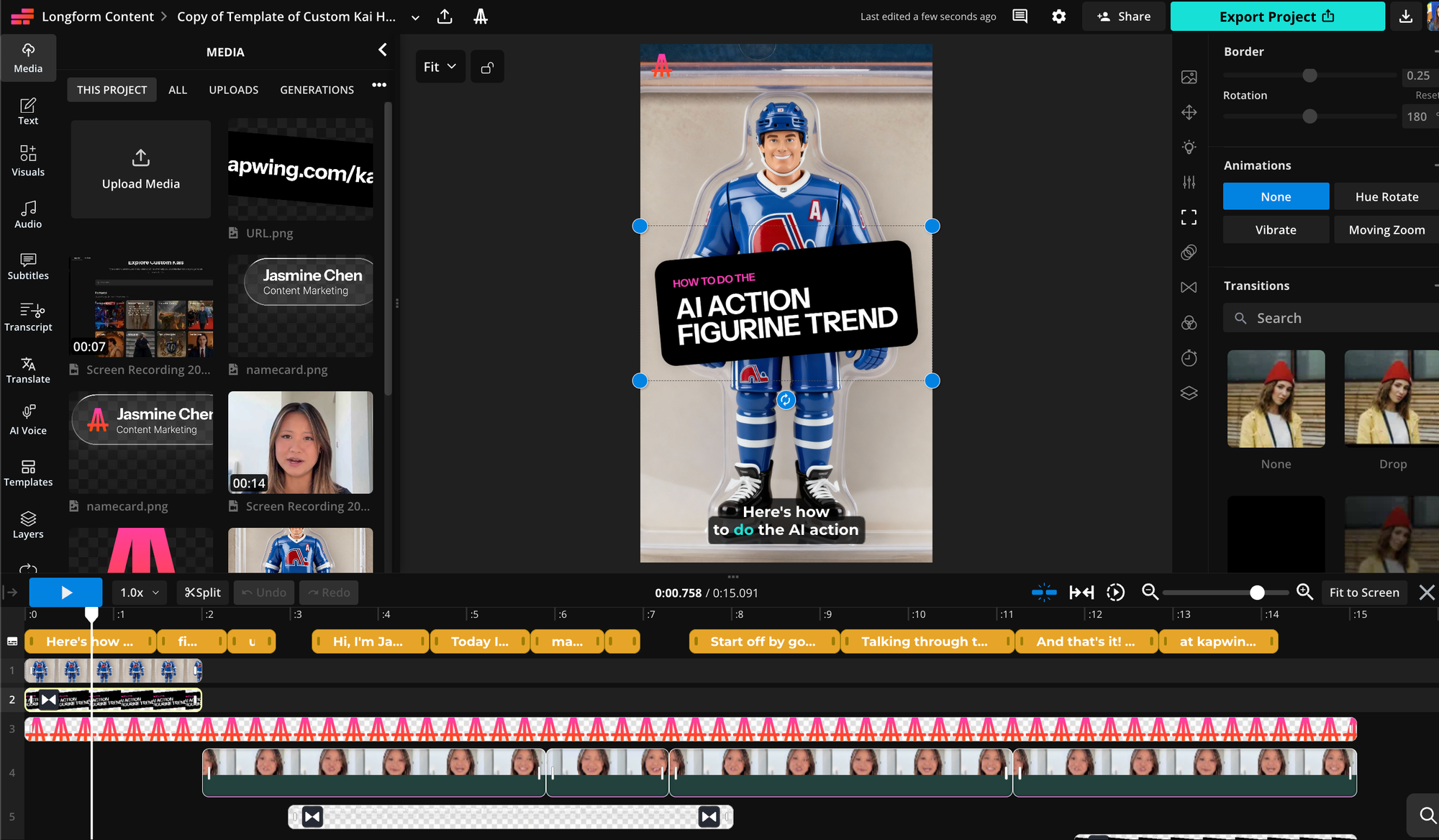
Once you have configured brand templates, your team can standardize template workflow to make more branded content faster. Here's one example content workflow:
- Start a project with the reusable brand template within Kapwing
- Swap in (or generate) new footage and update text
- Export in multiple aspect ratios if needed
- Move into an appropriate subfolder for review before publishing
This approach means you're not rebuilding brand elements every time. You're working within a system that ensures consistency automatically.
Train AI Workflows on your Tone and Style
In 2026, AI is the name of the game. Generative AI will enable your team to publish consistent copy, images, and videos across platforms.
Copywriting: Social posts and blog posts
Anthropic, OpenAI, and Google have products that enable you to set up and share a custom chatbot trained on your specific brand data. The ChatGPT solution is called "Custom GPTs," and the Gemini product is called "Gemini Gems." Setting up a custom AI workflow will help your team scale content creation in their brand style.
A Custom GPT is an instances of ChatGPT that is trained on your brand data with specific prompt or instructions. It may have reference files (text or documents) that it leverages to emulate your voice, making it sound more authentic and less "AI-y". To make a bot that will generate blog posts for you, copy 4-10 of your most representative blog posts, meaning those that speak to your audience clearly and reflect your value proposition, into a word document and create a CustomGPT using that doc as a reference.
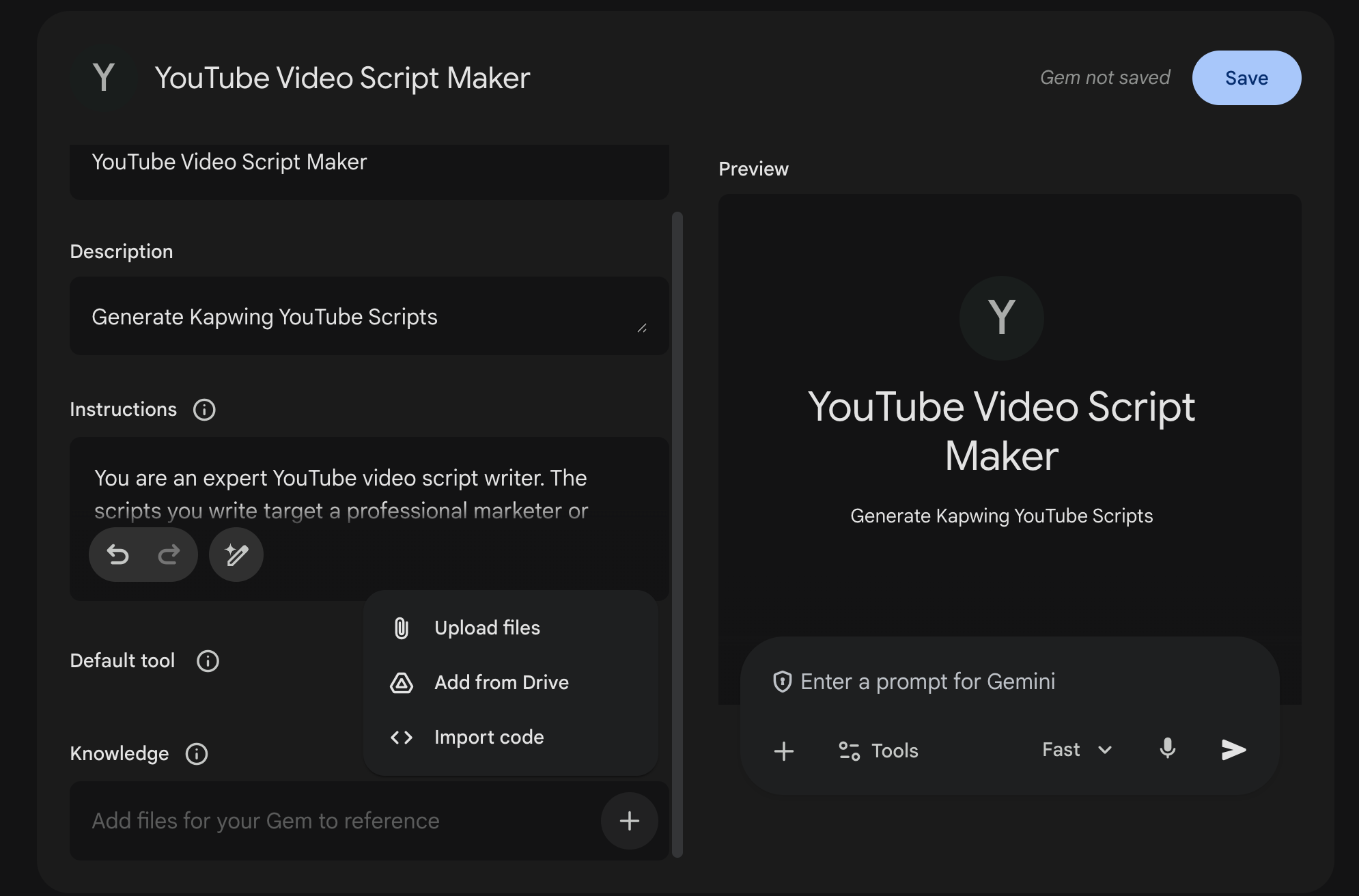
Other tasks that Custom GPTs can help with:
- Social media video scripts: Start by transcribing some of your favorite social media videos and downloading the transcript. Then, use the transcript as a reference for a custom GPT. After training the bot, it will be able to generate script in your style.
- Social media descriptions or comments: Create a reference file for some of your best social posts (works well for X, LinkedIn, YouTube Shorts, and Instagram). When an asset is finished, you can upload the asset to your CustomGPT and ask it to write a description for you.
- Seasonal social media posts: Have a niche holiday coming up? Train a GPT on your top-performing seasonal posts to make responsive social copy on the fly. This enables your team to react faster and with more consistent voice.
Tip: Check out Claude for blog post generation. We have found it to be the most human-sounding LLM and the best at matching our brand tone in copywriting.
Images: graphics, instagram posts, and backgrounds
For image generation (Instagram posts, background, thumbnails, and blog graphics), you'll need a generative AI workflow that specializes in images and video generation. With Kapwing's Custom Kais, you can train the bot on your brand imagery and use specialized AI prompt-to-image workflows to make versions of that for new topics.
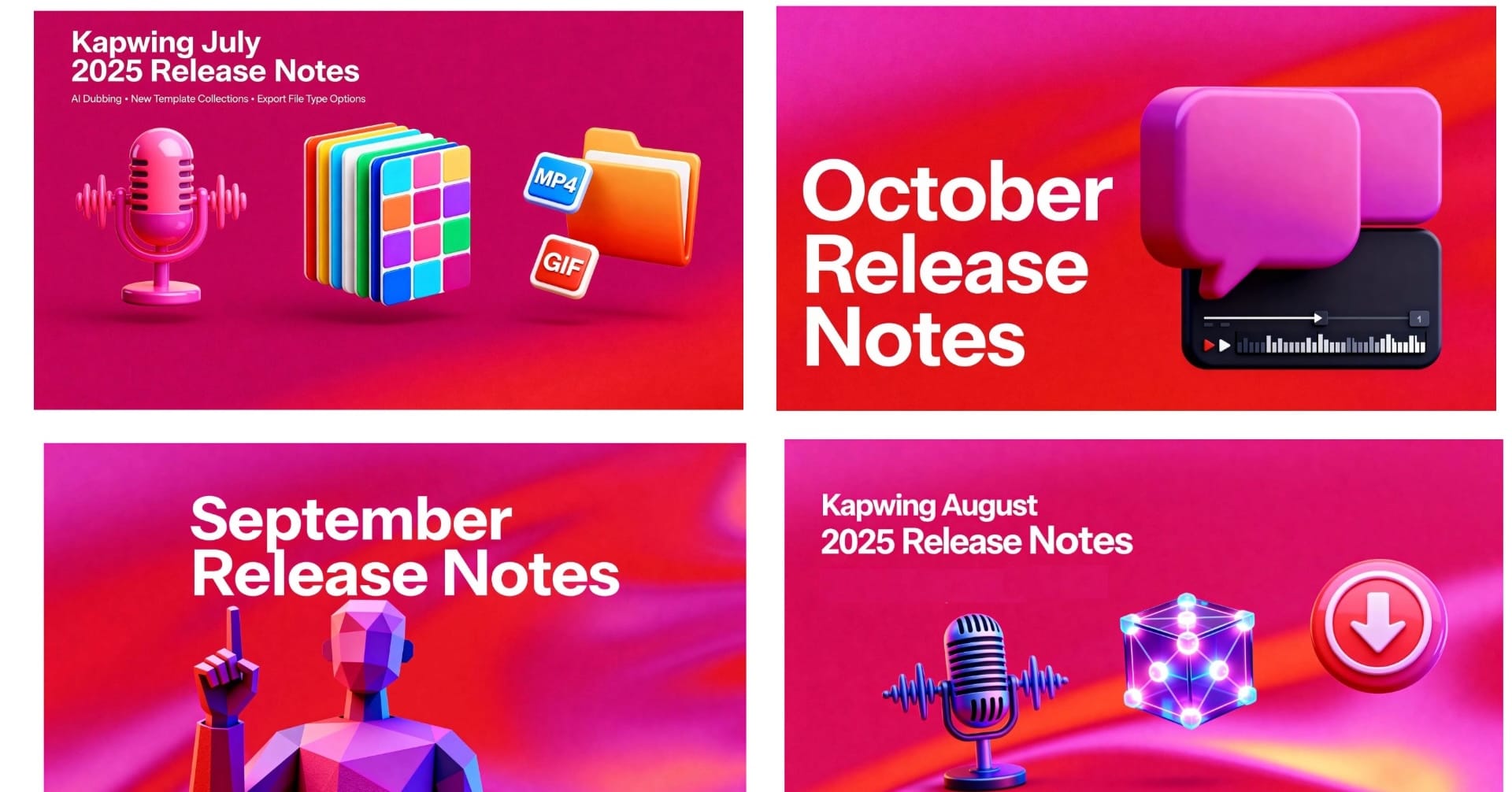
At Kapwing, we have custom Kais set up to generate our blog post cover images. These are trained on example reference images and a prompt from our designer. As a result, she doesn't have to make each of these images herself, by hand, enabling her to scale her expertise to more projects and surfaces without sacrificing brand consistency.
Audio: Voice Clones
Visual consistency gets most of the attention, but audio is just as critical for brand recognition. Audiences learn to expect the voice in your videos—whether it's narration, commentary, or explanations. So, switching between different narrators, voice actors, or team members creates a disjointed brand experience. When your audience hears the same voice across videos, they build familiarity and trust. This is especially important for:
- Educational content where one instructor becomes the recognizable expert
- Product announcements that should sound like they're from the same company representative
- Explainer videos where consistent narration builds authority
- Series content where the same host voice ties episodes together
The challenge is that booking the same person for every recording session is expensive and time-consuming. Executives have limited availability. Popular hosts get busy. Recording schedules conflict.
Fortunately, voice cloning technology in 2026 lets you create a digital copy of a person's voice that can generate new speech from text. This means you can maintain voice consistency across dozens of videos without requiring the original speaker to record every single one.
To set up a voice clone, use Kapwing's Voice Clone studio to add a voice actor into your brand kit. Ensure that you have their permission to clone their voice and that they have visibility into the created content. Your original speaker should still appear in key videos—launch announcements, major updates, personal stories. The AI voice handles the high-volume supporting content.
Videos: Vertical and long-form
Ever have a video in your head that you can describe with words, but don't make it because it will take hours to produce? Now you can make this video instantly. Try using Kapwing's AI Video Generator to generate footage from a text description.
Kapwing is the first AI Video Generator where every layer is editable. After you input a prompt, you'll be able to tweak, regenerate, and replace the layers in the timeline. This is the best way to ensure that every piece of generated footage passes your brand's QA checks and avoid the uncanny valley.
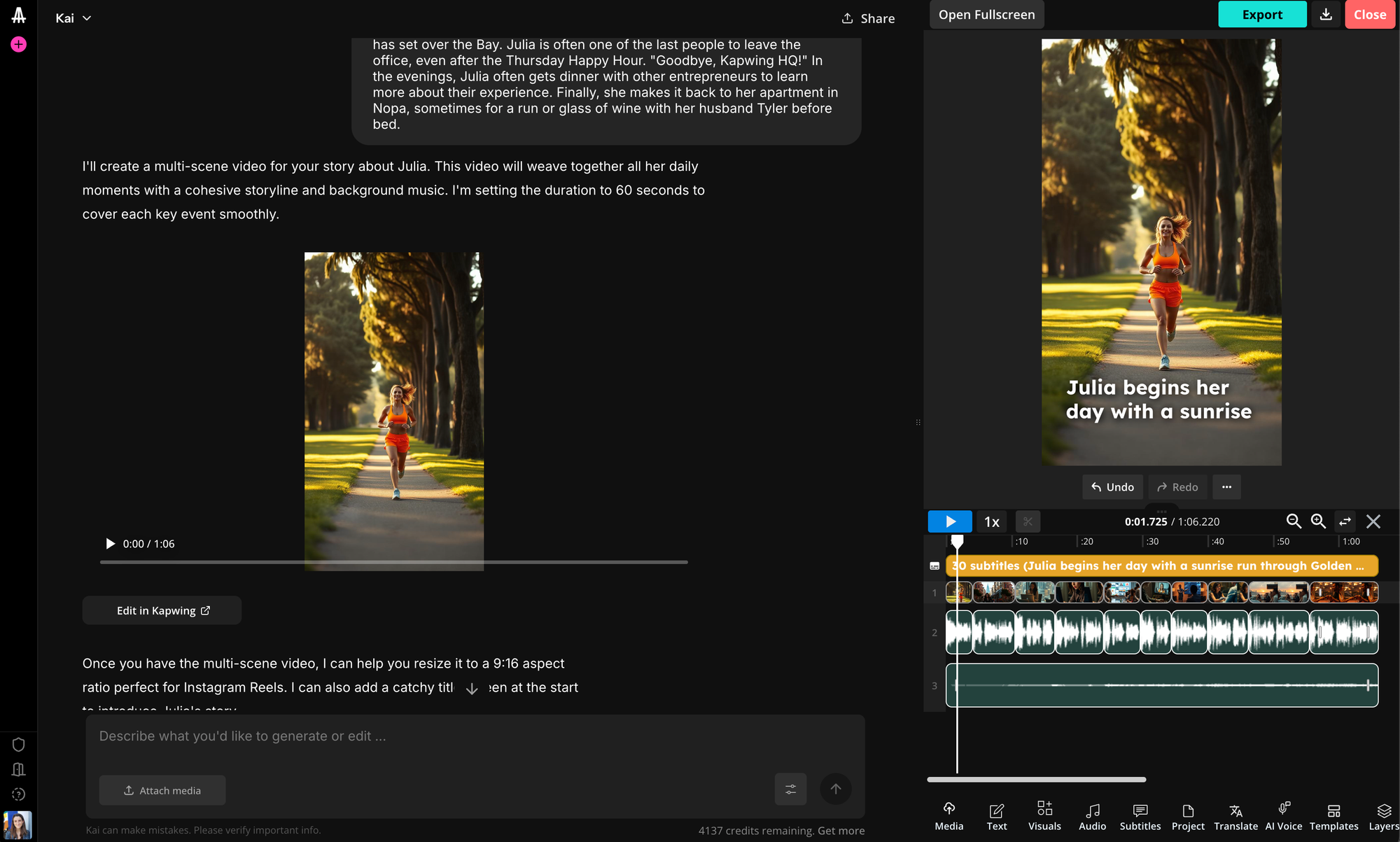
Kapwing's video generator is ideal for editing existing footage or repurposing long-form video and audio into vertical video clips. After uploading the source footage, type what you want the output to look like or what topics you want to clip, and Kapwing will smartly generate a video for you.
Use collaborative software and file sharing
In this decade, software teams have moved more and more of their workflows into the cloud. Web-based software is more secure (less file downloads and risk of losing sensitive materials) and saves time, enabling new teammates to easily onboard. Features to look for:
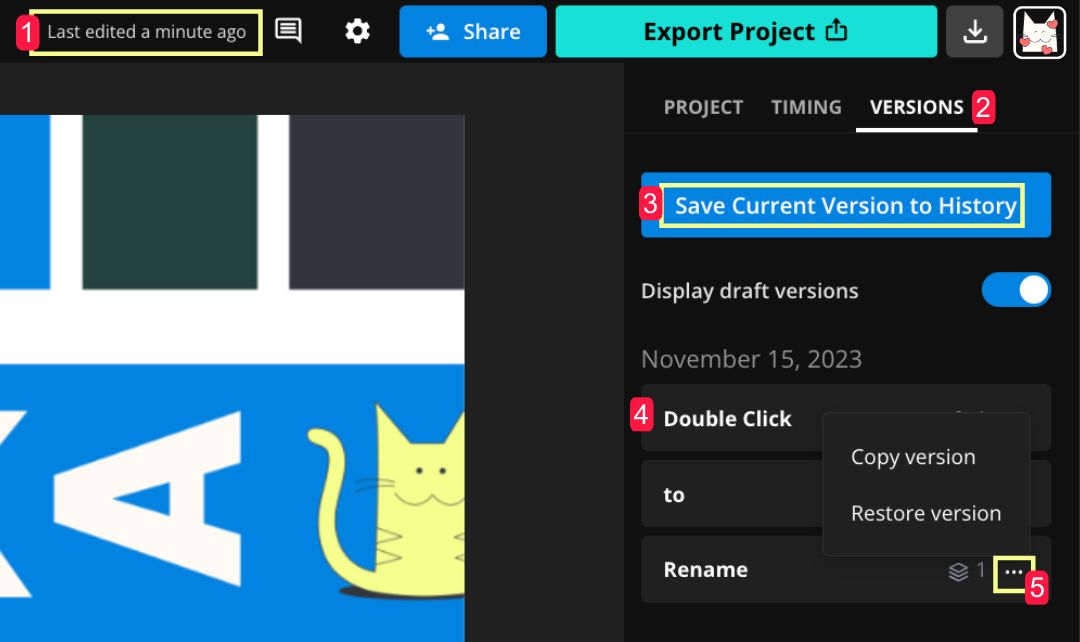
- Version control: Video editors are used to naming their files "FINAL_V5_FORREAL.mp4" because traditional video editors make it so difficult to track the latest version. Instead, choose a Google Docs-like video editing surface that ensures everyone is looking at the most recent version of the project. This saves your team cycles in reviewing the most recent feedback and staying on the same page, especially if working from different locations or time zones.
- Comments: Leave feedback in-line in the timeline. Find software that allows users to reply to and resolve standing comments, making it easier to go back and forth asynchronously.
- File-level collaboration and shared digital workspace: Organize your files and subfolders to represent different campaigns, stages, or series.
- Differentiated roles: Define who can set up and change brand settings, define approval workflows, and give managers or clients review visibility
Once you establish these systems, you'll be able to set up collaboration systems that ensure every asset meets brand standards. For AI generated assets, these systems give you a human in the loop so that everything is curated and controlled by your team.
Experiment with Conversational AI Assistant for Design
Kapwing's AI Assistant enables users to ask directly for what they need using natural language. As a result, you don't need experienced freelancers who know how to use video editors to touch every asset. Chatbots remove bottlenecks and enable your team to make more video content faster without sacrificing on quality.
2026 will be the year to roll out an AI Assistant for your creative workflows. Need to resize an image? Convert to a different format? Rather than relying on a person, install an AI Creative Assistant that can do these tasks for you and share with partners in other functions.
2026: The Year that Marketing Becomes Agentic
As generative AI evolves and grows in 2026, marketing teams will develop new brand standards to keep up with evolving role of AI creators. Instead of producing videos in-house, marketing leaders will unleash AI agents to create on-brand content for them.
The foundation you build now—your visual system, templates, color palettes, and voice guidelines—becomes the framework that AI tools work within. Instead of manually recreating brand elements for every video, you'll train systems to understand your brand's visual language and apply it consistently across hundreds of pieces of content.
This doesn't mean brand consistency becomes automatic or that human oversight disappears. The opposite is true. As AI handles more of the execution work, your role becomes more strategic. You're setting the standards, defining the boundaries, approving the output, and making the creative decisions that AI can't make on its own.
The teams that succeed in this environment are those who document their brand systems clearly, create reusable templates that scale, and establish workflows that balance efficiency with quality control. They use AI voice clones for high-volume narration while keeping human hosts for flagship content. They generate multiple format variations from one master video instead of starting from scratch each time. They maintain consistency not through manual effort, but through smart systems.
Brand consistency in 2026 isn't about doing more work—it's about building better infrastructure. Set up your visual systems now, create your templates, establish your approval processes, and the content you produce six months from now will still feel unmistakably yours, regardless of which tools or platforms emerge next.
The goal remains the same as it's always been: make your content instantly recognizable, regardless of where your audience encounters it. The difference is that you now have tools that make this achievable at scale.