5 Best Higgsfield Genjutsu Alternatives in 2026
I tested five Genjutsu alternatives to see which tools are better for recasting characters, preserving motion, and editing existing footage.
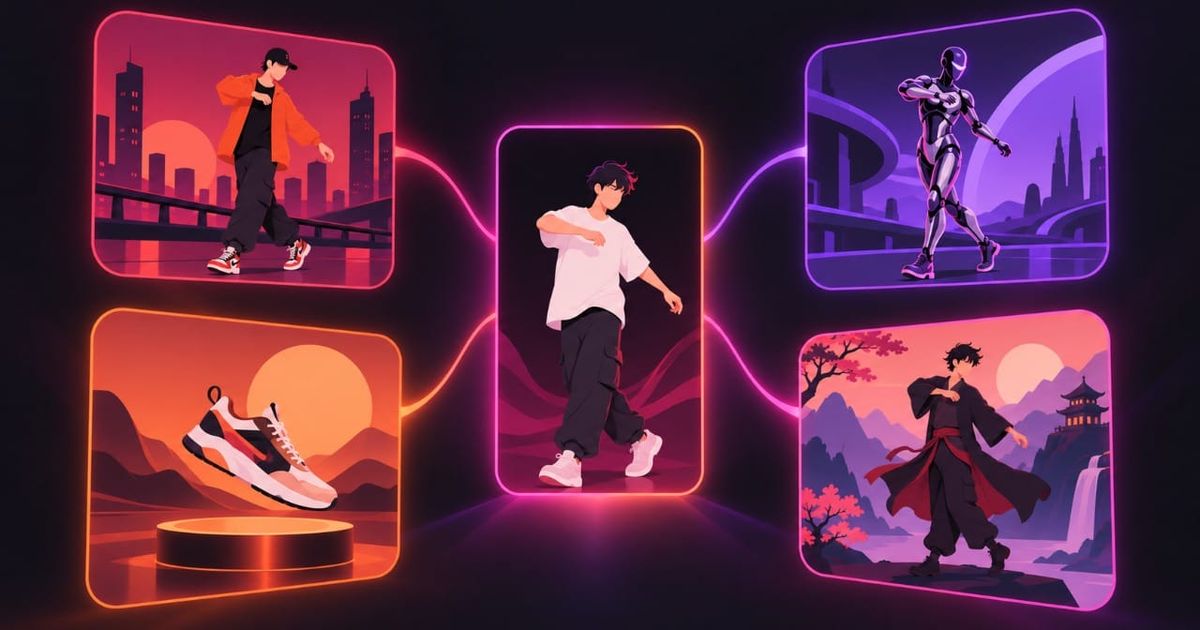
Higgsfield Genjutsu solves a slightly different problem from most AI video generators. You start with a video that already has the performance you want; Genjutsu can use that footage as the reference, then change the cast, wardrobe, product, environment, or visual treatment around it. That is why it has become especially useful for recreating existing formats. With Genjutsu, the original can become an input rather than something you have to describe again in a prompt.
There are still good reasons to look for a Higgsfield Genjutsu alternative. You may need longer source footage, more control over how characters are referenced, a cheaper workflow for repeated generations, or an editor that lets you finish the video after generation.
In this guide, we'll be going over 7 Genjutsu alternatives, depending on workflow. Specifically, we'll be evaluating based on body motion, facial performance, camera movement, cuts, timing, background, and audio.
Table of Contents:
- What Is Higgsfield Genjutsu?
- Kapwing — Best for Multi-Reference Recasts and Finishing the Video
- Runway — Best for Object, Product, and Wardrobe Swaps
- Luma — Best for Controlling How Far the Source Video Changes
- Kling — Best for Single-Character Motion Transfer
- Which Higgsfield Genjutsu Alternative Should You Use?
What Is Higgsfield Genjutsu?
Higgsfield launched Genjutsu on September 1, 2026 as a video transformation tool built around two separate workflows: Motion Transfer and Object Swap.
- Motion Transfer treats the source video primarily as a motion and timing reference. Higgsfield preserves the original motion, camera movement, and timing while rebuilding the visual scene from new references. You might keep the exact choreography and camera path of a fight scene, for example, but replace the fighters, their clothing, and the location.
- Object Swap tries to preserve much more of the source footage. You identify the character, product, outfit, location, or object that should change, and Genjutsu replaces that element while keeping the surroundings intact.
Higgsfield Genjutsu's Current Limits
Here's a rundown for Genjutsu's limits. It currently accepts 3–30 second reference videos, up to 40 reference images, and outputs up to 1080p. A 15-second generation currently costs 40 credits at 480p, 104 at 720p, or 144 at 1080p — roughly $2, $5.20, and $7.20 by Higgsfield's estimate.
The API has different limits from the consumer interface, including a smaller reference-image allowance and per-second pricing. That is worth checking if you're building Genjutsu into an automated workflow rather than generating manually.
Kapwing Kai — Best for Multi-Reference Recasts and Finishing the Video
Kapwing's Kai can create the same general type of video as Genjutsu, but it gives you more control over how the source material is broken apart.
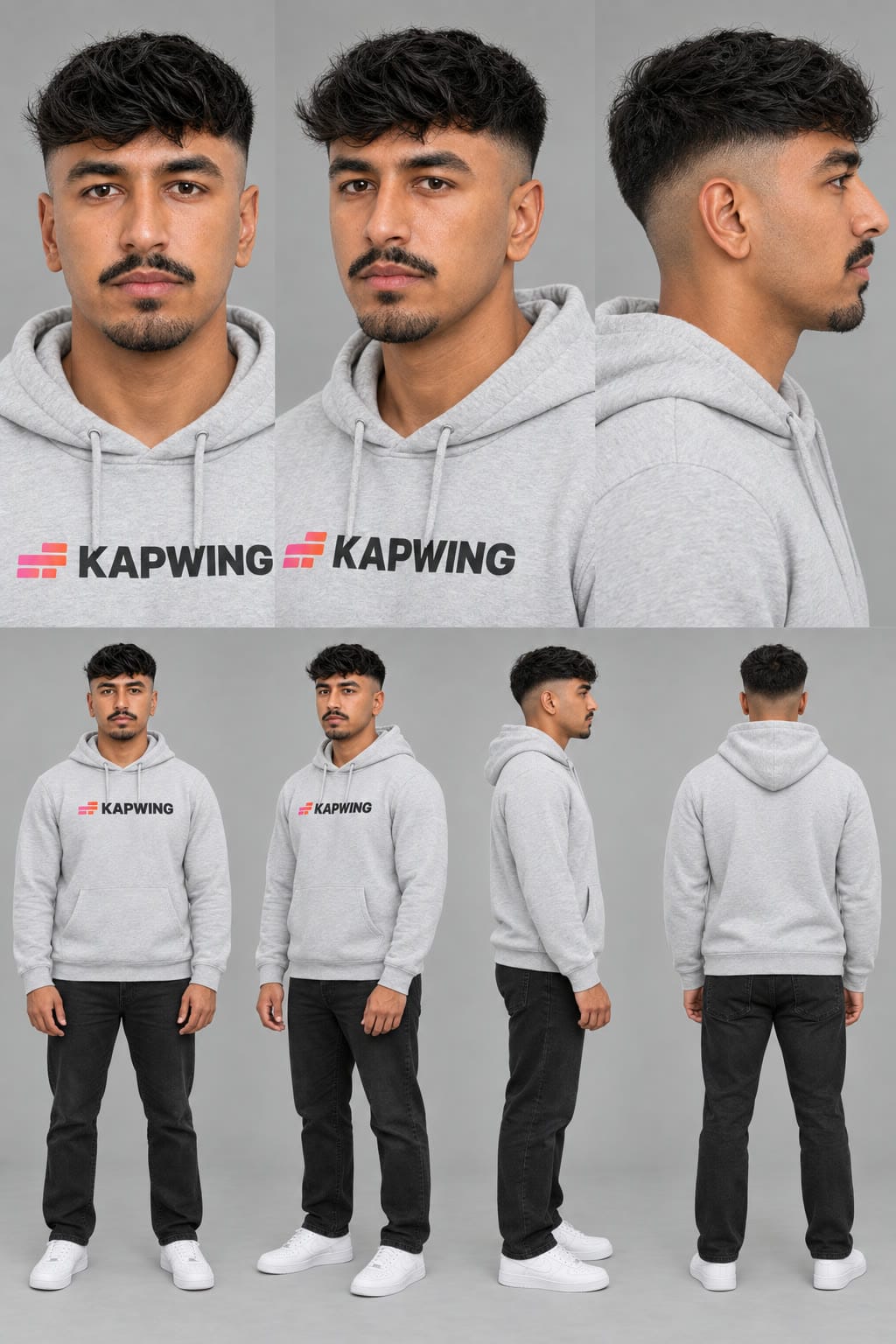
Instead of asking one tool to interpret the entire reference video, you can separate the job across different inputs: character sheets define who appears, a video defines how they move, and additional images can define the location or wardrobe.
How the Workflow Works
For the two-person Hotel Lobby trend, I used one character sheet for each new person and a separate motion-reference video for the choreography, selecting Seedance 2.5 as my model.
I also simplified the original performance into a line-drawing version.
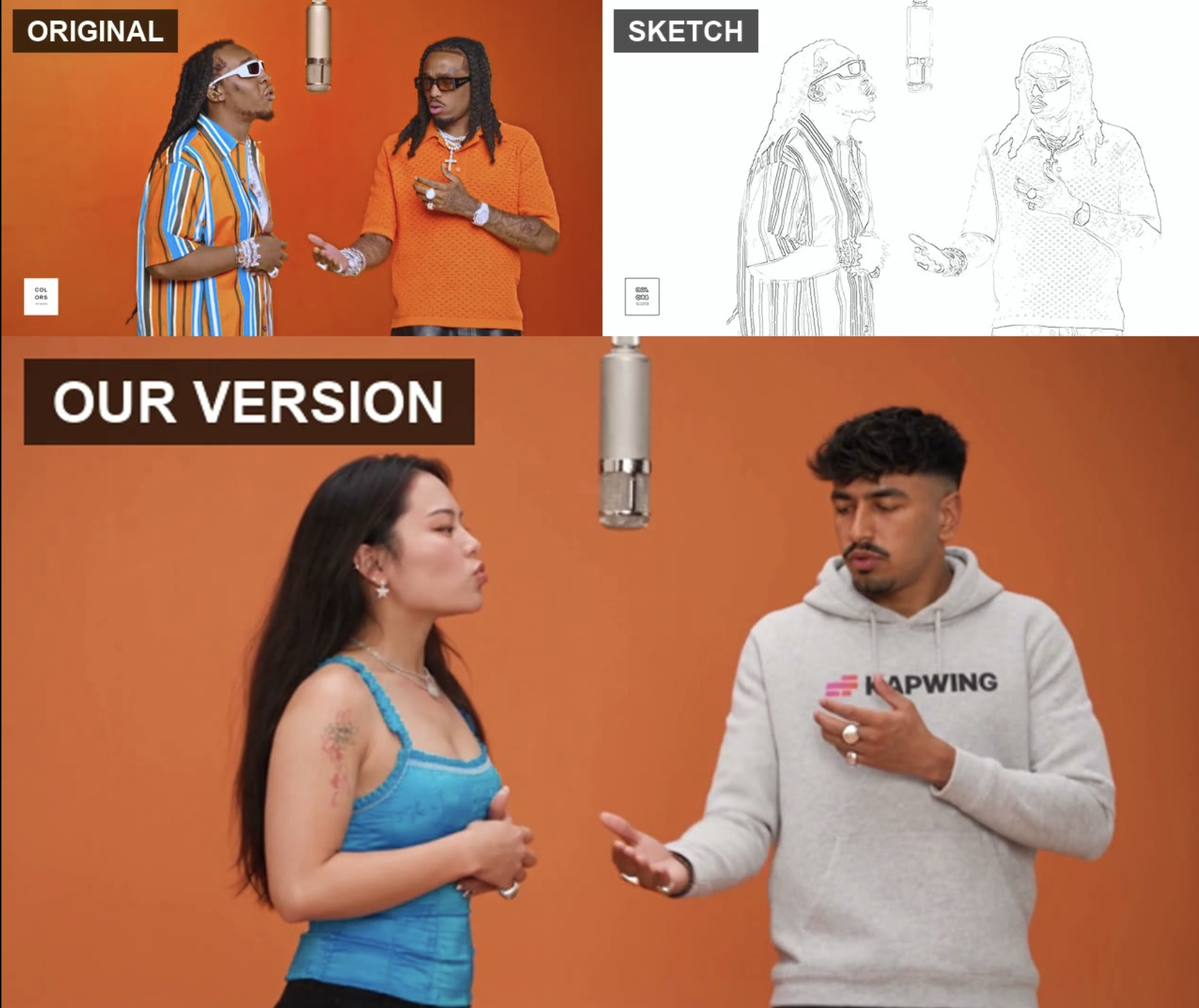
You can also use the same workflow structure for more complex scenes:
- Character Sheet 1: Character A
- Character Sheet 2: Character B
- Video reference: Motion, timing, and camera movement
- Location image: Environment
- Product image: Product appearance
Why Choose Kapwing Over Genjutsu?
In Kapwing, you can be more explicit about which asset controls identity, movement, wardrobe, setting, or product appearance. That becomes especially useful in multi-character scenes. Character sheets give Seedance 2.5 several consistent views of the same person, which reduces that guesswork.
I also prefer locking wardrobe when creating the character sheet. Asking the model to preserve one person's identity while separately inventing a new outfit creates another variable that can drift during the generation.
Kapwing has another practical advantage after the generation is finished: the result is already in a studio editor. You can restore or replace the source audio, combine multiple generations, add subtitles, or resize for Reels or YouTube.
That matters because motion-transfer generations are rarely the final post. For the Hotel Lobby recreation, for example, there was no reason to ask Seedance to reproduce the song when I could sync the original audio accurately afterward.
Where Higgsfield Genjutsu Is Better
Genjutsu is more direct. You upload the source, add the replacement references, and the tool is already structured around motion transfer. With Kapwing, you get more control partly because you're doing more of the reference planning yourself.
Seedance 2.5 is also a broader multi-reference video model rather than a dedicated motion-transfer system. If exact full-body movement is the only thing you care about, I would also test a specialized model such as Kling Motion Control.
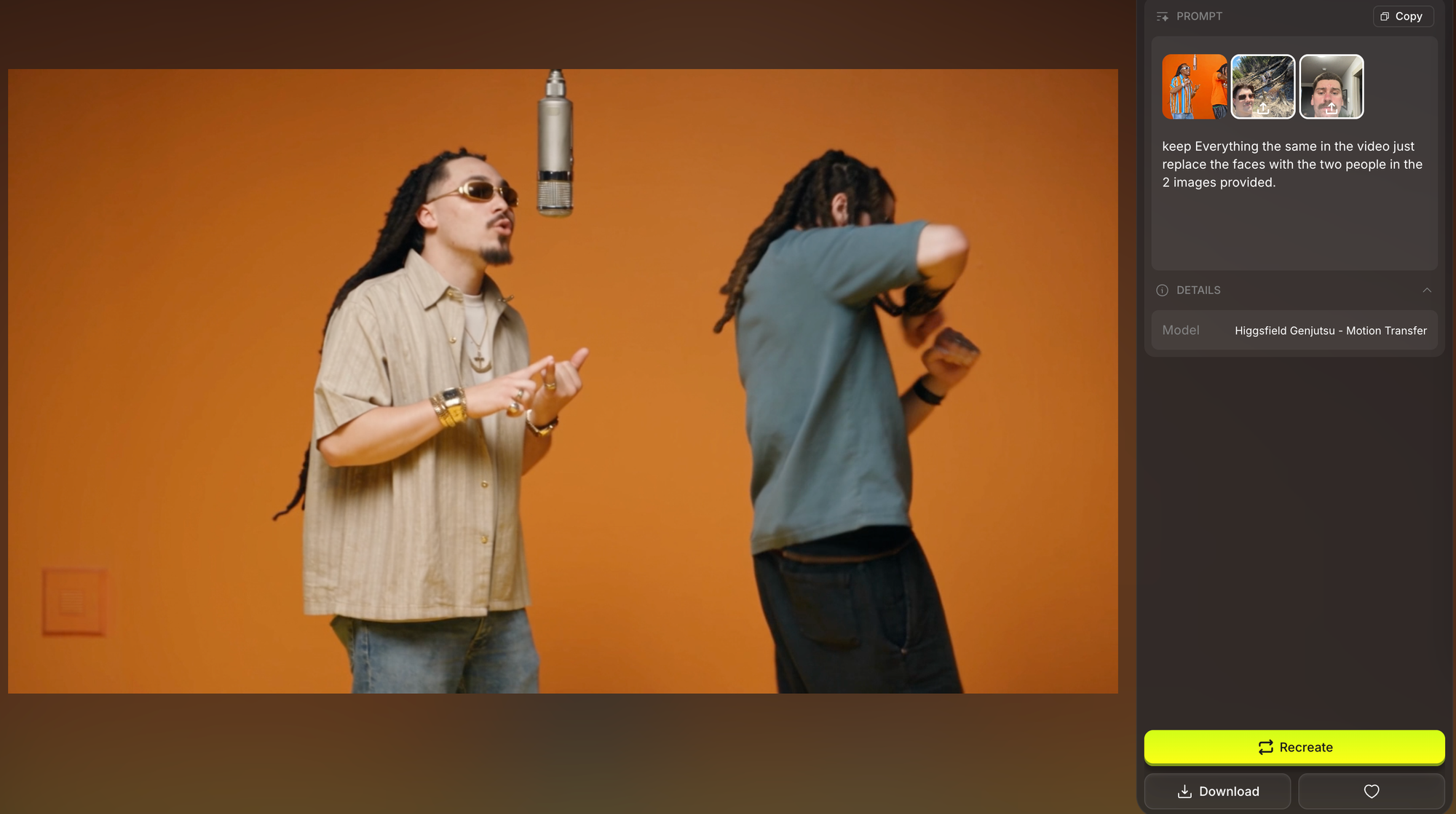
Neither workflow completely solves difficult physical interaction. Scenes with hugging, fighting, rapid handoffs, crossing bodies, or frequent occlusion are still much more likely to produce identity drift or incorrect motion assignment.
Kapwing vs. Genjutsu
Choose Kapwing if…
You want more control over where identity, motion, setting, wardrobe, and product information come from, especially in a multi-character scene.
Choose Genjutsu if…
You want the shortest path from a source performance to a transformed version and don't need as much control over how the references are separated.
Runway — Best for Object, Product, and Wardrobe Swaps
Runway is the Genjutsu alternative I'd choose when I want to keep the original video and change one part of it, rather than rebuild the scene around its motion.
Its closest equivalent to Genjutsu Object Swap is Edit Studio, powered by Aleph 2.0. You upload the footage you already like, identify what should change, and Runway carries that edit through the clip while trying to preserve everything else.
How the Workflow Works
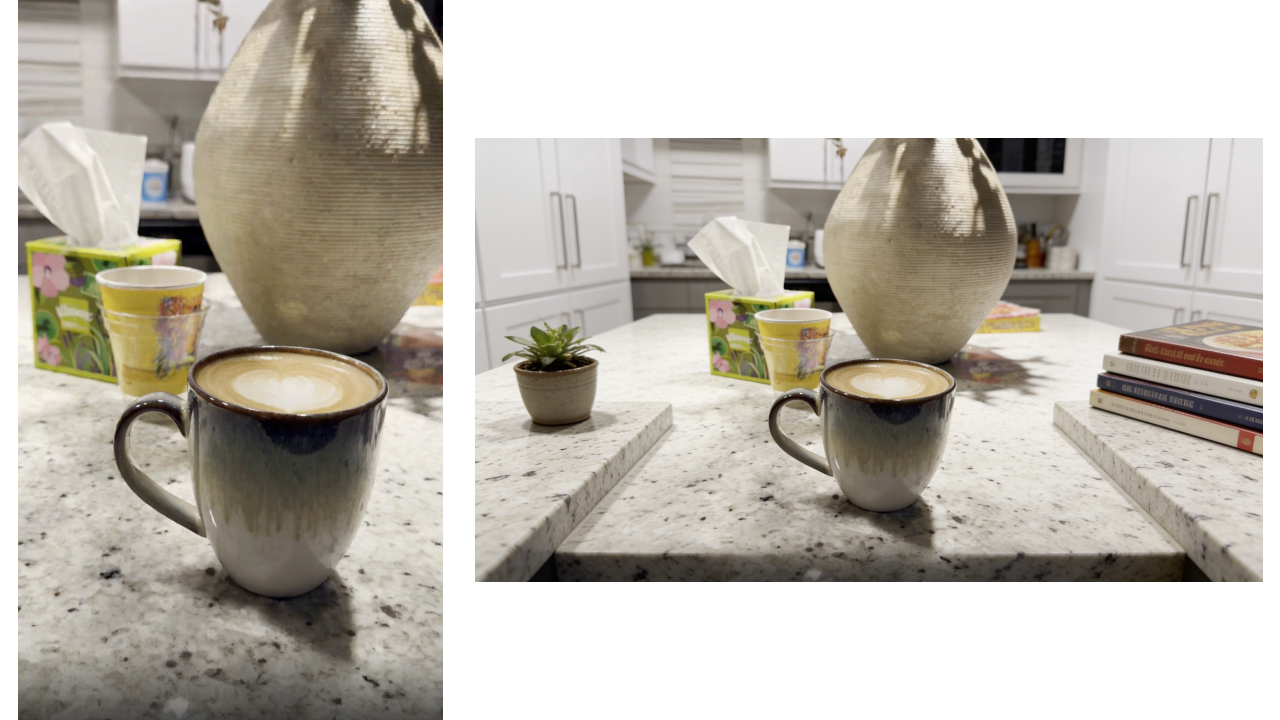
For my test, I used a product shot built around a water bottle.
I wanted to turn the can into a mug with cappuccino, convert the composition to 16:9, and keep the original camera movement, lighting, reflections, and timing.
I first uploaded the clip to Edit Studio and selected the section I wanted to work on. Runway supports ranged edits, so you can isolate only the relevant portion rather than processing the entire source clip.
I then chose a frame where the energy drink can was clearly visible and used that as the keyframe for the replacement.
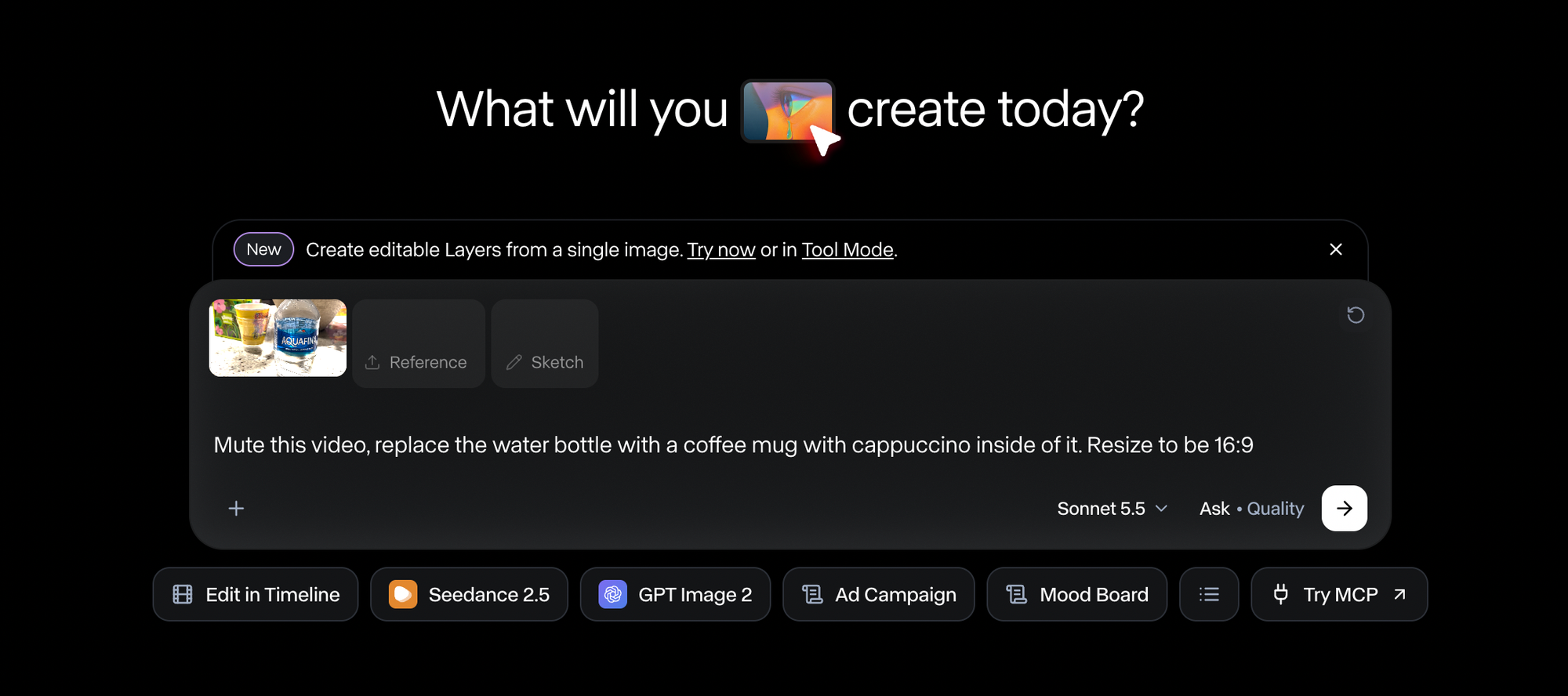
On that frame, I replaced the can with the coffee mug and checked the result before generating any video.
I was looking at fairly specific details: whether the mug was the right scale, whether it occupied the same physical space as the original can, whether the perspective made sense, and whether Runway had unnecessarily changed the hand, surrounding objects, lighting, or framing.
I also expanded the ratio for a horizontal 16:9 output. Runway's aspect-ratio expansion works through the same keyframe process: it generates the additional image area first, lets you preview the new composition against the original, and only then uses that keyframe to guide the video generation.
Once I was happy with the still, I generated the video. Aleph propagated the new mug through the existing camera movement and adapted it to the changing perspective of the shot. In my result, the reflections and shadows remained consistent with the original lighting.
Why Choose Runway Over Genjutsu?
With the coffee-mug example, I didn't have to spend a full video generation just to discover that the new object was too large or sitting at the wrong angle. Runway explicitly recommends checking the edited keyframe against the original before generating the video, and you can continue iterating on that frame.
Runway also lets you process only a selected portion of the clip. Aleph 2.0 currently costs 28 credits per second with a two-second minimum, so a five-second product appearance can be treated as a five-second edit rather than forcing you to process the full source video.
Where Higgsfield Genjutsu Is Better
For the actual object swap, Genjutsu is more streamlined. I wouldn't describe Runway as inherently better at product replacement. Its advantage is that I get more control over the edit before it becomes a video.
Genjutsu is also much stronger as an all-in-one option if the scope of the edit grows. If I decide that I no longer want just a coffee mug, I also want a different actor, new wardrobe, another location, etc, I can switch from Object Swap to Motion Transfer inside the same Genjutsu workflow.
Runway can cover those jobs too, but they are split across different systems. Edit Studio/Aleph handles generative edits to existing footage, while Act-Two handles performance transfer.
Runway vs. Genjutsu
Choose Runway if…
You want to inspect and refine the replacement on a still before committing to the full video, especially for product, wardrobe, background, or other commercial edits.
Choose Genjutsu if…
You want the faster direct swap workflow, or you expect the job to expand from changing one element to rebuilding much more of the video.
Luma — Best for Controlling How Far the Source Video Changes
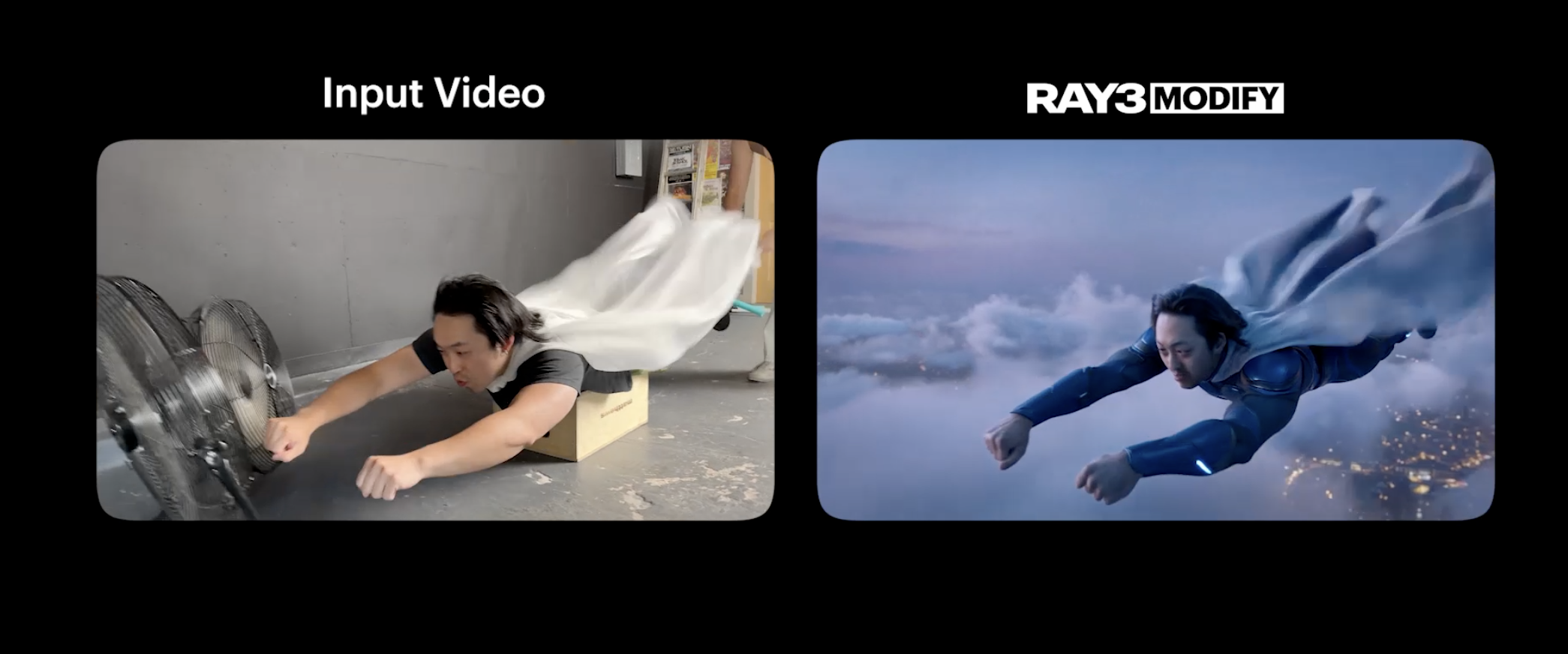
Luma's Ray3.2 Modify Video is the closest alternative here to Genjutsu Motion Transfer, but the control model is different.
Both start with existing footage and generate a new version around it. Genjutsu makes that relatively simple: upload the motion reference, add the replacement references, and let the model rebuild the scene.
Luma exposes more of what is happening underneath by letting you separately control how tightly the new video follows the source's motion, spatial structure, faces, bodies, and pose.
How the Workflow Works
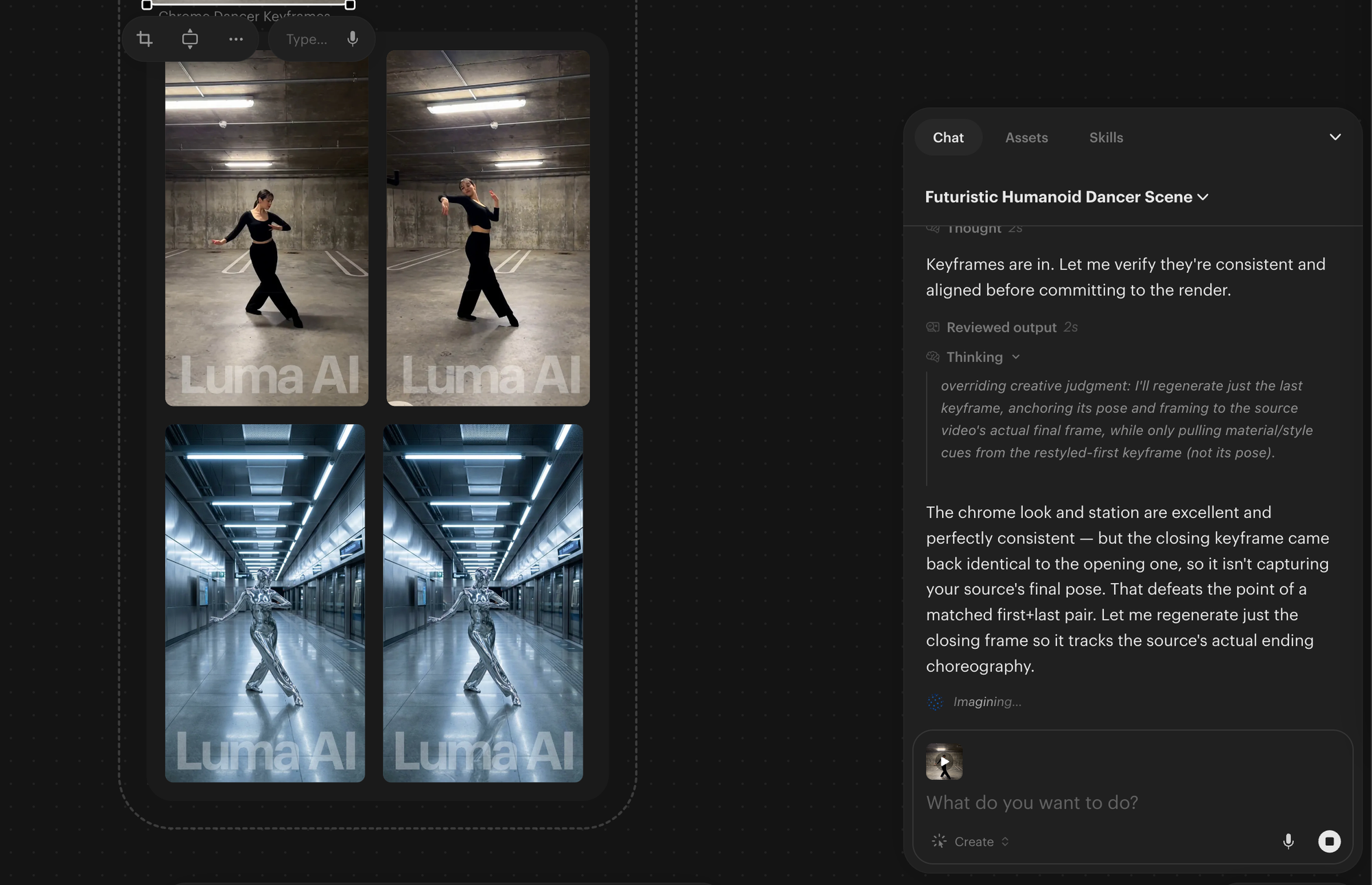
For my test, I used a 12-second video of a dancer moving through a concrete parking garage.
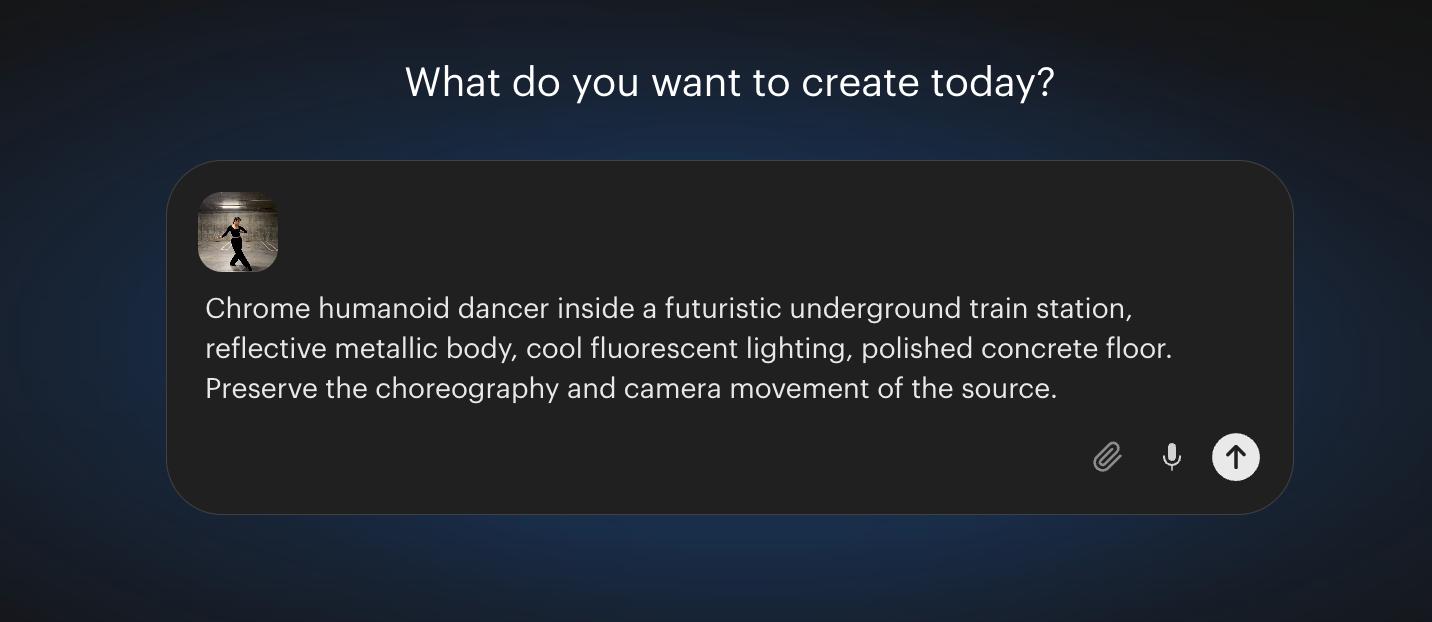
I wanted to turn the performer into a chrome humanoid dancing inside a futuristic train station, while keeping the choreography, timing, and camera movement from the original footage.
I uploaded the original clip into Ray3.2 Modify Video.
Then, I used the prompt to describe the new visual direction rather than redescribing the movement that was already present in the source:
From there, the useful part was being able to decide how closely different parts of the result should follow the original. I kept Motion high because the choreography was the part of the source I wanted to preserve. I also kept Structure fairly high so the spatial layout and composition continued to resemble the source rather than turning into a completely different shot.
Luma also gives you two ways of following the performer's body. Pose tracks the original skeleton more strictly, while Blocking gives the generated character more freedom while still following the broad staging and movement. For the chrome humanoid, that distinction was useful because the replacement character did not need to have exactly the same proportions as the original dancer.
I could also add keyframes at specific points in the 12-second clip.
Ray3.2 lets you place up to 16 keyframes inside a clip in Luma's current creative workflow. Its API supports more extensive keyframe configurations.
Why Choose Luma Over Genjutsu?
The biggest advantage is that I could separate things that Genjutsu largely groups together under Motion Transfer. In my test, I wanted the dancer's choreography and camera motion to remain recognizable, but I did not care about preserving their face, clothing, body material, or environment. Luma let me protect the former without also protecting the latter.
Luma is also more production-oriented than most tools in this category. Ray3.2 supports lower-resolution drafts for iteration and higher-resolution outputs up to 1080p, plus HDR and EXR options for workflows that continue into professional finishing software.
Where Higgsfield Genjutsu Is Better
Higgsfield Genjutsu currently accepts up to 40 reference images, while Luma's Modify workflow is more centered on transforming the source with prompts, preservation settings, and timeline keyframes. If I have images of two specific people, their exact outfits, a location reference, and a source performance, Genjutsu is already organized around that setup. Genjutsu also supports longer source clips: up to 30 seconds, compared with 20 seconds for Ray3.2 Modify.
The extra Luma controls can also become unnecessary for a straightforward recast. If I simply want to replace a dancer with another human character and move the performance into a new room, Genjutsu's Motion Transfer workflow is easier. Luma becomes more compelling when I need something more precise.
Luma Ray3.2 vs. Genjutsu
Choose Luma if…
You want to push the source video much further visually while controlling exactly which parts of the original performance and composition remain intact.
Choose Genjutsu if…
You already have the characters, wardrobe, products, or locations you want to insert and want a more direct replacement workflow.
Kling — Best for Single-Character Motion Transfer
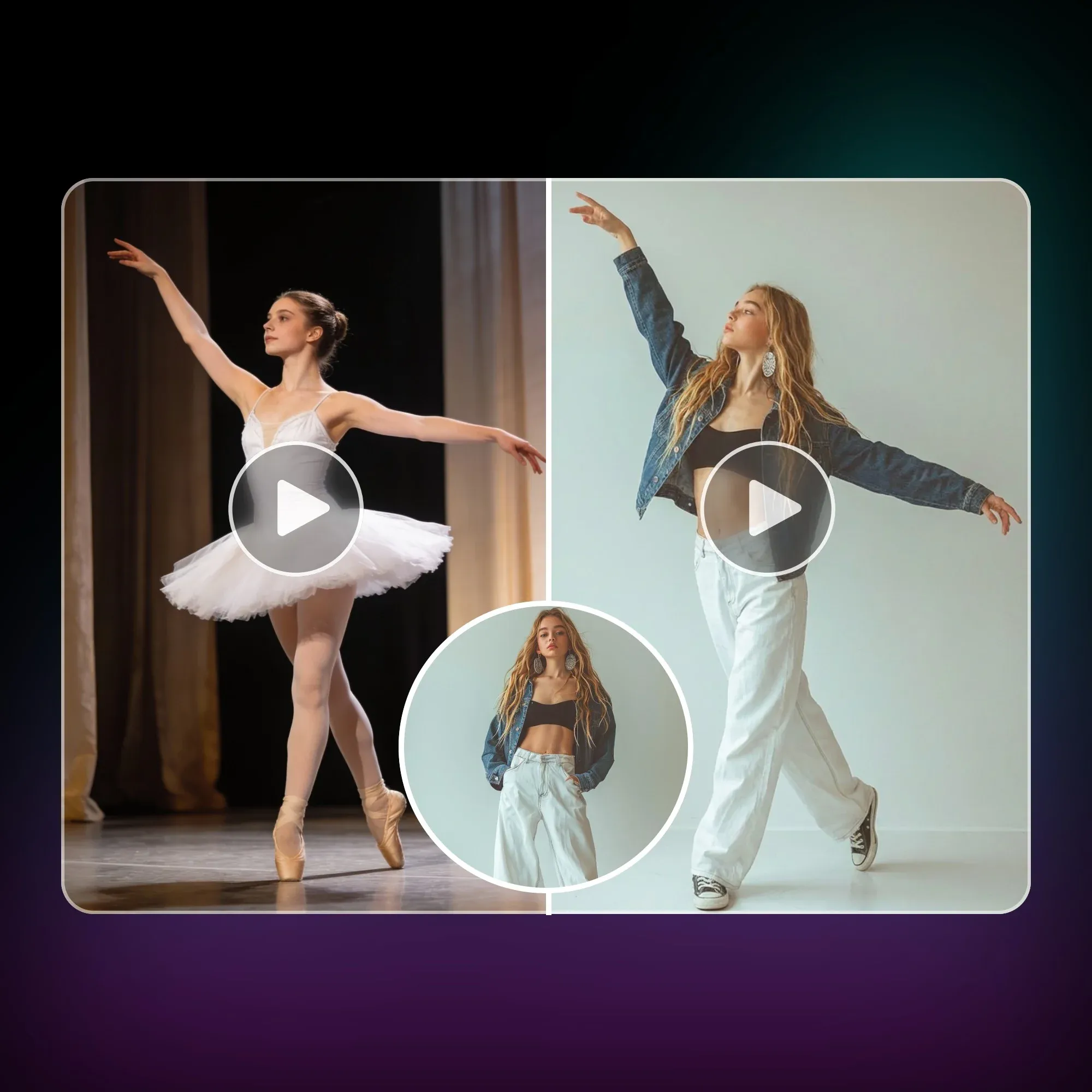
Kling is the most specialized motion-transfer option on this list. Its Motion Control workflow is built around a simple relationship: one video provides the performance, and one character image provides the person who performs it.
That makes it narrower than Genjutsu, but also easier to understand. Genjutsu can use a source video as the foundation for a much larger recast involving new characters, wardrobe, products, and environments. With Kling, the central job is make this character perform this movement as closely as possible.
How the Workflow Works
For my test, I uploaded the performance clip to Kapwing I wanted to reproduce as the motion reference, then prompted to add in my AI character.
Matching those two inputs matters more in Kling than I expected. If the reference video shows the performer head to toe, the character image should also show the full body. Kling's own guidance recommends matching the framing and proportions of the character image to the performer in the source footage.
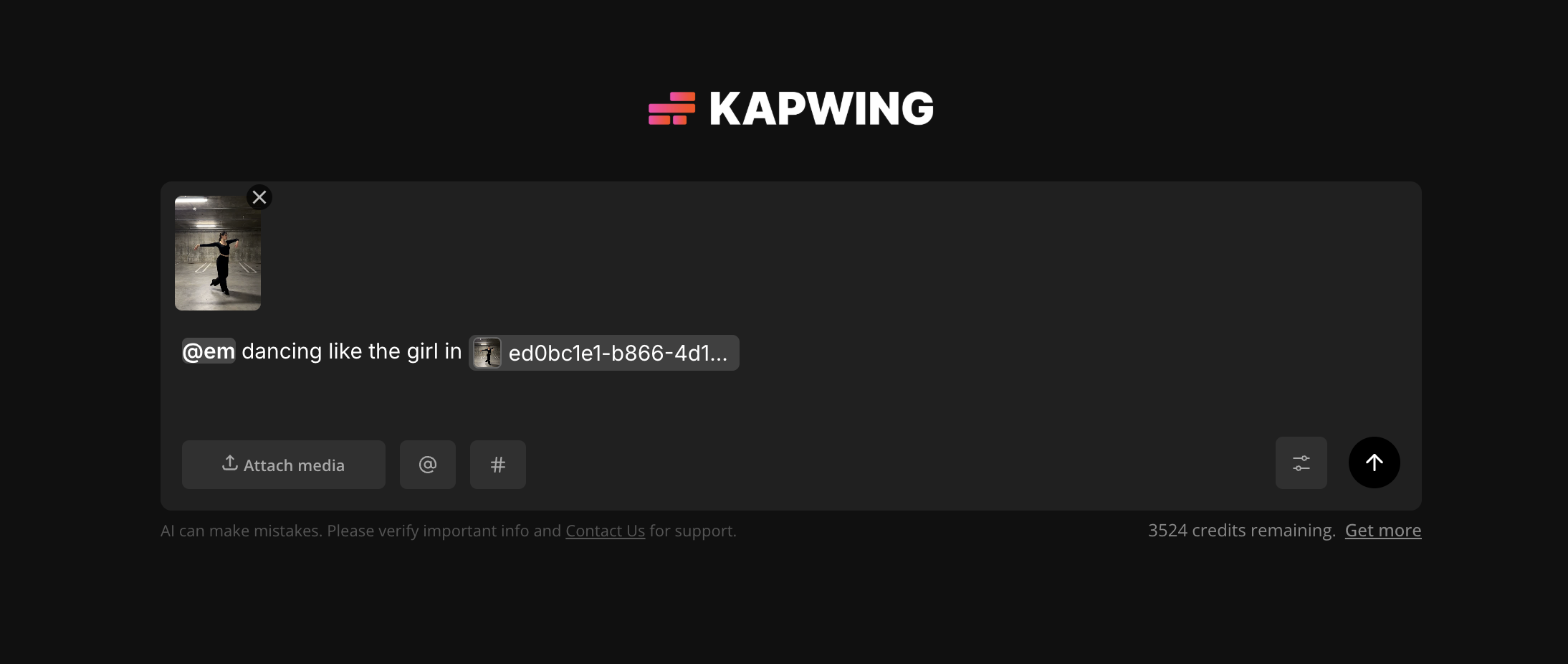
From there, there are two orientation modes.
- Character Orientation Matches Video makes the generated character follow the source video's movement, expression, orientation, and camera behavior. This was the more straightforward option for my test because my priority was keeping the new character close to the original performance.
- Character Orientation Matches Image keeps the movement and expressions from the source, but lets the character retain the orientation established in the reference image. In this mode, the camera can be controlled separately through the prompt. Kling limits this version to shorter references, while the video-orientation workflow can use motion clips up to 30 seconds.
Why Choose Kling Over Genjutsu?
Kling makes sense when the character's physical performance is the one thing I'm trying to reproduce. There are fewer competing references telling the model what should happen, which is useful for dancing, exercise, gestures, acting, martial arts, or other shots where matching the body movement matters more than rebuilding an elaborate scene.
The latest Motion Control workflow also puts much more emphasis on facial consistency. Element Binding can use multiple facial views or even a short facial-reference video, which helps when the source performer turns their head, changes expression, or briefly occludes their face.
Where Genjutsu Is Better
The tradeoff is that Kling's Motion Control workflow is fundamentally single-character. Kling recommends a motion reference with one clearly visible performer. If there are multiple people in the source, the system uses the movement of the person occupying the largest portion of the frame. Its current Element Binding workflow also supports one bound element in Motion Control.
That makes Kling much less suitable for something like my two-person Hotel Lobby recreation. Genjutsu can treat a larger performance as the reference while separately replacing several people, wardrobe choices, products, and parts of the environment.
Complex or very fast motion can result in Kling extracting only part of the usable action, which may produce an output shorter than the uploaded reference. Genjutsu therefore gives me more room when the source itself is complicated.
Kling vs. Genjutsu
Choose Kling if…
The central problem is getting one new character to closely reproduce an existing person's body movement and expressions.
Choose Genjutsu if…
The motion is only one part of a larger recast involving several characters, wardrobe, products, or an entirely new environment.
Scenario P-Video Replace — Best for Replacing a Character in Existing Footage
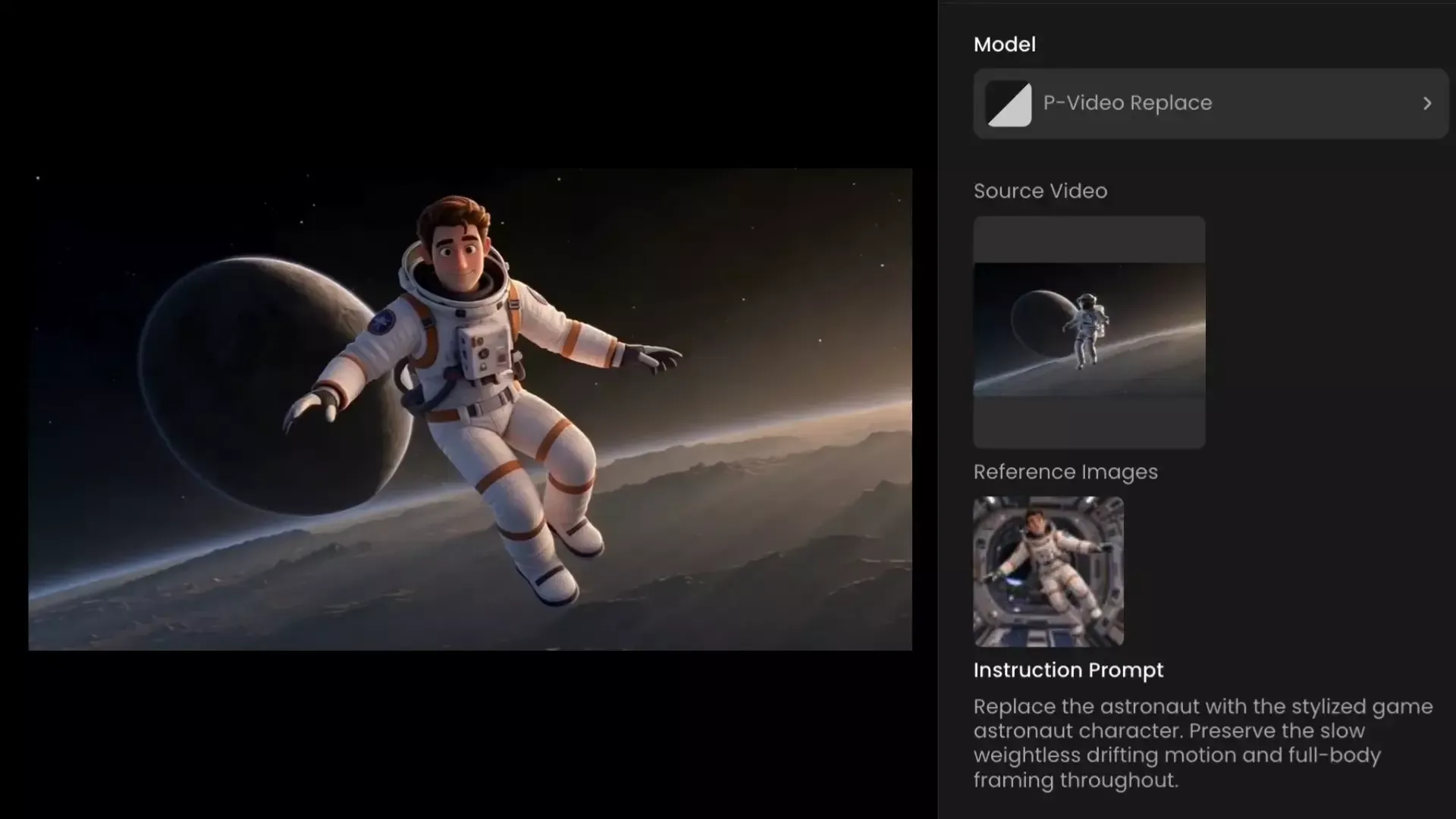
Scenario's P-Video Replace, built by Pruna AI, is the most literal character-replacement tool on this list.
It sounds similar to Kling Motion Control, but the starting point is different. Kling uses a video to teach a new character how to move. Scenario takes the video you already have and swaps the person inside it.
How the Workflow Works
For my test, I reused the 12-second shot of a dancer moving through a concrete parking garage. With Luma, I had used that footage as the foundation for a much bigger transformation: the dancer became a chrome humanoid and the parking garage became a futuristic train station.
For Scenario, I deliberately did the opposite. I wanted to keep the parking garage, camera movement, lighting, timing, and original audio exactly as they were and replace only the dancer.
I uploaded the original video into P-Video Replace, then added references for the new character. P-Video Replace supports up to four identity images, so I used multiple angles rather than relying on one portrait. That was particularly useful once the dancer started turning away from camera, because the model had an actual reference for how the replacement should look from the side rather than inventing it mid-shot.
The important part was that I didn't have to rebuild the scene around the new character. The concrete walls, shadows, floor, camera movement, and everything happening behind the performer came directly from the original footage.
Why Choose P-Video Replace Over Genjutsu?
Scenario is useful when almost everything in the video is already right. Genjutsu can also do character replacement through Object Swap, so Scenario isn't unique because it can swap a person. Its advantage is how tightly focused the workflow is around that one job.
That makes it particularly useful for footage shot with a stand-in, replacing an actor in existing branded footage, turning a live-action performer into a stylized character, or changing a character in footage where the production itself should remain untouched.
Scenario also keeps the source audio, so dialogue, music, and sound effects don't need to be recreated or synced back afterward.
Where Genjutsu Is Better
Genjutsu Motion Transfer is designed for that broader transformation. The source can supply the choreography, timing, and camera behavior while new references define the people, wardrobe, products, and environment.
Genjutsu also gives me substantially more reference capacity. Scenario P-Video Replace accepts up to four identity images, whereas Genjutsu's consumer workflow supports up to 40 references across multiple types of assets.
Which Higgsfield Genjutsu Alternative Should You Use?
If you're rebuilding a complicated performance with several characters, references, or environments, Kapwing gives you the most flexibility over where each piece of visual information comes from, plus an editor for finishing the result. Runway makes more sense when the original footage is already close to finished and you want to carefully change a product, outfit, object, or part of the frame with a keyframe you can inspect before generating the video.
For more transformative edits, Luma gives you unusually granular control over how closely the result follows the source motion, structure, pose, and composition. Kling Motion Control goes in the opposite direction and specializes in one narrower problem: making a new character closely reproduce a single performer's movement and expressions.
Genjutsu alternatives at a glance
Compare how each workflow handles motion, references, replacements, source preservation, and editing.
Frequently Asked Questions
What is the best Higgsfield Genjutsu alternative?
The best alternative depends on what part of the original video you need to preserve. Kapwing is the strongest fit for multi-reference recasts and videos that still need editing afterward. Runway is useful for precise object, product, wardrobe, or background edits that you want to preview on a keyframe first. Luma gives you more granular control over how closely a transformation follows the source motion and structure, while Kling Motion Control is especially useful when reproducing one performer's body movement is the priority.
What is the closest alternative to Higgsfield Genjutsu Motion Transfer?
Kling Motion Control is one of the closest alternatives if the main goal is transferring a single person's movement onto a new character. It uses a driving video to control the replacement character's movement, expressions, and orientation.
For more complex recasts involving multiple characters, environments, wardrobe, or other reference assets, Kapwing with Seedance 2.5 is closer to the broader Genjutsu Motion Transfer workflow.
What is the difference between Genjutsu and Kling Motion Control?
Both can use an existing performance to control a new character, but their scope is different. Kling Motion Control is primarily built around one character following one reference performance. Genjutsu Motion Transfer can use the source performance as the basis for a broader recreation in which the cast, wardrobe, products, environment, and overall visual style can all change.
Kling is therefore a stronger fit when matching the performer's movement is the main goal. Genjutsu is more useful when the movement is only one part of a larger recast.
Can Genjutsu replace a person in an existing video?
Genjutsu's Object Swap workflow can replace a person or character while preserving more of the original shot. Its Motion Transfer mode goes further by using the source primarily for motion, timing, and camera behavior while rebuilding more of the scene.
If keeping the existing footage almost completely intact is the priority, Scenario P-Video Replace is a more specialized option because its workflow is specifically designed around replacing the character while retaining the source scene, motion, camera movement, lighting, and audio.
Which Genjutsu alternative is best for multiple characters?
For a multi-character recreation, I would use Kapwing with a multi-reference model such as Seedance 2.5. Separate character sheets can define each person while a video reference supplies the choreography and timing.
Kling Motion Control is less suitable because its motion-transfer workflow is centered on a single primary performer. Multi-character scenes also become harder when people overlap, touch, cross positions, or obscure one another, regardless of the model being used.
Which Genjutsu alternative is best for changing an object or product in a video?
Runway Edit Studio with Aleph is a strong option when you want to replace a specific object or product while keeping the rest of the footage recognizable. Its advantage is the keyframe-first workflow: you can inspect and refine the replacement on a still frame before generating the edited video.
That makes it particularly useful when scale, perspective, reflections, shadows, or the object's position need to look correct before you spend credits processing the full clip.