How to Prompt MiniMax H3 (Hailuo 3.0): A Guide for AI Video Creators
A practical guide to prompting MiniMax H3 with references, motion, audio, and shot-by-shot control.
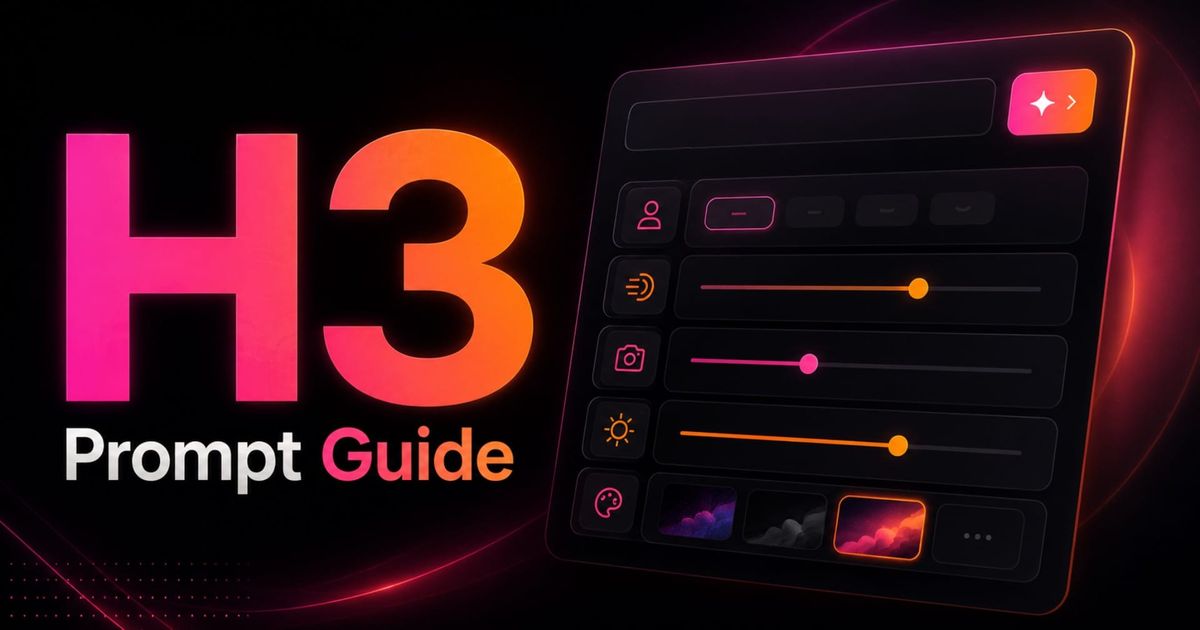
MiniMax H3, also known as Hailuo 3.0, gives AI video creators more ways to control a generation than earlier Hailuo models. Instead of relying on a text prompt or a single reference image, H3 can work with text, images, video, and audio in the same prompt.
That opens up more precise workflows: you can reference a product image, borrow movement from a video, preserve a character’s appearance across shots, or use audio to guide voice and timing. But with more inputs comes a more important question: how should you structure a MiniMax H3 prompt so the model knows what each reference is supposed to do?
This guide breaks that process into a repeatable MiniMax H3 prompt formula, followed by 10 prompting tips and 6 ready-to-use templates for common creator workflows. You’ll also see how H3 compares with Veo 3.1, Kling 3.0, and Seedance 2.5, and when each model may be the better fit.
Table of Contents:
- What Is MiniMax H3 (Hailuo 3.0)?
- MiniMax H3 Prompt Formula
- 7 MiniMax H3 Prompting Tips for Better AI Videos
- MiniMax H3 Prompt Templates by Use Case
- MiniMax H3 vs. Veo 3.1, Kling 3.0, and Seedance 2.5
- Frequently Asked Questions
What Is MiniMax H3 (Hailuo 3.0)?
MiniMax H3 is MiniMax’s third-generation Hailuo AI video model, released in July 2026. You may also see it referred to as Hailuo 3.0, Hailuo H3, or Hailuo 03.
H3 is omni-modal, meaning it can use text, images, video, and audio together as part of a single generation. That makes reference-based prompting much more flexible than in earlier Hailuo models, where creators had fewer ways to control identity, motion, sound, and shot continuity at the same time.
MiniMax H3 specs at a glance
- Video length: 5–15 seconds
- Frame rate: 24 fps
- Resolution: Up to 2K via API; 768p in Kapwing
- Reference inputs: Up to 12 files
- Audio: Native stereo audio
- Generation modes: 5
For creators, the practical takeaway is simple: H3 is built for more controlled, reference-heavy AI video workflows. The quality of your result depends not only on what you describe, but on how clearly you assign subjects, motion, audio, camera direction, and reference roles inside the prompt.
MiniMax H3
Specs at a glance
MiniMax H3 Prompt Formula
MiniMax H3 is easier to control when you treat the prompt as a specification for change over time, not just a description of what the video should look like. That matters because H3 can combine multiple kinds of input.
That leads to a practical H3 prompt structure:
References → Retention → Scene → Timeline → Camera → Audio → Constraints
Prompt structure
Anatomy of a MiniMax H3 Prompt
Click each section to see what it controls inside an H3 generation.
Once you understand the seven sections, the next step is deciding how much detail each one actually needs. A simple image-to-video clip might only need a clear action, a camera move, and one retention rule, while a reference-heavy product ad may need all seven sections.
The best H3 AI video prompts remove ambiguity where ambiguity would actually affect the result. That is the idea behind the next tool: instead of writing a prompt from scratch, you can build one and see how those decisions fit together.
MiniMax H3 Prompt Builder
Build an H3 prompt one step at a time: References → Retention → Scene → Timeline → Camera → Audio → Constraints.
Choose your generation mode
Your mode changes what the prompt needs to explain most clearly.
Assign your references
Tell H3 what each file controls, what to preserve, and what to ignore.
Define the scene
Describe who is present, where they are, what they do, and the visual treatment.
Build the timeline
Break complex motion into clear timed beats.
Direct the camera
Separate subject movement from what the camera physically does.
Describe the audio
Add dialogue, sound effects, ambience, and music separately.
Add constraints
Protect important continuity and prevent specific unwanted outputs.
7 MiniMax H3 Prompting Tips for Better AI Videos
Once you understand the anatomy of an H3 prompt, the next question is where extra specificity actually improves the result.
These are the prompting techniques that matter most.
1. Assign every reference a role — and say what should transfer
With Ref2VA, H3 also needs to know which attributes from that file should influence the output. A motion-reference video, for example, contains movement, but also a setting, camera motion, and audio. So, avoid broad instructions like:
Use Image 1 for the product and Video 1 for the movement.
Instead, define both the useful signal and the information H3 should ignore:
Video 1 defines the hand trajectory and movement timing only. Do not copy its actor, wardrobe, setting, lighting, or camera movement.
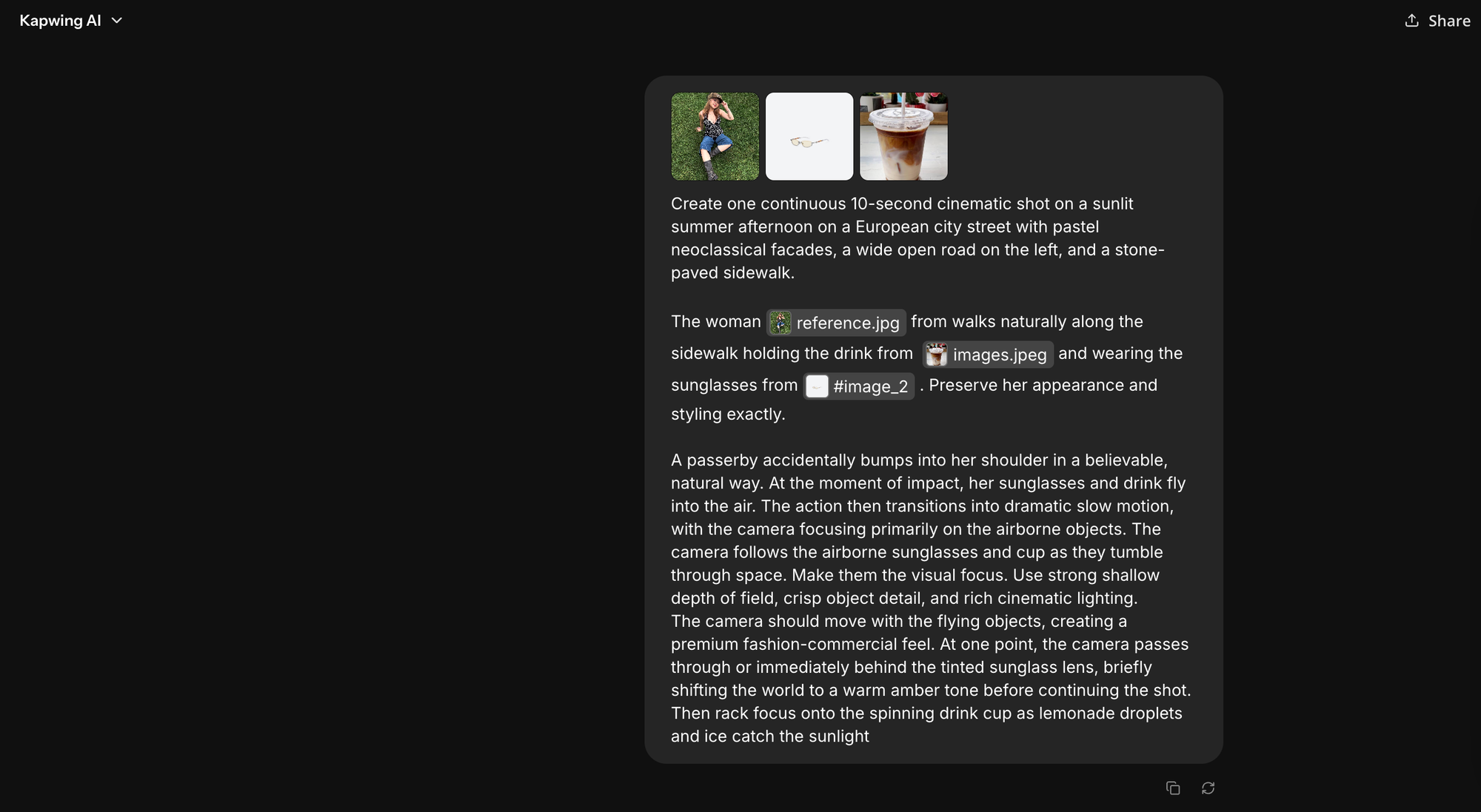
This becomes even more important when two references could plausibly control the same attribute. If both Image 1 and Image 2 contain strong lighting cues, tell H3 which one wins:
Use the lighting from Image 1. Ignore lighting cues from Image 2.
For more complex Ref2VA prompts, MiniMax goes one step further with explicit retention levels. Visual references can be described as fully_preserved, partially_preserved, attribute_transfer, or weak_reference; audio references use corresponding levels such as fully_copy, partially_copy, reference, and weak_reference. For example:
Image 2: attribute_transfer — preserve the jacket's color, material, and cut, but not the person wearing it.
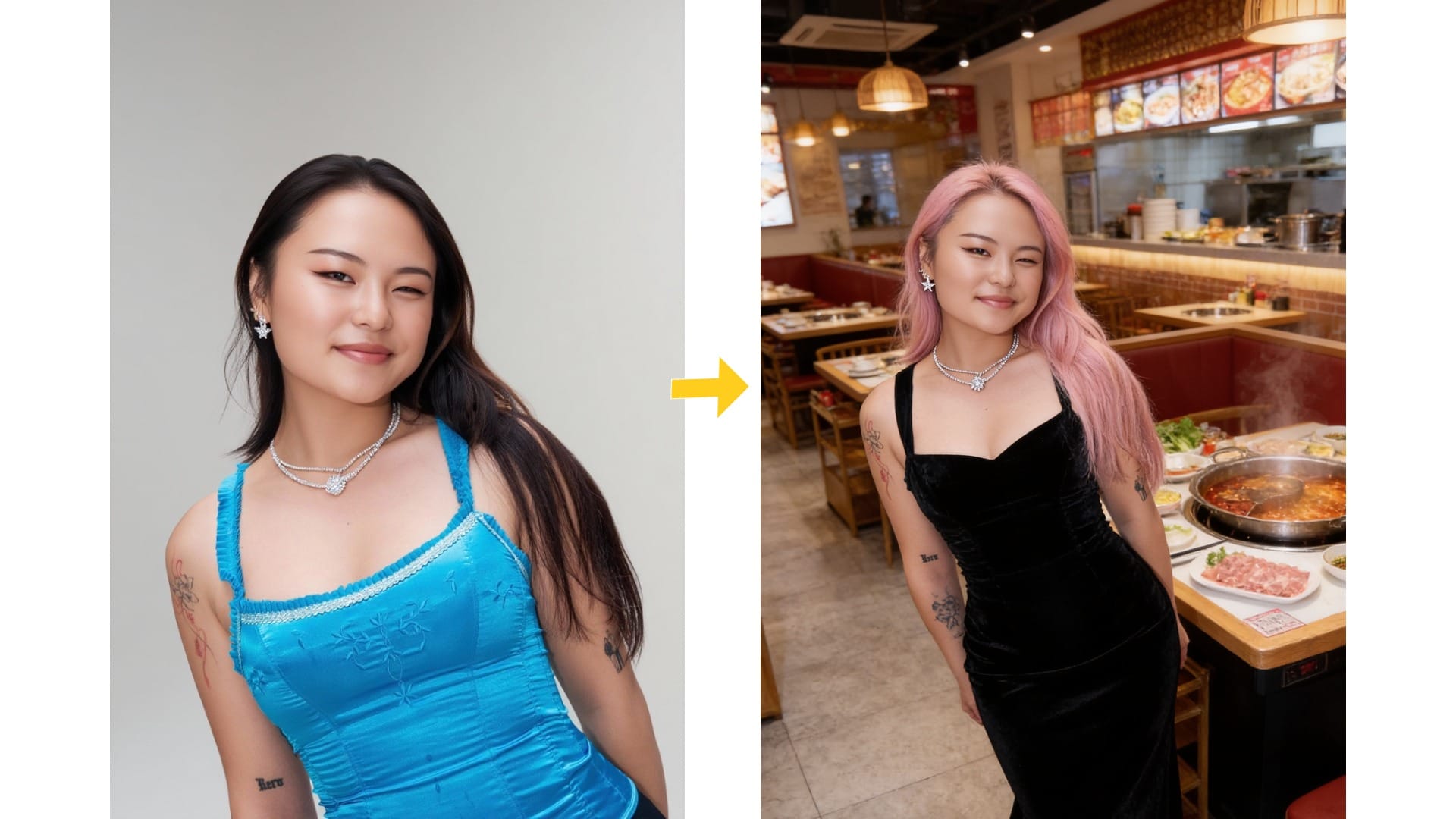
2. Separate identity from motion
One of the hardest problems in reference-driven video is telling H3 what it may change and what it must preserve. This is particulary important for AI characters and character consistency.
The cleanest way to write that instruction is to separate invariants—details that should remain stable—from variables—details that are expected to change.
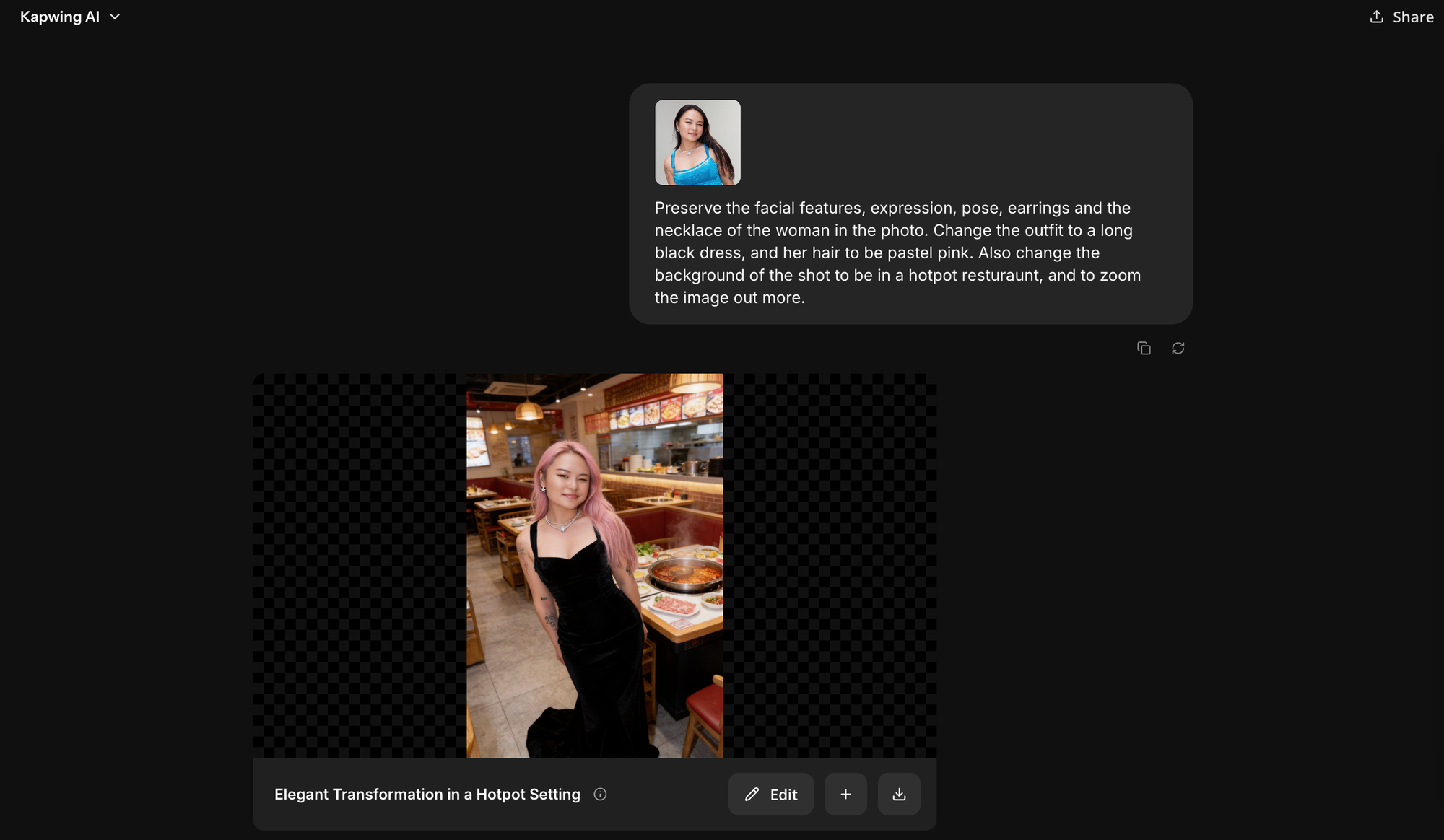
Instead of writing "Keep the woman consistent", be explicit:
Preserve the same facial identity, half-up dark hair, gold hoop earrings, and cream blazer throughout the clip.
It also helps to be realistic about framing. Facial identity is harder for video models to preserve when the face occupies only a small area of the frame. If facial fidelity is important, use the wide shot to establish the scene and move into medium or close framing for the beats where identity needs to read clearly.
3. Describe physical actions as trajectories
Short action verbs often leave important details unspecified. Consider the prompt "the woman picks up the bottle".
This does not tell H3 which hand the woman uses, where it touches the bottle, how quickly she lifts it, etc.
For product shots and other object interactions, describe the complete movement rather than only the final action:
starting state → movement → ending state
For example:
The bottle begins upright on the kitchen counter in a sage green kitchen. She reaches forward with her right hand, grips it around the upper third, lifts it smoothly to chest height, and rotates it until the front label faces camera.
4. Separate subject movement, camera movement, and cuts
Three different factors can change what appears on screen:
- the subject can move,
- the camera can move,
- the edit can cut to a different shot.
When a prompt does not distinguish between these three factors, the model may invent the wrong motion or compress several actions into an unclear transition.
For example, instead of: "dynamic tracking shot as she walks toward camera", you can write:
She walks forward at a relaxed pace. The camera tracks backward at the same speed, maintaining a waist-up medium shot.
For H3, use standard filmmaking language whenever possible: dolly in, track left, pan right, rack focus, handheld, locked-off, and whip pan. These terms describe recognizable camera operations more reliably than vague phrases such as make it cinematic or add dynamic movement.
5. Treat audio as part of the timeline
H3 generates sound together with the video, so audio should be planned as part of the action rather than added as a vague instruction at the end of the prompt. Start by separating the audio into four categories, then connect each important sound to the moment that produces it:
- dialogue
- physical sound effects
- ambience
- non-diegetic music
[6.2s] She pulls the tab open. A sharp metallic click occurs first, followed immediately by a short carbonation fizz.
When using an audio reference, specify exactly what should transfer and what should not. For example:
Audio 1 provides the speaker's vocal character and delivery cadence only. Use the dialogue written in this prompt rather than the words in the reference.
You can also preserve a complete reference when that is the intention:
Audio 1 is fully preserved as the soundtrack. Keep its original vocals, timing, and background music, and do not generate new dialogue.
6. Use MiniMax's structured prompt format for complex generations
Most single-shot H3 prompts do not need a rigid schema.
But when a prompt includes multiple subjects, reference image, retention rules, cuts, and audio sources, free-form prose can become difficult to organize and troubleshoot. MiniMax's advanced prompt format makes these instructions easier to manage by separating them into six fields:
subject_definitions
Defines reusable subjects and references so the rest of the prompt can refer to them consistently.
summary
States the overall task and the main relationships between the inputs and intended output.
retention_analysis
Specifies how strongly information from each reference should carry into the generation.
detailed_description
Describes the visual treatment and then the video shot by shot, in playback order, including synchronized sound events.
overall_soundscape
Defines continuous ambience and physical sound across the clip.
non_diegetic_music
Defines audience-only music separately, or explicitly indicates that none is wanted.
7. Design around the model's failure modes instead of trying to prompt through them
Not every generation problem has a prompt-side solution. For example, fine identity details become inherently harder to preserve as a face gets smaller in frame. Very fast movement gives the model less room to resolve clean geometry.
The practical response is often shot design, not a longer prompt. For example, if facial details matter, generate a close up shot rather than prompting extensively.
MiniMax H3 Prompt Templates by Use Case
The prompt structure changes depending on what you're asking H3 to solve.
The six templates below are starting points for common creator workflows. Replace the bracketed details with your own references and direction rather than treating the wording as fixed.
Product Reveal
Best for: Turning a product image into a short commercial shot
Mode: Image-to-video + audio
MiniMax Product Reveal Prompt Template
Reference
Image 1 defines the product. Fully preserve its proportions, packaging shape, material, label layout, brand colors, and cap. Ignore the white background and source lighting.
Scene
Minimal studio set with a warm neutral background. Soft directional key light from camera left and subtle rim light separating the product from the background.
Timeline
[0–3s] The product begins upright and stationary at the center of frame. Slow camera push-in. Small highlights travel naturally across the surface as the camera moves.
[3–6s] A hand enters from frame right, grips the product securely, lifts it from the surface, and rotates it approximately 30 degrees until the front label faces camera.
[6–8s] Cut to a static close-up of the front label. The hand tilts the product slightly toward the light while keeping the label square to camera.
Camera
Slow dolly-in for the opening shot. Hard cut at 6 seconds to a locked close-up. No handheld movement.
Audio
Quiet studio room tone. Subtle contact sound as the hand picks up the product. One restrained tonal hit on the close-up. No continuous background music.
Constraints
Product geometry, label, colors, typography placement, and proportions remain unchanged throughout. No additional text, logos, products, or exaggerated reflections.
UGC-Style Talking Head
Best for: Testimonials, hooks, creator-style ads, and social video
Mode: Reference-to-video + audio
Aspect ratio: 9:16
MiniMax UGC-Style Talking Head Prompt Template
References
Image 1 defines the creator's facial identity, hairstyle, skin tone, and outfit. Preserve these throughout.
Image 2 defines the bedroom environment and general practical-light placement. Use the room layout and lighting direction; do not copy people or foreground objects.
Scene
Casual phone-shot UGC video in a softly lit bedroom. Natural exposure, slightly imperfect composition, realistic skin texture. Avoid polished commercial lighting.
Timeline
[0–1.5s] The creator looks directly into camera as if recording a casual phone video. Small natural posture adjustment and slight handheld movement.
[1.5–8s] She says: “Okay, I was NOT expecting this to actually work.” Natural conversational delivery with one small hand gesture on “actually.” She maintains eye contact with camera and relaxes slightly after finishing the sentence.
Camera
Chest-up phone framing at approximately eye level. Mostly static handheld camera with low-amplitude natural micro-movement. No push-in, orbit, or cinematic rack focus.
Audio
Dialogue exactly as written. Natural room tone underneath. No music.
Constraints
Preserve facial identity, hair, and outfit. No subtitles or generated captions. No beauty-commercial skin smoothing, cinematic color grade, dramatic lens effects, or artificial camera moves.
Logo Sting or Title Card
Best for: Short intros, end cards, and graphic transitions
Mode: Text-to-video + audio, or image-to-video when a logo asset is available
MiniMax Logo Sting Prompt Template
Reference
Image 1 defines the supplied brand mark. Fully preserve its geometry and proportions.
Timeline
[0–2s] Black background. Fine white strokes progressively reveal the supplied mark from left to right.
[2–4s] The linework resolves into the complete solid mark while the camera performs an extremely subtle push-in.
[4–5s] Hold on the completed mark.
Audio
A restrained low-frequency synth swell builds during the reveal and ends with a soft percussive impact as the mark completes.
Constraints
Do not change the geometry of the supplied mark. No gradients, extra symbols, additional text, glow effects, or decorative particles.
Cinematic B-Roll / Establishing Shot
Best for: Travel, documentary, branded storytelling, and scene setting
Mode: Text-to-video + audio
MiniMax Cinematic B-Roll / Establishing Shot Prompt Template
Scene
Wide coastal fishing town at golden hour. Small working boats sit in a sheltered harbor. Low warm sunlight enters from frame left, creating long shadows across the waterfront. Light atmospheric haze over the distant buildings. Natural documentary color rather than saturated travel-ad grading.
Timeline
[0–3s] Locked wide establishing shot. Boats move subtly with the water while distant pedestrians cross the waterfront.
[3–8s] Camera begins a very slow lateral truck to the right, revealing additional buildings along the harbor while maintaining the same horizon height and lighting direction.
Camera
Wide lens, eye-level distant viewpoint. Locked for the first three seconds, then slow rightward truck. No zoom.
Audio
Distant gulls, small waves against the harbor wall, faint boat rigging and distant town ambience. No dialogue or music.
Constraints
Maintain the same time of day, weather, light direction, and geographic continuity throughout the shot. Avoid oversaturated colors, exaggerated lens flare, or dramatic speed ramps.
Outfit or Product Try-On
Best for: Fashion, ecommerce, product demonstrations, and reference compositing
Mode: Reference-to-video + audio
MiniMax Product Try-On Prompt Template
References
Image 1 defines the model's facial identity, hairstyle, and body proportions. Preserve these throughout.
Image 2 defines the garment. Use attribute_transfer for its color, material, silhouette, pattern, construction details, and fit. Do not copy the person, pose, or background in Image 2.
Image 3 defines the environment and lighting direction. Do not copy any people or wardrobe visible in the reference.
Scene
The model stands naturally in the referenced environment wearing the garment from Image 2.
Timeline
[0–3s] Medium-full shot. The model faces slightly left of camera with both arms relaxed, allowing the front silhouette and fabric to read clearly.
[3–6s] The model performs a slow quarter turn to the right. Fabric movement follows the body's rotation naturally.
[6–8s] The model settles into the new position, looks toward camera, and gives a brief natural smile.
Camera
Mostly locked eye-level frame with subtle handheld micro-movement. No pan or orbit.
Audio
Natural environmental room tone only. No dialogue or music.
Constraints
Preserve the model's identity and the garment's color, material, silhouette, and construction throughout. Do not introduce accessories, props, or additional garment details that do not appear in the references.
MiniMax H3 vs. Veo 3.1, Kling 3.0, and Seedance 2.5
There isn't one AI video model that is best for every job. The more useful comparison is what kind of control each model gives you and where that fits into your workflow.
H3's strongest case is reference-heavy generation: combining several kinds of source material and assigning different jobs to each. Other models may prioritize higher output resolution, different forms of motion control, or longer sequences.
| Feature | MiniMax H3 | Veo 3.1 | Kling 3.0 | Seedance 2.5 |
|---|---|---|---|---|
| Maximum clip length | Up to 15s | Depends on available mode | Depends on available mode | Depends on available mode |
| Audio generation | Native dialogue, SFX, ambience, and music | Native audio | Native audio | Native audio |
| Reference workflow | Multiple image, video, and audio references with explicit roles | Reference-driven workflows available | Strong visual and motion-reference workflows | Image/video reference and timeline-oriented control |
| Camera direction | Natural-language film direction | Natural language | Natural language + motion-oriented controls | Natural language + temporal direction |
| Open weights | Yes | No | No | No |
| H3's relative strength | Multimodal reference assignment and retention control | — | — | — |
When Should You Use Minimax H3?
H3 is worth reaching for when the generation depends on more than one source of truth. That could mean:
- keeping a specific person while borrowing motion from another video,
- combining a talent reference with a separate product reference,
- transferring only selected attributes from an outfit or environment,
- pairing a visual subject with a particular voice reference,
- or directing several shots while preserving identity and sound across the clip.
Frequently Asked Questions
What is MiniMax H3?
MiniMax H3 is the third generation of MiniMax's Hailuo video model family. It supports text, image, video, and audio inputs, including reference-driven workflows where different files can control different parts of the video.
You may see the model referred to as Hailuo 3.0, Hailuo H3, or Hailuo 03.
How detailed should a MiniMax H3 prompt be?
Detailed enough to remove ambiguity, but not detailed for its own sake.
For a simple image-to-video shot, you may only need to describe the action, camera movement, and details that must remain unchanged.
A multi-reference generation needs more explicit instructions because H3 has to determine which attributes should come from which reference.
What does attribute_transfer mean in an MiniMax H3 prompt?
attribute_transfer is one of the retention classifications used in MiniMax's structured Ref2VA prompting format. It tells H3 to transfer selected properties from a reference rather than reproducing the reference as a whole.
Other visual retention levels include fully_preserved, partially_preserved, and weak_reference.
How do I keep a character consistent in MiniMax H3?
Define the identity attributes that actually need to persist rather than relying only on phrases such as same woman or keep character consistent.
For example:
Preserve the same facial identity, shoulder-length black hair, gold hoop earrings, cream blazer, and apparent age throughout.
Framing also matters. If facial fidelity is important, medium and close shots give the model more visual information to work with than distant wide shots.
Do the [Zoom in] and [Truck left] commands work with MiniMax H3?
Do not treat the older bracketed Director commands as H3's primary camera-control syntax. Those commands are associated with earlier Hailuo Director workflows. For H3, write camera direction in natural filmmaking language instead:
Slowly dolly toward the product while maintaining eye-level framing.
That also gives you more freedom to specify speed, timing, composition, and how the camera move relates to subject motion.
Does MiniMax H3 generate audio?
Yes. H3 can generate audiovisual output including dialogue, ambience, sound effects, and music. For better control, separate those layers in the prompt rather than writing a general instruction like add realistic audio.
If timing matters, bind the sound to the visual action:
[5.4s] The glass touches the table with a quiet ceramic click.
This tells H3 both what should be heard and when.
Can MiniMax H3 use a voice reference?
H3's reference workflow supports audio references, but you should specify what aspect of the audio you want to retain. For example:
Audio 1 provides the speaker's vocal character and delivery cadence only. Use the new dialogue written in this prompt.
That distinction matters because an audio reference may contain voice identity, spoken words, emotion, timing, ambience, and music simultaneously.
Can MiniMax H3 create videos longer than 15 seconds?
A single H3 generation is designed for short clips, so longer sequences generally need to be assembled from multiple generations.
One useful workflow is to take the ending state of one clip and use it to condition the beginning of the next. Carry the same identity, reference-role, and retention language into subsequent prompts to reduce continuity drift.
You can then assemble and refine the sequence in an editor.
What is H3-Context-IR?
H3-Context-IR is the interpretation layer MiniMax describes as sitting ahead of H3's generation model.
Its job is to parse multimodal instructions and relationships — including references and temporal information — into a more structured representation that the generation model can use.
For creators, the important takeaway is conceptual: H3 prompts benefit from clearly separating subjects, reference roles, retention, timeline, sound, and other controls instead of mixing everything into one descriptive paragraph.
Why was my MiniMax H3 prompt blocked?
A generation can be restricted for reasons unrelated to prompt quality, including platform safety rules and intellectual-property safeguards.
Moderation behavior can also change by model version, API, platform, reference material, and context, so community reports should not be treated as definitive rules.
If a request involving a recognizable character, celebrity, or protected property is rejected, the solution is not to search for alternate wording that bypasses the restriction. Build an original creative direction from the attributes you actually need and follow the applicable Kapwing and MiniMax policies.