
How to Do the Ozil Goal AI Trend
Put yourself or a friend into Mesut Özil's iconic goal and turn it into a viral-worthy football meme.

The Ozil goal AI trend has taken over TikTok and Instagram Reels, with creators using AI to recreate Özil's iconic 2016 Champions League goal against Ludogorets. In the original clip, Özil chips the goalkeeper, sidesteps two sliding defenders, and calmly rolls the ball into an empty net. Now, a decade later, the same sequence is being recreated with entirely different people and characters in his place.
The trend started gaining traction in October 2026, with viral versions featuring Uncle Phil from The Fresh Prince of Bel-Air, Michael Scott from The Office, SpongeBob, Shrek, and even a T-Rex. Even Özil himself joined in, sharing an AI recreation featuring his present-day appearance.
You can make your own version using a Ozil Goal AI Generator. We'll cover how to make the trend, customize your character, and get a convincing result.
Table of Contents:
- What Is the Ozil Goal AI Trend?
- How to Do the Ozil Goal AI Trend
- Tips for Making a Better Ozil Goal AI Video
- Frequently Asked Questions
What Is the Ozil Goal AI Trend?
The Ozil goal trend is an AI-generated video inspired by Mesut Özil's winning goal for Arsenal against Ludogorets in the UEFA Champions League in November 2016.
Arsenal had recovered from a 2–0 deficit when Özil scored the winner in the 87th minute. He lifted the ball over the goalkeeper, calmly avoided two defenders who slid in to stop him, and rolled it into the empty net to secure a 3–2 victory.
@uefa 🥶 Ice-cold composure from Mesut Özil! 🎂 On his birthday, we’re looking back at his stunning #UCL winner for Arsenal against Ludogorets in 2016. #ThrowbackThursday ♬ Solas x Interstellar - Coversplay
In October 2026, AI recreations of the goal started spreading across TikTok and Instagram. Creators began replacing Özil with different people and fictional characters, turning an iconic football moment into a meme.
The key is that AI recreates the performance with a different subject, rather than simply placing someone's face over Özil's. This motion transfer allows the person to retain their own appearance and clothing while performing the movements.
@williamcooper64e1 how to make the ozil ai video ozil trending ai video ozil ai goal template ozil goal ai tutorial how to ai trend ozil goal ozil goal ai trend uncle phil ozil goal how to make an ozil goal ai video ozil goal ai video tutorial ozil goal ai video template ozil goal trend video tutorial how to make an ai goal video ai football trend video tutorial ai football video template how to make an ai football trend video cómo hacer un video del gol de özil con ia tutorial para hacer un video del gol de özil con ia tutorial del trend del gol de özil cómo hacer un video de un gol con ia tutorial del trend de fútbol con ia #capcut #capcutpioneer #ozil #aivideo #footballtiktok ♬ som original - R
How to Do the Ozil Goal AI Trend
There are a few ways to make an Ozil goal AI video, but the simplest approach is using a pre-built Custom Kai.
Custom Kais are AI generators with the necessary instructions already configured for a specific effect or trend. In this case, the generator handles the goal sequence, camera framing, stadium environment, and match audio. You only need to provide the person who will appear in the video.
Step 1: Choose a Clear Photo of Your Subject
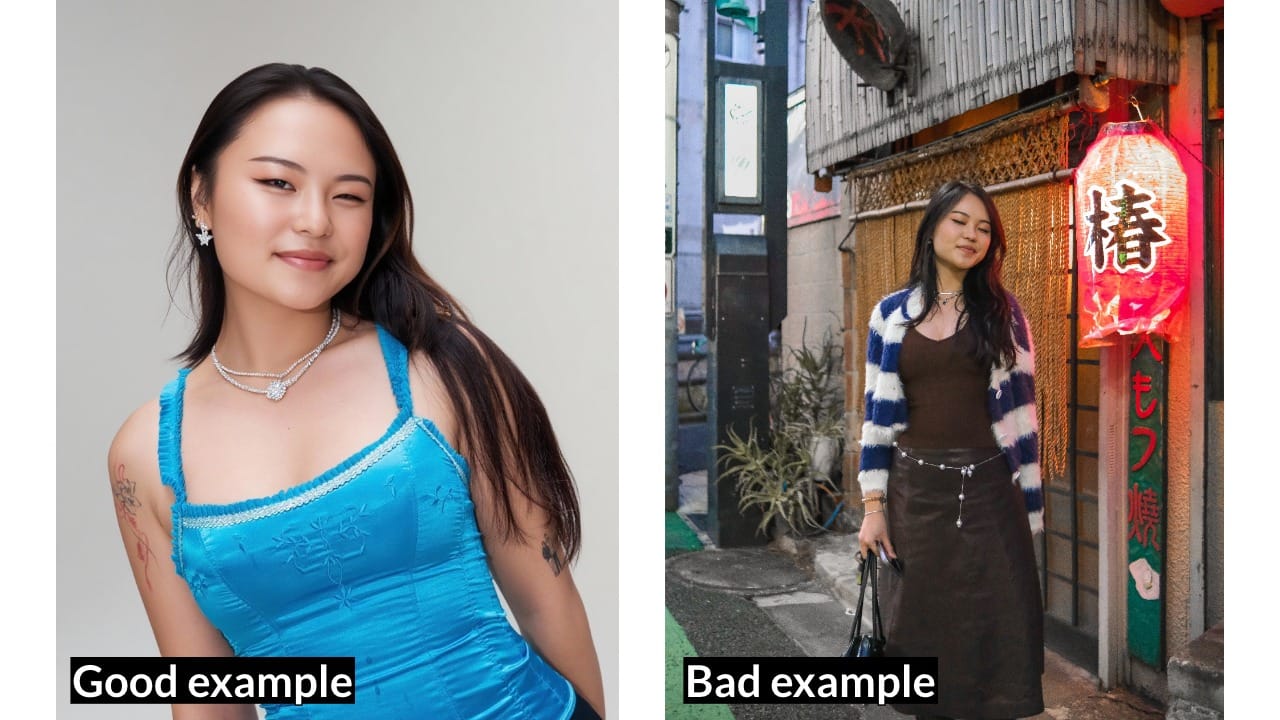
Start with a photo of yourself or the person you want to appear in the goal. I'd recommend a waist-up portrait, with the subject facing the camera.
The reference image matters because the AI needs to recreate the same person through several movements, including running, turning, and controlling the ball. A clear image gives it more information about the person's facial features, hairstyle, clothing, and proportions.
For the best results, choose a photo with good lighting, minimal background distractions, and only one person. Avoid heavy filters, sunglasses, and cropped images that obscure the subject.
Step 2: (Optional) Create an AI Character Sheet
If you're struggling to get a recognizable likeness, or want to reuse the same person across several AI videos, consider creating a character sheet first.
Open a Character Sheet Generator and upload your reference photo. The generator can produce a character reference combining a portrait with a full-body view.
A character sheet gives the video model more visual information about the subject, especially their face and outfit. This can help when the camera moves farther away or the character turns during the goal.
Step 3: Open the Ozil Goal AI Video Generator
Head to a Ozil Football Goal AI Video Generator.
Upload your photo or character sheet into the Kai chat. The generator is designed to place your subject into the goal sequence automatically, so there's no need to find the original football footage or describe every movement in a prompt.
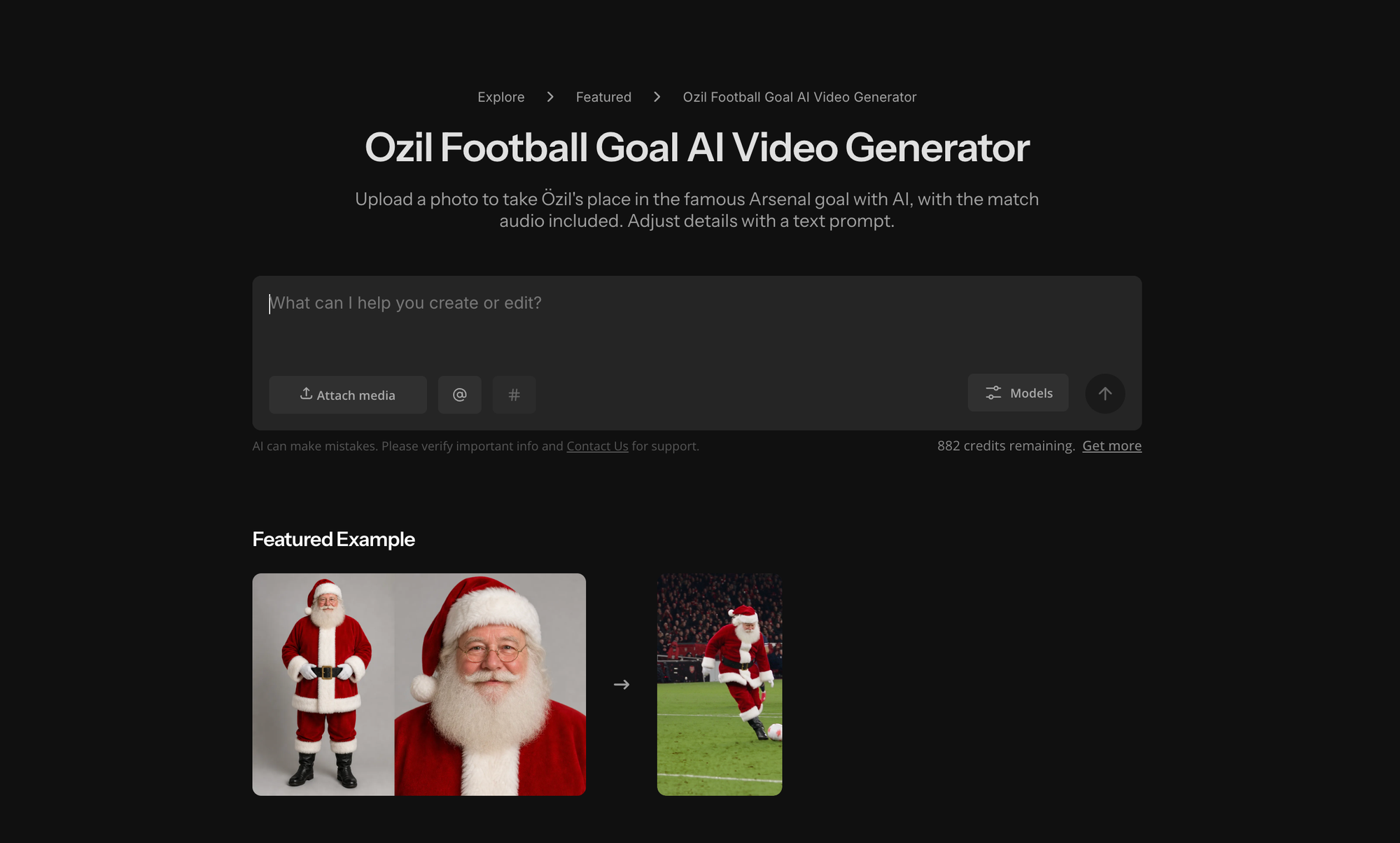
You can also customize the player's clothing. By default, the AI is instructed to preserve the appearance and outfit from your reference image, but you can add a short instruction such as:
"Dress the player in a red football kit. Keep their facial features and hairstyle consistent with the reference image."
Keep additional instructions focused on the character's appearance rather than rewriting the entire scene. The Custom Kai already has the goal's action and environment configured.
Step 4: Generate Your Ozil Goal Video
Once your image is attached, send the request to generate the video. Kapwing will use the photo as a character reference and create a vertical AI video following the recognizable Ozil goal sequence.
The generator also adds the match audio automatically, so you don't need to find a separate audio file or synchronize the sound to the action.
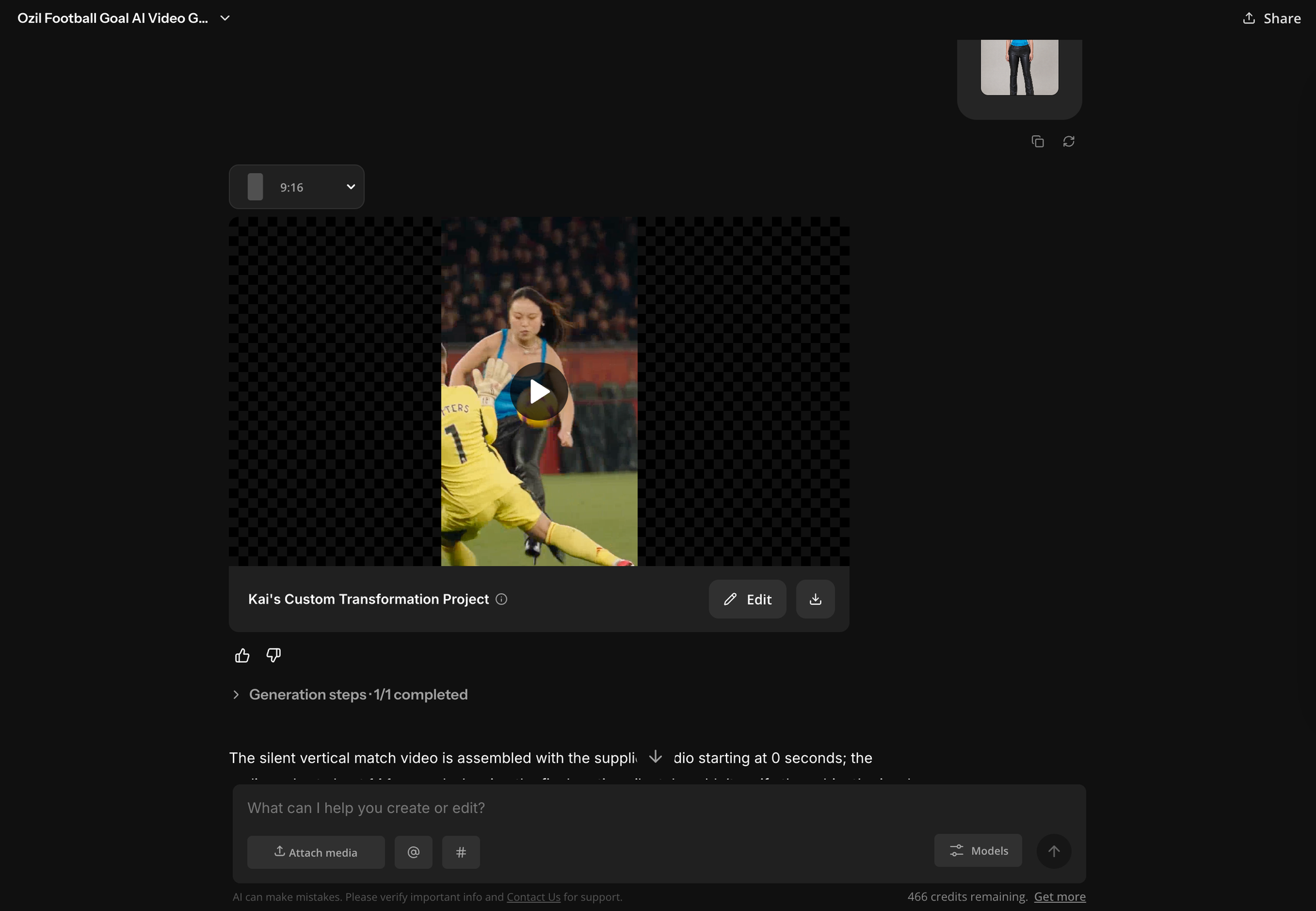
When the video finishes, watch the entire sequence before deciding whether to use it. Pay particular attention to three things:
- Facial consistency: Does the player still resemble the reference photo when moving or turning?
- Movement: Does the player convincingly clear the goalkeeper and avoid both defenders?
- The finish: Does the clip include the final goal rather than cutting off after the chip?
If the movement looks good but the face changes noticeably, try a clearer reference photo or character sheet.
If the face is accurate but a movement looks unnatural, regenerating may produce a better take without changing the image.
Step 5: Edit and Share Your Video
Once you're happy with the result, you can download the video or continue editing it in Kapwing's video editor.
The generated video is already designed for vertical social media, so you can post it directly to TikTok, Instagram Reels, or YouTube Shorts. However, a small amount of editing can make the joke land better.
Export the finished video as an MP4 and upload it to your preferred platform. If you use someone else's photo, make sure they have agreed to appear in the video, and label the result as AI-generated where required. Also check that you have appropriate rights to use any included audio, especially for commercial content.
Tips for Making a Better Ozil Goal AI Video
Although the Ozil trend is largely automated, the reference photo and a few creative choices can make a noticeable difference.
Prioritize a recognizable face over a perfect football outfit. The humor depends on viewers recognizing who's scoring. If the AI struggles to preserve the subject's identity, try a sharper portrait or a character sheet before adjusting other settings.
Keep the original outfit when possible. A person in a suit, hoodie, or everyday clothes can make the scene more entertaining than someone wearing a convincing football kit. The contrast between an ordinary person and an extraordinary goal is part of the appeal.
Check the entire move, not just the opening chip. The most memorable part of Özil's goal is the pause before the finish, when both defenders slide past. A video that cuts off too early loses the payoff that makes the trend recognizable.
Change one detail at a time. If the face is wrong, change the reference. If the outfit is wrong, adjust the clothing instruction. Trying to correct the camera, character, environment, and movement simultaneously makes it harder to understand what improved the result.
For creators making several versions, consistency also matters. Reusing the same character sheet and generation setup can make a series featuring friends, coworkers, or teammates feel more cohesive.
Frequently Asked Questions
How do you do the Ozil goal AI trend?
Open Kapwing's Ozil Football Goal AI Generator, upload a clear photo of yourself or another consenting adult, and generate the video. The Custom Kai recreates the goal sequence with your subject in Özil's position. You can then download the result or edit it in Kapwing before posting.
Which Ozil goal is used in the AI trend?
The trend recreates Mesut Özil's winning goal against Ludogorets in the UEFA Champions League on November 1, 2016. Özil chipped the goalkeeper, avoided two sliding defenders, and finished into an empty net to complete Arsenal's 3–2 comeback.
Do you need an AI prompt for the Ozil goal trend?
No. Kapwing's Custom Kai includes the instructions needed to recreate the goal. You only need to upload a reference image, although you can optionally include a short prompt to customize the player's clothing or appearance.
Is the Ozil goal AI generator free?
Kapwing is free to start, but AI video generations use credits. The number of credits required can vary, so check the estimate displayed in Kai before generating your video.
Can you make the Ozil goal trend with a photo of a friend?
Yes, provided your friend has agreed to the use of their photo. A clear, front-facing image will generally produce better results than a low-resolution or heavily filtered picture.
Does the Ozil AI video include sound?
Yes. Kapwing's Ozil goal generator automatically includes match audio. You can keep it, replace it in the editor, or choose an appropriate trending sound when publishing to TikTok or Instagram, subject to the platform's audio licensing rules.





