The 9 Best Free AI Video Generators, For Every Use Case
We've experimented with dozens of different video generators on the web first-hand. In this article, we put together a definitive ranking of the best AI Text to Video Generators that you can use for free.
Artificial intelligence has changed how videos are made, but not all AI video tools solve the same problem. Some generate scenes from a text prompt, others help turn scripts into explainers, and many focus on editing, captions, repurposing, or publishing content at scale. Choosing the right tool depends less on “how advanced” the AI is and more on what you’re trying to improve.
In this guide, we break down the best AI video tools by category, based on how people actually use them in 2026. Instead of ranking tools on novelty alone, we evaluated them on output quality, flexibility, usability, and how well they fit real creator and team workflows. Each category highlights one standout tool and explains why it’s the best choice for that specific job.
Whether you’re creating social videos, generating cinematic footage, repurposing podcasts, adding captions and voiceovers, or planning videos before production, this list is designed to help you quickly find the right AI video tool.
Table of Contents
- Best Generative AI Video Tool
- Best AI Video Makers for Social Media
- Best AI Avatar Video Maker
- Best Script-to-Video AI Tool
- Best AI Voiceover & Dubbing Tool
- Best AI Captions & Subtitles Video Tool
- Best AI Video Tools for Podcasts
- Best AI Video Tools for Storyboarding & Pre-Production
- Best Overall AI Video Tool
Best Generative AI Video Tool
🥇 Veo 3 — The Most Cinematic Text-to-Video Generator
Generative AI video tools create raw video scenes directly from a text prompt. Unlike social video makers or editors, these tools are focused on visual realism: camera movement, lighting, motion, and spatial consistency.
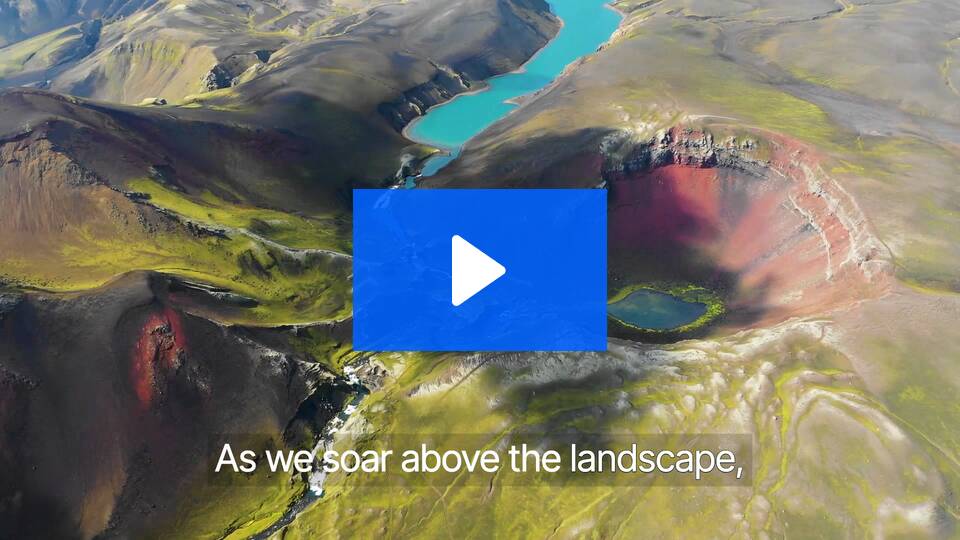
Veo 3 produces the most convincing end-to-end generative video we tested. From camera behavior to motion realism, Veo consistently delivers scenes that feel intentionally shot rather than algorithmically assembled. The results hold together across movement, perspective changes, and cuts.
When tested with a two-scene cinematic prompt (an overhead aerial shot followed by a close-up tracking shot), Veo 3 handled the transition cleanly. The cut was clear but consistent, maintaining lighting, color tone, and subject continuity between scenes. Motion felt smooth rather than simulated, and the camera tracked the subject naturally instead of relying on artificial zooms or static framing.
Compared to other generative models, Veo 3 shows fewer temporal artifacts, less background warping, and stronger spatial coherence.
Features
- Text-to-video generation with cinematic framing
- Support for multi-scene prompts
- Realistic camera motion and depth
- High visual fidelity for landscapes and wide shots
Pros
- Strong motion realism and scene coherence
- Handles camera movement better than most models
- Produces visually compelling raw footage
Cons
- Limited post-generation editing controls
- Not designed for captions, branding, or social formats
- Output length and structure are less predictable
Costs
Veo 3 offers a free tier with limited usage, and paid plans typically start around $24/month, scaling up for extended generation limits and higher quality outputs.
Best AI Video Makers for Social Media
🥇 Kapwing — The Best Tool for Creating Post-Ready Social Videos with AI
AI video makers for social media are designed to produce finished, post-ready videos. These tools optimize for pacing, captions, and aspect ratios. This is especially valuable for creators who need to publish frequently, iterate quickly, and adapt content across platforms without starting from scratch each time.
Kapwing stands out because it uses AI to assemble a complete social video (captions, visuals, voiceover, and timing) while keeping everything fully editable inside a real video editor.
This makes a big difference in practice. You can start with a prompt, script, article, or topic idea and quickly generate a vertical video that already follows social best practices. From there, you can fine-tune pacing, swap visuals, adjust captions, and apply branding without fighting the tool or starting over.
@kapwing It’s so easy to make faceless AI generated videos #kapwing #marketing #content #videoediting #ai #tts
♬ Circles - Instrumental - Post Malone
Features
- AI prompt and script-to-video generation
- Auto-captions optimized for social viewing
- AI voiceovers and optional avatars
- Built-in AI image generation for visual filler
- Full timeline-based video editor
Pros
- Produces videos that are immediately post-ready
- Strong support for faceless and voiceover-driven content
- Full creative control after AI generation
- Easy to adapt content across platforms
Cons
- Advanced motion graphics may require specialized tools
- Heavily AI-assisted workflows still benefit from manual refinement
Costs
Kapwing offers a free plan with watermarked exports and usage limits. Paid plans start at $16 per month, removing watermarks and unlocking higher export quality and AI features. Team and business plans are available at higher tiers.
Best AI Avatar Video Maker
🥇 HeyGen — Best AI Tool for Talking-Head & Avatar Videos
Not everyone wants to be on camera, but many videos still perform better with a human presence. AI avatar video tools solve this by turning scripts into talking-head videos using synthetic presenter. This is especially important for training, internal communications, explainers, and marketing videos.
HeyGen is the strongest AI avatar video maker available right now, particularly for creating scripted talking-head videos. It focuses on doing one thing well: turning written text into presenter-led videos with realistic avatars, natural-sounding voices, and synchronized lip movement. You can either use a stock avatars, or create a custom one by verifying yourself with a short capture.
While no AI avatar is perfectly human, HeyGen’s avatars maintain stable facial expressions, eye contact, and pacing better than most alternatives. This makes the outputs feel usable for professional contexts.
Features
- Text-to-video generation with AI avatars
- Stock “Instant Avatars” and custom avatar creation
- Natural-sounding AI voices with lip-sync
- Multi-language support and dubbing
Pros
- Fast way to create talking-head videos without filming
- Avatars are among the most consistent and realistic available
- Easy for beginners to use
- Well suited for professional and instructional content
Cons
- Results can still feel slightly uncanny in longer videos
- Limited creative control over body movement and framing
- Best outputs often benefit from post-editing in another editor
Costs
HeyGen typically offers a limited free trial. Paid plans start from $24 per month, with higher tiers at $99 per month.
Best Script-to-Video AI Tool
🥇 Kapwing — Best Script-to-Video AI Tool
Blog posts, scripts, outlines, newsletters, and talking points are often the raw material for video. Script-to-video AI tools bridge that gap by turning written content into a structured video with narration, visuals, and pacing. This helps creators reuse and scale written content into video.
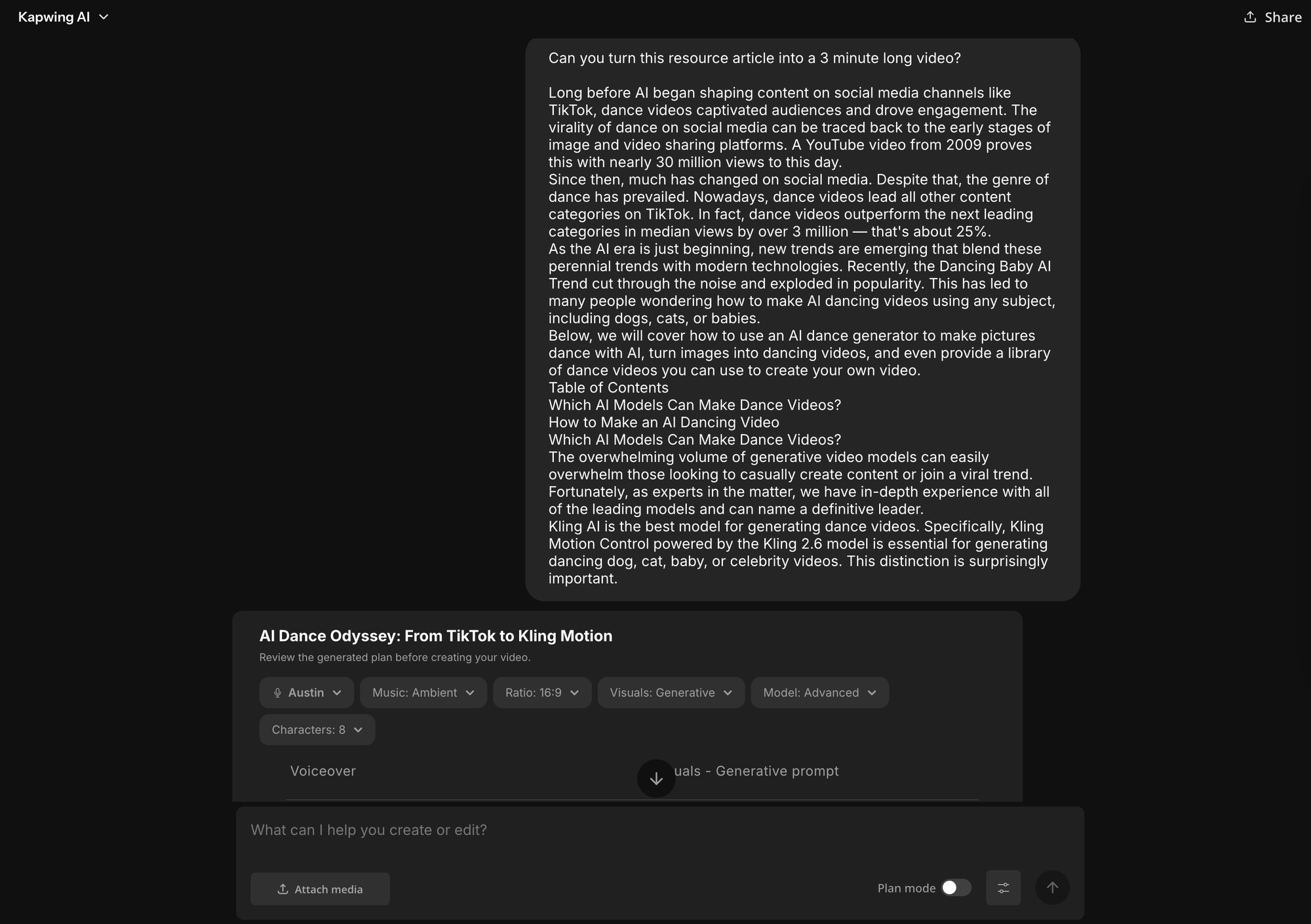
Kapwing is the strongest script-to-video AI tool because it treats written content as the foundation of the video, not just an input. Instead of generating a single opaque output, Kapwing breaks a script into B-Roll, scenes, captions, and visuals that remain fully editable.
Features
- Script and article-to-video generation
- Scene-based breakdown tied to the timeline
- AI voiceovers with editable narration
- Auto-captions synced to spoken text
- Visual suggestions and smart B-roll
- Full editing control after generation
Pros
- Excellent for repurposing written content into video
- Clear structure makes videos easy to edit and refine
- Works well for both short and long-form scripts
- Output adapts easily to different formats
Cons
- Visual suggestions may need manual refinement
- Best results require some editorial judgment
Best AI Voiceover & Dubbing Tool
🥇 ElevenLabs — Best AI Tool for Realistic Voiceovers and Dubbing
Voiceovers are one of the hardest parts of video to scale. Recording audio takes time, revisions are tedious, and creating multiple versions becomes expensive. AI voiceover and dubbing tools solve this by turning text into natural-sounding speech that can be regenerated instantly when scripts change.
ElevenLabs is the strongest AI voiceover and dubbing tool available, particularly when voice realism matters. Its text-to-speech outputs sound more natural and expressive than most alternatives, making it well suited for narration, explainers, audiobooks, and video voiceovers that need to hold attention.
In practice, ElevenLabs lets you paste in a script, choose from a wide range of voices, and generate high-quality audio that can be reused across projects. Voices maintain consistent tone and pacing, and small script edits don’t require full re-recordings — you can regenerate audio in seconds. This makes it especially useful for creators iterating on video scripts or producing content at scale.
Features
- High-quality AI text-to-speech generation
- Large library of realistic voices and styles
- Voice cloning and custom voice options
- Multi-language support and AI dubbing
- Downloadable audio files for video editors
Pros
- Fast iteration without re-recording
- Strong support for multilingual voiceovers
- Works well across many video styles
- Integrated in Kapwing
Cons
- No built-in video editing tools
- Limited emotional control compared to human voice actors
- Best results still require thoughtful script writing
Costs
ElevenLabs offers a free tier with usage limits. Paid plans start at $5 per month, with higher tiers unlocking longer generations, more voices, voice cloning, and commercial usage rights.
Best AI Captions & Subtitles Video Tool
🥇 Descript — Best AI Tool for Captions and Transcript-Based Editing
Captions aren’t just about accessibility, they’re essential for editing spoken content efficiently. For podcasts, interviews, and talking-head videos, creators often want captions that double as an editing interface, allowing them to cut video by editing text instead of scrubbing a timeline.
Descript is one of the most powerful AI caption and subtitle tools for speech-driven video and audio. Unlike traditional caption generators, Descript treats transcription as the core editing layer: you edit the text, and the video or audio updates automatically.
This makes Descript extremely effective for podcasts, interviews, tutorials, and long-form spoken content. Captions are generated quickly and stay tightly synced to the audio. You can correct wording, remove filler words, or cut entire sections simply by editing the transcript.
Add Captions & Subtitles to Videos In One Click | Descript
Features
- Automatic transcription and subtitle generation
- Text-based video and audio editing
- Filler word and silence removal
- Speaker detection and labeling
Pros
- Extremely fast caption creation for spoken content
- Edit video by editing text
- Strong accuracy for dialogue-heavy recordings
Cons
- Limited caption styling for social platforms
- Less flexible for visual-heavy edits
- Not optimized for high-volume short-form content
Costs
Descript offers a free plan with limited transcription and exports. Paid plans start at $16 per month, with higher tiers unlocking longer transcription limits.
Best AI Video Tool for Marketing & Ads
🥇 Canva — Best AI Tool for Marketing and Ad Video Creation
Marketing and advertising videos have specific requirements that differ from organic or cinematic content. Ads need strong hooks in the first few seconds, brand consistency, fast iteration, and multiple format outputs. General video creation tools don’t always meet these needs efficiently.
Canva is the strongest tool for marketing and ad video creation because it blends brand control with AI generation in a way that’s accessible to non-designers and scalable for teams. While many tools focus on generative visuals or templates alone, Canva integrates AI assistance into a brand-centric creative workflow.
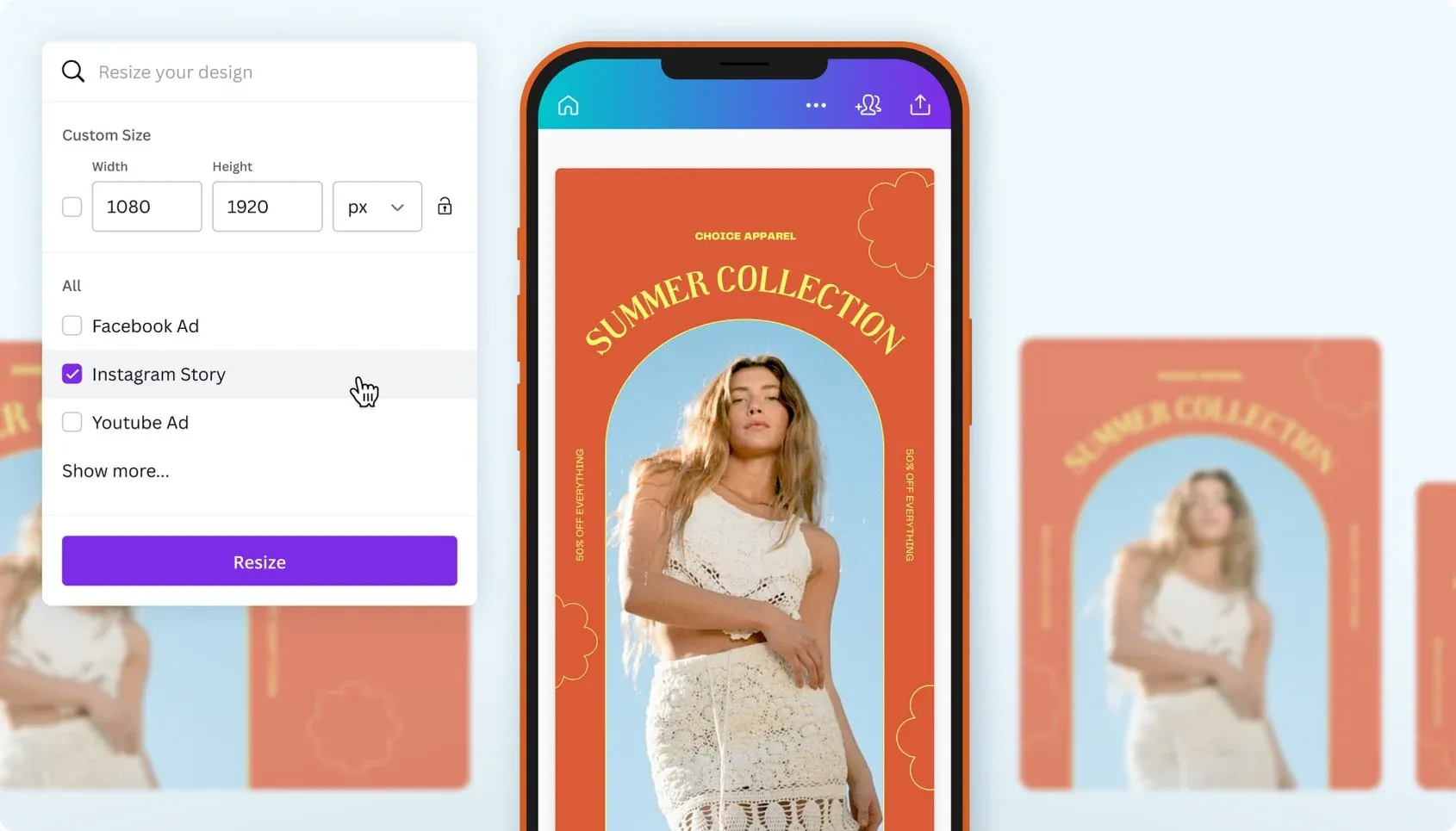
In practice, Canva lets you start from existing brand assets (colors, fonts, logos) or create new ones with AI, then generate and iterate on multiple video ad variants within minutes. Its AI-assisted features include text suggestions/prompts, automated video layouts, and resizing for different platforms.
Features
- AI-assisted video ad templates
- Brand kit + asset library integration
- Resizing and adaptation across formats
- Motion and animation presets
- Text suggestions, script prompts, and style guides
Pros
- Easy for non-designers to use
- Integrated brand controls prevent creative drift
- Fast iteration and versioning for ad testing
- Cloud workflow with team collaboration
Cons
- Not a dedicated cinematic editor
- Deep custom animation requires external tools
- Some advanced features behind higher tiers
Costs
Canva offers a free tier with limited access to templates and assets. Paid plans start at $12.99/month for individuals and $30/month per user for teams.
Best AI Video Tool for Podcasts
🥇 Descript — Best AI Tool for Turning Podcasts into Video
Podcast audiences increasingly discover content through video, even when the original format is audio-first. Turning podcast episodes into video manually is slow: you need captions, layouts, visuals, and pacing that work on platforms like YouTube, Shorts, and social feeds.
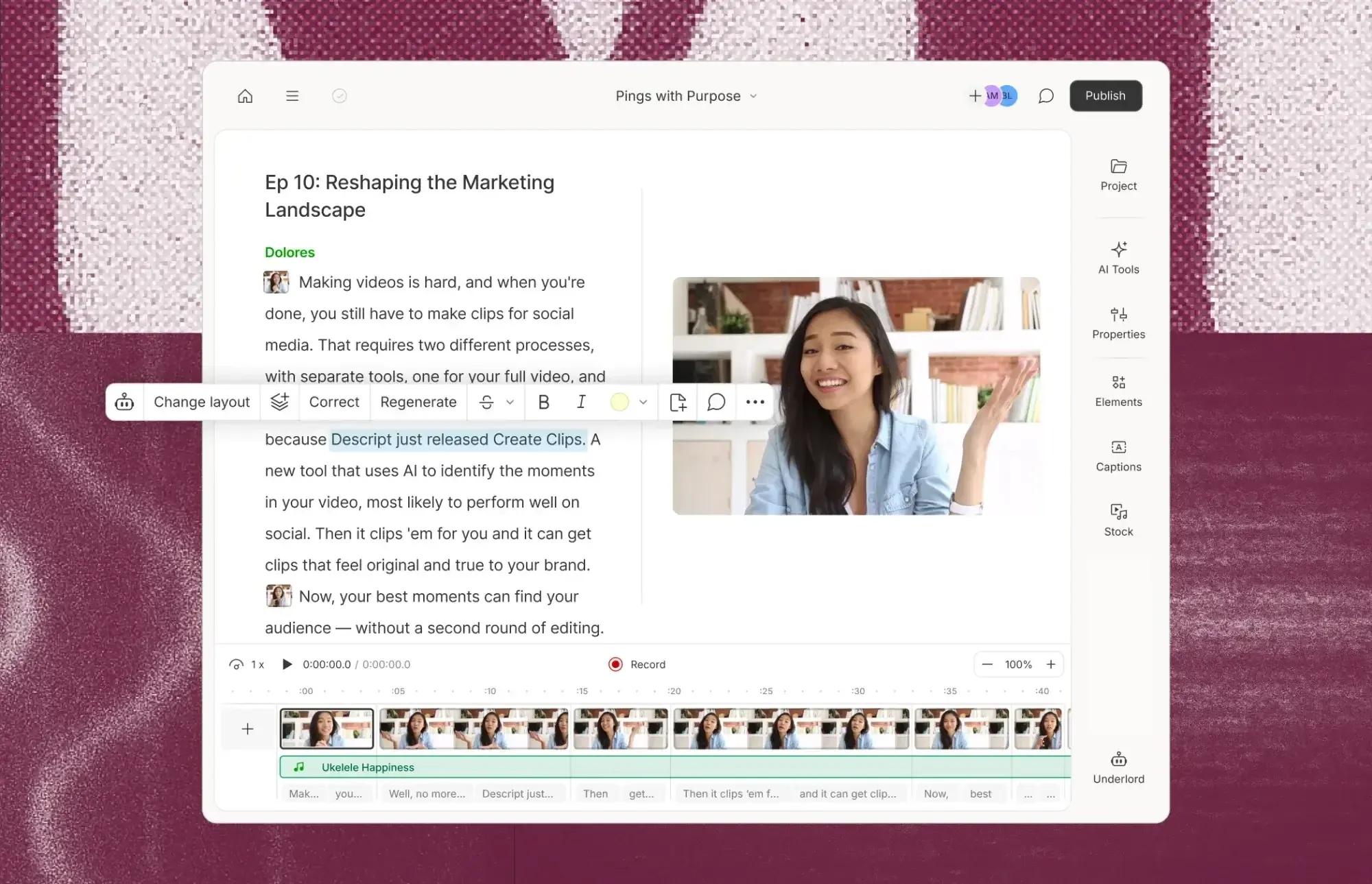
Descript is the best AI video tool for podcasts because it treats spoken audio as the core editing layer. Instead of editing waveforms or timelines, you edit the transcript, and the audio and video update automatically.
Features
- Automatic transcription and text-based editing
- Podcast-friendly video layouts
- Auto-captions synced to speech
- Filler word and silence removal
- Easy clip extraction from long episodes
Pros
- Extremely fast editing for dialogue-heavy content
- Edit audio and video by editing text
- Strong caption accuracy
- Ideal for podcasts and interviews
Cons
- Limited visual customization compared to full editors
- Not designed for cinematic or animated visuals
- Best results focus on speech, not visuals
Costs
Descript offers a free plan with limited transcription and exports. Paid plans start at $16 per month, with higher tiers unlocking longer transcription limits.
Best AI Video Tool for Storyboarding & Pre-Production
🥇 Runway — Best AI Tool for Storyboarding and Pre-Production Visualization
Before filming or editing, teams often need to visualize ideas. Storyboarding and pre-production traditionally require sketches, mockups, or expensive concept art. AI video tools now make it possible to prototype shots, sequences, and visual concepts directly from text. This category matters for creators, filmmakers, and marketers who want to explore ideas quickly before full production.
Runway is the strongest AI tool for storyboarding and pre-production because it offers Storyboarding and Moodboarding tools designed specifically for early-stage visual planning. The Storyboarding tool allows creators to generate rough shots and scene concepts from text or reference images. These outputs help communicate framing, camera movement, and sequence flow without requiring hand-drawn boards or manual mockups.
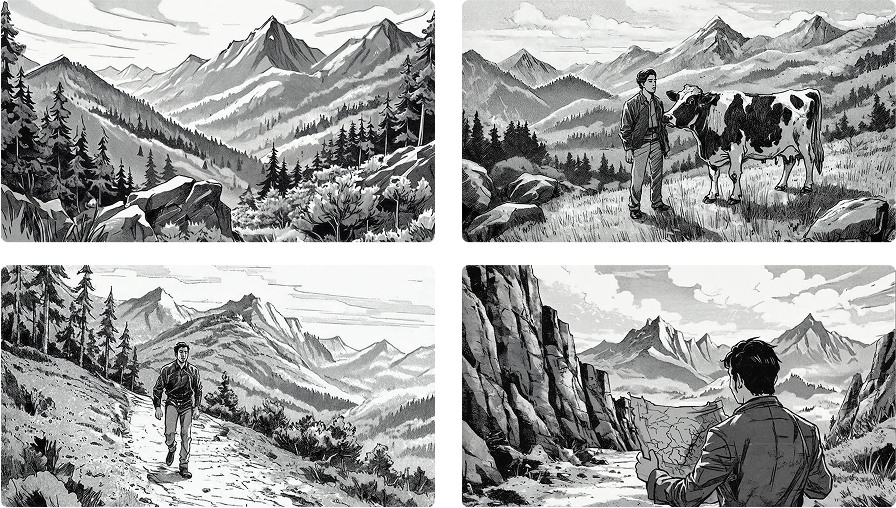
The Moodboarding tool focuses on aesthetic exploration. Creators can generate and collect stylized visuals that define tone, lighting, color palettes, and visual references for a project.
This makes it easier to establish creative direction early and ensure visual consistency across stakeholders, pitches, or production teams.
Features
- Text-to-video and image-to-video generation for concept shots
- AI-generated storyboards for scene planning
- Moodboarding for visual style, tone, and aesthetic exploration
- Exportable visual assets for refinement in other editors
Pros
- Excellent for rapid visual experimentation
- Reduces time spent on traditional storyboards
- Encourages creative exploration
- Useful for pitches and concept development
Cons
- Not designed for final, production-ready video
- Limited control over precise shot timing
- Outputs often require refinement elsewhere
Costs
Runway offers a limited free tier with usage caps. Paid plans start at $12 with higher tiers unlocking more generation credits, higher-quality exports, and advanced generative features.
Best Overall AI Video Tool
🥇 Kapwing — Best All-In-One AI Video Platform for Creation, Editing, and Repurposing
In 2026, AI video creation isn’t a single task, it’s a workflow. A best overall tool is one that supports not just one niche use case, but multiple core video workflows with depth, flexibility, and usability.
Kapwing stands out as the best overall AI video tool because it effectively unifies the major phases of modern video production into a single, accessible workflow. Instead of forcing you to piece together multiple specialized tools, Kapwing lets you generate, edit, caption, and repurpose content within one platform, significantly reducing friction and context switching.
Creators can begin with a prompt, script, or existing video and quickly iterate toward a finished output that looks and performs well across formats — Shorts, Reels, YouTube, webinars, promos, and beyond. Auto-captions, AI voiceovers, smart editing tools, repurposing workflows, and export presets coexist in the same timeline, making the whole experience feel coherent rather than fragmented.
Where Kapwing particularly excels is in balancing AI assistance with manual control. You’re not locked into a single automated output; every element remains editable. This flexibility matters whether you’re a solo creator testing hooks or a team producing consistent branded content.