How To Get ChatGPT To Write Video Scripts In Your Tone Of Voice
About 33% of ChatGPT users working in content and marketing use it for script writing or dialogue.
Most AI-generated video scripts fail in the same way: they’re technically fine, but they don’t sound like anyone. The pacing is off. The language is too polished. It's not that ChatGPT can't write good scripts. In fact, about 33% of ChatGPT users in content and marketing use it for script writing. The issue is asking the AI to write your video scripts without first teaching it your tone of voice or the task at hand.
Since video scripts are meant to be spoken, not read, they rely on rhythm, emphasis, pauses, and conversational flow. While structure and technique are essential to a video script, even a well-structured script can feel awkward or inauthentic if the tone doesn’t match how you actually speak on camera.
This guide will show you how to do both: how to write effective video scripts, and how to get ChatGPT to generate them in your tone of voice. You’ll learn how to structure scripts for different video formats, how to prompt ChatGPT so it writes for spoken delivery, and how to turn those scripts into finished videos.
Table of Contents
- What Are Video Scripts?
- How To Write a Good Video Script
- How to Prompt ChatGPT To Write a Video Script
- How to Use Kapwing To Create a Video With a Script
- Frequently Asked Questions
What Are Video Scripts?
A video script is a blueprint for spoken content. Unlike written content, which can be skimmed or reread at will, video scripts are consumed verbally, where clarity on the first pass matters most.
If something is unclear, unnecessary, or slow, attention drifts. This is especially true in short-form formats, like TikTok or Reels, where even small moments of friction can lead to a skip. But the same principle applies to long-form video: anything that forces the viewer to work harder than necessary reduces retention.
Rather than prioritizing polished prose, effective video scripts are optimized for first-pass comprehension. This means being intentional about sequence (when information is revealed), pacing (how quickly ideas turn over), and emphasis (what the viewer should carry forward).
How To Write a Good Video Script
A video script is defined by three mechanics: a hook that earns attention, a build that develops the idea, and a payoff that resolves the promise. This structure appears across formats — from short-form TikTok clips to long-form YouTube videos — though each section is compressed or expanded depending on context.
Hook – Earning Attention
A video hook is not the same as an introduction. Rather than explaining what the video will be about, a strong hook signals to the viewer why it's worth their time.
Effective hooks usually do one of three things:
- Promise a specific outcome (“By the end of this video, you’ll know…”)
- Create tension or contrast (“Most people do this wrong…”)
- Signal relevance (“If you’ve ever struggled with…”)
Head of Content, Liam Curtis, explained the importance of video hooks when writing scripts for then cuts the audio :
"The hook is the most important part of a video, particularly on social media and YouTube. If viewers drop off in the first 10 seconds, that’s a strong negative signal for the YouTube algorithm. If you had to pick one thing to improve, extending average watch time from 15 seconds to 20 — and eventually 30 — can make a surprisingly big difference to a channel’s overall growth."
In the example below, which explores the role of background music, the hook pairs dramatic background music with a big claim, then cuts the audio to demonstrate its impact.
• Signals value immediately by surfacing the point early
• Creates tension, curiosity, or relevance within the first few seconds
• Makes it clear why the video is worth watching now
A bad video script:
• Leads with background or context before earning attention
• Delays the payoff and asks for patience instead of engagement
Build — Developing the Idea
The build is where the script delivers on the promise made in the hook. This is the core of the video: the explanation, demonstration, or argument.
Strong builds are organized around one idea at a time, unfolding information in a way that’s easy to follow on first pass. Instead of stacking multiple points at once, effective scripts move step by step, allowing the viewer to process each idea.
In the example below, the hook promises to show the viewer how to create a Polaroid strip without a photo booth. The build then walks the viewer through the steps to actually make it.
• Develops the idea in a clear, logical order
• Introduces one point at a time, with clean transitions
• Balances speed with clarity, especially in short-form formats
A bad video script:
• Overloads the viewer with too much information at once
• Jumps between ideas without clear progression
• Lingers too long on setup without advancing the point
Payoff — Resolving the Promise
The payoff is where the script fulfills the expectation set by the hook. In some videos, the payoff is an insight or realization. In others, it’s a demonstration, conclusion, or call to action. Regardless, a good payoff feels earned and aligned with the rest of the script.
In the example above, the payoff is the completed Polaroid strip, followed by a call to action to explore other custom Kais.
• Clearly delivers on the promise made in the hook
• Ends with a sense of closure or next step
A bad video script:
• Fizzles out without resolving the core point
• Introduces new ideas instead of consolidating the main one
• Adds a CTA that feels disconnected from the content
How to Prompt ChatGPT To Write a Video Script
Most weak AI video scripts fail because the prompt jumps straight to format (“write a script”) without first clarifying meaning. Strong prompts follow a different order: they explain what the video is about, define the angle, and then shape that information for a specific video format.
In this section, we’ll focus on prompting ChatGPT to write video scripts, including how to explain your topic clearly, how to use notes or existing content, and how to turn written material (like a blog post) into a performable script.
1. Explain the Video Topic Clearly
Before ChatGPT can write a good video script, it needs to understand what the video is trying to say. This goes beyond naming a topic. You also need to explain the angle, scope, and takeaway. The more clearly you explain the idea, the more precise the output will be.
In practice, this might look like a short paragraph at the top of your prompt:
The angle is that music affects pacing and emotion more than visuals alone.
The audience is beginner creators who don’t think much about sound yet.
The takeaway is to be intentional about what music you use, with a call to action of checking out our resources."
Another effective strategy is to ask ChatGPT to repurpose existing material for a script. This might include notes, a rough outline, or even a blog post or article.
For example, turning a blog post into a video script might look like this:
I want to turn this into a short-form video script.
Focus on extracting one takeaway and rewriting it for spoken delivery."
From his personal experience writing scripts, Curtis added:
"The great thing about LLMs is that they don’t get overwhelmed by information in the way humans do. Passing notes to ChatGPT for a script is very different from briefing a human writer. I’ve always found that more context is better — even rough, off-the-cuff notes with messy grammar are useful. The goal is to get as many valuable points down as possible and clearly signal the overall direction. GPT can work out what matters and what to include.
"With a human scriptwriter, you’d need to be far more concise and careful to avoid mixed messages, because untangling that usually means time-consuming back-and-forth conversations. With GPT, you can quickly refine the prompt or iterate in real time, which makes the whole process faster and more flexible."
2. Choose the Video Format and Platform
Once the topic and angle are clear, the next step is telling ChatGPT where the script will be used. Short-form feed videos, YouTube explainers, ads, and voice overs all have different pacing and expectations. As such, specifying the format tells the model how fast the script should move and how much detail is appropriate.
In a ChatGPT prompt, this might look like:
3. Write A Hook
Even when using ChatGPT to write scripts, you should write the hook yourself. This is firstly because hooks rely on instinct, creativity, and an understanding of what is compelling in your niche: things that are difficult to outsource.
Writing the hook yourself anchors the script in a clear point of view from the start. It tells ChatGPT what the video's real promise is, making the build more focused and the payoff more satisfying.
"This is the one part of the script that, personally, we always either write ourselves from scratch or allow enough time to heavily edit," said Curtis.
This doesn’t mean ChatGPT can’t help with hooks at all. If you have a rough idea but not the exact wording, you can ask ChatGPT to iterate within constraints:
Once you've written your hook, you can use it give the script a clear structure. To do this in the prompt, you should specify how your script will unfold:
4. Describe How the Script Should Sound
By default, ChatGPT writes in a polished tone that often sounds unnatural when spoken. As such, it's important to describe how your script should sound when read out loud.
Don't use abstract labels like "casual" or "friendly". Instead, describe the mood, tone, and delivery in concrete, observable terms:
The tone should be reminiscent to that of a classroom teacher explaining a concept to their students"
If you have a distinct on-camera voice, adding a short writing or transcript sample can be especially effective. Even a few lines communicate rhythm, sentence length, and emphasis better than adjectives alone:
[insert sample]
Write the rest of the script in a similar tone."
Here is what the prompt looks like altogether:
The angle is that music affects pacing and emotion more than visuals alone.
The audience is beginner creators who don’t think much about sound yet.
The takeaway is to be intentional about what music you use, with a call to action of checking out our resources.
Write a script for a 30-second short-form feed video for an on-camera creator.
Use the hook to promise a clear outcome, a build that develops one idea at a time, and a payoff that reinforces the main point.
Use direct, conversational language that sounds natural when spoken aloud. Keep sentences short. Avoid filler words and over-stuffing adjective.
The tone should be reminiscent to that of a classroom teacher explaining a concept to their students."
How to Use Kapwing To Create a Video With a Script
On Kapwing, you can not only prompt the AI to write a video script, but also turn that script into a finished video within the same chat. This is especially useful when you want to move quickly from idea to output.
This workflow works best when you’re creating short-form content, repurposing written material into video, or testing multiple script variations. Instead of exporting a script and rebuilding it elsewhere, you can refine the language, generate visuals, and preview the result in one place, which makes it easier to judge what actually works on screen.
1. Prompt the AI to Write the Video Script
Start by prompting Kapwing AI to write the video script, following the same prompting workflow outlined in the previous section. This means clearly explaining what the video is about, defining the angle and audience, and then shaping the script using structure and delivery rules.
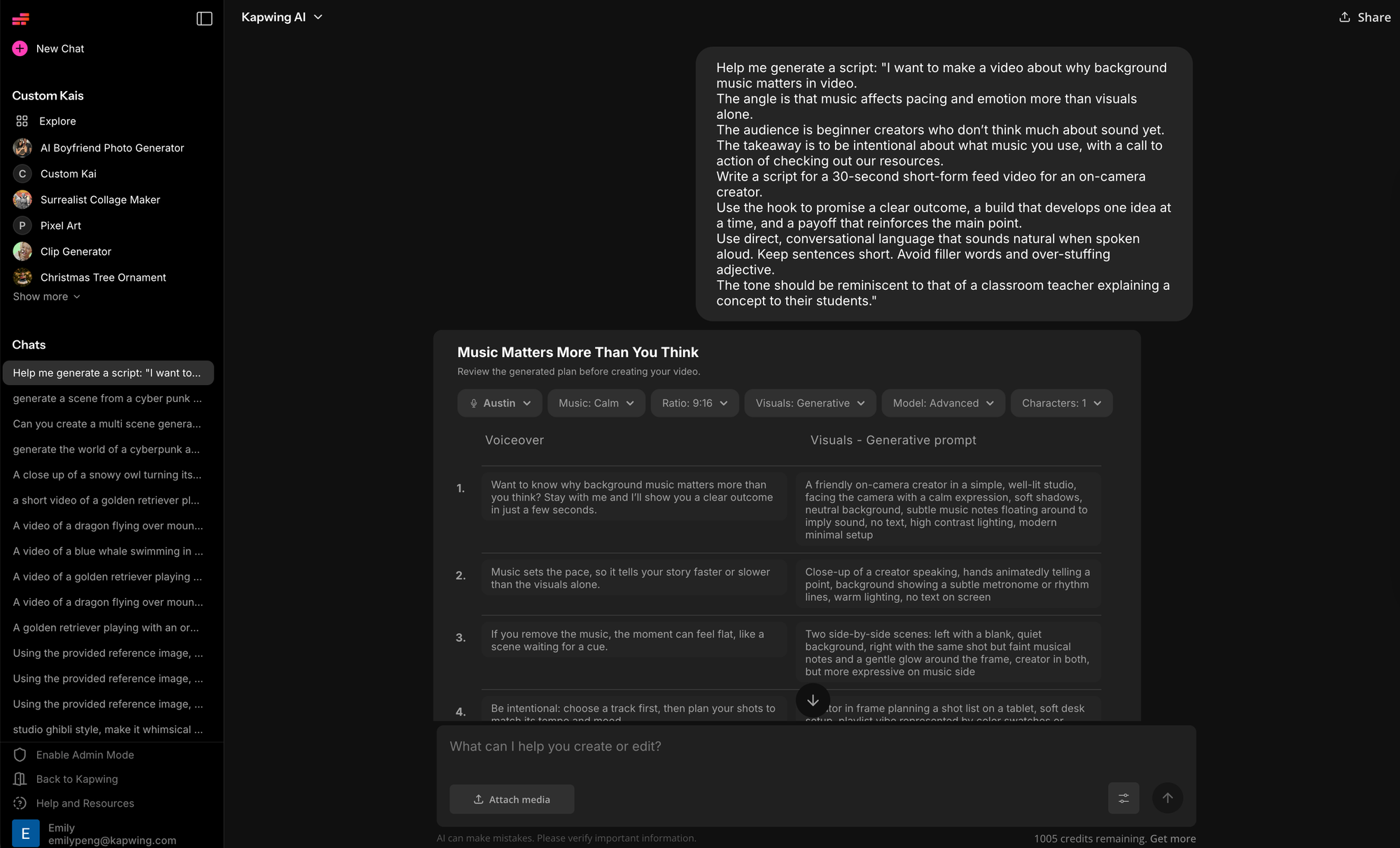
When using Kai, the script is not generated in isolation. Kai automatically considers how the script translates to the screen, pairing lines with appropriate on-screen text, images, or media as part of the video-generation process.
2. Edit and Refine the Script in Chat
Before turning the script into a video, take a moment to evaluate it. It may be helpful to focus on a few high-impact checks:
- Hook speed: The opening should surface the point immediately. If the hook takes more than a sentence to get there, shorten it.
- Line length: If a line can’t be spoken comfortably in one breath, it’s likely too long for short-form video.
- Rhythm and pacing: Read the script out loud. Look for spots where the rhythm drags or feels rushed.
- Visual alignment: Flag lines that would benefit from on-screen text or visual emphasis.
Because you’re still in the same chat, give precise, surgical feedback instead of rewriting everything:
Shorten the hook and make it more direct.
Break the third line into two shorter beats.
Remove any setup that isn’t necessary on first watch.
3. Turn the Script Into a Video
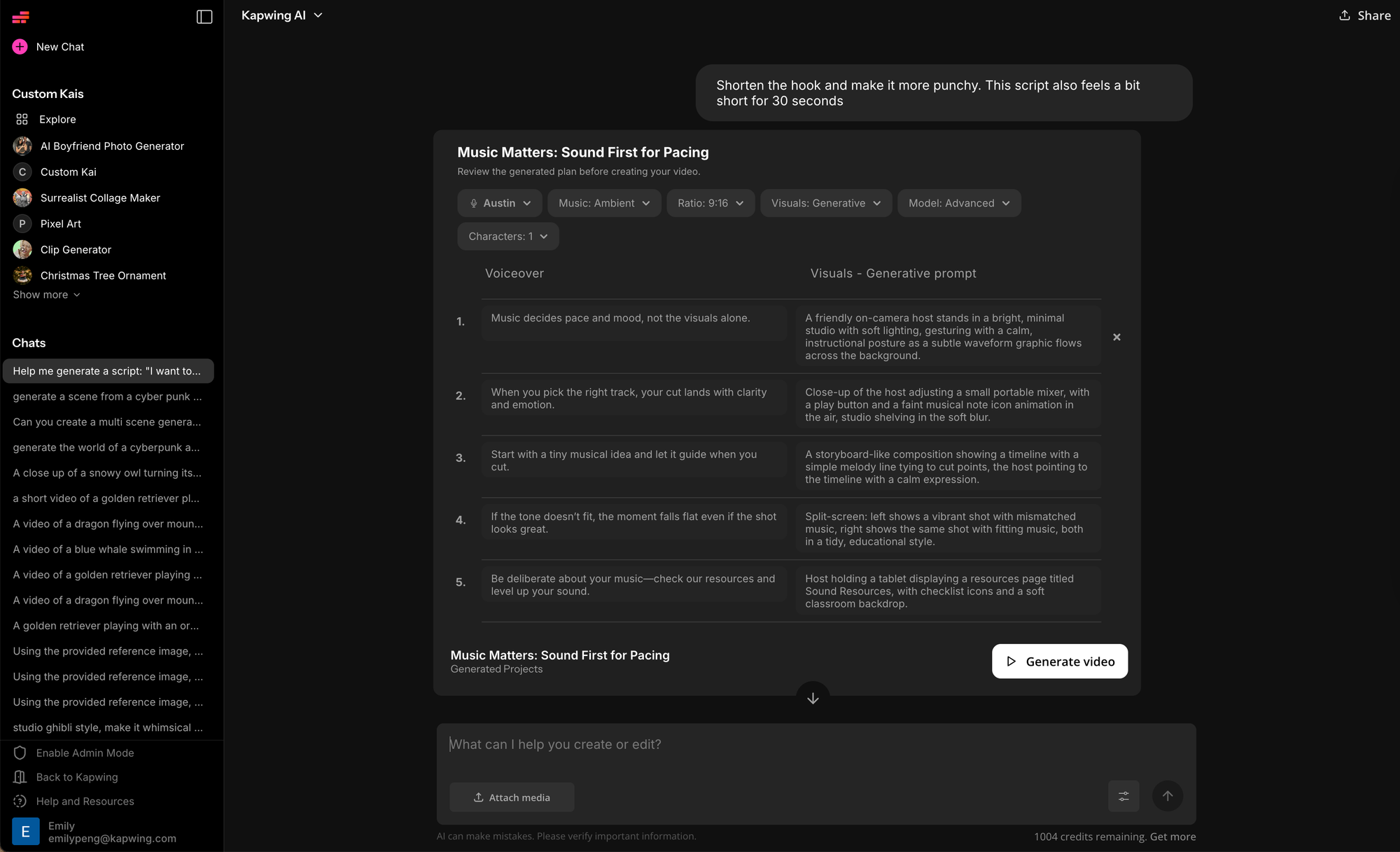
Once you’re happy with the script, you can fine-tune the visuals before generating the final video. In the chat interface, Kai presents the script alongside a table that describes the corresponding visuals or media for each section.
To edit the visuals, click directly into the visual description field for the line you want to change and type what you’d like to see instead. This makes it easy to adjust visuals line by line without rewriting the script itself.
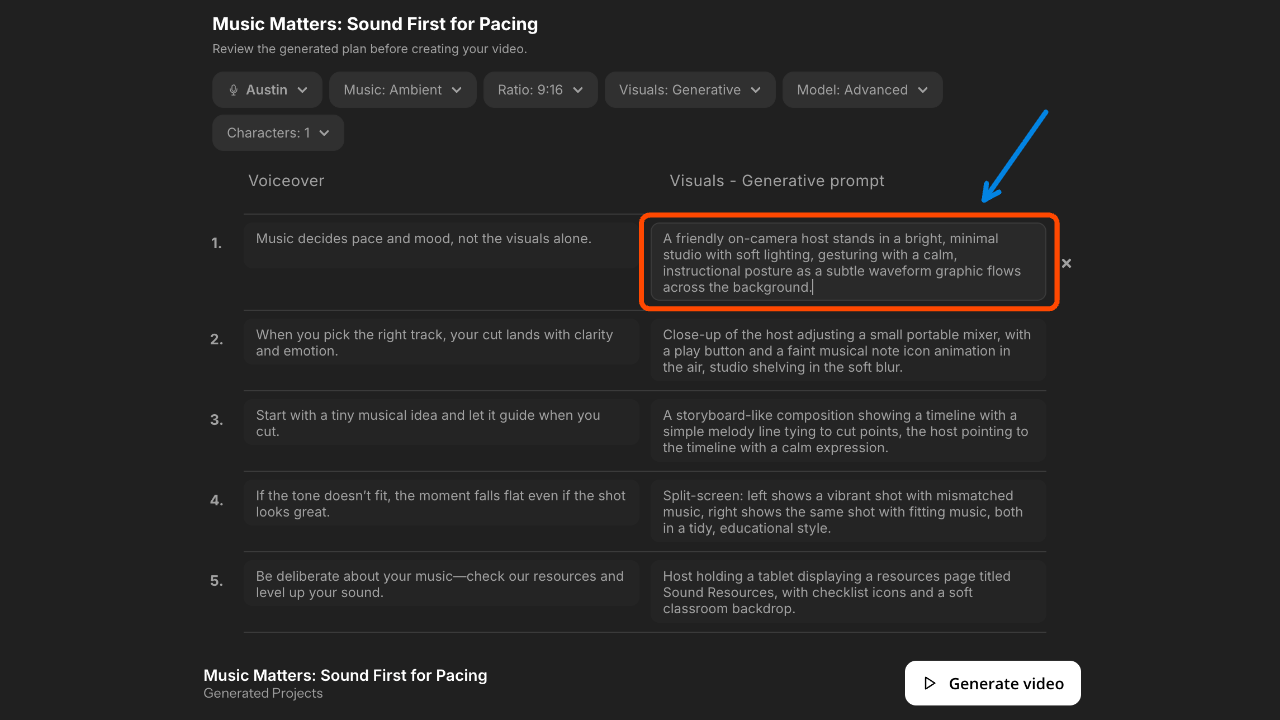
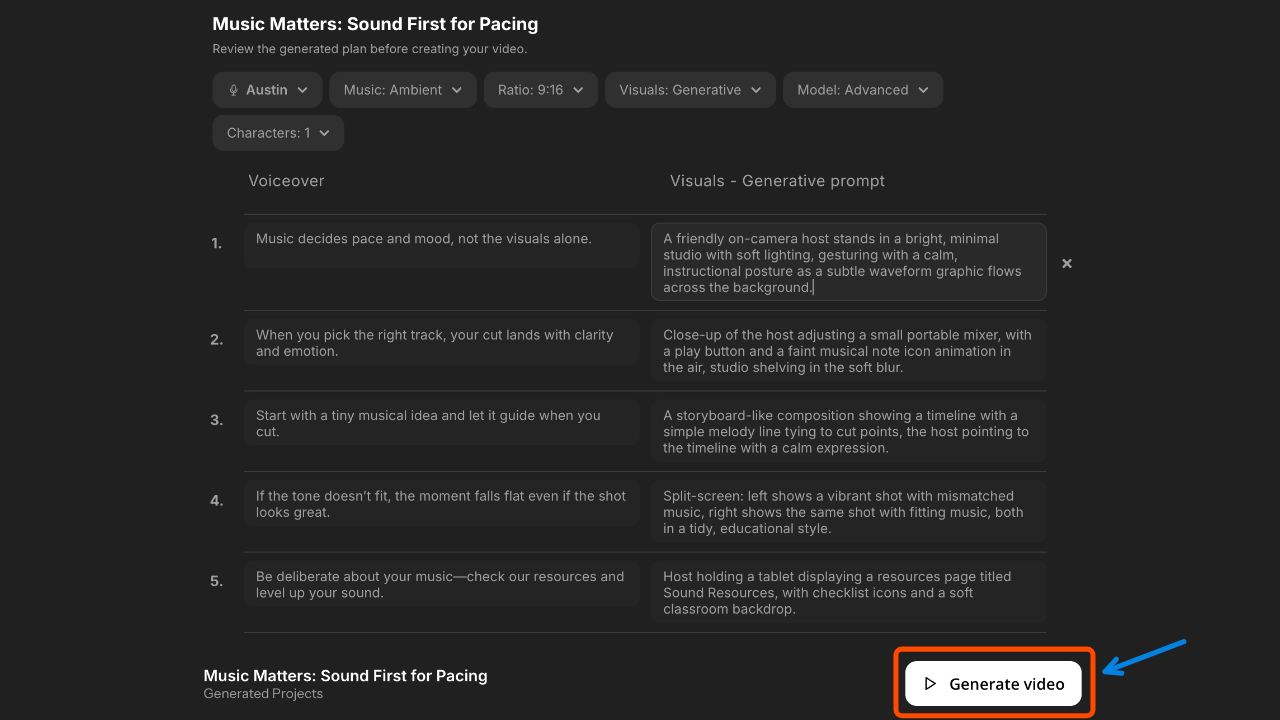
When everything looks right, click Generate Video to create the final video.
Kai will use your script and visual descriptions to make the video automatically.
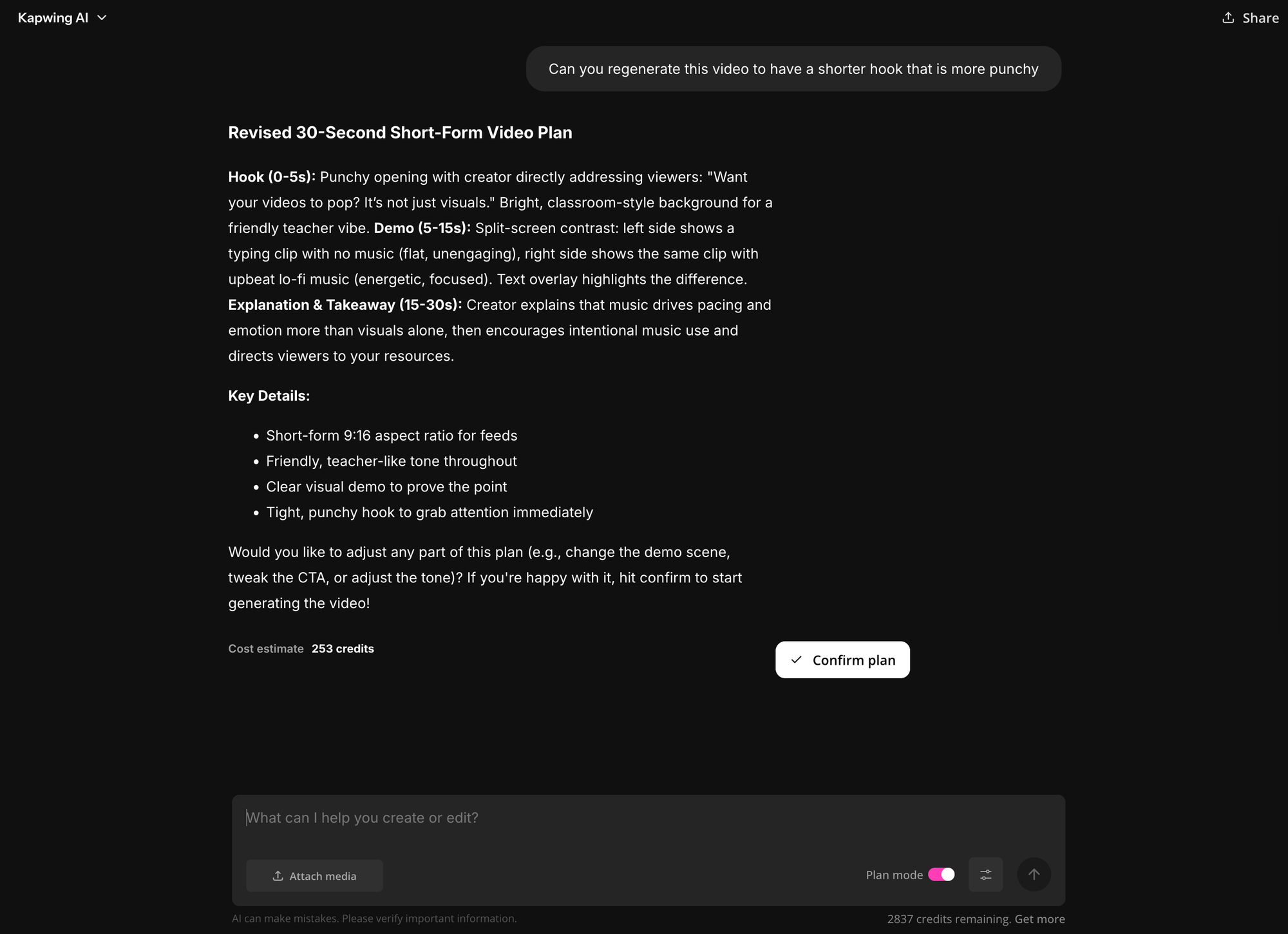
4. Iterate on the Video
After the video is generated, you can make edits in two ways:
- Prompting the chat
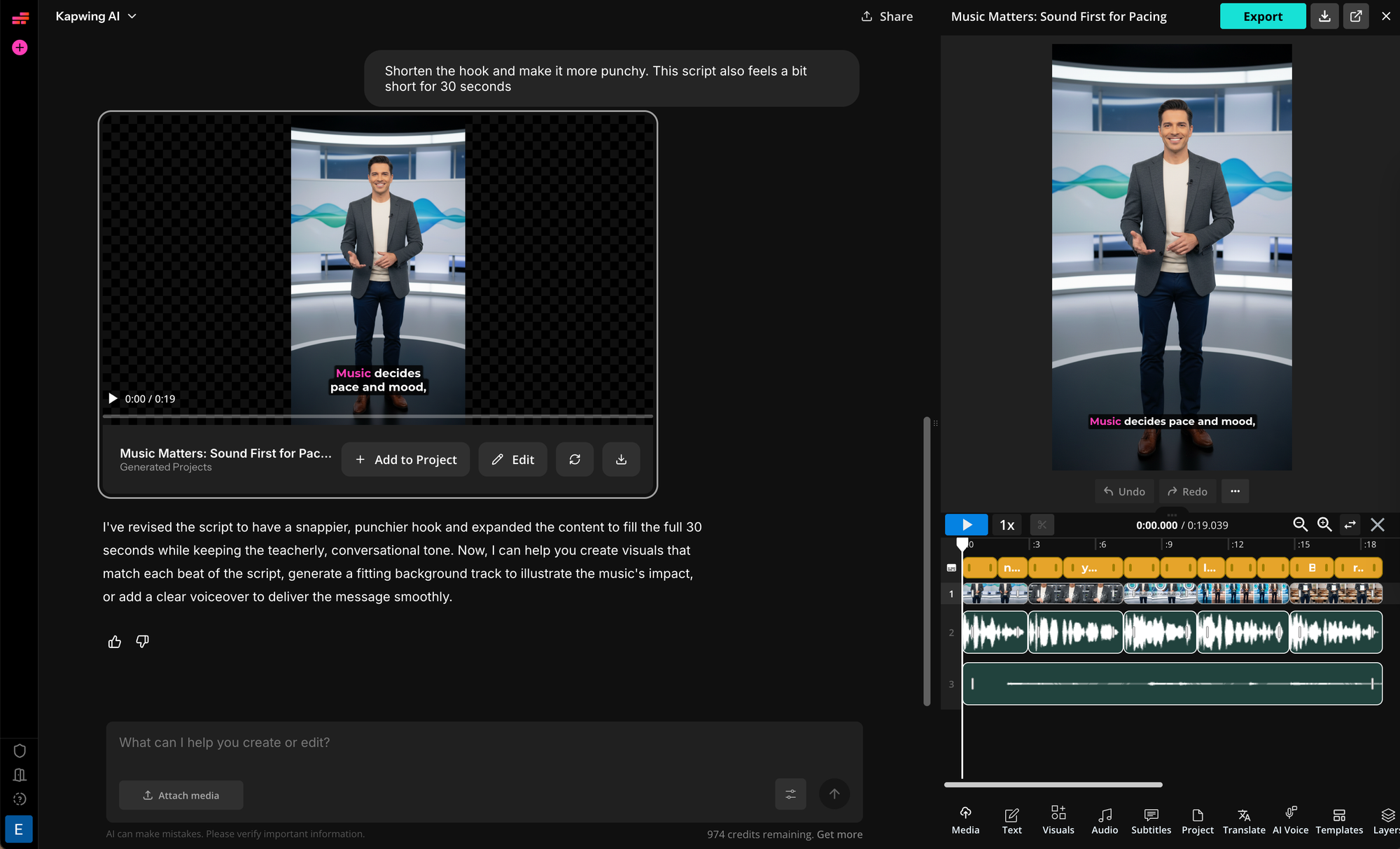
- Opening the project in the Studio and editing it manually.
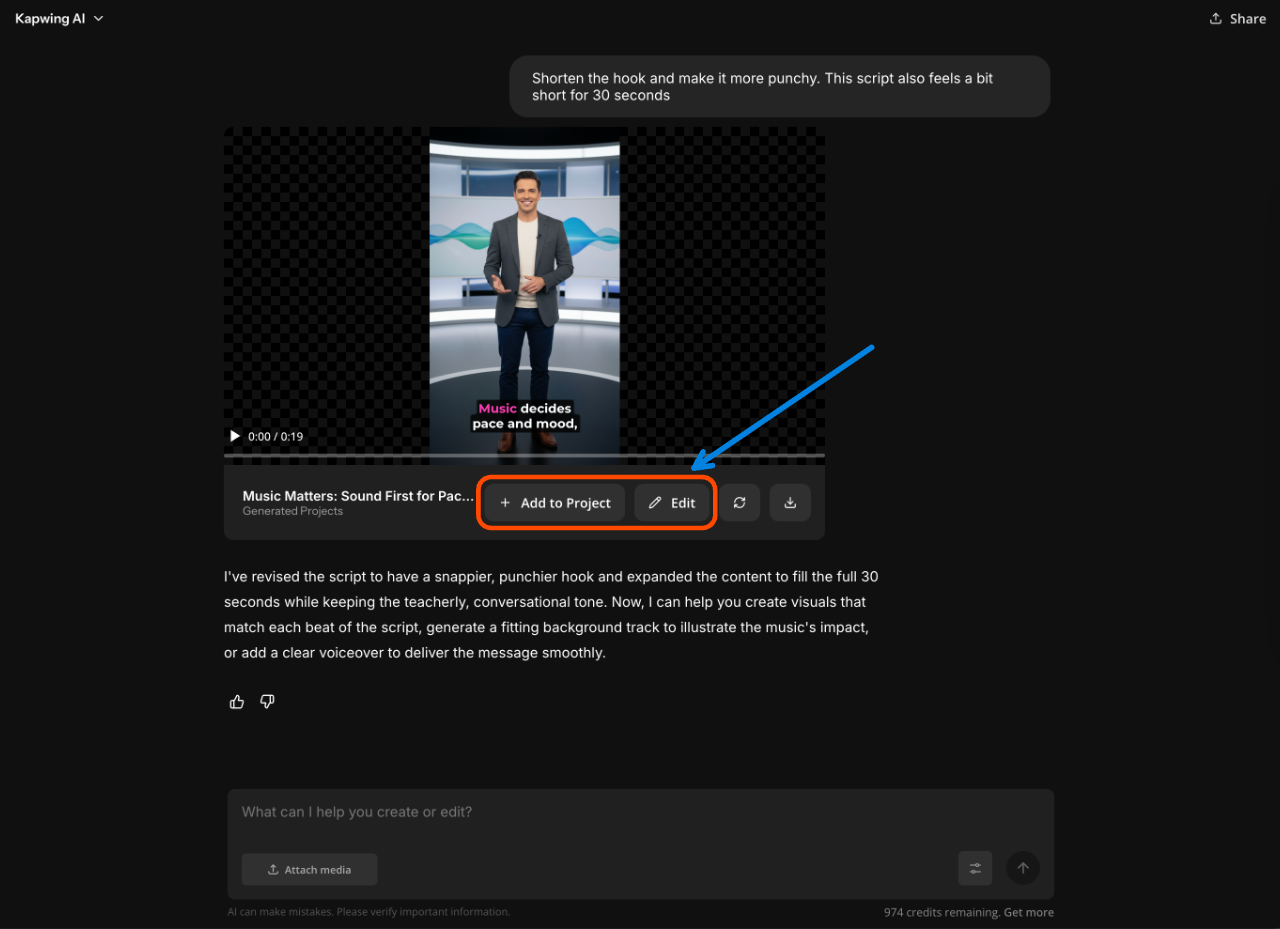
Editing in chat is best for adjusting script/voiceover lines, swapping visuals, or testing alternate hooks and endings. Effective example prompts include:
- “Shorten the hook and make it more direct, then regenerate the video.”
- “Rewrite the third line so it’s easier to say out loud and update the visuals.”
- “Swap the second visual for something simpler and regenerate.”
Opening the project in the Kapwing Studio is better when you want more precise control. The editor lets you fine-tune timing, text placement, captions, and layouts. Effective workflows include:
- Reposition captions for mobile-safe viewing
- Swap in brand visuals, screenshots, or b-roll
- Create platform-specific versions (9:16 for Shorts, 1:1 for feeds, 16:9 for YouTube)
5. Export
Once your video is ready, you can export it. If you’re working in chat, simply click Download to export the video. If you’ve opened the project in the Studio, click Export in the top-right corner of the editor.
Before you export, do a quick final pass to make sure the pacing feels right and all text is readable on mobile.
Frequently Asked Questions
Can ChatGPT write video scripts for YouTube, TikTok, and Reels?
Yes. ChatGPT can write video scripts for YouTube, TikTok, Instagram Reels, and Shorts—as long as you specify the platform, length, and structure in your prompt. Short-form video scripts require faster pacing and clearer hooks, while YouTube scripts can build context more gradually. The quality depends more on how you prompt ChatGPT than on the platform itself.
How do I prompt ChatGPT to write a good video script?
The best way to prompt ChatGPT for video scripts is to first explain what the video is about, then define the angle, audience, and format. After that, ask for a clear structure (hook, build, payoff) and specify that the script should be written in short, spoken lines. Vague prompts lead to generic scripts; detailed prompts lead to performable ones.
What is the best structure for AI-generated video scripts?
The most reliable structure for AI-generated video scripts is hook → build → payoff. The hook earns attention, the build delivers one idea at a time, and the payoff resolves the promise. This structure works across short-form and long-form video and helps prevent ChatGPT from writing unfocused or overly long scripts.
Can I turn a blog post into a video script using ChatGPT?
Yes, and this is one of the most effective uses of ChatGPT for video. The best approach is to paste in the blog post (or key sections) and ask ChatGPT to extract a single core takeaway and rewrite it for spoken delivery. Avoid trying to cover the entire article—short-form videos perform best when they focus on one idea.
Do I need to describe visuals when writing a video script with ChatGPT?
Not always. If you’re only writing a script, visuals don’t need to be included. When turning a script into a video using tools like Kapwing, visuals are generated automatically based on the script. That said, writing scripts that are easy to visualize leads to better video results.