
How to Use Google Lyria 3.5
Generate better AI music with Lyria 3.5 by learning how to structure prompts, control arrangements, and refine tracks inside Kapwing.
Google Lyria 3.5 is built for more than vaguely appropriate background music. The model can create tracks up to three minutes long, follow recognizable song structures, generate vocals and lyrics, and respond to detailed musical instructions around genre, instrumentation, tempo, key, mood, and arrangement.
What makes Lyria 3.5 more useful than other music generators is its ability to follow musical direction over time. You can tell it not only what genre or mood you want, but how the arrangement should evolve.
The important distinction, however, is how you prompt it. The following guide will cover that, and much more. I'll go into depth on what the technical capabilities of Lyria 3.5 are, how you prompt it, and how to generate your first song.
Table of Contents:
- What Is Google Lyria 3.5?
- How to Prompt Google Lyria 3.5
- How to Use Google Lyria 3.5
- Google Lyria 3.5 Usage Rules and Commercial Rights
What Is Google Lyria 3.5?
Lyria 3.5 is Google DeepMind's music-generation model for creating high-fidelity music from text prompts. It outputs 44.1 kHz stereo audio and can generate complete arrangements containing multiple instruments, vocals, and lyrics.
The main difference between Lyria 3.5 and simpler AI models is its emphasis on long-range musical structure. Rather than only producing a 20- or 30-second musical texture, it is designed to maintain musical ideas across longer tracks. That makes it useful for:
- Functional music: background tracks for tutorials, ads, product demos, podcasts, documentaries, and social videos.
- Music-first content: original songs, jingles, theme music, cinematic scores, and vocal tracks where the arrangement itself matters.
Below is a example of a CityPop song generated with Lyria.
What's New in Lyria 3.5?
The biggest improvements in Lyria 3.5 are centered around giving creators more control over longer generations:
- Longer, More Coherent Tracks: Lyria 3.5 can generate music up to three minutes long, with duration influenced through the prompt.
- Better Prompt Adherence: Google reports improved adherence to musical instructions, particularly when lyrics are involved.
- More Natural Vocals and Lyrics: Lyria 3.5 can generate its own lyrics or perform lyrics you provide
- More Technical Musical Control: You do not need to understand music theory to prompt Lyria, but it can respond to musical terminology including BPM, keys, genres, instrumentation, and song sections. Google's prompting examples include instructions such as
122 BPM,G major, andD minor
How to Prompt Google Lyria 3.5
A useful structure for a strong Lyria prompt is:
Purpose → Duration → Genre → Mood → Tempo → Instrumentation → Structure → Vocals → Lyrics → Production
The interactive example below breaks that hierarchy apart. Click any part of the prompt to see what it controls, why it matters, and how a vague instruction can be turned into one Lyria can act on.
See what each part of a strong Lyria prompt is doing.
A useful prompt moves from the track's purpose toward increasingly specific musical decisions. Select a layer below to see where it appears in the example, why it matters, and how to make the instruction more useful.
Create a background soundtrack for a short travel documentary lasting about two minutes . Use minimal cinematic ambient music with subtle neo-classical influences . The track should feel reflective and slightly nostalgic at first, gradually becoming warm and optimistic . Keep it around 82 BPM with a restrained, steady pulse . Use soft piano, warm analog synth pads, muted bass, brushed percussion, and understated strings . Begin sparsely with piano, introduce strings gradually, build gently through the middle, and resolve quietly . Keep the track instrumental with no lead vocal . No lyrics are needed . Finish with warm analog production, natural dynamics, a wide stereo image, and no overpowering lead elements .
Purpose
Tell Lyria what job the music needs to perform before describing the sound itself. Purpose gives everything that follows context. A track designed to sit behind narration should behave differently from a standalone song, even if both share the same genre.
Purpose is also an arrangement constraint. Background music often benefits from fewer dominant melodies, less vocal activity, and more space for dialogue. Instead of only describing what the music should sound like, describe what it needs to accomplish.
You don't need all ten layers in every prompt. More instructions can actually make a prompt less precise if they compete with one another. Prioritize characteristics that materially affect the result. For example, for a background track, purpose + genre + mood + instrumentation may be enough.
You can use the prompt builder below to experiment with, and write an expert Lyria prompt.
Build a Lyria prompt
Fill in only the directions that matter. The builder will organize them into a musical hierarchy instead of a disconnected list of adjectives.
Example Lyria 3.5 Prompts
Use the examples below as starting points rather than fixed formulas.
Pay attention to how each one defines the purpose first, then adds only the musical details that matter for that specific use case.
Tutorial or Explainer Background
Create a two-minute instrumental background track for a tutorial video. Warm lo-fi hip-hop at around 82 BPM with mellow Rhodes piano, soft boom-bap drums, subtle upright bass, and very light vinyl texture. Relaxed and focused rather than sleepy. Keep the arrangement consistent and unobtrusive so it sits beneath narration. Avoid dramatic transitions or prominent lead melodies. No vocals.
Cinematic Trailer
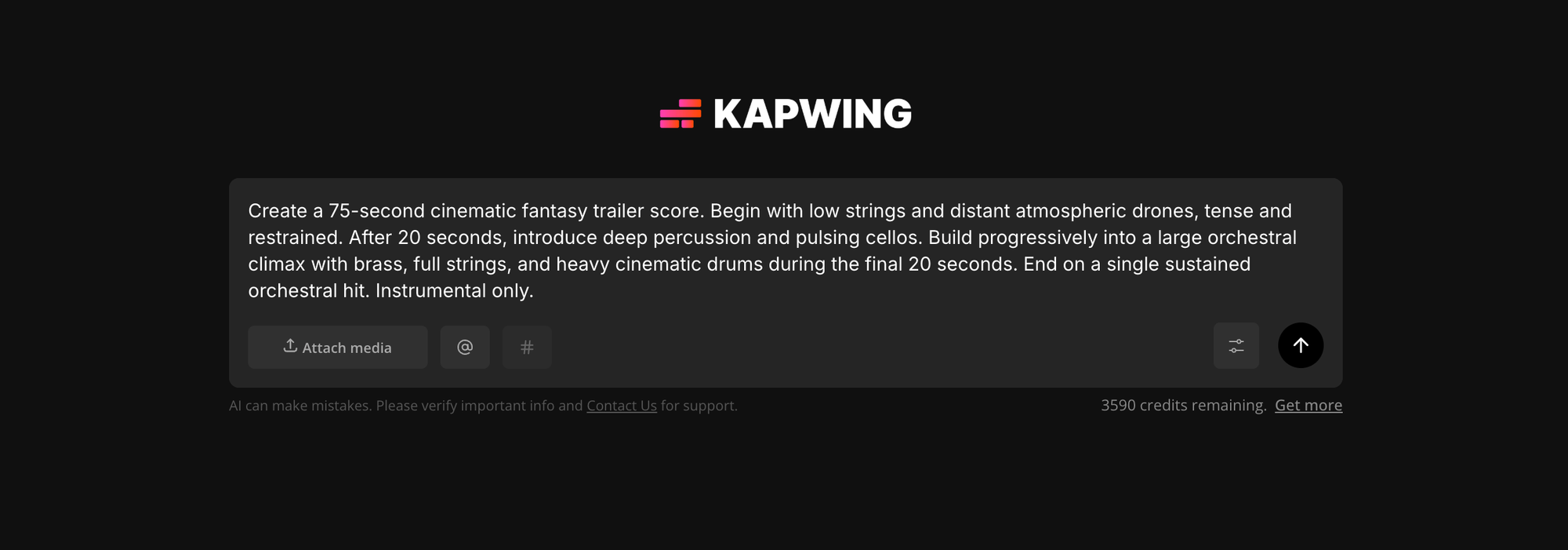
Create a 75-second cinematic fantasy trailer score. Begin with low strings and distant atmospheric drones, tense and restrained. After 20 seconds, introduce deep percussion and pulsing cellos. Build progressively into a large orchestral climax with brass, full strings, and heavy cinematic drums during the final 20 seconds. End on a single sustained orchestral hit. Instrumental only.
1 Minute Social Ad
Create an energetic 60-second electronic-pop track for a fast vertical social ad. 125 BPM, bright synth bass, punchy electronic drums, handclaps, and one memorable synth hook. Start immediately with energy, create a short lift around the midpoint, and finish with a clean musical hit suitable for a logo reveal. Instrumental only.
Podcast Intro
Create a intro theme for a conversational technology podcast. Modern indie-electronic sound with muted guitar, warm synth bass, and crisp but understated percussion. Curious, intelligent, and slightly playful. Include one short memorable melodic motif that can function as the recurring show theme. Instrumental only.
Vocal Pop Song
Create a full upbeat indie-pop song at 122 BPM in G major. Bright acoustic guitar, driving kick drum, handclaps, warm bass, and subtle synth layers. Female lead vocal with a clear, energetic delivery and layered harmonies in the chorus. Structure: short intro, verse, chorus, second verse, chorus, bridge, final double chorus, short outro. Write lyrics about taking an unplanned summer road trip with friends and realizing that getting lost was the best part.
How to Use Google Lyria 3.5
Once you know the kind of track you want, generating it with Lyria 3.5 is fairly straightforward.
The main work happens before you click generate: choosing the model, defining the role the music needs to play, and turning that direction into a clear prompt.
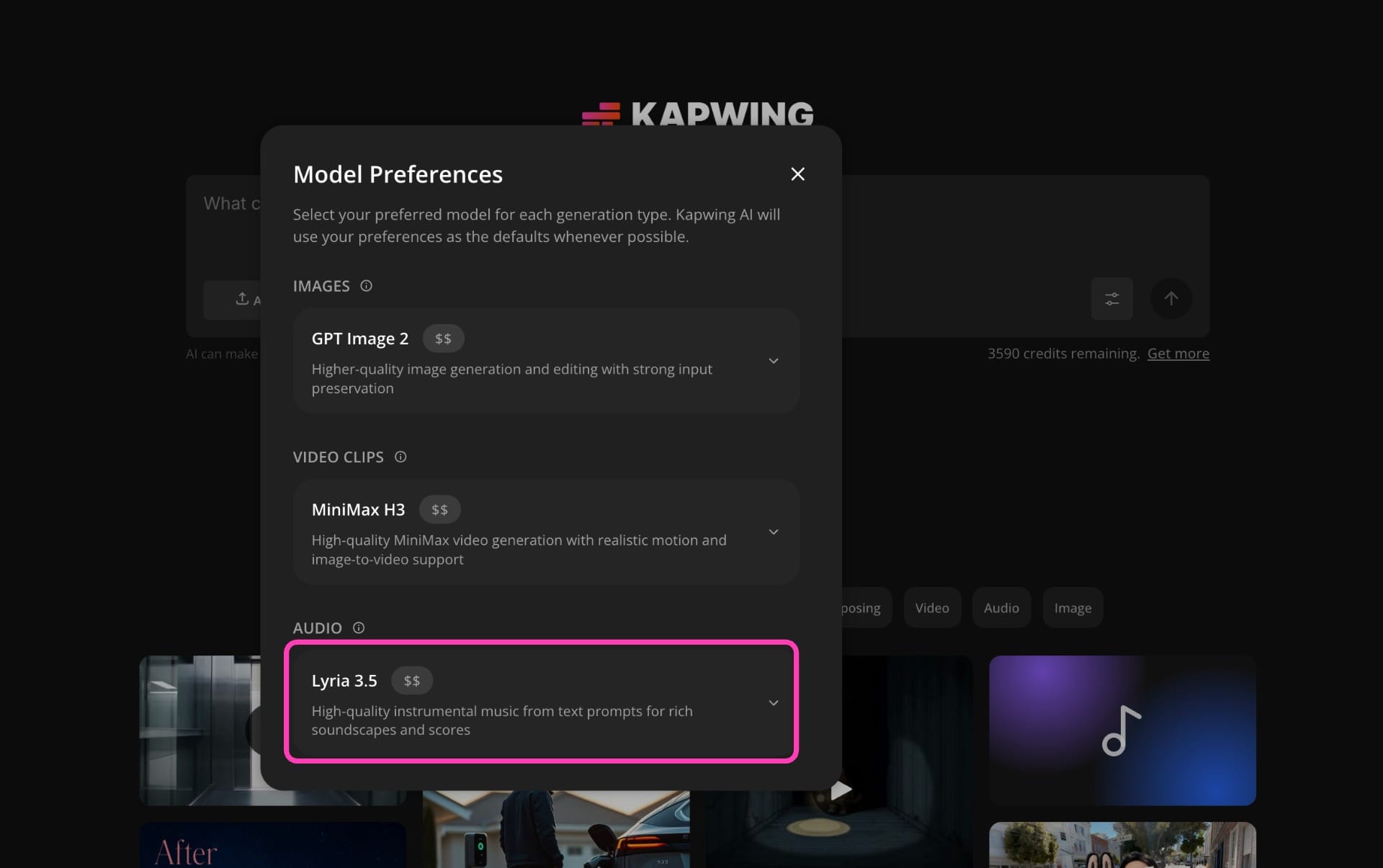
Step 1: Select Lyria 3.5
Open Kai and go to Model Preferences. Under the audio or music options, select Google Lyria 3.5.
Choosing the model explicitly is useful when you already know you want Lyria. You can also describe the audio you need conversationally in Kai and allow Kai to interpret the request for you.
Step 2: Decide What Job the Music Needs to Do
Before writing the prompt, define the track's purpose. Put that purpose at the beginning of your prompt:
This is an easy step to skip, but it has a large effect on the result. For example, a piece of music underneath a voiceover behaves differently from music accompanying a cinematic montage. For example, compare
Create a two-minute instrumental background track for a product tutorial with spoken narration. Keep the arrangement restrained and leave plenty of space for the voiceover.
with:
Create a two-minute cinematic soundtrack for a fast-paced product launch montage. Build progressively toward a large final reveal.
Both could eventually use similar instruments, but they give Lyria completely different arrangement priorities.
Step 3: Write the Music Brief
Describe the musical direction using the prompting guide above. You don't need every component every time, but the more important a characteristic is, the more explicitly you should state it.
A useful template is:
Create a [duration] [instrumental/vocal] track for [purpose]. Use [genre/style] with a [mood/emotional direction] feel at [tempo/rhythm]. Feature [instrumentation]. [Describe how the arrangement should develop over time]. [Vocal/lyric instructions, if needed]. Finish with [production or ending direction].
Input your prompt into Kai.
Step 4: Generate the Track
Generate your first version and evaluate:
- Is the genre correct?
- Is the tempo appropriate?
- Is the instrumentation too busy?
- Does the track develop at the right moments?
- Are vocals competing with your video?
- Does the ending feel resolved?
- Does the track maintain its identity through the full runtime?
Two generations from the same prompt can sound different because Lyria is nondeterministic, so regenerating an unchanged prompt can also produce a useful alternative.
Step 5: Change One Variable at a Time
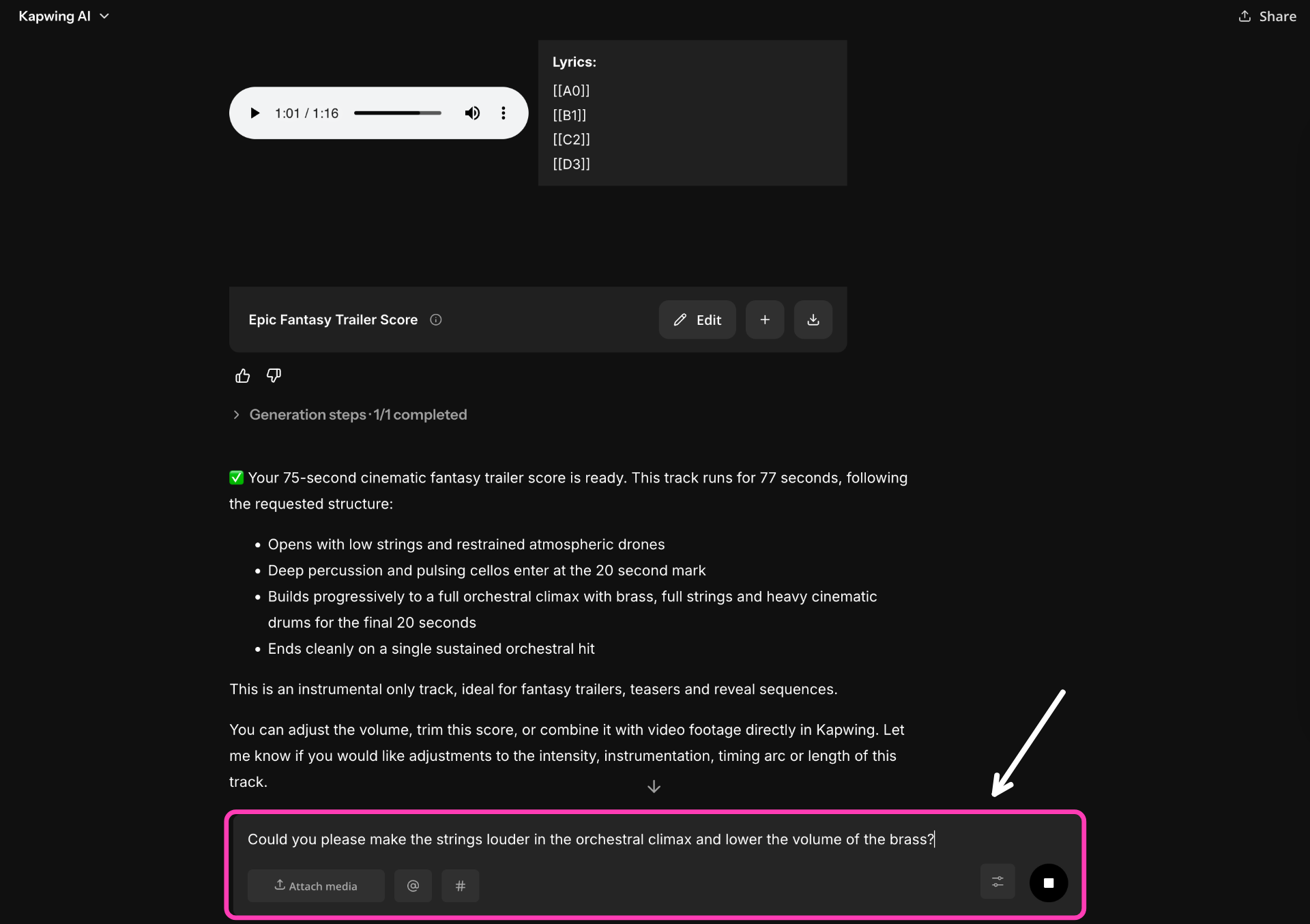
If the result is close, resist rewriting the entire prompt. Instead, identify what is actually wrong. For example, you could prompt:
Keep the existing restrained orchestral feeling, but reduce the percussion and introduce the brass only during the final 20 seconds.
Or:
Keep the instrumentation but slow the tempo from an energetic groove to a steady 80 BPM pulse.
Changing a small number of variables makes it easier to understand which instructions are affecting the output.
Step 6: Edit the Music Against the Video
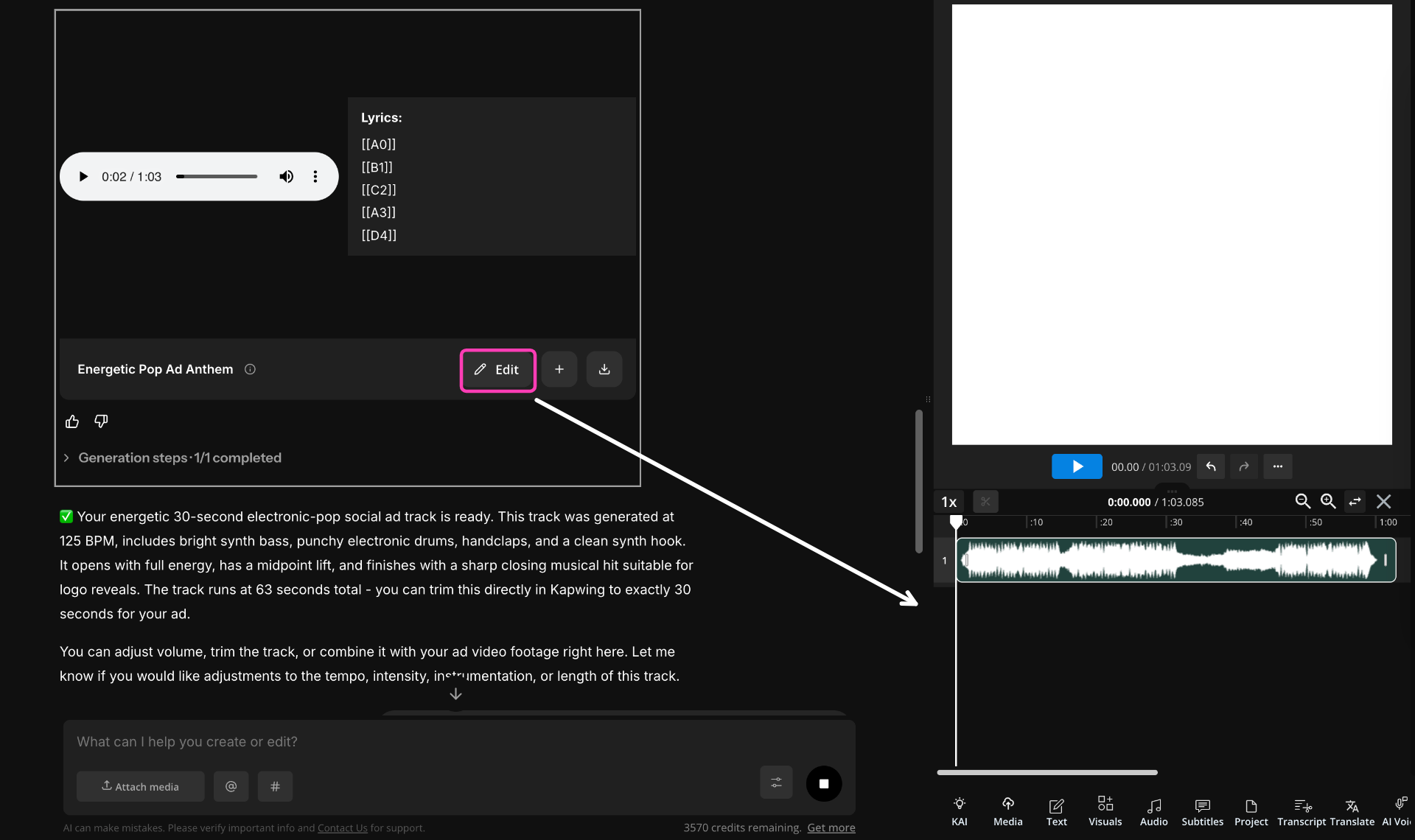
Once you have a generation you like, you can add it to the Kapwing studio to edit the audio.
From there, treat the generated track like any other music asset: trim it, split it, fade the beginning or ending, lower it underneath narration, and time musical changes against important moments in the edit.
You don't necessarily need the generated track to arrive perfectly timed. Often the better workflow is to generate a strong piece of music, then shape its placement during the edit.
Google Lyria 3.5 Usage Rules and Commercial Rights
Lyria 3.5 is designed with both creative-reference and provenance safeguards in mind.
That affects two practical questions creators often have: whether you can prompt with an existing artist or song, and what rights apply to the music you generate.
Can You Reference an Artist or Existing Song?
Avoid structuring prompts around direct imitation of a living artist, a recognizable artist voice, or copyrighted lyrics. Google applies safety filtering to requests involving specific artist voices and protected lyrical content. Instead of:
Make this sound like [artist]
translate the reference into musical characteristics:
Melancholic alternative pop with sparse piano, muted electronic percussion, breathy intimate vocals, and a restrained chorus that gradually expands into layered harmonies.
This is also usually a better prompting technique. Naming an artist tells the model who you're referencing; describing the arrangement, vocal texture, instrumentation, tempo, and production explains what you actually want from the reference.
Can You Use Lyria 3.5 Music Commercially?
Lyria-generated audio also contains Google's SynthID watermark, an inaudible signal designed to identify the audio as AI-generated even after common modifications such as compression or format conversion. SynthID does not function like an audible tag and does not itself determine your usage rights.
It's also important to separate commercial usage rights from copyright ownership. Under current U.S. Copyright Office guidance, purely AI-generated material is not automatically protected simply because someone wrote the prompt. Human-authored elements — such as editing, arranging, selecting, or substantially modifying generated material — may be protectable.
For creators, that makes the final edit important. A generated Lyria track can be the starting material, while the way you cut it, arrange it, mix it with other elements, and incorporate it into a larger project contributes the human creative work around the generation.
Frequently Asked Questions
Can Lyria 3.5 generate full songs?
Yes. Lyria 3.5 can generate complete songs with instrumentation, vocals, lyrics, and recognizable sections such as verses, choruses, bridges, and outros. For better results, specify the song structure instead of asking only for a genre and mood.
Can I give Lyria 3.5 my own lyrics?
Yes. Keep your lyrics separate from the production instructions and use labels such as [Verse], [Chorus], and [Bridge]. This makes it clearer which text should be sung and how the song should be organized.
Can Lyria 3.5 write lyrics for me?
Yes. Instead of supplying finished lyrics, you can describe the subject, perspective, and emotional arc you want. More specific narrative direction usually produces less generic lyrics than a broad request such as “write a love song.”
Can Lyria 3.5 make instrumental music?
Yes. Add instructions such as instrumental only or no vocals to your prompt. For background music under dialogue or narration, it can also help to request a sparse arrangement and no prominent lead melody.
Does Lyria 3.5 understand BPM and musical keys?
Yes. You can specify BPM, musical keys, instrumentation, rhythmic feel, song sections, and other standard music terminology. These details aren't required, but they're useful when you need tighter control over pacing or style.
Why does my Lyria music sound generic?
Generic results often come from prompts built mainly from broad mood words such as epic, happy, or cinematic. Add more concrete information — especially genre, instrumentation, rhythm, structure, and the intended use of the track.
How do I make Lyria music fit a video?
Describe the role of the music and how its energy should change around the edit. For example, ask for a sparse opening beneath dialogue, a gradual build during a montage, and a clean final hit for a logo reveal. You can then fine-tune timing, volume, fades, and cuts in the editor.
Can Lyria 3.5 create background music for YouTube videos?
Yes. Instrumental background tracks are one of Lyria's most practical uses. Tell it what type of YouTube video the music is accompanying and explicitly ask for room for narration if there's voiceover.
Can Lyria 3.5 make music for ads and social media videos?
Yes. For shorter ads, give Lyria the duration and describe the desired progression. A 15- or 30-second track often works better when you ask it to establish the musical idea immediately, include one clear build, and end cleanly rather than slowly developing like a full-length song.
Does Lyria 3.5 add a watermark to generated music?
Lyria-generated audio includes Google's SynthID watermark, which is designed to be inaudible to listeners while allowing AI-generated audio to be identified.
Can I download Lyria 3.5 music as an MP3?
When generating Lyria music through Kapwing, you can incorporate the track into a video project or export audio as part of your editing workflow. This also lets you trim the generation, add fades, and adjust its volume before exporting.