
How do Kapwing Credits Work?

Table of Contents
How many credits does each plan get?
How many credits does each tool cost?
How many credits does AI Dubbing use?
How many AI Credits correspond to AI generations?
Can I buy more credits on the Business plan?
Can I get a refund of credits if there's an error?
Where can I see the number of credits I've used?
How Many Credits Does Each Plan Get?
The Free Plan comes with 10 credits lifetime.
The Pro Plan comes with 1000 credits per month.
The Business Plan comes with 4000 credits per month.
The Enterprise Plan comes with custom credits per month.
How Many Credits Does Each Tool Cost?
*All tools will cost at least 1 credit, even if the input is less than a minute.
**For TTS, the cost will be noted under the text box to the left, so you can have an estimate of your usage before processing.
What Tools Don’t Require Credits?
Remove Image background
Enhance Image
Blur Video Background
Stabilize
Chroma Key
Find Scenes
Remove video background
Smart Cut
Add audio waveform
While these tools do not use credits, free users may still have limited or one-time access to some of them. Paid users, regardless of tier, currently have unlimited access to these tools.
How Many Credits Does AI Dubbing Use?
Credits are applicable to most of the Kapwing tools including dubbing. In general about 30 seconds of dubbing is equal to 10 credits.
On the Pro Plan, you can dub up to 50 minutes if you do not use your credits for any other tool. On the Business Plan, you can dub up to 200 minutes if you do not use your credits for any other tool.
How Many Credits Correspond To Kapwing AI Generations?
Depending on what you generate, the amount of credits used will vary. If you are generating an image, it would cost anywhere between 4-6 credits. A video would be 20+ credits depending on the length, resolution, and model.
For Kapwing AI, your current credits will be displayed under the chat box to the right and will update as you generate new outputs. Here is a general breakdown:
| Kapwing AI Generations | Credit Cost |
|---|---|
| Kapwing AI Video Generation | credits depend on quality and model used, AI estimate is the best resource |
| Kapwing AI Image Generation | 4 - 6 credits depending on quality and model used |
| Kapwing AI Audio Generation | 10 credits per song/sound effect |
| Video Resize | 4 credits per video |
| Merge Media (Non-Transcript Merge) | 1 credit per 5 input files* |
| Transcription-Based Editing | 1 credit per minute of transcription and 1 credit per 5 minutes of input video |
*Merge Media will cost a minimum of 1 credit, even if the input is fewer than 5 input files.
Can I Buy More Credits On The Business Plan?
If you are already on the Business Plan and need more credits, we do offer a one-time purchase of 500 credits for $50 USD. You can buy multiple packs of 500 credits, but please note these credits do not roll over. If there are remaining credits at the end of the month, they will be removed upon the credit refresh that occurs on the first of the month.
If you want more limits than our Business Plan and a larger quantity than 500 credits/$50, you would have to sign up for our Enterprise Plan. Our Enterprise Plan is tiered pending the usage and limit requirements of your team. To upgrade to Enterprise, you can contact us here.
Can I Get A Refund Of Credits If There's an Error?
When limits fail, our system will automatically issue back credits.
For example, if you dub a 5-minute video, we will deduct the 100 credits before the dubbing, but after the failure is processed, our system will automatically re-issue those 100 credits. If you believe there is an issue with your credits, please contact our team for assistance.
For AI generation credits, much of the results depend on the prompting of the AI. If the AI does not generate a video or image to your liking, you will have to try again with a more precise prompt. Since the AI is working as intended, we do not issue refunds for generations that were successful but not the desired result.
Where Can I See The Number Of Credits I've Used?
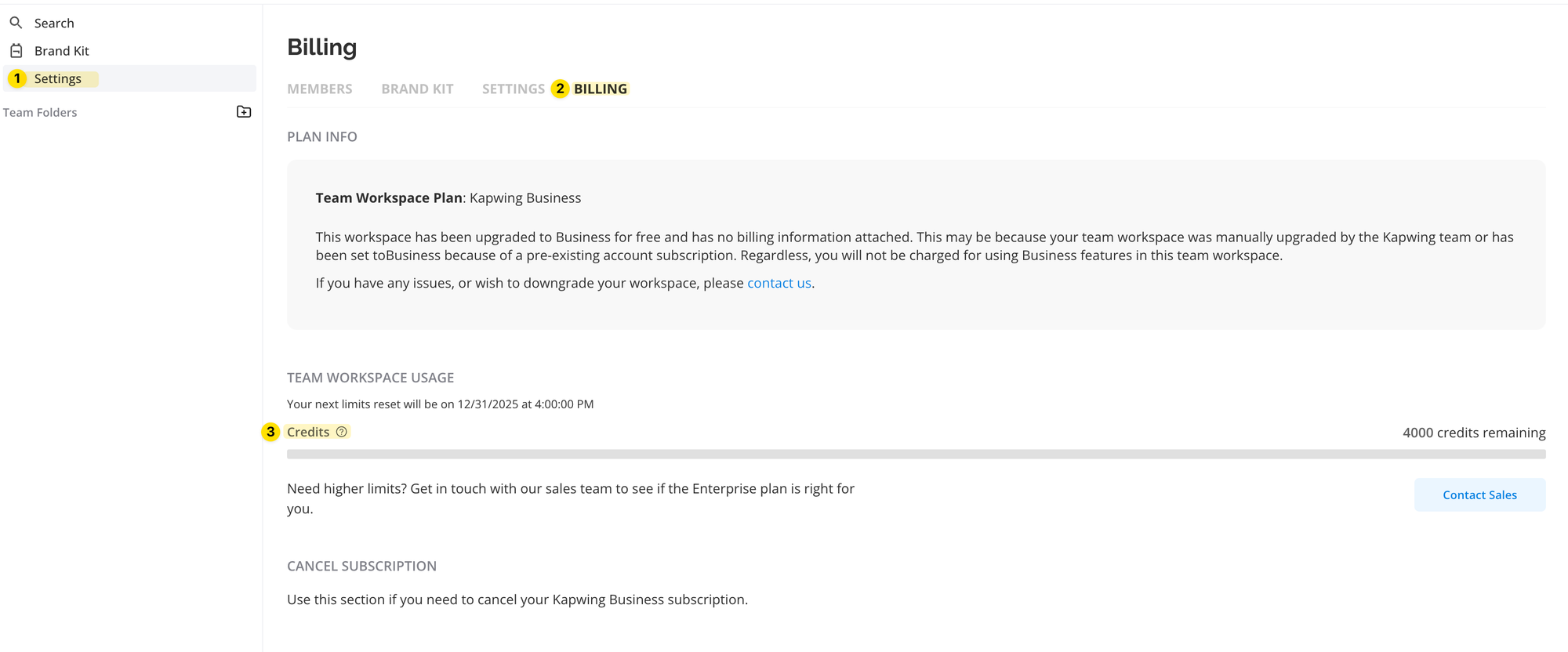
To review how many limits you have used throughout the month, you can go to your Workspace > Settings> Billing, and you will see the breakdown of how many credits you have used.
Learn More:
Pricing & Subscription FAQ
Which Paid Plan is Right for Me? Pro vs Business Plan FAQ
How to Switch Subscriptions and Billing Cycle



