
How to Download Sora Videos — Resolution, Length Limits & Upload Specs
OpenAI's new Sora 2 app has surpassed 1 million downloads in less than 5 days.

Sora 2 is OpenAI’s mobile app powered by the latest Sora model. The app has a social feed, remixing tools, and Cameos (a way to place yourself or friends into AI-generated scenes).
Knowing how to download Sora videos is key to sharing your creations beyond the app. Downloading lets you repost your Sora videos on platforms like TikTok, Instagram, and YouTube, as well as ensures you have the highest-quality version of your video for future editing.
In this guide, we’ll explain how to download videos from Sora 2, what resolution and length limits to expect, and how to make sure your exported clips look crisp and perform well wherever you upload them.
Table of Contents
What is Sora 2?
Sora 2 is OpenAI’s latest text-to-video application built on the Sora model. It allows users to generate short video clips from written prompts. The app is known for producing viral-ready short videos directly.
Sora differs in how it handles content tone. The model is capable of recognizing narrative cues and generating humor or irony without highly engineered prompts. This makes it easier for everyday users to produce content that feels intentional.
Beyond generation, Sora 2 functions as a small creative platform. Users can browse a public feed, remix existing clips, or refine their outputs without leaving the app. It also includes Cameos, a feature that lets users capture their likeness once and appear as a subject in AI-generated scenes
How to Download Sora Videos
Downloading your videos from Sora 2 lets you save, edit, or repost your AI-generated clips on platforms like TikTok, Instagram, and YouTube. Whether you’re archiving a project or sharing it elsewhere, it’s important to understand how downloads work, especially if your video includes a Cameo.
iPhone (Sora 2 App)
You can download any video you’ve generated in the Sora 2 app directly to your camera roll. Here’s how:
- Open your finished video
Once rendering is complete, tap the thumbnail in your feed or project library to open it.

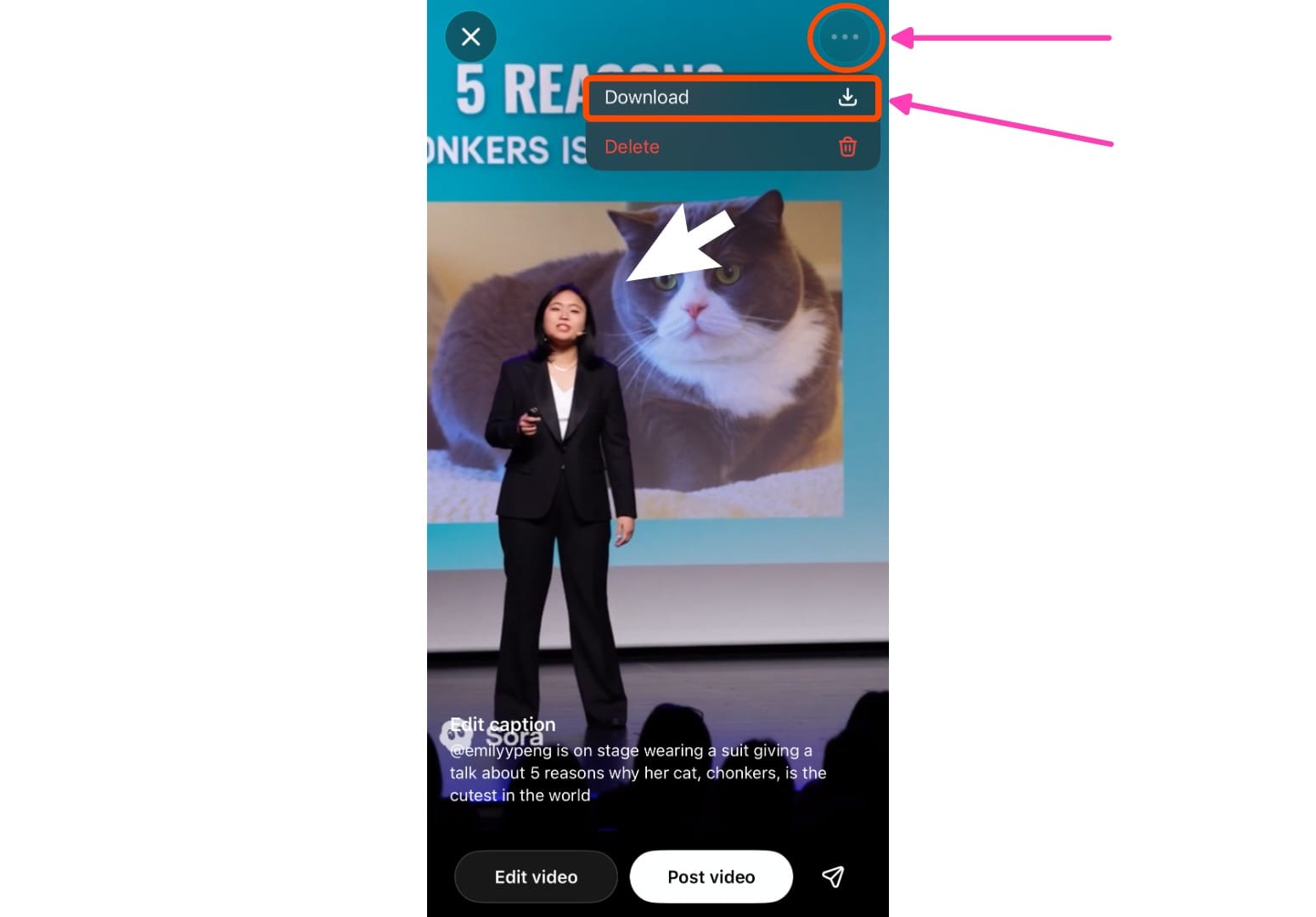
- Tap the three-dot menu (⋯)
You’ll see this icon in the upper-right corner of the player. Tap it to open more options. - Select “Download”
This will export the video as an MP4 file and save it to your Photos app or Downloads folder.
- Check your Photos app
The downloaded file will appear in your camera roll or “Downloads” folder as an MP4.
If you don’t see the Download button:
This can happen if the video is still rendering in the background or if it includes a Cameo that restricts downloading (see below). Try refreshing or reopening the app once the render completes.
On the Web (sora.com)
If you’re using Sora in a browser, you can save videos directly from your workspace.
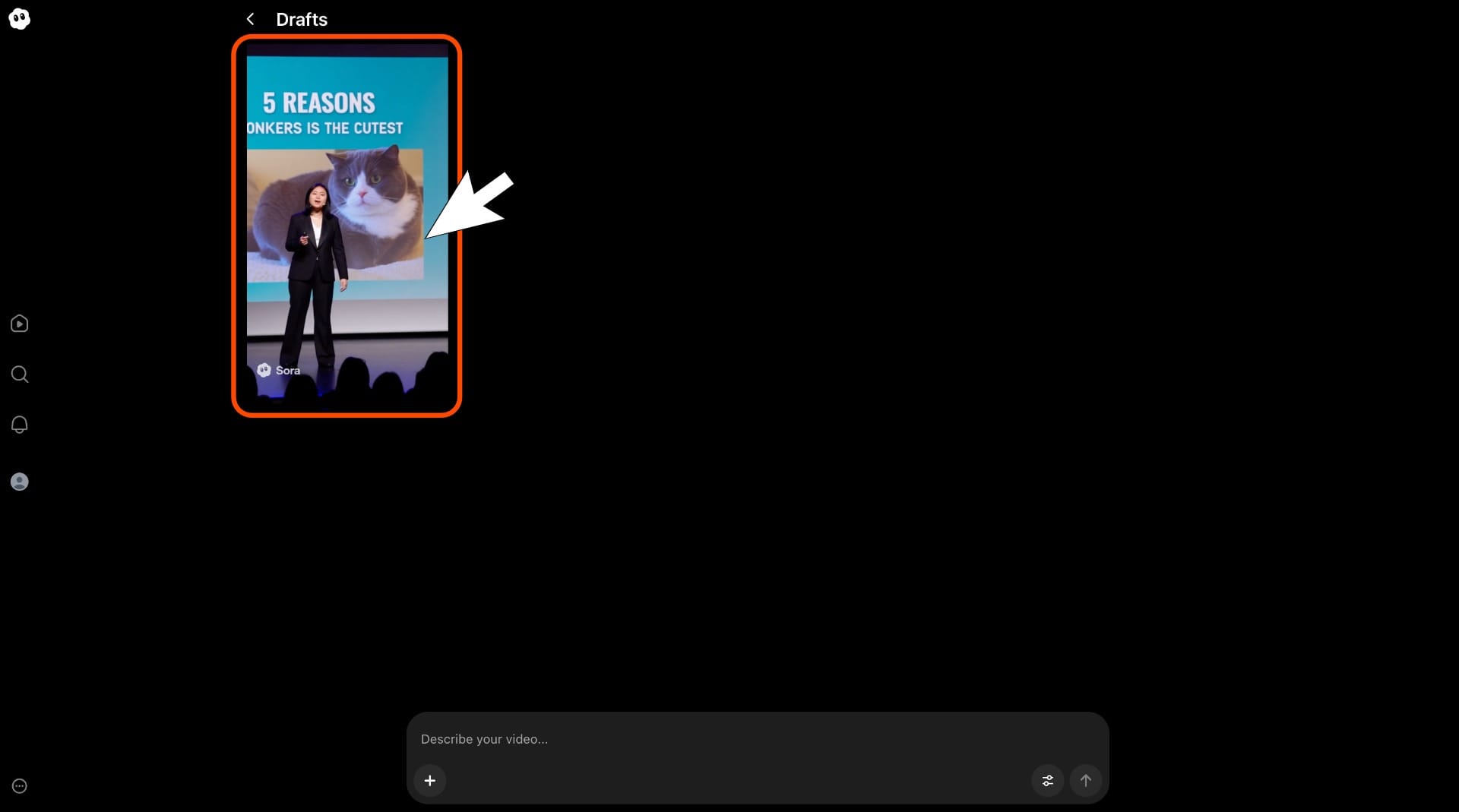
- Go to your Sora project page
Once your video is fully rendered, open it.
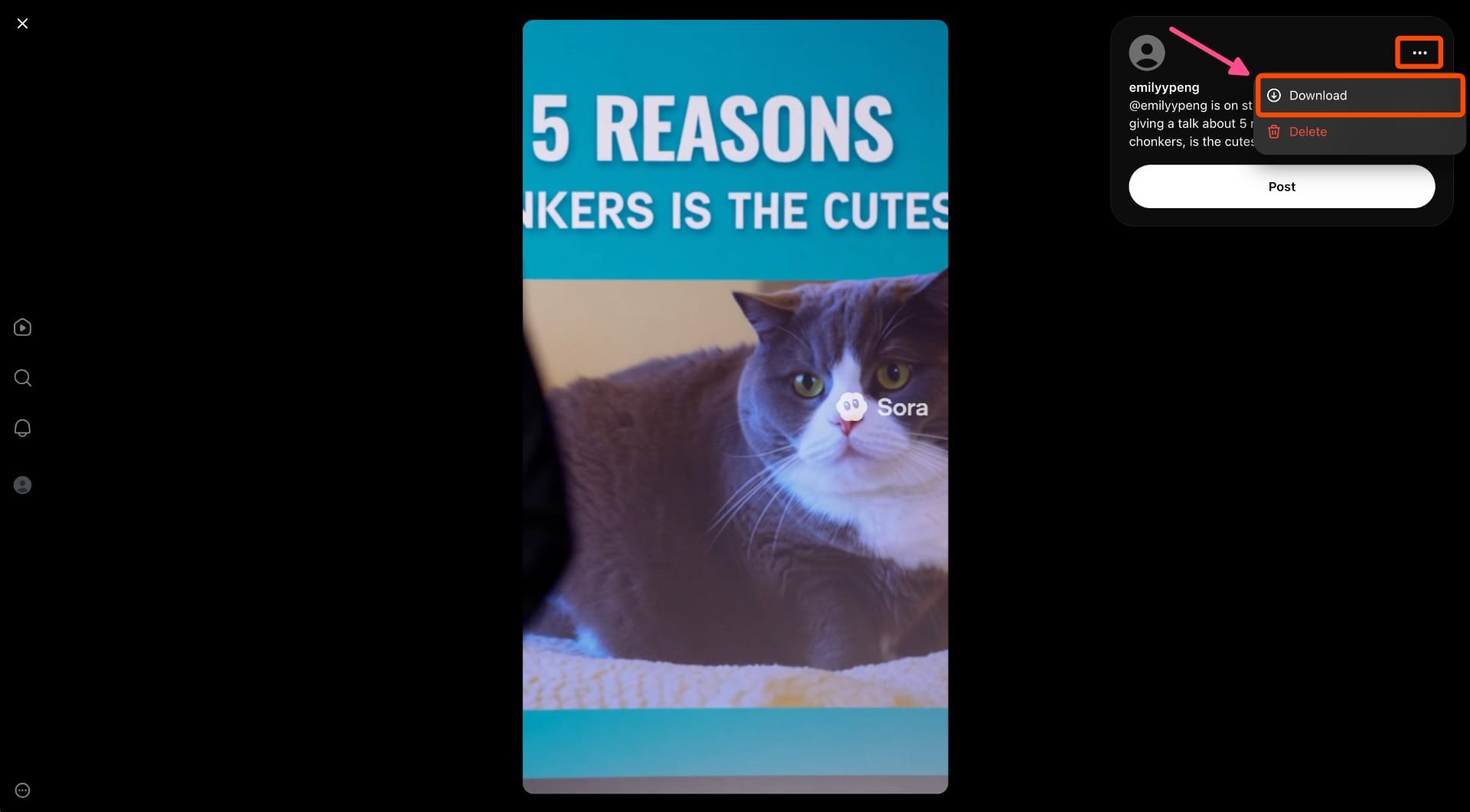
- Click the three-dot menu (⋯)
In the upper right corner of the video or player toolbar, click the menu to expand your options. - Select “Download”
Choose Download to export your file. It will download as an MP4 to your computer.
- Save the file
Choose a location on your computer. Sora exports as .mp4, so it’s ready to upload anywhere.
Downloading Videos With Cameos
If your video includes a Cameo, download availability depends on whose likeness is used:
- Your own Cameo: You can download it normally. Some Pro users may receive a watermark-free version if the video was generated from text and only depicts themselves.
- Someone else’s Cameo: You cannot download videos that include another person’s cameo. Downloads are blocked to protect intellectual property rights and obtain consent. You’ll still be able to preview and edit the video in the app, but exporting is disabled.
- No Cameo or text-only clips: These can always be downloaded and re-uploaded across platforms, with a visible watermark
Sora Video Specs and Limits
Here’s what you can expect when you generate and download videos from the Sora 2 app or web player. This section sticks to current, documented limits so you can plan edits and reposts confidently.
Resolution
- Up to 1080p exports are supported. On paid tiers, ChatGPT Pro can reach 1080p, while Plus often tops out at 720p in-app.
Length (Duration)
- Videos are generally capped at up to 20 seconds on Pro; Plus plans are typically up to 10 seconds. Exact availability can vary by tier and interface.
Aspect Ratios
- Sora supports widescreen (16:9) and vertical (9:16) outputs, so you can tailor to the standard aspect ratios of YouTube, TikTok, and Instagram.
File Format
- Downloads save as MP4, ready for most editors and social platforms. (This is the standard in OpenAI’s help flow for downloading Sora videos.)
Frequently Asked Questions
Can I download Sora videos without publishing them?
Yes. You can download your own videos directly after rendering in the Sora 2 app or web player; publishing is optional. Publishing is only required if you want other users to view, remix, or download your video from the Explore feed.
Why don’t I see the Download button in Sora?
The Download button may not appear if your video is still processing, if you’re using someone else’s Cameo, or if the Cameo owner has revoked access. Try refreshing the app once rendering completes. If it’s still unavailable, check whether the video includes another person’s likeness; those clips can’t be exported.
How long can Sora videos be?
Sora currently supports videos up to 10–20 seconds long, depending on your account tier and the complexity of the prompt. The model focuses on short-form content.
Does Sora add sound or music automatically?
Yes. Sora can generate basic sound, music, and dialogue that match the scene’s tone. However, these audio elements are simple placeholders; many creators add custom audio later during editing.
What file format and resolution do Sora downloads use?
All Sora videos export in MP4 format with up to 1080p resolution.
Why do Sora videos have a watermark?
Every Sora video includes a visible watermark and C2PA provenance metadata. These signals verify that the content was generated by AI and preserve transparency when clips are shared online.