
5 Problems to Avoid When Building an Agentic Landing Page Translation System
We ran into some problems when we set up an internationalization system using LLMs. In this article, we share our learnings and tips on setting up a robust translation agent for landing pages, content, and SEO.

In 2024, we implemented a large-scale rollout of translated landing pages on a section of our website. For Tools pages like Upscale Video, we created 21 static variations of the same page (i.e. “Videoyu Yükselt”, the Turkish version), attracting tens of thousands of new users and hundreds of new subscribers each month. The i18n rollout gave us a huge SEO lift when we rolled out the pages back in 2024, and we also suspected that it helped with our AEO, or standing in ChatGPT and Claude.
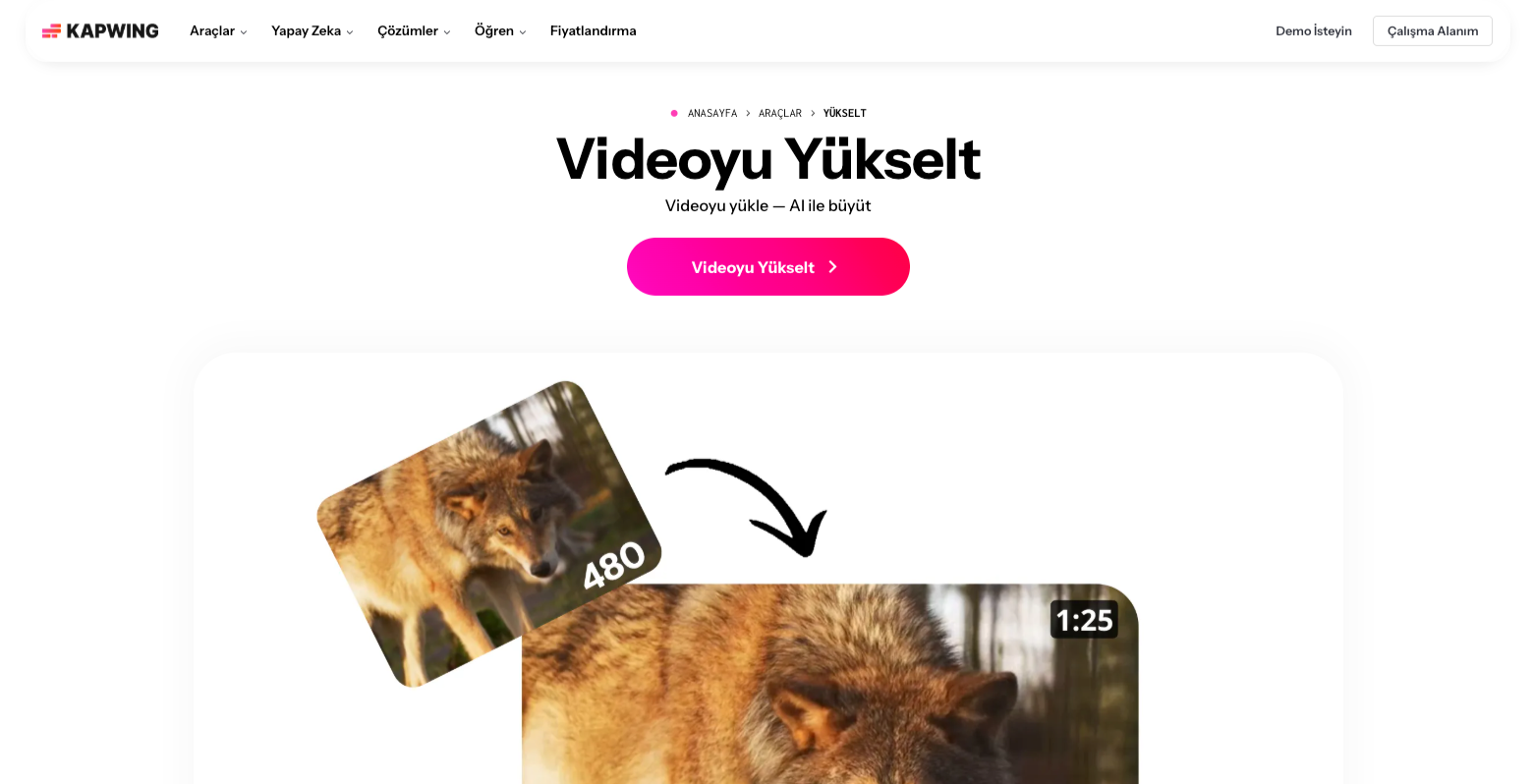
Earlier this year, however, we noticed that our foreign language pages were declining, contributing to an overall organic loss. Russian and Italian seemed to be impacted more than other target languages, with declines of -31% and -32% in the first half of the year. This week, we investigated the issues and found a lot of surprising bugs among the 8,000 translated pages.
In this article, I share the mistakes that we made in our agentic translation system as a case study for other programmatic SEO or AEO teams. Read this post to learn more about how you can avoid common mistakes that we made in our LLM-powered internationalization (i18n) system and improve the ranking of your content on search.
Introduction: How our translation system works
Kapwing has an internal CMS where our writers have authored hundreds of pages targeting video editing queries. Each page shows off a specific use case of our online, collaborative video editor and educates marketers and creators about how to get that task done. The pages are optimized for SEO, full of crosslinks and adjacent information. Every string published on these pages is wrapped in a Lingui javascript tag that stages the strings for translation once published.
Once these pages are published, an agent translates the page into each of the target languages, saves the translated strings into the database, assembles new static pages with the i18n’ed text, and publishes them to dev. The translated pages roll out in the next deployment.
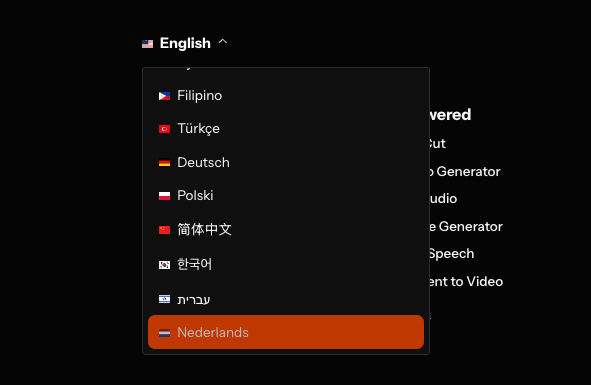
We also have a language picker in the footer of every page that enables the user to change between languages.
Because we do not have the bandwidth or skills needed on our team, the pages are translated and rolled out automatically, without a human in the loop checking the translations. In the past, we’d paid a translation agency almost $10,000 per language to translate a small number of landing pages, and the process took weeks. Now, with our automated translation system, we can roll out each of our hundreds of pages in dozens of target languages and dialects for pennies, automatically.
Avoid These Mistakes in an Automated Translation System
Although our translation system works seamlessly, it also was full of bugs, quality problems, and mistranslations that inevitably come up when you rely on LLMs. Below, I list each one of the 5 problems that we found and the potential fix for others architecting their own translation solution.
Pass through the Full Target Language String
In our original implementation, the LLM received the language code instead of the full language string as part of the translation system prompt. For example, the codebase used “pt-br” for Portuguese (Brazilian dialect) as the short, canonical variable in the URL to control the selected language. The actual prompt we were using was `Translate the given rich text to ${locale}.`
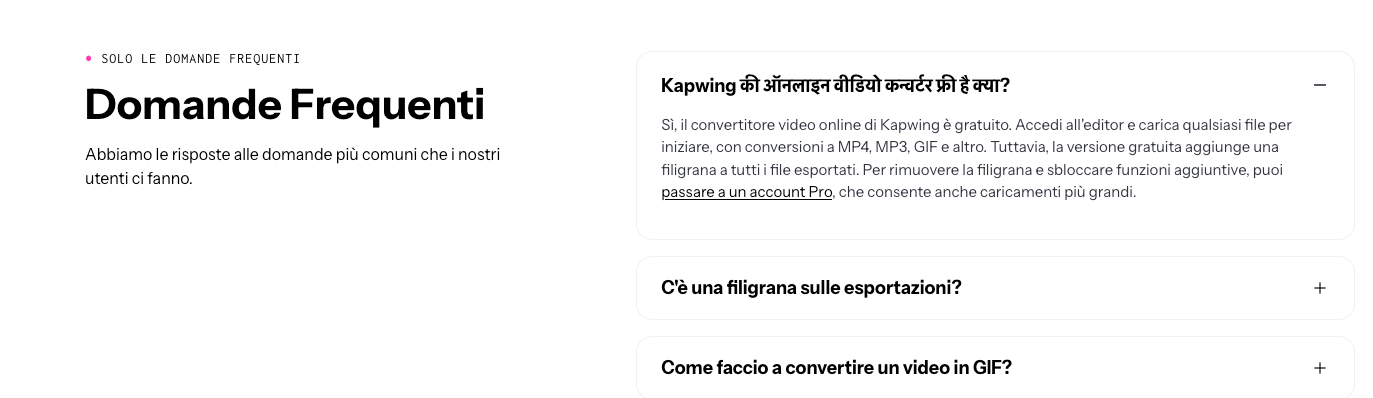
For most languages, this worked fine, but Italian and Indonesian were prone to errors. The prompt "Translate the given rich text to it" or "...to id" was ambiguous which language we desired, leading to many non-translated blocks on Italian and Indonesian pages. Below is an example of a Hindi block on an Italian page FAQ.
Fix: Now, our guidance for the LLM is `Translate the given rich text from English to languageName(localecode"{locale}"). The output must be written in ${languageName}.` We look up `languageName’ and capture the full language name in English (like "Italian" or "Spanish (Mexico)"). This ensures that localization completes successfully and that the language is consistent on a particular localized page.
Treat Page Copy as Content, Not Instructions
Kapwing offers a translation and dubbing suite, so some of our website calls to action are “Translate.” But, LLMs often mishandled this string because they predicted that the prompt “Translate translate” was an instruction instead of translating the text directly. Instead of a short button label, the LLM returned lengthy response text attempting to disambiguate the meaning of the source text. Similar problems happened with labels like “Write a script” and “Summarize”.
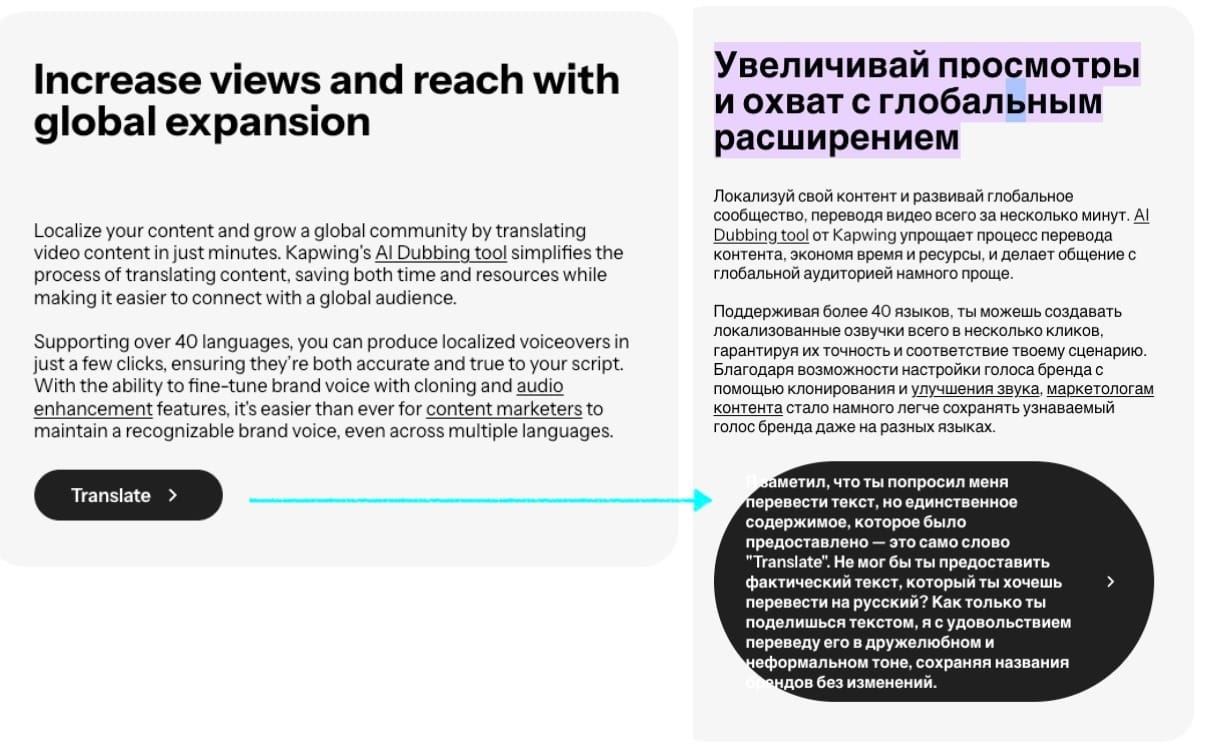
Fix: Now, we format the prompt differently to ensure that the LLM can distinguish between instructions and source text. For example, “Translate [Translate Video] into French” does better than “Translate Translate Video into French.”
Take Care to i18n Hyperlinks
How do you internationalize a URL? On our website, we translate some links into multiple languages and others only in English. For example, our Help Center shows up only in English, whereas our /tools/ pages are translated. So, we need logic where translatable links are transformed into the correct language (a URL variable is appended) and non-translatable pages are linked directly, with no transformation.
In our first implementation, the logic of URL transformation was buggy, leading to tens of thousands of broken links across our site. The bugs came from multiple sources, mostly related to inaccurately detecting and filtering links when selecting strings for translation. For example, we tried to probe for links using an https:// check, but this didn’t catch relative links correctly. Sometimes, URLs were not extracted properly from rich text due to complexities of the DOM element.
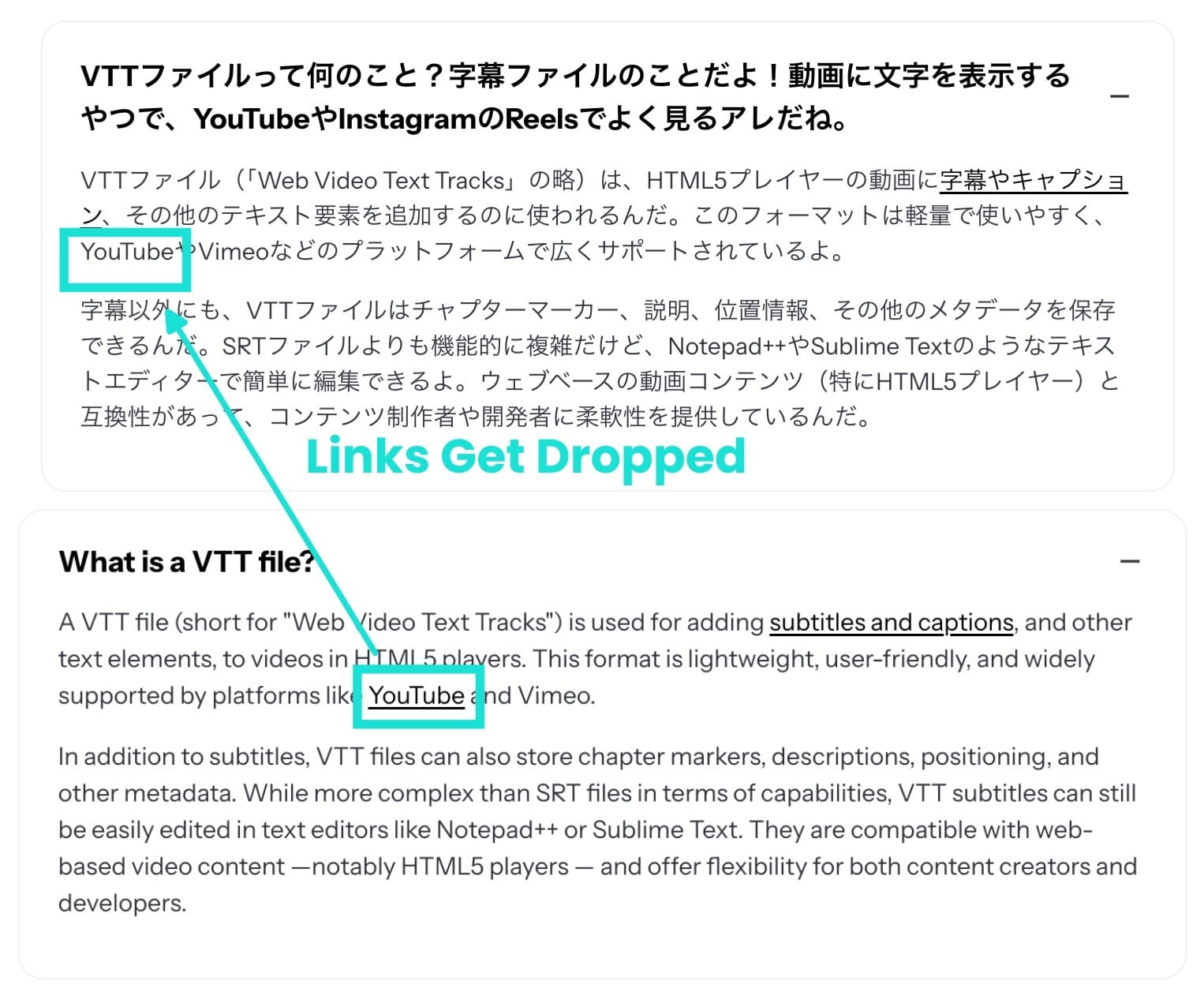
When links were accidentally passed through to an LLM, it responded with an error or fully translated the URL, ignoring our link schema. For example, an LLM translated the below “Related Link” on an Add Effects page fully into Arabic, leading to a 404.
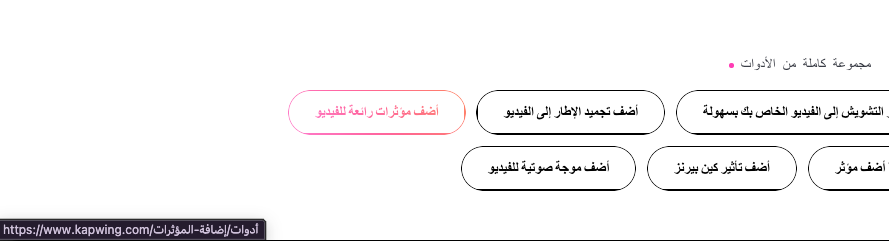
Fix: We've expanded our link checking to filter out relative links as well. URLs are replaced with placeholders and restored afterward, preventing mistakes such as translating /help into /ayuda.
Use Better Models to Avoid Mistranslations
It’s no surprise that more primitive models return lower-quality translations. Since we publish new pages every week and translate them into dozens of dialects, we use a cheaper model (Haiku through Anthropic’s bulk API) to power our translation engine. In the Hebrew Rotate Video page, for example, contained 5 translations which changed the meaning of a phrase; the EN title "How to Tilt a Photo Online" was translated to "איך לעוות תמונה באינטרנט," meaning distort rather than tilt.
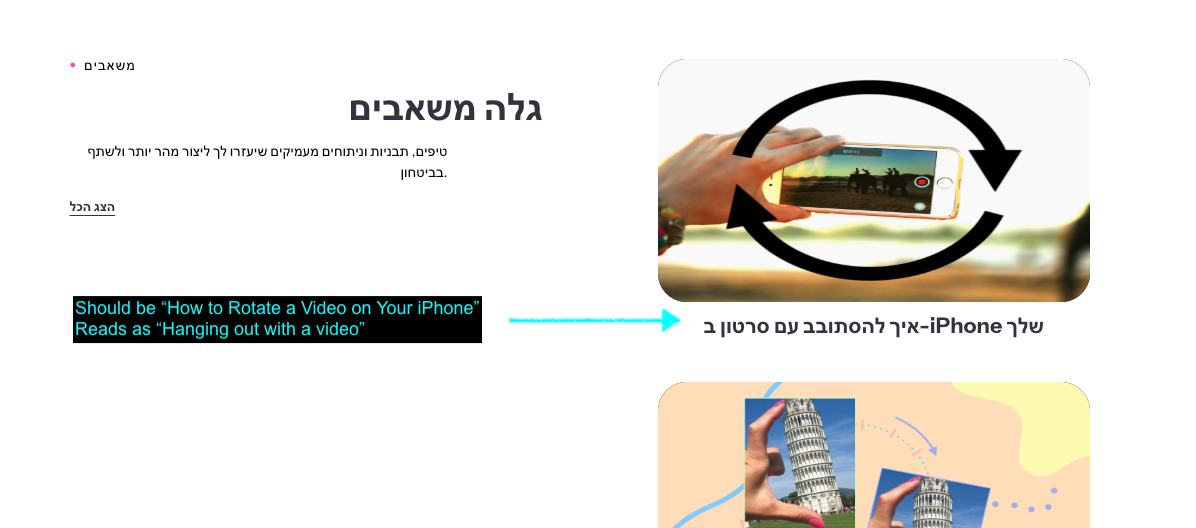
Fix: This week, we’re using our spare cycles of Astra to review and prioritize the docs that need translation. We plan to do a one-time fresh translation of some fraction of the pages. Our translation system still uses the batch API from Anthropic for a 50% discount on the task.
Give the LLM Space to Leave Translation Notes
Previously, the LLM would sometimes leave notes inline, saving its working “thoughts” into the database. For example, below, the LLM left a note in English “This text is already in German, so no translation was needed.”
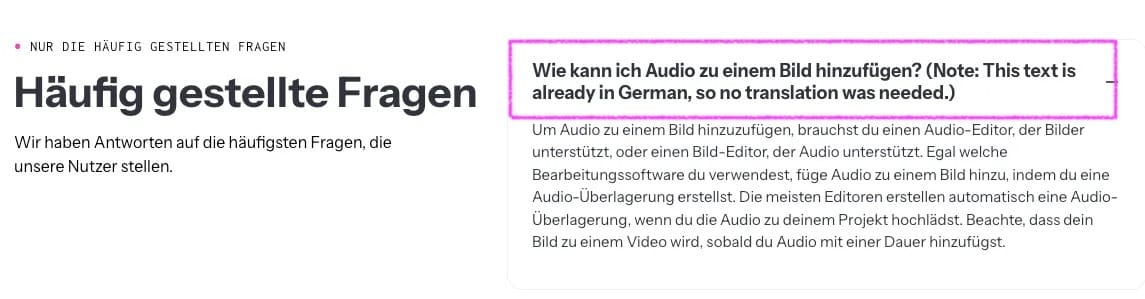
Fix: Now, we’ve set up a dedicated system where it can leave notes without saving those notes in the database. We require the model to return a “Translated” or “Unchanged’ status so that questions, explanations, apologies, or alternatives do not leak into landing page copy. We added a node library Franc that reviews completed translation and flags problems like language mismatch or link issues. It’s easier now to track translation errors as they are automatically flagged and categorized.
Validating Translations Before Rolling Them Out
Although spot checks on every page would be expensive, a random quality sampling can help you discover these issues and address them. It was one spot check by our Content Editor that led us to review and fix these problems. In additional to occasional human review, our new-and-improved i18n system performs these automated checks before publishing pages live:
- Link count on the translated page matches the source
- Status returned by the LLM is "Translated"
- Franc's detected language matches the target language
- Output length of the translated text is some reasonable multiple of the input text
We think that these translation issues impacted our search standing, so we're hopeful that the business impact of this system will be significant. Although Kapwing employs writers in the Bay Area to author these pages for us, it is possible that Google flagged or demoted our website as spam or AI-generated. We’re optimistic that our translation engine will serve as an effective AEO and SEO buoy, lifting the domain authority site-wide.
Thanks for reading! We hope that this article helps other technical SEO teams to avoid the novice mistakes that we made in setting up our LLM Translation systems. Reach out on X (@KapwingApp) with more ideas, or try translating your video content with our new video dubbing MCP.